
導入
The Chilkey Foxy65 is a compact 65% mechanical keyboard designed for versatility and performance. It features a gasket-mounted aluminum case, hot-swappable switches, tri-mode connectivity (Bluetooth 5.0, 2.4GHz wireless, and USB-C wired), and customizable RGB backlighting. This manual provides detailed instructions for setting up, operating, and maintaining your Foxy65 keyboard.
パッケージ内容
以下の項目のボックスにチェックを入れてください。
- Chilkey Foxy65 Mechanical Keyboard
- USB-Cケーブル
- 2.4GHzワイヤレスレシーバー(USBドングル)
- キーキャッププーラー
- スイッチプーラー
- Replaceable Diffuser (Cat Ear Design)
- ユーザーマニュアル
- Small tool kit (screws, hex key)
ビデオ: Foxy65 Mechanical Keyboard Unboxing. This video demonstrates the unboxing experience and shows the included accessories.
製品終了view
The Foxy65 keyboard combines a compact layout with advanced features for an enhanced typing experience.
- 65% コンパクトレイアウト: Space-saving design while retaining essential keys.
- トライモードワイヤレス接続: Bluetooth 5.0、2.4GHzワイヤレス、USB-C有線接続をサポートします。
- ガスケット構造: Features an FR4 plate, 1.2mm Flex Cut PCB, and four layers of Poron dampening for a softer, more elastic feel and thicker sound.
- ホットスワップ可能: 3 ピンおよび 5 ピンのメカニカル スイッチと互換性があり、はんだ付けなしで簡単にカスタマイズできます。
- プログラム可能なノブ: A dedicated knob for volume adjustment, which can also be programmed for other functions.
- PBT キーキャップ: Durable doubleshot PBT keycaps with Cherry profile 快適なタイピングを実現します。
- RGBバックライト: Features 18 lighting effects and supports music rhythm lighting, with two interchangeable diffuser types.

画像: 以上view of the Foxy65 Mechanical Keyboard highlighting its key features.
ビデオ: Foxy65 Aluminum Mechanical Keyboard. This video provides a general overview of the keyboard's design and features.
設定
Follow these steps to set up your Foxy65 keyboard:
- キーボードを充電する: Connect the provided USB-C cable to the keyboard and a power source (e.g., computer USB port, wall adapter). The keyboard has a 4500mAh battery.
- 接続モードを選択: The wireless switch is located under the spacebar. Gently remove the spacebar keycap to access the switch. Choose between 2.4GHz, Bluetooth, or Wired mode.
- 有線モード: USB-Cケーブルをコンピューターに直接接続します。キーボードは自動的に認識されます。
- 2.4GHzワイヤレスモード: Insert the 2.4GHz USB receiver into an available USB port on your computer. Switch the keyboard to 2.4GHz mode. Press FN+R to activate 2.4GHz pairing. The keyboard should connect automatically.
- Bluetoothモード: Switch the keyboard to Bluetooth mode. Press FN+Q, FN+W、 または FN + E to select one of three Bluetooth channels. The indicator light will flash, indicating pairing mode. On your device, search for "Foxy65" in Bluetooth settings and connect.

画像: Three Modes Connection. This image illustrates the different connectivity options and the location of the wireless mode switch.
操作手順
RGBバックライトコントロール
The Foxy65 keyboard features 18 kinds of lighting effects. Use the following key combinations to control the RGB backlighting:
- FN + |: さまざまな照明モードを切り替えます。
- FN+DEL: Toggle between different lighting colors.
The keyboard also supports cool music rhythm lighting effects with the appropriate driver software.

画像: Ultra Bright RGB Backlight. This image demonstrates the RGB lighting and control key combinations.
プログラム可能なノブ
The dedicated metal knob on the Foxy65 keyboard provides quick access to volume control:
- 左折してください: 音量を下げます。
- 右折: 音量を上げます。
- クリック: オーディオをミュート/ミュート解除します。
The knob can also be programmed for other keys or functions using the keyboard's software.

画像: Adjust volume as you like. This image details the functionality of the programmable knob.
ホットスワップ可能なスイッチ
The Foxy65 features a hot-swappable PCB, allowing you to easily change mechanical switches without soldering. It is compatible with both 3-pin and 5-pin switches.
スイッチを交換するには:
- キーキャップ プーラーを使用して、必要なキーキャップを取り外します。
- Use the switch puller to gently remove the switch from the PCB.
- Align the pins of the new switch with the hot-swap socket on the PCB. Ensure the pins are straight to avoid bending.
- 新しいスイッチをカチッと音がするまでしっかりと押し込みます。
- キーキャップを交換します。

画像: Hot Swappable PCB. This image shows the components involved in the hot-swappable feature.

画像: Chilkey Lotus Pink Switch. This image provides details on the linear switch type.
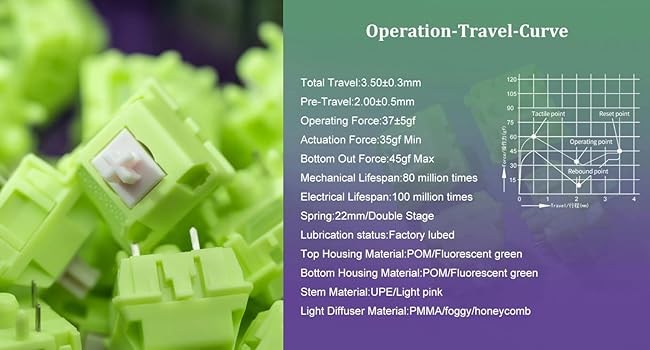
画像: Chilkey Sprout Green Switch. This image provides details on the tactile switch type.
メンテナンス
To ensure the longevity and optimal performance of your Foxy65 keyboard, follow these maintenance guidelines:
- クリーニング: Regularly clean the keycaps and case with a soft, dry cloth. For deeper cleaning, remove keycaps using the provided keycap puller and clean with a mild cleaning solution if necessary. Ensure the keyboard is disconnected from power before cleaning.
- スイッチケア: If you replace switches, ensure they are inserted correctly to avoid bending pins. Avoid excessive force.
- ストレージ: When not in use, store the keyboard in a clean, dry environment, away from direct sunlight and extreme temperatures. The included dust bag can be used for protection.
トラブルシューティング
If you encounter issues with your Foxy65 keyboard, refer to the following common solutions:
- キーボードが応答しない:
- キーボードが充電されていることを確認してください。
- Check the connection mode switch under the spacebar. Make sure it is set to the correct mode (Wired, 2.4GHz, or BT).
- For wired connection, try a different USB-C port or cable.
- For 2.4GHz, ensure the USB receiver is securely plugged in and re-pair by pressing FN+R.
- For Bluetooth, ensure Bluetooth is enabled on your device and re-pair using FN + Q/W/E.
- Intermittent Disconnections (Wired Mode):
- This could indicate a faulty USB-C cable or port. Try a different cable or port.
- Ensure the cable is fully inserted and not loose.
- RGBバックライトが機能しない:
- キーボードの電源がオンになっていることを確認してください。
- Try cycling through lighting modes with キー.
- Adjust brightness settings (refer to advanced functions in the full manual if available).
- キーが登録されない:
- Remove the keycap and switch for the affected key. Re-insert the switch firmly, ensuring pins are not bent.
- If the issue persists, try swapping the switch with a known working switch to determine if the switch or the socket is faulty.
仕様
Detailed technical specifications for the Chilkey Foxy65 Mechanical Keyboard:
| 特徴 | 詳細 |
|---|---|
| ブランド | OOCTPK (Chilkey) |
| モデル | Foxy65 |
| レイアウト | 65% コンパクト (66 キー) |
| 接続技術 | 2.4GHzワイヤレス、Bluetooth 5.0、USB-C有線 |
| スイッチタイプ | メカニカル(ホットスワップ可能な3/5ピン) |
| キーキャップ素材 | Doubleshot PBT, Cherry Profile |
| ケース素材 | アルミニウム |
| 取り付けスタイル | ガスケットマウント |
| プリント基板 | 1.2mm Flex Cut PCB, South-facing LEDs |
| Damp強化 | 4 layers of Poron dampener kit |
| バックライト | RGB (18 effects, music rhythm support) |
| バッテリー容量 | 4500mAh |
| 製品寸法 | 長さ12.99インチ x 幅4.88インチ x 高さ1.26インチ |
| アイテム重量 | 4.3 ポンド |
| 対応デバイス | ラップトップ、PC、タブレット |

画像: Mechanical Keyboard Internal Structure. This image illustrates the various layers and components of the keyboard's gasket mount design.
ビデオ: Sound Test of Foxy65 Mechanical Keyboard. This video demonstrates the typing sound profile of the keyboard with Lotus Pink Linear Switches.
保証とサポート
The Chilkey Foxy65 Mechanical Keyboard comes with a 1年間保証 ご購入日から1年間有効です。本保証は、通常の使用における製造上の欠陥および故障を対象としています。誤用、事故、不正な改造、または通常の摩耗や損耗による損傷は保証の対象外となります。
For warranty claims, technical support, or further inquiries, please contact OOCTPK customer service through the retailer where the product was purchased or visit the official Chilkey webサポートの連絡先情報のサイト。