
製品終了view
The Kisnt FD17 is a versatile 17-key wireless mechanical number pad designed to enhance productivity for various computing tasks. It offers dual-mode connectivity, allowing seamless switching between Bluetooth 5.0 and 2.4G wireless connections. Featuring a gasket-mounted structure for a comfortable typing experience and creamy sound, along with hot-swappable linear switches and durable PBT keycaps, this numpad is built for both performance and customization.

フロント view of the Kisnt FD17 Wireless Mechanical Number Pad, showcasing its 17-key layout, including the 'Pair' key and the included USB receiver, indicating its dual wireless capabilities.
主な特徴:
- デュアルモード接続: Supports Bluetooth 5.0 and 2.4G wireless connections for broad compatibility and minimal latency.
- 17キーの実用的なレイアウト: Includes essential keys like ESC, Tab, Backspace, and Calculator for enhanced functionality.
- ガスケットマウント設計: Absorbs sound effectively, providing a comfortable and quiet typing experience.
- ホットスワップ可能なスイッチ: 3 ピンおよび 5 ピン スイッチと互換性があり、カスタマイズとメンテナンスが容易です。
- 人間工学に基づいたデザイン: Features a sloped profile for comfortable use during extended periods.
- 省電力モード: Automatically enters sleep mode after inactivity to conserve battery life.
セットアップと接続
The Kisnt FD17 offers two primary connection methods: 2.4G wireless via a USB receiver and Bluetooth 5.0. Ensure you have one AAA battery (not included) installed before proceeding.
バッテリーの取り付け:
- Locate the battery compartment on the back of the number pad.
- 電池カバーを開きます。
- 正しい極性に注意しながら、単 4 電池 1 本を挿入します。
- 電池カバーを閉じます。

後方 view of the number pad, illustrating the AAA battery compartment and the storage slot for the 2.4G USB receiver.
2.4Gワイヤレス接続:
- Take out the 2.4G USB receiver from the battery compartment.
- レシーバーをコンピューターの使用可能な USB ポートに接続します。
- Locate the power and mode switch on the side of the number pad and slide it to the '2.4G' position.
- The number pad will automatically connect to your computer.
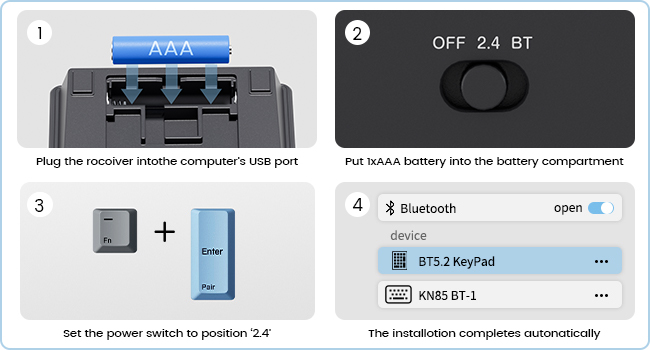
Step-by-step guide for connecting the number pad via 2.4G wireless, including battery insertion, receiver plug-in, and switch setting.
Bluetooth 5.0 接続:
- Locate the power and mode switch on the side of the number pad and slide it to the 'BT' (Bluetooth) position.
- を押し続けます Fn + Enter (Pair) keys simultaneously for 5 seconds until the indicator light flashes, indicating pairing mode.
- コンピューターまたはデバイスで Bluetooth 設定を開き、新しいデバイスを検索します。
- Select 'BT 5.2 KeyPad' from the list of available devices to complete the pairing process.
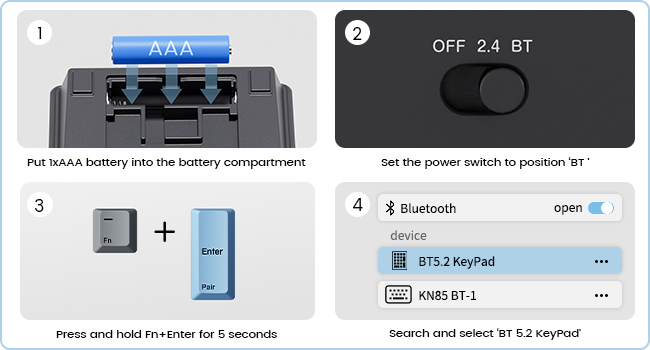
Step-by-step guide for connecting the number pad via Bluetooth, including switch setting, pairing key combination, and device selection.

The Kisnt FD17 number pad shown connected to both a desktop computer via 2.4G wireless and a laptop via Bluetooth, demonstrating its dual-mode capability.
操作手順
The Kisnt FD17 number pad is designed for intuitive use with its practical 17-key layout and additional functions.
主な機能:
- The numpad includes standard numeric keys (0-9), arithmetic operators (+, -, *, /), and Enter.
- Additional keys include ESC, タブ, バックスペース, and a dedicated 電卓 鍵。
- の 電卓 key functions only in Windows OS.
- の Fn key can be used in combination with other keys for specific functions, such as pairing.
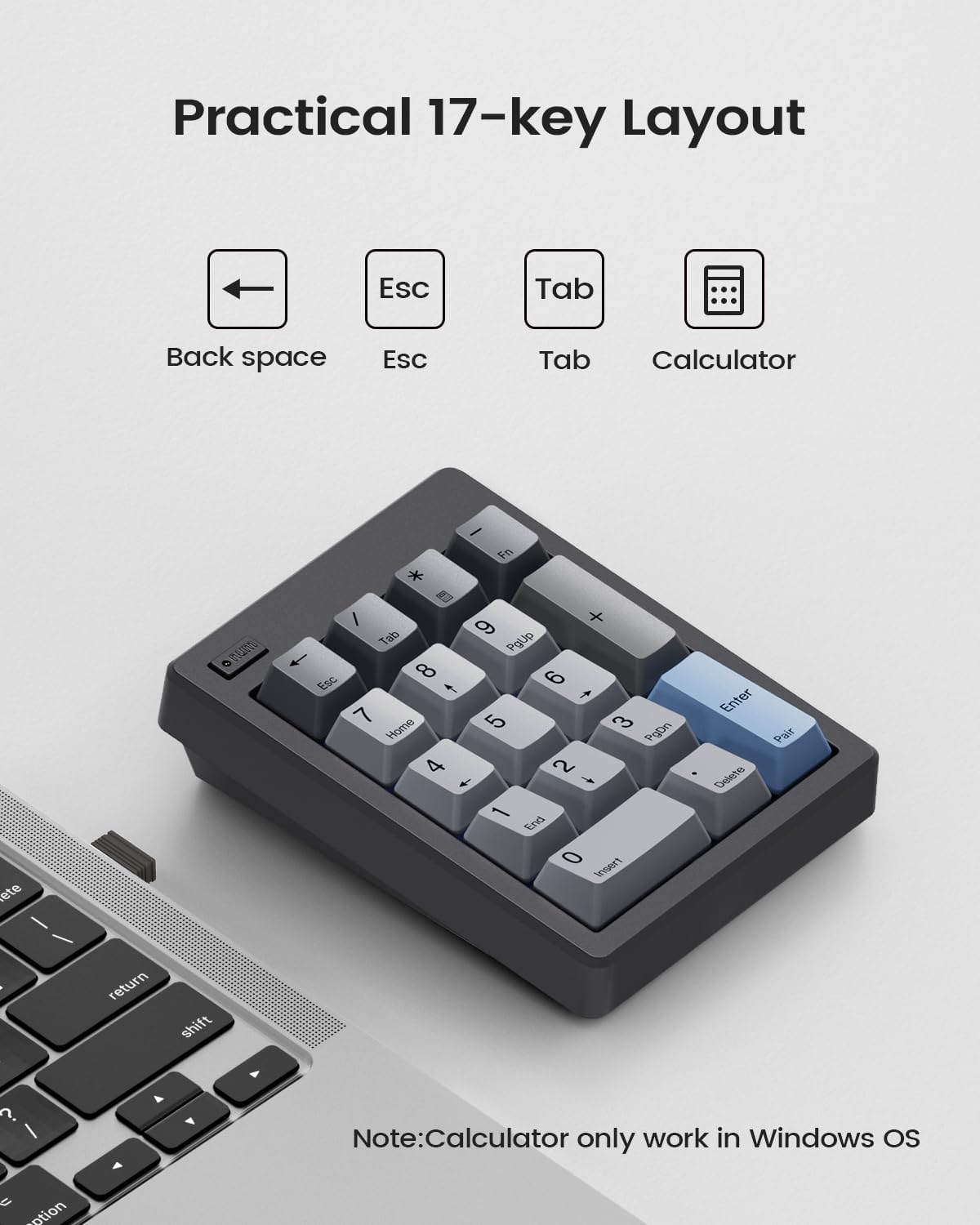
オーバーヘッド view of the 17-key layout, highlighting the Backspace, Esc, Tab, and Calculator keys, with a note on Calculator key compatibility.
Auto Sleep & Power-Saving Mode:
To conserve battery life, the number pad automatically enters a sleep mode after a period of inactivity. It has an independent power switch for manual control.
- In 2.4G mode, the numpad will enter sleep mode after 5 minutes of inactivity.
- In Bluetooth mode, the numpad will enter sleep mode after 60 minutes of inactivity.
- To wake the numpad, simply press any key.

The number pad from a side angle, showing the power switch and details about its auto-sleep duration for both 2.4G and Bluetooth modes.
メンテナンス
Proper maintenance ensures the longevity and optimal performance of your Kisnt FD17 number pad.
クリーニング:
- 柔らかく乾いた布を使用して、テンキーの表面を拭きます。
- 頑固な汚れには、軽くamp布を水または中性洗浄液で湿らせ、すぐに拭いて乾かしてください。
- 強力な化学薬品や研磨材の使用は避けてください。
ホットスワップ可能なスイッチ:
The FD17 features hot-swappable switches, allowing you to easily change switches without soldering. It supports both 3-pin and 5-pin switches.
- キーキャップ プーラー (付属していません) を使用して、キーキャップをスイッチからゆっくりと引き抜きます。
- スイッチ プーラー (付属していません) を使用して、スイッチを PCB から慎重に取り外します。
- 新しいスイッチのピンを PCB の穴に合わせます。
- 新しいスイッチをカチッと音がするまでしっかりと押し込みます。
- キーキャップを取り付け直します。

The number pad with several keycaps and switches removed, illustrating the hot-swappable design that supports both 3-pin and 5-pin switches.
トラブルシューティング
If you encounter issues with your Kisnt FD17 number pad, refer to the following common solutions.
接続の問題:
- Numpad not connecting: Ensure the battery is correctly installed and has sufficient charge. Check that the mode switch is set to the correct position (2.4G or BT).
- 2.4G 接続の問題: Try plugging the USB receiver into a different USB port on your computer. Ensure the receiver is not too far from the numpad.
- Bluetooth接続の問題: Make sure Bluetooth is enabled on your device. Forget the device from your Bluetooth settings and attempt to re-pair it. Ensure no other Bluetooth devices are causing interference.
機能上の問題:
- Calculator key not working: The Calculator key is only compatible with Windows operating systems. It will not function on Mac OS or ChromeBook.
- Limited functionality on Mac OS: Apple products do not fully support external function key buttons, which may limit the use of certain special keys on the numpad when connected to Mac OS.
- キーが反応しない: Check if the numpad is in sleep mode and press any key to wake it. If individual keys are not responding, the switch or keycap may need to be re-seated or replaced.
仕様
| 特徴 | 詳細 |
|---|---|
| モデル | FD17 |
| 接続技術 | Bluetooth 5.0 / Wireless 2.4GHz |
| キーの数 | 17 |
| キーボードの説明 | メカニカルナンバーパッド |
| 特集 | Creamy Sound, Ergonomic, Hot-Swappable, PBT Dye-Sub Keycap, Powered by AAA Battery |
| 対応デバイス | ラップトップ、PC、スマートフォン |
| 電源タイプ | 電池駆動(単4電池1本、別売) |
| 材質タイプ | プラスチック |
| 製品寸法 | 12.29 x 9.19 x 3.3 cm(4.84 x 3.62 x 1.3インチ) |
| アイテム重量 | 197.88 g (6.98 オンス) |

The ergonomic design of the Kisnt FD17, highlighting its sloped profile and compact dimensions for comfortable use.
保証とサポート
Specific warranty details for the Kisnt FD17 Wireless Mechanical Number Pad are not provided in this manual. For warranty information, technical support, or further assistance, please contact Kisnt customer service directly or visit their official webサイト。
You can often find support contact information on the product packaging or through the retailer where the product was purchased.