導入
This manual provides essential instructions for the installation, operation, and maintenance of your Generic Projector Fan, model 06025SS-13Q-WU. This fan is designed as a replacement component for various Epson projector models, including CB-X17, CB-X20, CB-X21, CB-X22, CB-X25, CB-X27, CB-X29, CB-X30, CB-97, CB-97H, and CB-98H. Please read this manual thoroughly before attempting any installation or maintenance to ensure proper function and safety.
重要な互換性に関する注意事項
注記: There are many kinds of fan wiring sequences, and they are often incompatible between different fan models or projector revisions. It is critical to verify the fan wiring sequence before installation. Please compare the wiring of your existing fan with the replacement fan. If there is any doubt, it is recommended to send images of the front and back of your original fan, along with its interface wiring sequence diagram, to your supplier for verification.
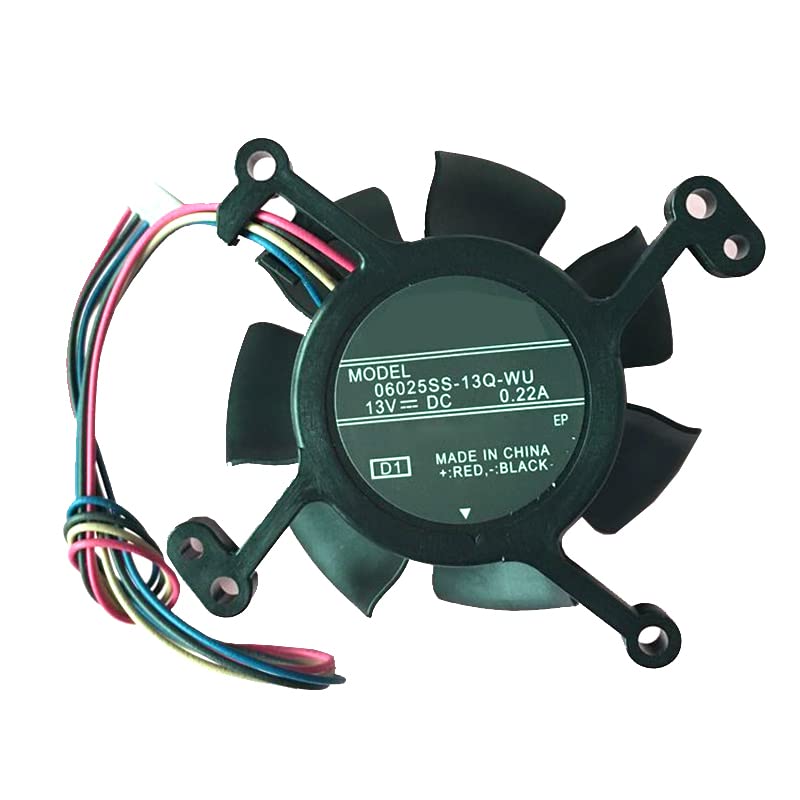
Image illustrating the critical warning about fan wiring sequence compatibility. This image emphasizes the need to check wiring before installation to avoid incompatibility issues.
セットアップとインストール
Replacing a projector fan requires careful attention to detail. If you are not comfortable with electronic component replacement, it is recommended to seek professional assistance.
安全上の注意:
- Always disconnect the projector from the power source and allow it to cool down completely before beginning any work.
- Use appropriate tools to avoid damaging the projector casing または内部コンポーネント。
- 清潔で静電気のない環境で作業してください。
インストール前のチェック:
- Verify Wiring Sequence: As highlighted in the Important Compatibility Note, carefully compare the wiring of your new fan (Model 06025SS-13Q-WU) with the original fan from your projector. Ensure the connector type and wire order (sequence) match exactly. Incompatible wiring can lead to fan malfunction or damage to the projector.
- Confirm the fan dimensions match the original fan to ensure it fits correctly within the projector's housing.
一般的なインストール手順:
- プロジェクターを慎重に開けるasing according to your projector's specific service manual or instructions.
- Locate the old fan. Disconnect its power cable from the motherboard or power supply.
- Remove any screws or clips securing the old fan and carefully extract it.
- Position the new Generic Projector Fan (06025SS-13Q-WU) in the same orientation as the old fan.
- Secure the new fan with the appropriate screws or clips.
- Connect the fan's power cable to the corresponding port, ensuring the connector is fully seated and the wiring sequence is correct.
- プロジェクターを慎重に組み立て直すasing、すべてのネジが締められており、ケーブルが挟まれていないことを確認します。
操作手順
The Generic Projector Fan operates automatically when the projector is powered on. Its function is to maintain optimal internal temperatures by circulating air and dissipating heat from critical components. No user intervention is required for its operation once correctly installed.
- Ensure the projector's ventilation ports are clear and unobstructed to allow for proper airflow.
- Avoid operating the projector in excessively dusty environments, which can impede fan performance.
メンテナンス
Regular maintenance helps prolong the life of your projector and its cooling fan.
- ほこりの除去: Periodically clean the projector's exterior and ventilation grilles using a soft, dry cloth or a can of compressed air. Do not spray compressed air directly into the fan blades at close range, as this can damage the bearings.
- 内部クリーニング: If the projector is frequently used in dusty environments, internal cleaning may be necessary. This should be performed by a qualified technician to avoid damaging sensitive internal components.
- 検査: During any internal cleaning, visually inspect the fan for any signs of wear, damage, or excessive dust accumulation on the blades.
トラブルシューティング
If you encounter issues after replacing the fan, consider the following:
- ファンが回転しない:
- Check if the fan's power connector is securely attached to the motherboard.
- Verify the wiring sequence. An incorrect wiring sequence is a common cause of non-functional fans.
- Ensure the fan blades are not obstructed by cables or debris.
- ファンからの異常な音:
- Ensure the fan is securely mounted and not vibrating against the casing.
- Check for any foreign objects (e.g., loose screws, wires) that might be hitting the fan blades.
- If the noise persists and is a grinding or rattling sound, the fan bearings may be faulty, requiring replacement.
- プロジェクター過熱警告:
- Confirm the fan is spinning correctly and moving air.
- プロジェクターの通気口が塞がれていないことを確認してください。
- The fan might be underperforming or incorrectly installed. Re-check installation steps and wiring.
仕様
| 特徴 | 詳細 |
|---|---|
| モデル番号 | 06025SS-13Q-WU |
| 互換性 | Epson CB-X17, CB-X20, CB-X21, CB-X22, CB-X25, CB-X27, CB-X29, CB-X30, CB-97, CB-97H, CB-98H |
| 巻tage | DC13V |
| 現在 | 0.22A |
| ワイヤーの数 | 4行 |
| 製品寸法 | 3.94 x 3.94 x 3.94インチ |
| アイテム重量 | 3.52オンス |
| メーカー | ジェネリック |
| 原産国 | 中国 |
サポートと保証
For technical assistance, questions regarding compatibility, or warranty claims, please contact the seller or manufacturer directly through your purchase platform. Provide your order details and a clear description of the issue for prompt support.


