
1. はじめに
Thank you for choosing the Leapwell Portable Bluetooth Desktop CD Player, Model L-CD202B. This device offers versatile audio playback options, including CD, Bluetooth, FM Radio, USB, AUX, AB Repeat, and Optical modes. Designed for both home and portable use, it features integrated speakers and a rechargeable battery. This manual provides essential information for safe and effective operation of your new CD player.
2. 安全情報
- 使用前にすべての指示を読み、将来の参考のために保管してください。
- デバイスを雨、湿気、または極端な温度にさらさないでください。
- ラジエーター、暖房送風口、ストーブ、その他の熱を発生する装置などの熱源の近くにデバイスを置かないでください。
- メーカー指定のアタッチメント/アクセサリのみを使用してください。
- 乾いた布でのみ清掃してください。
- 通気口を塞がないでください。
- 電源コードが踏まれたり挟まれたりしないように保護してください。
- 雷雨のときや長期間使用しない場合は、デバイスのプラグを抜いてください。
- すべてのメンテナンスは資格のあるサービス担当者に依頼してください。
3. 箱の中身
開梱したら、すべてのアイテムが揃っていて良好な状態であることを確認してください。
- Leapwell Portable CD Player
- リモートコントロール
- USB-C充電ケーブル
- 3.5mmAUXケーブル
- 取扱説明書
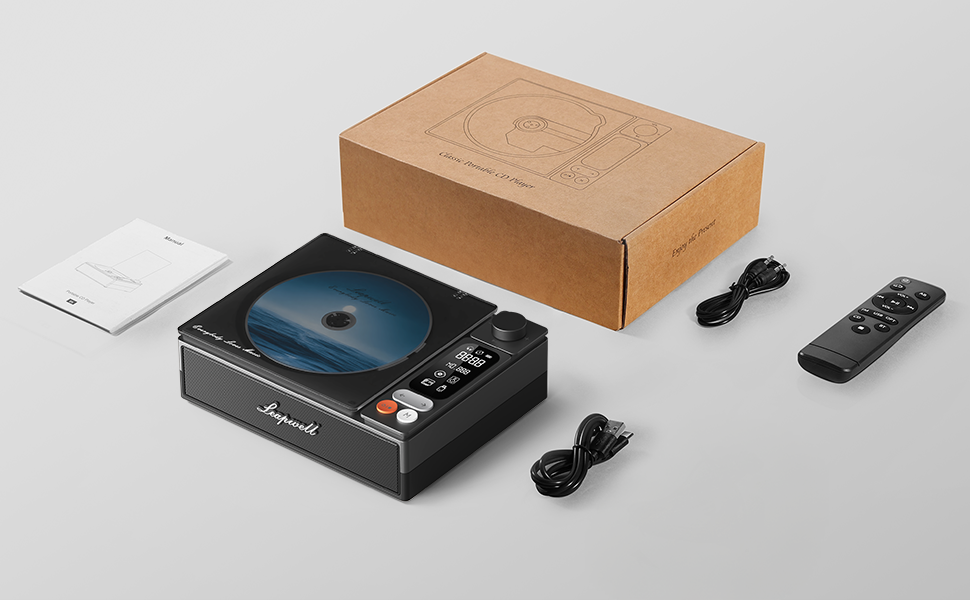
Image: All components included in the Leapwell CD Player package, including the player, remote, cables, and manual.
4.製品オーバーview
The Leapwell L-CD202B is a compact and versatile audio device designed for various listening preferences.

画像: 正面 view of the Leapwell Portable Bluetooth Desktop CD Player with a CD inserted and the dust cover open.
主な特徴:
- 7-in-1 再生モード: Supports CD Play, Bluetooth (Receive & Transmit), FM Radio, USB, AUX, AB Repeat, and Optical Mode.
- HiFiスピーカーシステム: Features an independent sound cavity design and inner magnetic speaker unit for enhanced sound detail and bass.
- Bluetooth 5.1: Allows seamless connection to mobile phones, tablets, and external Bluetooth speakers or headphones.
- 充電式バッテリー: Built-in USB-C fast-charging battery provides 4-5 hours of playback.
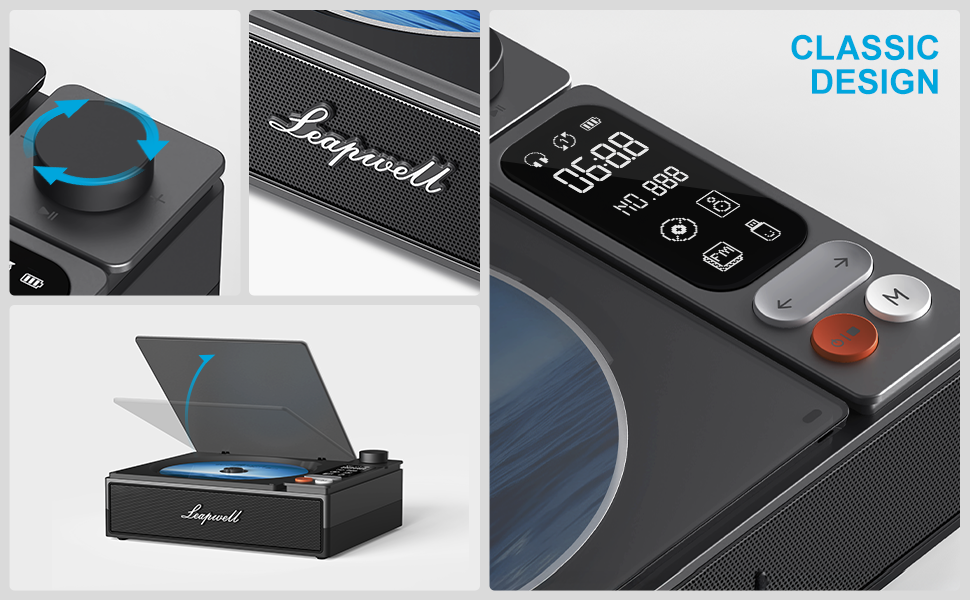
- クラシックデザイン: Retro square design with a translucent CD dust cover, volume knob, and a 2.4-inch LCD display.
- 光出力: For connecting to external decoders for lossless audio.
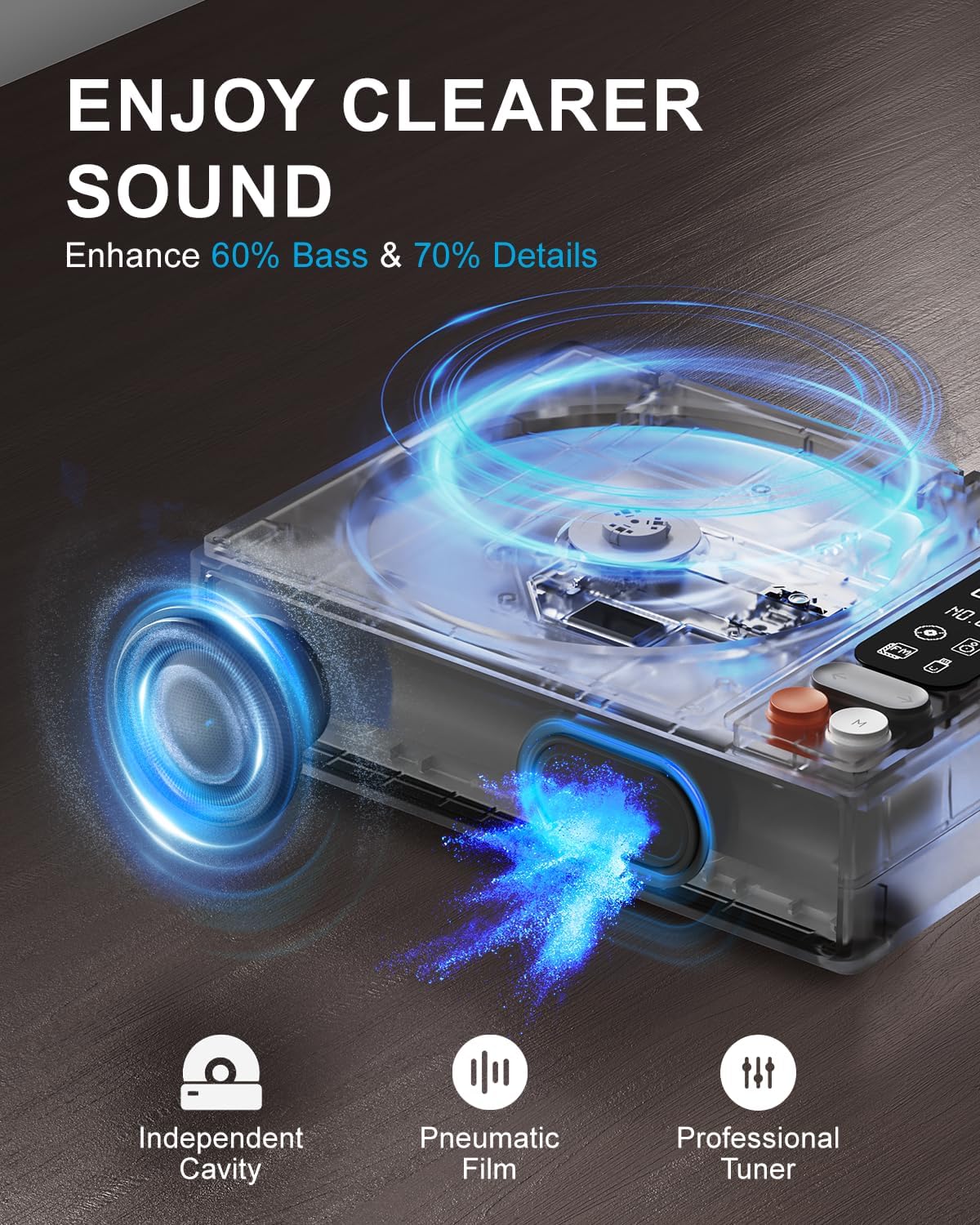
Image: Diagram illustrating the internal speaker design with independent cavity and pneumatic film for enhanced bass and sound detail.

画像: クローズアップ view of the Leapwell CD Player highlighting its classic design, volume knob, and digital display.
5. セットアップ
5.1デバイスの充電
Before first use, fully charge the CD player using the provided USB-C cable. Connect the USB-C end to the player's charging port and the other end to a 5V-2A USB power adapter (not included) or a computer's USB port. Charging via a computer's USB port will be slower.

Image: The Leapwell CD Player shown outdoors with battery indicators, emphasizing its portability and rechargeable battery.
5.2 電源オン/オフ
デバイスの電源をオンにするには、電源ボタンを長押しします。電源をオフにするには、もう一度電源ボタンを長押しします。
5.3 CDの読み込み
- Gently lift the translucent dust cover.
- Place a CD onto the spindle, ensuring it is centered and flat.
- Close the dust cover. The player will begin reading the CD automatically or after selecting CD mode.
Video: Demonstration of loading a CD into the Leapwell CD Player and initiating playback. The video also shows the Bluetooth pairing process.
6。 動作モード
The Leapwell CD Player supports multiple audio playback modes. Use the 'M' (Mode) button on the device or remote control to switch between modes.
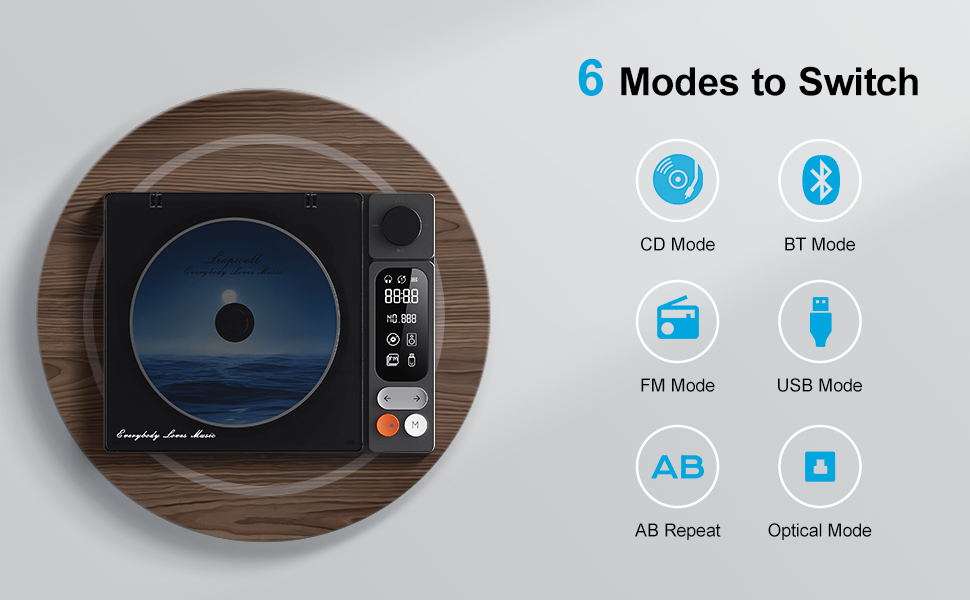
Image: Visual representation of the six main operating modes: CD, Bluetooth, FM, USB, AB Repeat, and Optical.
6.1 CD Play Mode
After loading a CD, the player will typically detect it and begin playback. Use the play/pause, next/previous track buttons, and the volume knob to control playback.
6.2Bluetoothモード
The device supports both Bluetooth Receive and Transmit modes.
- 受信モード: Allows you to connect your mobile phone or tablet to the CD player and use its built-in speakers for audio output. Activate Bluetooth mode on the CD player, then search for 'CD player' on your external device's Bluetooth settings and pair.
- 送信モード: Enables the CD player to connect to external Bluetooth speakers or headphones. Activate Bluetooth mode on the CD player, then put your external Bluetooth device into pairing mode. The CD player will search and connect.

Image: A smartphone wirelessly connected to the Leapwell CD Player via Bluetooth, demonstrating the receive mode functionality.

Image: A woman enjoying music through Bluetooth headphones connected to the Leapwell CD Player, illustrating the transmit mode.
6.3 FMラジオモード
Switch to FM Radio mode. Use the next/previous track buttons to scan for radio stations. The display will show the current frequency.
6.4USBモード
オーディオを含む USB フラッシュ ドライブを挿入します files into the USB port. The player will automatically switch to USB mode and begin playback. Use the track control buttons to navigate.
6.5 AUX モード
Connect an external audio device (e.g., smartphone, MP3 player) to the CD player's AUX input using the provided 3.5mm AUX cable. Switch to AUX mode to play audio from the connected device through the CD player's speakers.
6.6 AB Repeat Mode
This mode allows you to repeat a specific section of audio. During playback, press the AB Repeat button once to set point A, and press it again to set point B. The player will continuously repeat the section between A and B. Press a third time to cancel.
6.7 Optical Mode
Connect the CD player to an external decoder or amplifier via an optical fiber cable (not included) using the optical output port. Switch to Optical mode to transmit digital audio for enhanced sound quality.

Image: The Leapwell CD Player connected to an external audio amplifier using an optical cable, demonstrating the optical output feature.
7. コントロール
The CD player features intuitive controls for easy operation:
- ボリュームノブ: 回転させて音量レベルを調整します。
- 再生/一時停止ボタン: 再生を開始または一時停止します。
- 次/前のトラック ボタン: 次のまたは前のトラック/ステーションにスキップします。
- モード(M)ボタン: さまざまな再生モードを切り替えます。
- LCDスクリーン: Displays track information, mode, time, and battery status.
- リモートコントロール: Provides convenient access to all functions from a distance of up to 15 feet.
画像: 詳細 view of the control panel, including the volume knob, playback buttons, mode button, and LCD display.
8. メンテナンス
8.1デバイスのクリーニング
Wipe the exterior of the CD player with a soft, dry cloth. Do not use liquid cleaners or abrasive materials. Keep the CD compartment free of dust and debris. Avoid touching the optical lens.
8.2 CDケア
CDは端を持って扱ってください。傷やホコリがたまらないように、ケースに入れて保管してください。汚れたCDは、柔らかく糸くずの出ない布で中心から外側に向かって拭いてください。
9。 トラブルシューティング
If you encounter issues with your Leapwell CD Player, refer to the following common problems and solutions:
- 電源なし: デバイスが充電されているか、電源に接続されていることを確認してください。
- CDが再生されない: Check if the CD is inserted correctly and is clean. Ensure the device is in CD Play mode.
- 音が出ない: Adjust the volume. Check if external speakers/headphones are properly connected or paired via Bluetooth. Ensure the correct mode is selected.
- Bluetooth接続の問題: Ensure the CD player is in Bluetooth mode and your external device's Bluetooth is enabled and in pairing mode. Try restarting both devices.
- 充電しながら使用できますか? Yes, it can. Please unplug the power when not in use for a long time.
- Can it connect to Bluetooth headphones? Yes, it can. It can also connect to a mobile phone and play music.
- Can it be charged via a computer's USB port? Yes, it can. However, charging will be very slow. It is recommended to use a 5V-2A adapter for charging.
10. 仕様
| 製品寸法 | 7.3 x 5.7 x 2.5インチ |
| アイテム重量 | 1.4ポンド |
| モデル名 | L-CD202B |
| 色 | 黒 |
| 接続技術 | 補助、Bluetooth、光、USB |
| 特集 | Anti-Skip Protection, Auto Power-Off, Bluetooth, Portable, Rechargeable |
| バッテリー | リチウムイオン電池1個(付属) |
11. 保証とサポート
Leapwell CD Players come with lifelong technical support and 24/7 professional customer service. For any inquiries or assistance, please contact Leapwell customer support through the official channels provided at the time of purchase or on the Leapwell webサイト。