
導入
The eppfun SK003Pro is a Bluetooth 5.4 hands-free car speakerphone designed for clear communication and safe driving. It features advanced noise reduction, voice control integration, and multi-point connectivity.
主な特徴:
- ブルートゥース 5.4 テクノロジー: Integrates the latest low-energy Bluetooth 5.4 chip for longer transmission distance and faster speed.
- 明確なコミュニケーション: Equipped with a Bluetooth 5.4 chipset, integrated speaker, echo and background noise reduction, and volume control for clear calls.
- ハンズフリー通話: Utilizes an integrated microphone and DSP technology for effective noise reduction and excellent sound quality. The 3W integrated speaker delivers clear and loud audio.
- 音声コントロール: Supports safe driving with calls and navigation via Google Assistant/Siri Assistant.
- マルチポイント接続: Connects to two devices simultaneously, allowing easy switching between music and calls.
- 簡単なインストール: Simple pairing with your mobile phone and attachment to the sun visor with the included clip.
1. セットアップとインストール
Follow these steps to set up your eppfun SK003Pro speakerphone:
- デバイスを充電します。 Before first use, fully charge the speakerphone using the provided USB Type-C cable. A full charge takes approximately 1.5 hours.

Image: The USB Type-C charging port and ON/OFF switch are located on the side of the device. Connect the provided cable to charge.
- 電源オン: Slide the ON/OFF switch to the "ON" position. The device will enter pairing mode.
- 携帯電話とペアリング:
- 携帯電話でBluetoothを有効にします。
- 検索する 利用可能なBluetoothデバイス。
- Select "eppfun SK003Pro" from the list to connect. A confirmation tone will sound upon successful pairing.
- 車両への取り付け: Attach the speakerphone to your car's sun visor using the integrated clip. Ensure it is securely fastened and does not obstruct your view.

Image: The speakerphone is designed to clip easily onto the car's sun visor for optimal microphone and speaker placement.
2. 操作手順
2.1 基本機能
- 通話への応答/終了: を押す 通話ボタン (phone icon) once to answer an incoming call or end an ongoing call.
- 通話の拒否: を押し続けます 通話ボタン 着信を拒否するために2秒間。
- 音量コントロール: 使用 '+' そして 「-」 buttons to adjust the call volume or media playback volume.
- 最後の番号にリダイヤル: を2回押します 通話ボタン 最後にダイヤルした番号に再度ダイヤルします。
2.2 音声アシスタント(Siri/Google アシスタント)
The eppfun SK003Pro supports voice commands through your phone's assistant.
- 音声アシスタントを有効にする: を押す マイクボタン (microphone icon) once to activate Siri or Google Assistant on your connected phone.
- You can then use voice commands for navigation, making calls, sending messages, and more, ensuring safe driving.
2.3 マルチポイント接続
The device can connect to two mobile phones simultaneously.
- Pair the first phone as described in the "Setup" section.
- After the first phone is connected, put the speakerphone back into pairing mode (usually by briefly disconnecting and reconnecting, or by holding the call button if it has a dedicated pairing function - refer to specific device prompts if available).
- 2台目の電話をペアリングします。
- The speakerphone will now be connected to both devices, allowing you to switch between them for calls or media.

Image: The speakerphone supports connecting to two mobile phones simultaneously, enabling seamless switching between devices.
3. メンテナンス
- クリーニング: デバイスの清掃には、柔らかく乾いた布をご使用ください。液体クリーナーやエアゾールは使用しないでください。
- ストレージ: デバイスは直射日光や極端な温度を避け、涼しく乾燥した場所に保管してください。
- バッテリーのケア: To prolong battery life, avoid fully discharging the battery frequently. Charge the device regularly, even if not in use for extended periods. The high-quality lithium battery offers up to 500 hours of standby time.

Image: The device features an 800mAh lithium battery, providing extended standby time and reliable performance.
4。 トラブルシューティング
If you encounter issues with your eppfun SK003Pro, refer to the following solutions:
| 問題 | 考えられる原因 | 解決 |
|---|---|---|
| 電話とペアリングできません。 | Bluetooth is off on phone; device is not in pairing mode; device battery is low. |
|
| Poor call quality / Others cannot hear me clearly. | Microphone obstruction; low volume; environmental noise; device not positioned correctly. |
|
| スピーカーフォンから音が出ません。 | Volume too low; device not connected; media routed to phone speaker. |
|
| 音声アシスタントが応答しません。 | Not activated; phone settings. |
|
5. 仕様
| 特徴 | 詳細 |
|---|---|
| ブランド | エップファン |
| モデル番号 | SK003プロ |
| 色 | グレー |
| 接続技術 | ブルートゥース5.4 |
| 対応デバイス | スマートフォン、タブレット |
| 材料 | アクリロニトリルブタジエンスチレン(ABS)、金属 |
| スピーカー出力 | 3W (Dual 3W speakers, 40MM Graphene Diaphragm)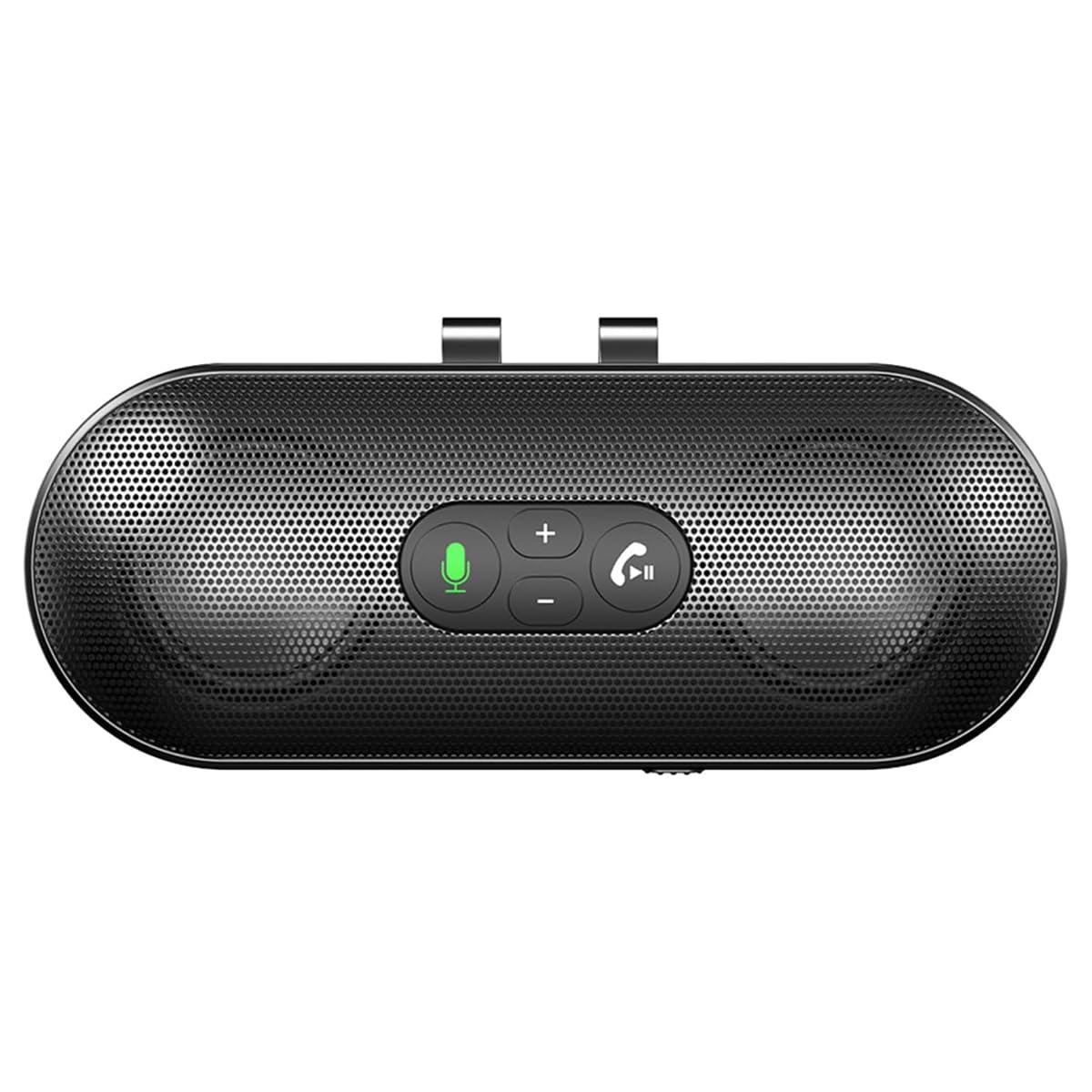 Image: The speakerphone features a powerful audio system with dual 3W speakers and 40mm Graphene Diaphragms for clear and loud sound. |
| マイクロフォン | Integrated, High-definition with DSP noise reduction |
| 電池のタイプ | リチウムイオン(800mAh) |
| 充電ポート | USBタイプC |
| 充電時間 | 約1.5時間 |
| 待機時間 | 最大500時間 |
| 原産国 | 中国 |
6. 保証情報
The eppfun SK003Pro comes with a manufacturer's warranty.
- メーカー保証: 1年
- 保証請求のために購入証明書を保管してください。
- Warranty does not cover damage caused by misuse, accidents, unauthorized repairs, or normal wear and tear.
7. カスタマーサポート
For further assistance or inquiries, please contact eppfun customer support:
- メーカー: エップファン
- Webサイト: www.eppfun.com (注: これはプレースホルダーです URL正しいサポートについては、製品のパッケージまたは公式ドキュメントを参照してください。 webサイト。)
- メールアドレス: support@eppfun.com (Note: This is a placeholder email, please refer to your product packaging or official documentation for the correct support email.)
When contacting support, please provide your product model number (SK003Pro) and a detailed description of the issue.