
1.製品オーバーview
The ieGeek ZY-G2 is a versatile 4G solar-powered security camera designed for both outdoor and indoor surveillance. It operates without Wi-Fi, utilizing a 4G LTE connection via an integrated SIM card. Key features include 2K HD resolution, 300° horizontal pan capability, a 10000mAh rechargeable battery, and a 3W solar panel for continuous power. The camera also offers color night vision, two-way audio, and intelligent motion detection with real-time alerts.

Figure 1: ieGeek ZY-G2 4G Solar Security Camera with solar panel, highlighting 4G connectivity and no Wi-Fi requirement.
2. パッケージ内容
パッケージにすべてのアイテムが揃っていることを確認します。
- ieGeek ZY-G2 4G Camera
- ソーラーパネル(3W)
- 取り付けブラケット(マグネット式)
- USB-C充電ケーブル
- ネジと壁プラグ
- ユーザーマニュアル
- Integrated SIM Card (with initial free data)
3.セットアップガイド
3.1 初期充電
Before first use, fully charge the camera using the provided USB-C cable. This ensures optimal battery performance.
3.2 SIM Card Installation/Replacement
The camera comes with an integrated SIM card for immediate 4G connectivity, including 7 days of free unlimited data. To replace the SIM card, locate the black film covering the SIM slot. Gently remove this film using a pen or tweezers. Insert your compatible 4G SIM card into the slot. Ensure the camera is powered off before inserting or removing the SIM card.

Figure 2: Instructions for SIM card replacement, showing the protective film removal.
3.3 アプリのインストールとペアリング
Download the ieGeek Cam application from your smartphone's app store (compatible with Android and iOS). Follow the in-app instructions to pair your camera. No complex network configuration is required due to 4G connectivity.
3.4 カメラとソーラーパネルの取り付け
The camera features a magnetic base for easy installation on metallic surfaces. For non-magnetic surfaces, the base includes screw holes for secure mounting. The solar panel should be installed in a location that receives maximum direct sunlight throughout the day to optimize charging efficiency. Refer to the solar panel installation guide for optimal orientation.

Figure 3: Magnetic mounting for easy installation.

Figure 4: Solar charging setup for continuous power.
4. 操作手順
4.1 ライブ View PTZコントロール
Access the live video feed through the ieGeek Cam app. The camera supports 300° horizontal rotation, allowing you to remotely adjust the viewing angle to cover various areas. Note that automatic tracking is not supported.

Figure 5: 300-degree horizontal rotation for wide coverage.

Figure 6: Wide field of view covering a large area.
4.2 動きの検出とアラート
The camera detects human and object movements within a 10-meter range. Upon detection, it triggers an alarm and sends instant notifications to your app. You can define specific surveillance zones to reduce false alarms.
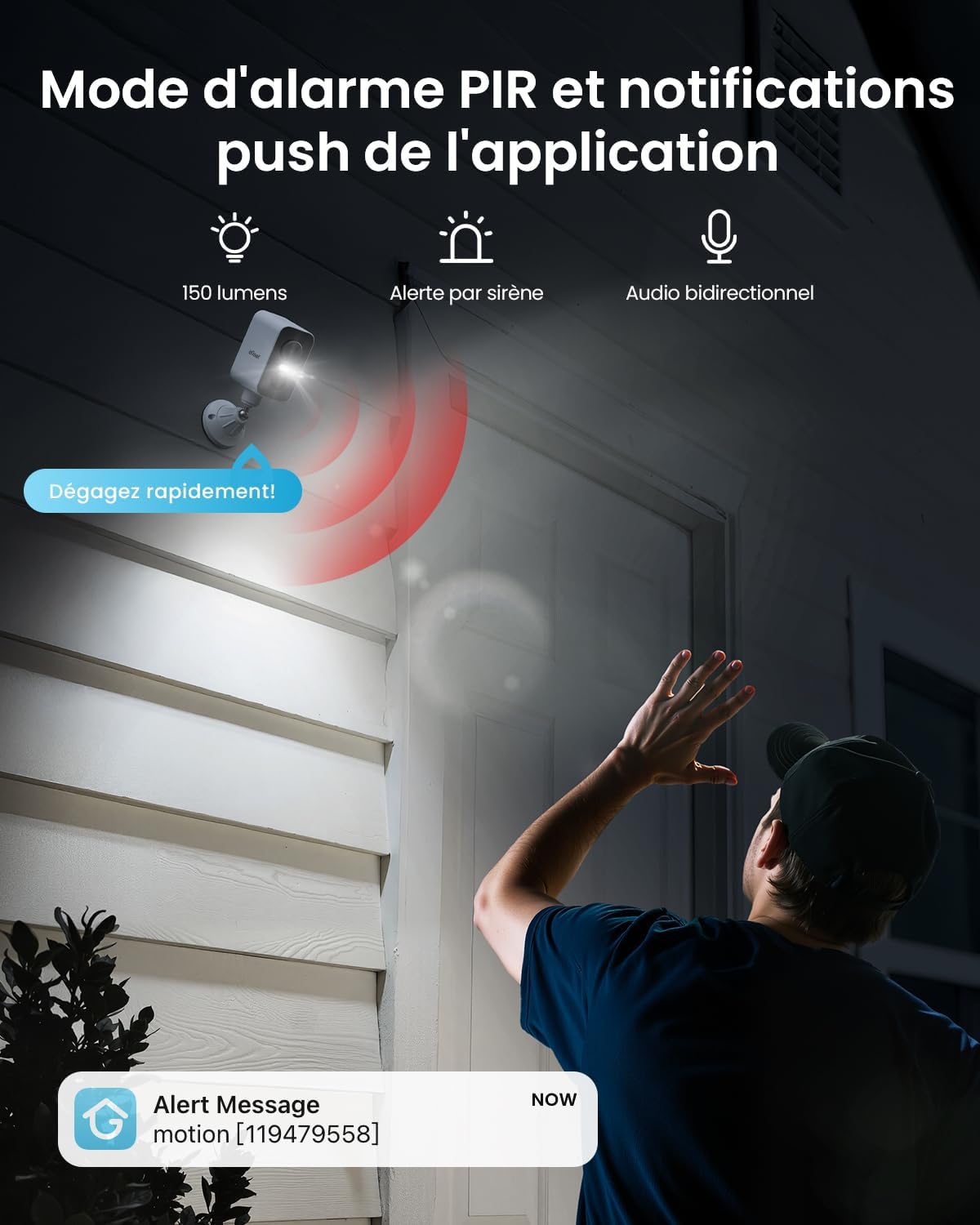
Figure 7: PIR alarm mode and push notifications.

Figure 8: Customized protection zones to minimize false alerts.
4.3 双方向オーディオ
Equipped with a powerful microphone and speaker, the camera supports two-way audio communication. This allows you to speak to visitors or deter intruders remotely.

図 9: 双方向音声通信。
4.4 ナイトビジョン
The camera provides 2K HD color night vision, ensuring clear images even in low-light conditions. Infrared night vision is also available.

Figure 10: 2K HD color night vision.
4.5 記録と保存
The camera supports local storage via a Micro SD card (up to 128GB). Cloud storage options are also available through the ieGeek Cam app. Continuous recording (AOV) is not supported; recording is triggered by motion detection.
4.6 複数ユーザー共有
Share camera access with family members through the app, allowing multiple users to view ライブフィードを確認し、アラートを受信します。

図 11: 複数ユーザー共有機能。
5. メンテナンス
5.1 バッテリーとソーラーパネル
The camera is equipped with a 10000mAh battery and a 3W solar panel for sustained operation. Ensure the solar panel is clean and free from obstructions to maximize charging efficiency. The camera is designed to be woken up 4000-5000 times on a full charge.
5.2 耐候性
With an IP66 rating, the camera is resistant to rain, snow, and dust, making it suitable for various outdoor environments. It operates effectively in temperatures ranging from -10°C to 50°C.

Figure 12: IP65 weather resistance for outdoor use.
6。 トラブルシューティング
- SIM Card Connectivity Issues: If you experience problems with SIM card connectivity, ensure the integrated SIM card is properly seated and activated, or that your replacement SIM is compatible with 4G LTE networks. Refer to the ieGeek Cam app for specific data plan details and activation status.
- ライブ View 遅れ: A slight delay in the live view feed may occur due to network coverage variations. Ensure the camera has a strong 4G signal for optimal performance.
- No Continuous Recording: Please note that the camera does not support continuous recording (AOV). Recording is event-triggered by motion detection.
- バッテリーが充電されていません: Ensure the solar panel is clean and positioned to receive direct sunlight. If using the USB-C cable, verify the connection and power source.
7. 仕様
| 特徴 | 仕様 |
|---|---|
| モデル名 | ZY-G2 |
| 接続技術 | 4G LTE, Wireless |
| 解決 | 2K HD (1440p, 2560 effective video resolution) |
| 光センサー技術 | シーモス |
| ナイトビジョン | Color Night Vision, 15 Meters Range, 4 IR LEDs |
| パン角度 | 300 度 (水平) |
| View 角度 | 130度 |
| デジタルズーム | 4x |
| 電源 | Solar Powered (3W Solar Panel), 10000mAh Battery |
| 耐水性レベル | (防水)IP66 |
| ストレージ | Micro SD(最大128GB)、クラウドストレージ(オプション) |
| 対応デバイス | Smartphone, Tablets |
| 制御方法 | Mobile Application, Remote Control |
| 寸法 | 8.5 x 8.5 x 15 cm |
| 重さ | 650グラム |
| 動作温度 | -10°C ~ 50°C |
8. 保証とサポート
ieGeek is committed to customer satisfaction and product security. This camera comes with a 2年間保証 for free replacement. Additionally, a 30日間返金保証 is offered. For any questions or assistance, customer service is available 24 hours on working days. You can contact support via the ieGeek Cam app or through Amazon.

Figure 13: Warranty and support details.