1. はじめに
Thank you for choosing the Generic 50000mAh Solar Power Bank. This high-capacity portable charger is designed to keep your electronic devices powered on the go, featuring solar charging capabilities, multiple output ports, and a digital display for convenience. Please read this manual carefully to ensure proper use and optimal performance of your device.
2.製品オーバーview
2.1 主な特徴
- Impressive 50000mAh Capacity: Provides multiple recharges for mobile devices.
- 統合ソーラーパネル: Offers alternative charging for emergency situations or outdoor use.
- 多彩な充電: Equipped with 4 USB outputs (3 standard USB, 1 fast charging USB) and a USB Type-C output.
- Advanced Fast Charging: Supports 22.5W fast charging for efficient and rapid device power-up.
- デジタルディスプレイ: Integrated LCD screen accurately shows the remaining battery level.
- 複数の入力オプション: Compatible with Lightning, Micro USB, and USB Type-C inputs for recharging the power bank.
- 実用的なデザイン: Portable white structure with a convenient carrying handle, ideal for travel, work, and outdoor activities.
2.2 コンポーネント
パワーバンクのさまざまな部品について理解しておきましょう。
- デジタルディスプレイ: バッテリーの割合を表示しますtage.
- ソーラーパネル: Located on the front for solar charging.
- USB出力ポート(x4): 外部機器の充電に。
- USB Type-C Output Port: 外部機器の充電に。
- Input Ports (Lightning, Micro USB, USB Type-C): パワーバンクの充電用。
- 電源ボタン: To activate the display or turn on/off the device.
- キャリングハンドル: 持ち運びに便利です。
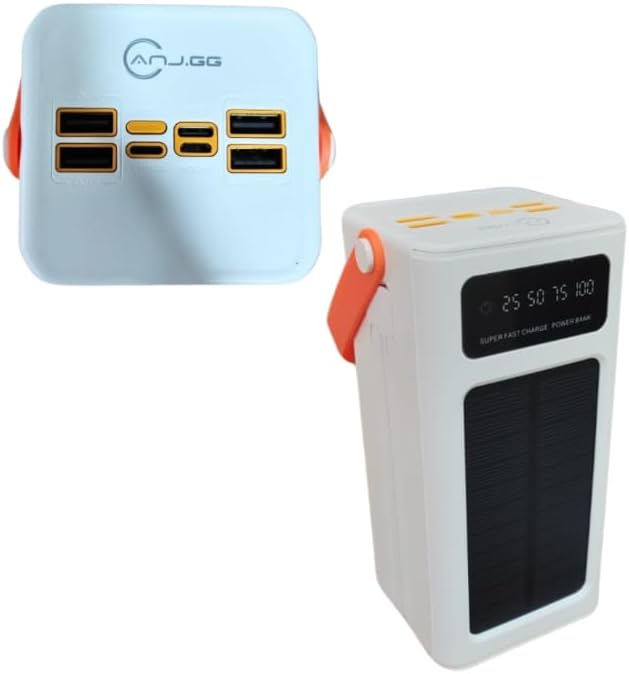
画像2.2.1: 上 view of the power bank, highlighting the four USB output ports and various input ports.

画像2.2.2: 前面 view of the power bank, showing the digital display, solar panel, and carrying handle.
3. セットアップ
3.1 パワーバンクの初期充電
Before first use, fully charge the power bank using a wall adapter. This ensures the internal battery is properly conditioned.
- Connect a compatible charging cable (Micro USB, Lightning, or USB Type-C) to one of the power bank's input ports.
- ケーブルのもう一方の端を USB 壁アダプタ (付属していません) に接続し、電源コンセントに差し込みます。
- The digital display will show the charging progress. Charge until the display reads 100%.
3.2ソーラー充電
The integrated solar panel provides an alternative charging method, primarily for emergencies or maintaining charge. It is not intended as the primary charging source due to varying solar intensity and charging speed.
- パワーバンクをソーラーパネルが直射日光に面するように設置します。
- Ensure no obstructions block the solar panel.
- The solar charging indicator on the display will activate when charging via solar power.
4. 操作手順
4.1 外部デバイスの充電
- Ensure the power bank is sufficiently charged. Check the digital display for the battery level.
- Connect your device's charging cable to one of the power bank's USB output ports or the USB Type-C output port.
- ケーブルのもう一方の端をデバイスに接続します。
- The power bank should automatically begin charging your device. If not, press the power button once to activate.
- The digital display will show the power bank's remaining charge.
For optimal performance, use quality charging cables compatible with your devices.
4.2 デジタルディスプレイの理解
The digital display provides real-time information about the power bank's status:
- バッテリーパーセンtage: Shows the exact remaining charge (e.g., 25, 50, 75, 100).
- 充電インジケーター: An icon or animation will appear when the power bank is being recharged.
- ソーラー充電インジケーター: A specific icon (e.g., a sun) will light up when solar charging is active.
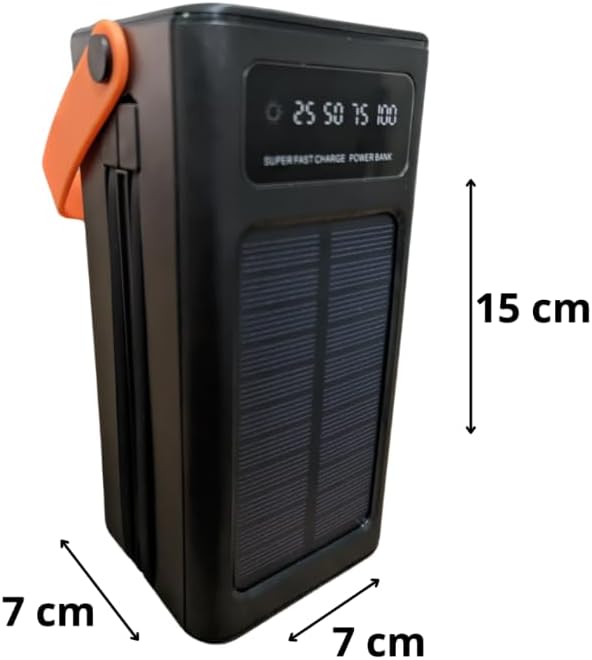
Image 4.2.1: Close-up of the digital display showing battery level indicators (25, 50, 75, 100).
5. メンテナンス
- 定期的な充電: バッテリーの状態を維持するために、使用していない場合でも、少なくとも 3 か月に 1 回はパワーバンクを完全に充電してください。
- ストレージ: パワーバンクは、直射日光や極端な温度を避け、涼しく乾燥した場所に保管してください。
- クリーニング: 外装の清掃には、柔らかく乾いた布をご使用ください。刺激の強い化学薬品や研磨剤は使用しないでください。
- 落下や衝撃を避ける: Protect the device from physical damage.
- 水への露出: このデバイスは防水ではありません。水や高湿度にさらさないでください。
6。 トラブルシューティング
- デバイスがパワーバンクから充電されない:
- Ensure the power bank is charged (check digital display).
- 充電ケーブルがパワーバンクとデバイスの両方にしっかりと接続されていることを確認します。
- Try a different USB port on the power bank.
- 別の充電ケーブルを試してください。
- パワーバンクの電源ボタンを押して出力を有効にします。
- パワーバンクが充電されない:
- 充電ケーブルがパワーバンクの入力ポートと壁のアダプターにしっかりと接続されていることを確認します。
- Verify the wall adapter is working and plugged into a live outlet.
- 別の充電ケーブルまたは壁のアダプターを試してください。
- For solar charging, ensure the panel is in direct sunlight and unobstructed. Note that solar charging is slower than wall charging.
- 充電が遅い:
- 急速充電対応ケーブルを使用していること、およびデバイスが急速充電をサポートしていることを確認してください。
- The 22.5W fast charging port provides higher output; ensure you are using this specific port if fast charging is desired.
- 充電中はデバイス上の不要なアプリケーションを閉じてください。
7. 仕様
| モデル | 50000mAh ソーラーパワーバンク |
| 容量 | 50000mAh |
| 入力ポート | ライトニング、マイクロUSB、USBタイプC |
| 出力ポート | 4 x USB (3x 5V-2A, 1x 22.5W Smart Port), 1 x USB Type-C |
| USBType-C出力 | 5V-3A, 9V-2.22A, 12V-1.67A |
| 急速充電 | 最大22.5W |
| 特集 | Carrying Handle, Digital Display, Solar Panel |
| 電源 | Rechargeable Battery and Solar Power |
| 色 | 白 |
| 製品重量 | 450グラム |
| パッケージ寸法 | 25 x 18 x 8 cm |

Image 7.1: Dimensions of the power bank (note: image shows black version for clarity of dimensions).
8. 保証情報
This product is covered by a standard manufacturer's warranty against defects in materials and workmanship. The warranty period typically begins from the date of purchase. Please retain your proof of purchase for any warranty claims. For specific warranty terms and conditions, refer to the documentation provided at the time of purchase or contact your retailer.
9. サポート
If you encounter any issues or have questions regarding your Generic 50000mAh Solar Power Bank that are not addressed in this manual, please contact the retailer or the point of purchase for assistance. Provide your product model and a detailed description of the issue to facilitate support.


