
導入
This manual provides detailed instructions for the assembly, operation, and maintenance of your FLEXISPOT One-Piece Standing Desk with Rattan Drawers. Please read this manual thoroughly before installation and use to ensure proper function and safety. Keep this manual for future reference.

Image: The FLEXISPOT One-Piece Standing Desk in black with rattan drawers, featuring a monitor shelf and an integrated control panel.
重要な安全情報
怪我や製品の損傷を防ぐために、次の安全ガイドラインを守ってください。
- 組み立て説明書には常に注意深く従ってください。
- 子供やペットを組み立てエリアに近づけないでください。
- 組み立て時には適切な工具と安全装備を使用してください。
- デスクを操作する前に、すべての接続が安全であることを確認してください。
- 机に過度の荷重をかけないでください。最大耐荷重は110ポンドです。
- 高さ調整中は可動部分に手や物を近づけないでください。
パッケージ内容
Verify that all components are present before beginning assembly. The desk ships in two separate packages.
- Desktop with integrated monitor shelf and rattan drawers
- Desk frame and legs
- コントロールパネル
- 電源アダプタとケーブル
- 組み立て用ハードウェア(ネジ、ボルト、工具)
- ユーザーマニュアル

Image: A diagram illustrating the dimensions of the desk components and indicating that the product ships in two separate packages.
組み立て手順
Assembly typically takes approximately one hour. Refer to the separate detailed assembly guide included in your package for step-by-step instructions and diagrams. Ensure all fasteners are correctly identified and used in their designated locations.
- すべてのコンポーネントを開梱し、パッケージの内容リストと照合します。
- Attach the desk legs to the desktop frame using the provided hardware.
- Connect the control panel and motor cables as instructed.
- Secure any cable management components.
- 机を希望の場所に置きます。
設定
After assembly, connect the desk to a power source.
- Plug the power adapter into the desk's control box.
- 電源コードを標準の電源コンセントに差し込みます。
- The desk is now ready for initial use.
操作手順
高さ調整
The desk features an electric motor system for smooth height transitions.
- を押す 上矢印 机を上げるボタン。
- を押す 下矢印 机を下げるボタン。
- The desk can adjust between 28.9 inches (minimum) and 46.5 inches (maximum).
- The motor operates quietly, typically below 50dB.

Image: The desk shown at its minimum (28.9") and maximum (46.5") adjustable heights.
メモリプリセット
Program up to three preferred height settings for quick adjustments.
- 机を希望の高さに調整します。
- を押す M ボタンを押し、番号付きプリセットボタンの1つ(1, 2、 または 3)を 3 秒以内に押して、現在の高さを保存します。
- 保存した高さを呼び出すには、対応する番号のプリセット ボタンを押すだけです。

画像: クローズアップ view of the desk's control panel, highlighting the up/down arrows and memory preset buttons.
モニター棚
The integrated monitor shelf is designed to elevate screens to an ergonomic eye level.
- Place your monitor(s) on the shelf to reduce neck and back strain.
- This helps maintain proper posture during extended work sessions.

Image: Visual comparison of poor posture versus ergonomic sitting and standing postures facilitated by the adjustable desk.
Rattan Drawers
The desk includes both sliding-door desktop compartments and an under-desk drawer for organized storage.
- Use the desktop compartments (47.2"x8.7"x5.5") for easy access to frequently used items.
- The under-desk drawer (23.6"x11.8"x3.9") provides discreet storage for documents or books.
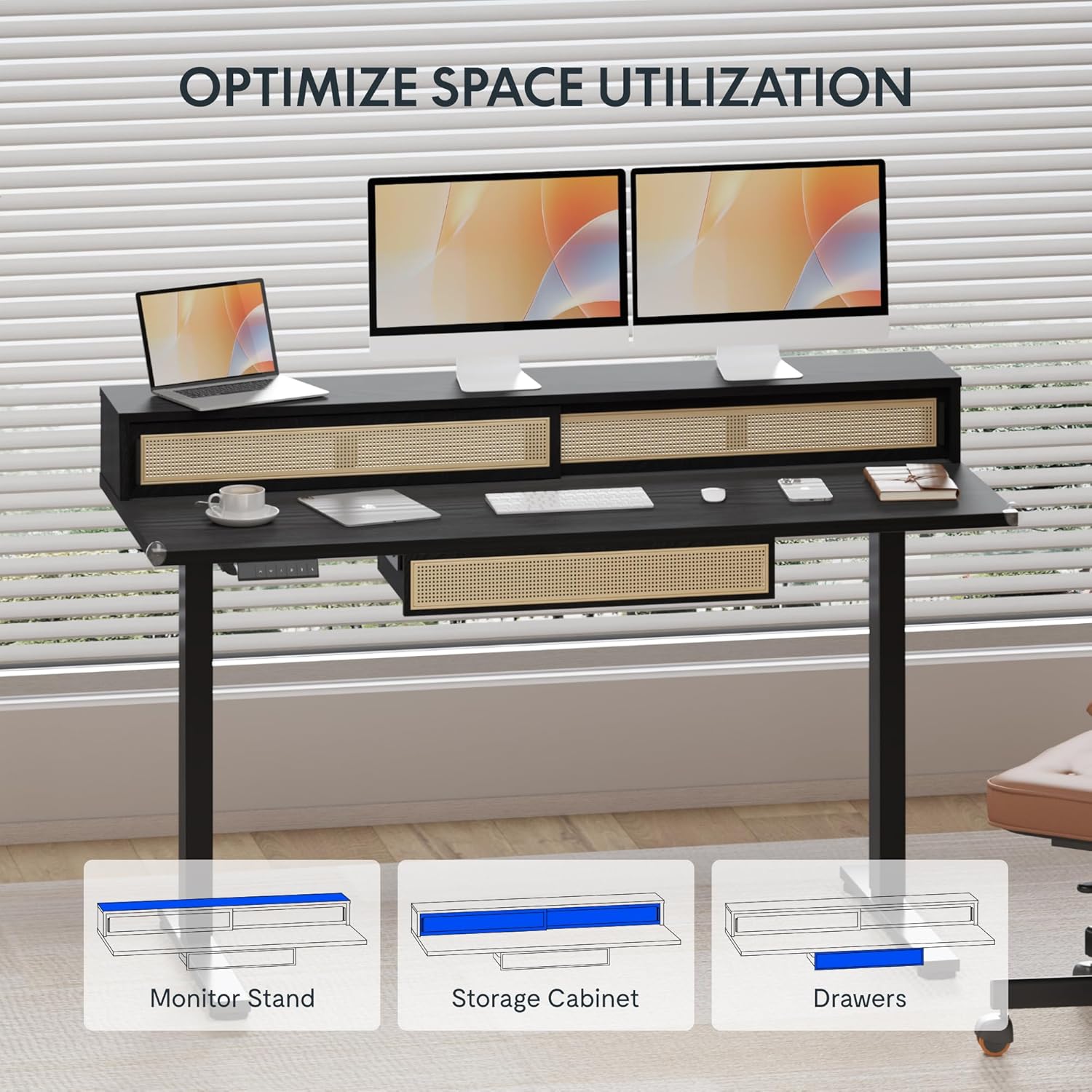
Image: An illustration demonstrating the various storage options, including the monitor stand, storage cabinet, and drawers, for optimal space utilization.
メンテナンス
定期的なメンテナンスにより、デスクの寿命が長くなり、最適なパフォーマンスが確保されます。
- クリーニング: 机の表面を柔らかくて乾いた布で拭きますamp 布。 仕上げを損傷する可能性がある研磨剤入りのクリーナーや刺激の強い化学薬品は避けてください。
- 検査: すべてのネジとボルトがしっかりと締まっているか定期的に確認してください。必要に応じて締め直してください。
- ケーブル管理 ケーブルがきちんと整理され、デスクの動きを妨げないことを確認します。
トラブルシューティング
デスクで問題が発生した場合は、次の一般的な解決策を参照してください。
| 問題 | 考えられる原因 | 解決 |
|---|---|---|
| デスクが動かず、コントロールにも反応しません。 | Power connection issue, cable disconnected, motor error. | Check power cord connection to outlet and desk. Ensure all motor cables are securely connected. Unplug and replug the power for 10 seconds to reset. |
| 机の動きが不均一であったり、異常な音がしたりします。 | 負荷が不均一、接続が緩い、障害がある。 | Ensure weight is evenly distributed. Check for any obstructions under the desk. Verify all assembly screws are tight. |
| メモリプリセットが機能していません。 | プリセットが正しく保存されませんでした。 | Re-save the desired height settings by pressing 'M' then the preset number within 3 seconds. |
仕様
| 特徴 | 詳細 |
|---|---|
| ブランド | フレキシポット |
| 製品寸法(奥行き×幅×高さ) | 23.6"D x 47.2"W x 29"H (at lowest point) |
| 色 | 黒 |
| ベース素材 | 合金鋼 |
| 上部の材質の種類 | 木材 |
| 最小高さ | 28.9インチ |
| 最大高さ | 46.5インチ |
| 引き出しの数 | 1 (under-desk) |
| Enclosed Shelves | 2 (sliding-door desktop compartments) |
| 特集 | Corded electric height adjustment, Memory Presets |
| 必要な組み立て | はい |
保証とサポート
FLEXISPOT provides comprehensive warranty coverage for your standing desk:
- フレームとモーター: 5年間の保証。
- エレクトロニクス: 2年間の保証。
This warranty ensures lasting security for your workspace investment. For customer support, technical assistance, or warranty claims, please refer to the contact information provided in your product packaging or visit the official FLEXISPOT webサイト。