
1. 重要な安全情報
設置およびご使用の前に、このマニュアルをよくお読みください。このマニュアルは、今後の参考のために保管してください。
- 重量容量: Do not exceed the maximum weight capacity of 33 lbs (15 kg) per arm. Exceeding this limit may result in serious injury or product damage.
- モニターサイズ: このマウントは 13 ~ 39 インチのモニター用に設計されています。
- VESAの互換性: Ensure your monitor has VESA mounting patterns of 75x75 mm or 100x100 mm. If your monitor does not have these patterns, a VESA adapter (sold separately) may be required.
- デスクの厚さ: C-clamp is suitable for desks 0.39"-1.77" thick. The grommet mount is suitable for desks 0.39"-1.77" thick with a hole diameter of 0.39"-2.36".
- デスク素材: Do not install this product on tempered glass desks or other fragile table tops. Ensure your desk is structurally sound to support the combined weight of the mount and monitors.
- 組み立て: Assemble the product according to the instructions. Incorrect assembly can lead to product failure or injury.
- 可動部品: 挟まれないように、調整中は可動部分に手や指を近づけないでください。
2.製品オーバーview
The MOUNT PRO Dual Monitor Desk Mount provides an ergonomic solution for mounting two monitors, offering extensive adjustability and integrated features for an organized workspace.
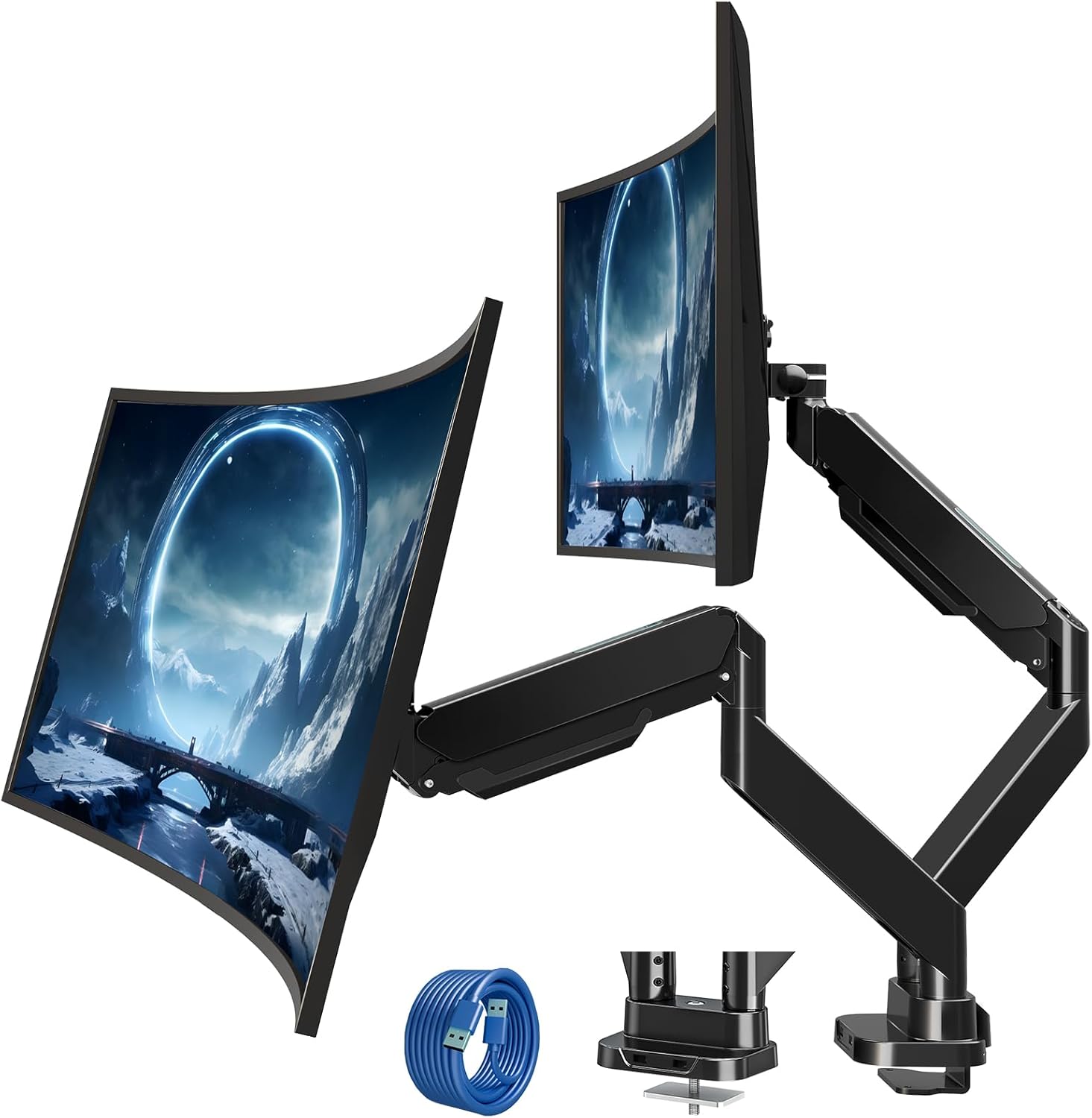
Figure 2.1: MOUNT PRO Dual Monitor Desk Mount with two monitors.
2.1 主な特徴
- Supports two flat or curved monitors from 13" to 39" in size.
- Each arm supports monitors weighing between 4.4 lbs (2 kg) and 33 lbs (15 kg).
- Compatible with VESA patterns 75x75 mm and 100x100 mm.
- Full range of motion: tilt +90°/-45°, swivel 180°, rotation 360°.
- Adjustable height and extension for optimal view角度を変える。
- 統合ケーブル管理システム。
- Two USB ports at the base for convenient charging and data transfer.

Figure 2.2: Compatibility details for monitor size, weight, and VESA standards.

Figure 2.3: The mount's capability to support large and heavy monitors, up to 33 lbs per arm.
3. パッケージ内容
すべての部品が揃っていて、損傷がないことを確認してください。部品が不足または損傷している場合は、カスタマーサポートにお問い合わせください。
- Monitor Arms (x2)
- デスクClamp ベース
- グロメットマウントハードウェア
- VESAプレート(2枚)
- USB延長ケーブル
- ハードウェアキット(ネジ、ワッシャー、スペーサー)
- 六角レンチ(各種サイズ)
- 取扱説明書
4.インストールガイド
4.1インストール前のチェック
Before beginning installation, confirm your monitor and desk meet the following requirements:
- モニターサイズ: 13インチ~39インチ
- モニターの重量: 4.4-33 lbs (per arm)
- VESA パターン: 75x75 mm or 100x100 mm
- デスクの厚さ(C-clamp/グロメット): 0.39インチ~1.77インチ
- Grommet Hole Diameter (Grommet mount only): 0.39インチ~2.36インチ

Figure 4.1: Compatibility requirements for monitors and desk.
4.2 デスクの互換性
Ensure your desk edge or grommet hole is suitable for installation. Avoid installing on desks with fragile materials like tempered glass.

Figure 4.2: Desk edge requirements for secure clamp インストール。
4.3取り付けオプション
マウントには2つの取り付け方法があります: C-clamp またはグロメットマウント。
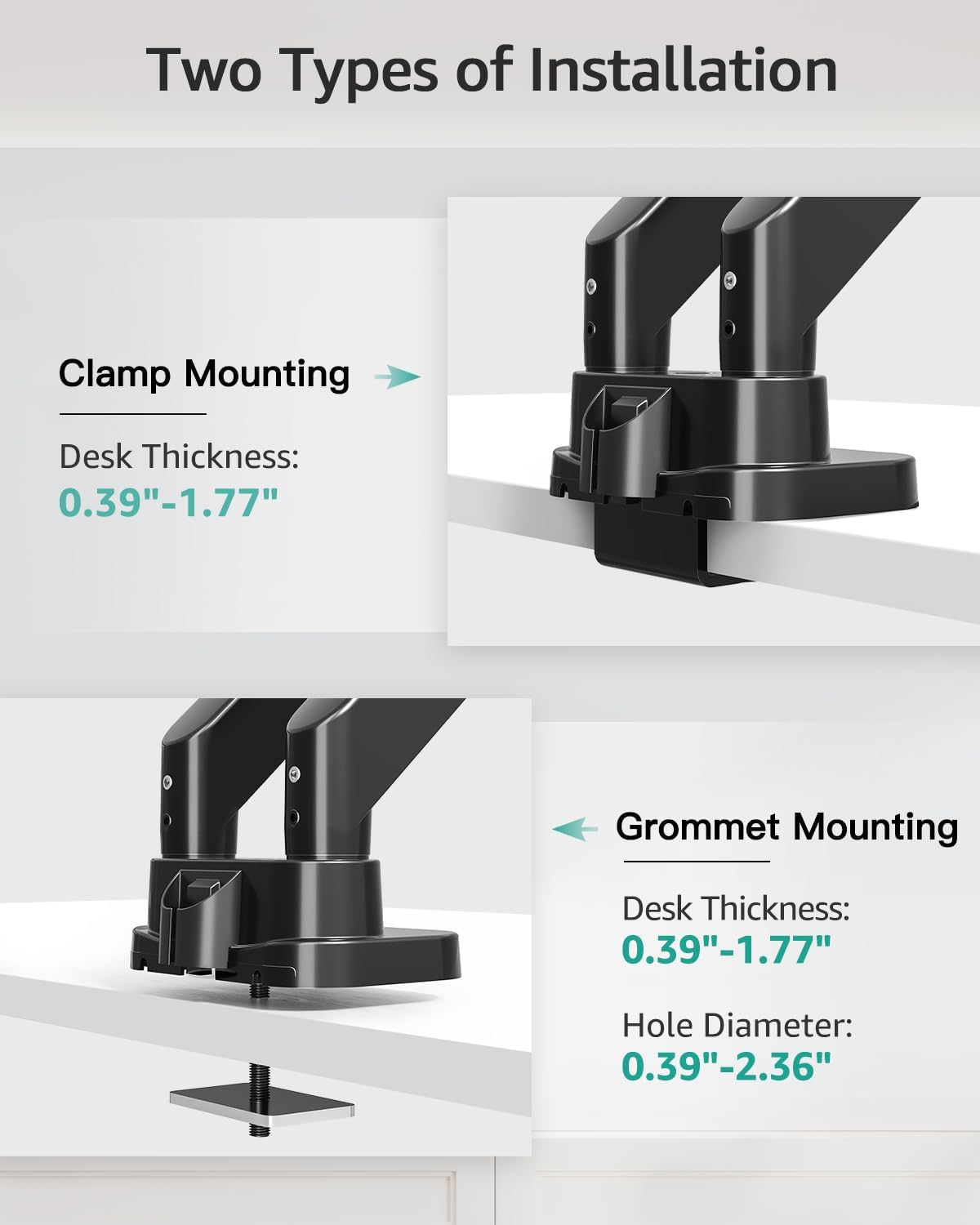
Figure 4.3: Visual representation of C-clamp グロメット取り付け方法。
4.3.1 C-Clamp インストール
- C-clを取り付けるamp to the desk base.
- Position the base on the desired location on your desk.
- C-clを締めますamp マウントがデスクにしっかりと固定されるまでネジを締めます。
4.3.2 グロメットの取り付け
- C-clを分解するamp from the base and attach the grommet plate.
- グロメットボルトをデスクの穴に挿入します。
- Secure the mount from underneath the desk using the provided washer and nut.

Figure 4.4: Steps for easy base installation using either C-clamp or grommet method.
4.4 モニターの取り付け
- Attach the VESA plate to the back of your monitor using the appropriate screws and spacers from the hardware kit. Ensure the screws are tightened securely.
- Slide the monitor with the attached VESA plate onto the monitor arm's VESA head. The quick-release design allows for easy attachment.
- モニターがしっかりと固定されていることを確認してください。

Figure 4.5: Detail of VESA quick release boards and monitor locking mechanism.
5. 操作と調整
The MOUNT PRO Dual Monitor Desk Mount offers a wide range of adjustments to customize your viewing の経験。
5.1 Monitor Positioning (Tilt, Swivel, Rotation)
Each monitor arm allows for flexible positioning:
- Adjust the monitor angle up to 90° upwards and 45° downwards.
- スイベル: モニターを水平方向に左または右に最大 180 度回転させます。
- 回転: モニターを 360 度回転させて、横向きと縦向きを切り替えます。

Figure 5.1: Illustrates the full range of motion including swivel, tilt, and 360° rotation.
5.2 Height and Extension Adjustment
The gas spring arms allow for smooth vertical and horizontal adjustments.
- 最大高さ: Monitors can be raised up to 21.5 inches from the desk surface.
- 最大延長: Arms can extend up to 20.9 inches.

Figure 5.2: Maximum height and extension capabilities of the monitor arm.
5.3 ガススプリングの張力調整
The gas spring tension must be adjusted to match the weight of your monitor for optimal stability and ease of movement. Hold the arm in a horizontal position during adjustment.
- For lighter monitors (monitor raises up): Turn the adjustment screw clockwise towards the "-" symbol to reduce tension.
- For heavier monitors (monitor drops down): Turn the adjustment screw counter-clockwise towards the "+" symbol to increase tension.
A scale line on the arm indicates the approximate gas spring force value, with each division representing about 2 lbs. Adjust until the arm holds the monitor's position stably.

Figure 5.3: Gas spring tension adjustment mechanism with a visual scale.
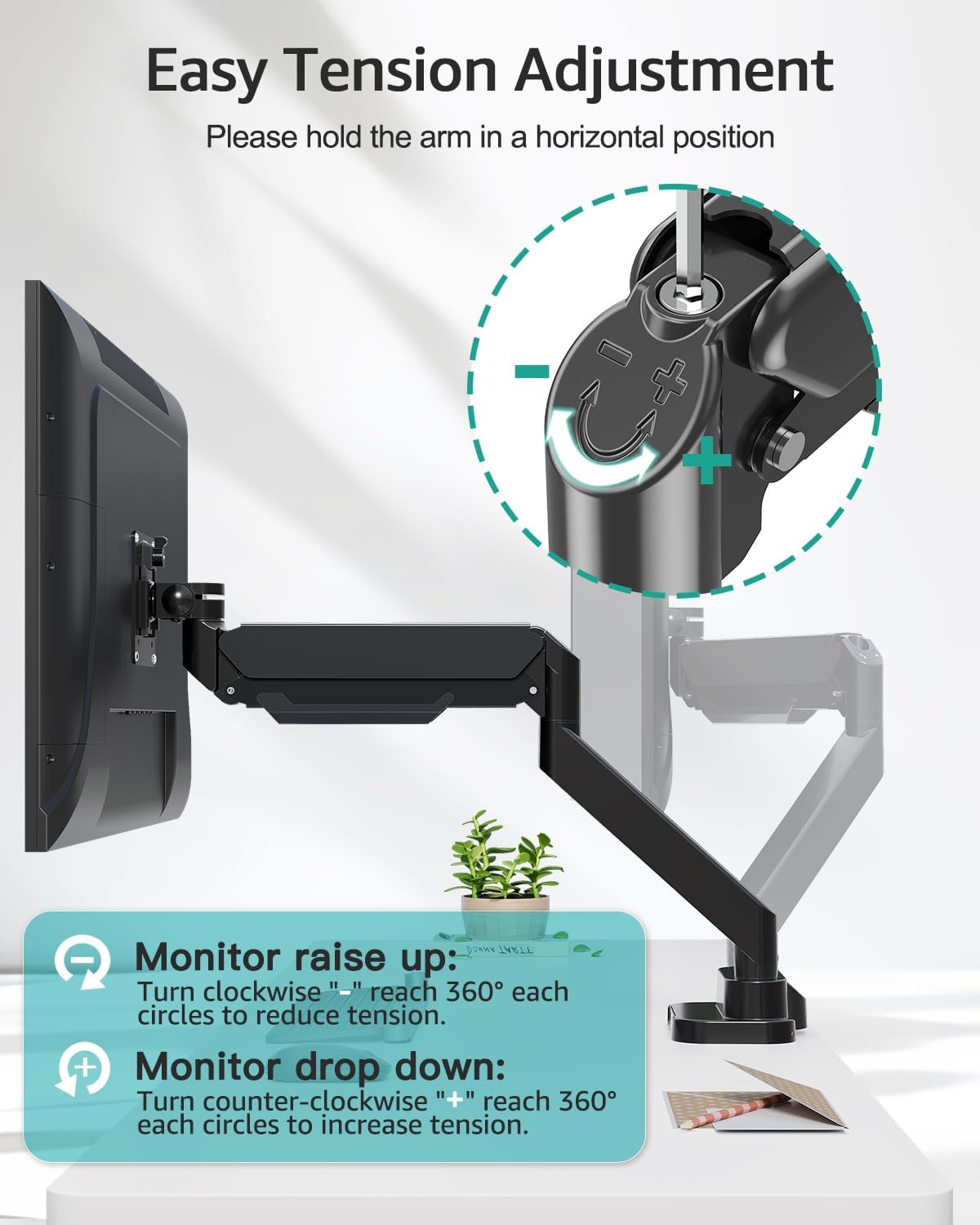
Figure 5.4: Detailed instructions for adjusting tension to suit monitor weight.
5.4 ケーブル管理
Route your monitor cables through the integrated cable management channels along the arms to maintain a tidy workspace.
5.5つのUSBポート
The base of the mount includes two USB ports. Connect the provided USB extension cable from the mount's base to your computer to enable these ports for charging devices or data transfer.

Figure 5.5: Cable management system and integrated USB ports for desktop organization.
6. メンテナンス
- すべてのネジと接続部がしっかりと固定されているか定期的に確認してください。
- マウントを柔らかくてきれいな布で拭いてくださいamp 布で拭いてください。研磨剤入りの洗剤や溶剤は使用しないでください。
- Periodically verify that the gas spring tension is still appropriate for your monitor's weight.
7。 トラブルシューティング
7.1 Monitor Sags or Does Not Stay in Position
- 解決: The gas spring tension is too low for the monitor's weight. Increase the tension by turning the adjustment screw counter-clockwise towards the "+" symbol (refer to Section 5.3).
7.2 Monitor Arm is Too Stiff or Hard to Move
- 解決: The gas spring tension is too high for the monitor's weight. Decrease the tension by turning the adjustment screw clockwise towards the "-" symbol (refer to Section 5.3).
7.3 Mount Feels Unstable on Desk
- 解決: C-clを締め直すamp or grommet bolt. Ensure the desk thickness is within the specified range (0.39"-1.77") and the desk material is sturdy.
7.4 Monitor Does Not Fit VESA Plate
- 解決: Verify your monitor's VESA pattern is 75x75 mm or 100x100 mm. If not, a VESA adapter may be required. Some monitors may require removing a cover or original stand before attaching the VESA plate.
8. 仕様
| 特徴 | 仕様 |
|---|---|
| ブランド | マウントプロ |
| モデル | B0F7LRZF4F |
| モニターサイズの互換性 | 13" - 39" (flat or curved) |
| 耐荷重(片腕あたり) | 4.4 - 33ポンド(2 - 15 kg) |
| VESA互換性 | 75x75 mm、100x100 mm |
| 傾斜角度 | +90° / -45° |
| スイベル角度 | 180° |
| 回転 | 360° |
| 最高の高さ | 21.5インチ |
| 最大延長 | 20.9インチ |
| デスクの厚さ(Clamp/グロメット) | 0.39インチ~1.77インチ |
| グロメット穴径 | 0.39インチ~2.36インチ |
| 材料 | 金属 |
| 色 | 黒 |
| アイテム重量 | 14.63ポンド |
9. 保証とサポート
MOUNT PRO products are designed and manufactured to high-quality standards. This product is covered by a limited warranty from the date of purchase. For warranty details, technical support, or to report missing/damaged parts, please contact MOUNT PRO customer service through the retailer where the product was purchased or visit the official MOUNT PRO webサイト。
Please have your model number (B0F7LRZF4F) and purchase information ready when contacting support.


