
Pisichen 21.5INTS-White-NEW
Pisichen 21.5インチ タッチスクリーン モニター ユーザーマニュアル
Model: 21.5INTS-White-NEW
導入
This user manual provides comprehensive instructions for the setup, operation, maintenance, and troubleshooting of your Pisichen 21.5-Inch Touchscreen Monitor. Please read this manual thoroughly before using the product to ensure proper functionality and to prevent damage.
The Pisichen 21.5-inch touch monitor is designed to enhance your work efficiency and provide an interactive experience with its responsive 10-point capacitive touchscreen. It features a Full HD 1920x1080 resolution display, built-in speakers, and versatile connectivity options including HDMI, VGA, and USB for touch functionality.
主な特徴
- Sensitive 10-Point Capacitive Touchscreen: Offers seamless and responsive interaction, allowing direct engagement with content and simultaneous multi-finger input.
- Stunning FHD 1080P Display: A 21.5-inch Full HD (1920x1080) resolution screen with a 1000:1 contrast ratio, 250cd/㎡ brightness, 170° viewing angle, and 60Hz refresh rate for clear and smooth visuals. Includes low-blue-light and eye-care technology.
- 幅広いデバイス互換性: Equipped with USB2.0 (for touch), HDMI, VGA, and DC ports for easy connection to PCs, laptops, PS3/4, and gaming consoles.
- 多彩な表示モード: Supports duplicate, extend, and second-screen modes to enhance productivity and workspace.
- Built-in Speakers and VESA Mounting: Integrated speakers provide audio, and the 75x75mm VESA mount allows for flexible installation options.
パッケージ内容
セットアップを続行する前に、パッケージにすべてのアイテムが揃っていることを確認してください。

The package includes the Pisichen 21.5-inch touchscreen monitor, a user manual, an HDMI cable, a USB cable, and a power adapter, ensuring it is ready for immediate use.
- Pisichen 21.5-Inch Touchscreen Monitor
- 電源アダプター
- HDMIケーブル
- USBケーブル(タッチ機能用)
- ユーザーマニュアル
セットアップ手順
1. モニターの接続
The monitor offers various connection options to suit your needs. Ensure all connections are secure before powering on the device.

詳細 view of the monitor's input/output ports, including HDMI, VGA, headphone, DC power, and USB 2.0 touch ports.
- 電源接続: Connect the provided power adapter to the DC power port on the monitor and then plug it into a wall outlet.
- ビデオ接続(HDMI): Use the HDMI cable to connect the monitor's HDMI port to the HDMI output port on your computer, laptop, or gaming console.
- ビデオ接続 (VGA): Alternatively, use a VGA cable to connect the monitor's VGA port to the VGA output port on your computer or laptop.
- タッチ機能接続: To enable the touch function, connect the included USB cable from the monitor's USB 2.0 touch port to an available USB port on your computer. This step is crucial for touch signal transmission.
- オーディオ出力(オプション): If you prefer external audio, you can connect headphones or external speakers to the headphone jack. The monitor also has built-in speakers.
2. 取り付けオプション
The Pisichen monitor supports both desktop placement and VESA wall mounting for flexible setup.
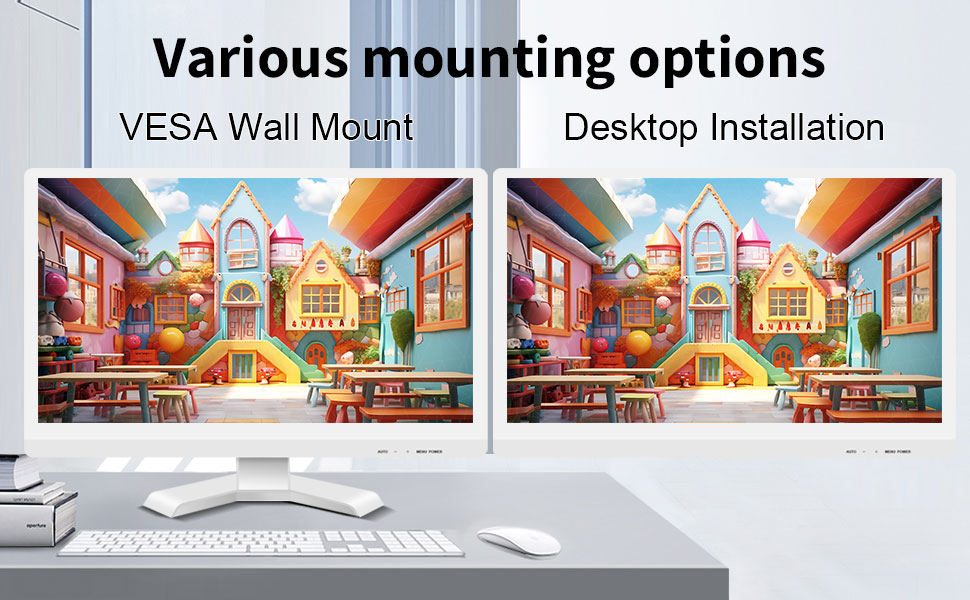
The monitor can be set up on a desktop stand or mounted on a wall using a VESA compatible bracket.
- デスクトップのインストール: Attach the provided stand to the monitor base and place it on a stable, flat surface.
- VESA ウォールマウント: The monitor features a 75x75mm VESA mounting pattern. Use a compatible VESA bracket (not included) to mount the monitor on a wall or an adjustable arm. Ensure the mount can support the monitor's weight (9.88 pounds).

後方 view of the monitor highlighting the VESA 75x75mm mounting pattern and overall dimensions.
操作手順
1.電源のオン/オフ
Locate the power button on the monitor. Press it to turn the monitor on or off. The power indicator light will illuminate when the monitor is on.
2. Using the Touchscreen Function
Once the USB cable is connected to your computer, the 10-point capacitive touch function will be active. You can interact with the screen using your fingers or a passive capacitive stylus.

The monitor supports direct touch interaction for intuitive control.
- シングルタッチ: マウスのクリックに相当します。
- タップ&ホールド: 右クリックに相当します。
- ドラッグ: Move items by touching and dragging.
- ピンチしてズーム: 2 本の指を使ってコンテンツを拡大または縮小します。
- マルチタッチ: The monitor supports up to 10 simultaneous touch points, enabling collaborative work or complex gestures.

The 10-point multi-touch feature allows for multiple users or complex interactions simultaneously.
重要な注意: The touch functionality is disabled on Mac OS, iPad OS, and iOS. This monitor only supports passive capacitive styluses.
3. 表示モード
モニターは、コンピューターに接続するとさまざまな表示モードをサポートします。
- 複製モード: Displays the same content on both your primary screen and the Pisichen monitor.
- 拡張モード: デスクトップを両方の画面に拡張し、作業スペースを広くします。
- セカンドスクリーン専用モード: Displays content only on the Pisichen monitor, turning off your primary screen.
You can typically switch between these modes through your operating system's display settings (e.g., Windows Display Settings).
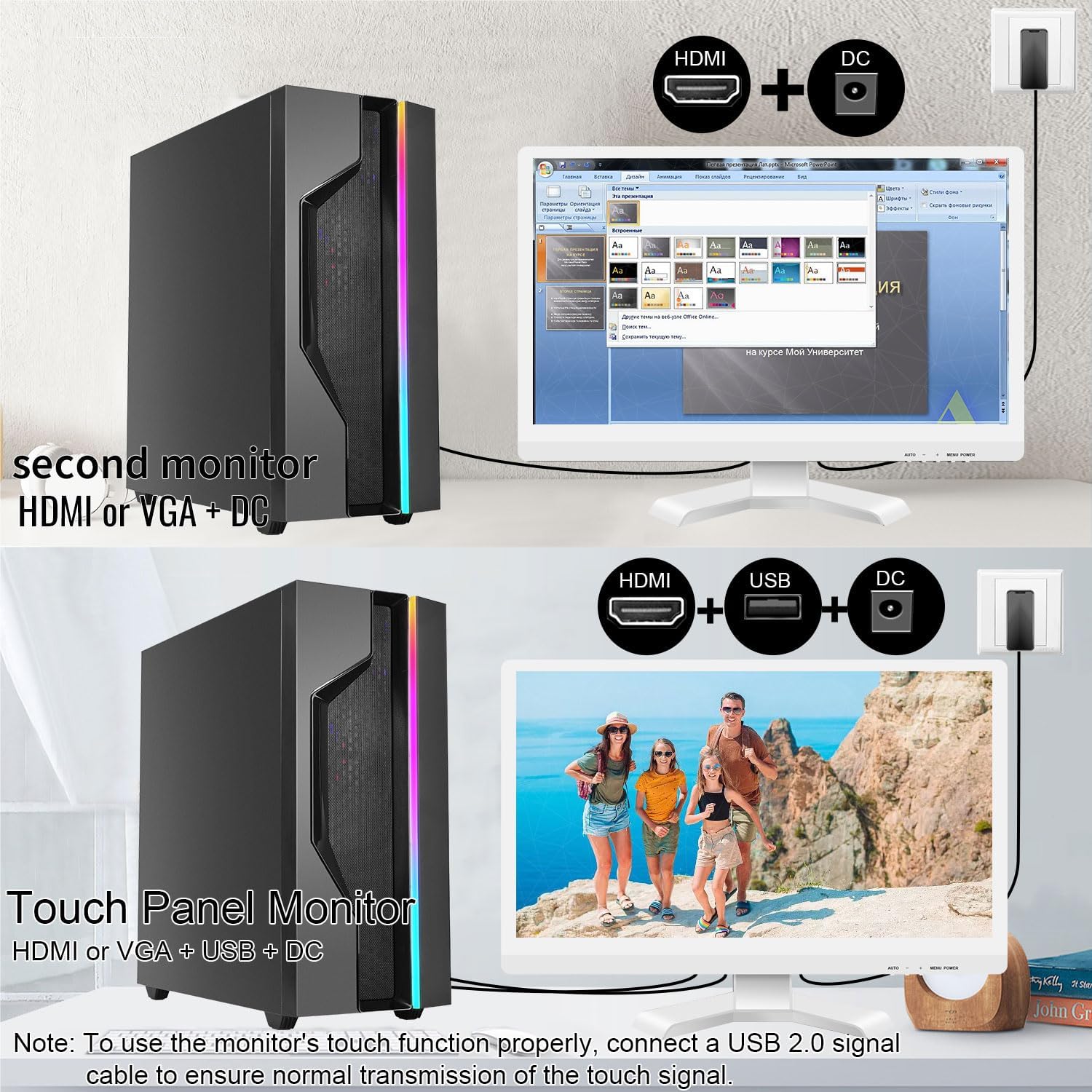
Illustrations of connecting the monitor as a secondary display or as a touch-enabled display.
4. オンスクリーンディスプレイ(OSD)メニュー
The monitor features an OSD menu for adjusting display settings. Use the buttons located on the monitor's frame (usually on the bottom right) to navigate and select options.
- メニューボタン: OSDメニューを開きます。
- 上/下ボタン: メニュー オプションをナビゲートします。
- 入力/選択ボタン: 選択を確定するか、サブメニューに入ります。
- 終了ボタン: 現在のメニューまたは OSD を終了します。
一般的な OSD 設定には、明るさ、コントラスト、色温度、入力ソースの選択、アスペクト比などがあります。
メンテナンスとケア
- 画面の掃除:
Always power off the monitor and unplug it before cleaning. Use a soft, lint-free cloth lightly dampened with water or a non-abrasive, monitor-specific cleaning solution. Do not spray liquid directly onto the screen. Avoid using alcohol, ammonia, or abrasive cleaners, as they can damage the screen surface.
- Cのクリーニングasing:
モニターを拭くasing with a soft, dry cloth. If necessary, a slightly damp 布を使用することもできますが、通気口やポートに湿気が入らないようにしてください。
- ストレージ:
長期間使用しない場合は、モニターを直射日光や極端な温度を避け、涼しく乾燥した場所に保管してください。可能であれば、元の梱包材を使用して保護してください。
- 換気:
Ensure the monitor's ventilation openings are not blocked. Proper airflow is essential to prevent overheating.
- 取り扱い:
モニターは丁寧に取り扱ってください。落としたり、強い衝撃を与えたりしないでください。モニターの上に重い物を置かないでください。
トラブルシューティング
| 問題 | 考えられる原因 | 解決 |
|---|---|---|
| 画面に画像がありません |
|
|
| タッチスクリーンが反応しない |
|
|
| 画像がぼやけたり歪んだりする |
|
|
| 内蔵スピーカーから音が出ない |
|
|
仕様
| モデル番号 | 21.5INTS-White-NEW |
| 画面サイズ | 21.5インチ |
| 解決 | 1920 x 1080ピクセル(FHD 1080p) |
| アスペクト比 | 16:9 |
| 輝度 | 250カンデラ(cd/㎡) |
| コントラスト比 | 1000:1 |
| View角度 | 170° |
| リフレッシュレート | 60Hz |
| タッチ·テクノロジー | 10ポイント静電容量式タッチ |
| 入力ポート | HDMI, VGA, USB 2.0 (for touch), DC Power |
| オーディオ | 内蔵スピーカー、ヘッドフォンジャック |
| VESAマウントの互換性 | 75x75mm |
| 製品寸法(長さ x 幅 x 高さ) | 0.78 x 20.4 x 14.9インチ |
| アイテム重量 | 9.88ポンド |
| メーカー | 深セン・コノワ・エレクトロニクス株式会社 |
| 原産国 | 中国 |
保証とサポート
For warranty information and technical support, please refer to the official Pisichen website or contact their customer service directly. Details are typically provided on the product packaging or the manufacturer's official support channels.
訪問することができます Pisichen Store on Amazon for more product information and potential support contacts.
Ask a question about this manual
Ask about setup, troubleshooting, compatibility, parts, safety, or missing instructions. Manuals+ will review the question and use this page’s manual context to help answer it.