
TCL 65C7K
TCL PREMIUM 4K QD-Mini LED TV 65インチ C7K ユーザーマニュアル
モデル: 65C7K
導入
This manual provides comprehensive instructions for setting up, operating, maintaining, and troubleshooting your new TCL PREMIUM 4K QD-Mini LED TV 65" C7K. Please read this manual thoroughly before using the television to ensure proper operation and to maximize your view体験。 今後の参考のために、このマニュアルを保管してください。

図1: 前面 view TCL 65インチC7K QD-Mini LEDテレビのasin洗練されたデザインと鮮やかなディスプレイが特徴です。
設定
1. 開梱とパッケージ内容
テレビをパッケージから慎重に取り出し、すべての部品が揃っていることを確認してください。
- 01 TCL 65" Television
- 01リモコン
- 01 P2/RCA Adapter Cable
- 電源ケーブル
- ユーザーマニュアル(このドキュメント)
- TV Stand components (if applicable)
2. Stand Installation / Wall Mounting
For stand installation, attach the provided stand components to the bottom of the TV using the designated screws. Ensure the stand is securely fastened and the TV is stable on a flat surface. If wall mounting, refer to your wall mount's instructions and ensure proper VESA compatibility and secure installation.
3. デバイスの接続
The TCL C7K TV offers a variety of ports for connecting external devices. Refer to the diagram below for port locations and types.
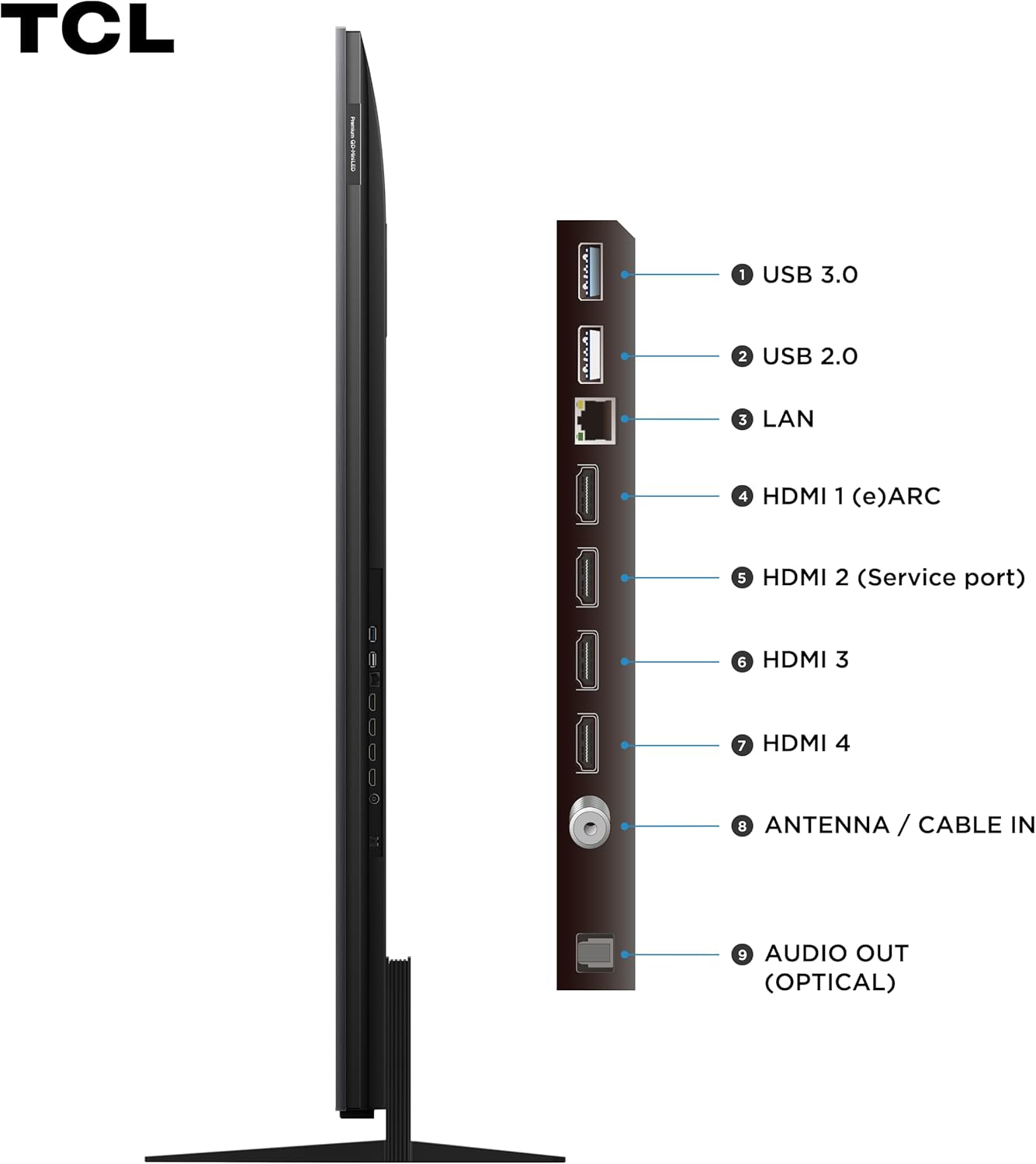
図2:側面 view of the TCL C7K TV, detailing the available connection ports.
- 1. USB 3.0: For high-speed data transfer from USB devices.
- 2. USB 2.0: フラッシュドライブなどの USB デバイスを接続します。
- 3. LAN: 有線インターネット接続用のイーサネット ポート。
- 4. HDMI 1(eARC): High-Definition Multimedia Interface with Enhanced Audio Return Channel support.
- 5. HDMI 2 (Service port): HDMI input, also used for service.
- 6. HDMI 3: 高精細マルチメディアインターフェース入力。
- 7. HDMI 4: 高精細マルチメディアインターフェース入力。
- 8. ANTENNA / CABLE IN: アンテナまたはケーブルテレビ信号を接続します。
- 9. AUDIO OUT (OPTICAL): Digital optical audio output for soundbars or home theater systems.
Connect your power cable to the TV and a wall outlet. For internet access, connect an Ethernet cable to the LAN port or connect wirelessly via Wi-Fi during the initial setup.
4. 初回電源投入とセットアップウィザード
Press the power button on the remote control. The TV will guide you through the initial setup wizard, including language selection, network connection, Google account sign-in, and channel scanning. Follow the on-screen prompts to complete the setup.
テレビの操作
1. リモートコントロールview
The included remote control allows you to navigate the TV's interface, adjust settings, and access smart features. Familiarize yourself with the button layout for easy operation.
2. Google TV インターフェース
Your TCL C7K TV runs on Google TV, providing a personalized and intuitive user experience. Access your favorite streaming services, live TV, and apps from a single, organized home screen.

Figure 3: The Google TV interface, offering a centralized hub for all your entertainment.
3. 主な特徴
- 4K QD-Mini LED Display: Experience stunning clarity and vibrant colors with Quantum Dot Mini LED technology, offering precise local dimming and high brightness.
- ドルビービジョンIQとHDR10+: Enjoy enhanced contrast, brightness, and color detail with support for leading HDR formats, adapting to your room's lighting conditions.
- Bang & Olufsenのオーディオ: Immerse yourself in superior sound quality, engineered by Bang & Olufsen for a rich and dynamic audio experience.
- 144Hz VRR & 240Hz ゲームアクセラレータ: Achieve ultra-smooth gameplay with a high refresh rate and Variable Refresh Rate (VRR) support, optimized for gaming.
- Google アシスタント: 音声コマンドを使用して、テレビを制御したり、コンテンツを検索したり、スマートホーム デバイスを管理したりできます。
- ALLM (自動低遅延モード): Automatically switches to a low-latency mode for a more responsive gaming experience.

Figure 4: Visual representation of the key features of the TCL C7K TV.
4. ゲーム機能
The TCL C7K is designed for an exceptional gaming experience:
- 144Hz VRR: Ensures smooth, tear-free visuals by synchronizing the TV's refresh rate with your console or PC's frame rate.
- 240Hz ゲームアクセラレータ: Provides an even smoother experience for compatible games, reducing motion blur.
- AMD FreeSync プレミアムプロ: Eliminates stuttering and tearing for fluid gameplay.
- HDMI 2.1: Supports advanced gaming features like 4K@120Hz, VRR, and ALLM.

Figure 5: Experience immersive gaming with the TCL C7K's advanced gaming features.
5. 最適 View距離
最高のもののために viewing experience, consider the recommended distance from your TV based on its size. For a 65-inch TV, an ideal viewing distance is approximately 2.0 to 2.5 meters (6.5 to 8.2 feet).

図6:推奨 viewing distances for various TV sizes.
メンテナンス
1. テレビの掃除
画面をきれいにするには、柔らかく糸くずの出ない布で優しく拭いてください。頑固な汚れには、軽くampen the cloth with water or a screen-specific cleaning solution. Avoid using harsh chemicals, abrasive materials, or direct spraying onto the screen. Clean the TV's frame and stand with a soft, dry cloth.
2. ソフトウェアの更新
Your Google TV will periodically check for and download software updates automatically when connected to the internet. These updates improve performance, add new features, and enhance security. You can also manually check for updates in the TV's settings menu.
トラブルシューティング
テレビで問題が発生した場合は、次の一般的な問題と解決策を参照してください。
| 問題 | 考えられる原因 / 解決策 |
|---|---|
| 電源なし | Ensure the power cable is securely plugged into the TV and a working electrical outlet. Check the power indicator light on the TV. Try a different outlet. |
| 画像なし/黒い画面 | Verify the correct input source is selected (e.g., HDMI 1, TV). Check cable connections from external devices. Restart the TV and connected devices. |
| 音が出ない | Check the volume level and ensure the TV is not muted. Verify audio cable connections to external sound systems. Check audio output settings in the TV menu. |
| リモコンが動作しない | 電池を交換してください。リモコンとテレビの赤外線センサーの間に障害物がないことを確認してください。Bluetoothリモコンの場合は、再度ペアリングしてください。 |
| ネットワーク接続の問題 | Restart your router and modem. Check Wi-Fi password. For wired connections, ensure the Ethernet cable is properly connected. Try connecting to a different network if possible. |
| 画質の問題(ぼやけ、歪み) | Check the resolution of the content being played. Ensure cables are securely connected. Adjust picture settings (brightness, contrast, sharpness) in the TV menu. |
If the problem persists after trying these solutions, please contact TCL customer support for further assistance.
仕様
| 特徴 | 詳細 |
|---|---|
| ブランド | TCL |
| モデル | 65C7K |
| 画面サイズ | 65インチ |
| ディスプレイ技術 | QD-ミニLED |
| 解決 | 4K (3840 x 2160) |
| リフレッシュレート | 120 Hz (Native), 144Hz VRR, 240Hz Game Accelerator |
| オペレーティング·システム | Google TV、Android |
| 特集 | Dolby Vision IQ, HDR10+, Google Assistant, ALLM, Audio by Bang & Olufsen, AiPQ Pro Processor, AMD FreeSync Premium Pro |
| 接続性 | Wi-Fi (Dual Band), Bluetooth, HDMI 2.1 (x4), USB 3.0 (x1), USB 2.0 (x1), LAN, Optical Audio Out, Antenna/Cable In |
| オーディオ出力 | 2.1 Channel Surround Sound (with Subwoofer) |
| 電源 | 電力 |
| 製品の寸法(WxDxH) | 144.4 x 6 x 83.2 cm(スタンドなし) |
| 製品重量 | 27.4キログラム |
| 認証 | 00738-24-06714 |
| エネルギー効率 | 100% (ENCE) |

Figure 7: Energy efficiency label for the TCL 65C7K TV.
保証とサポート
保証情報
Your TCL 65C7K TV comes with a manufacturer's warranty. Please refer to the warranty card included in your package for specific terms and conditions, including coverage duration and what is covered. Keep your proof of purchase for warranty claims.
Extended warranty options may be available for purchase. For details, please check with your retailer or TCL's official webサイト。
カスタマーサポート
For technical assistance, troubleshooting beyond this manual, or warranty service, please contact TCL customer support. You can find contact information on the official TCL webサイトまたは製品ドキュメントに記載されています。
When contacting support, please have your TV's model number (65C7K) and serial number ready. The serial number is typically located on a sticker on the back of the TV.
Ask a question about this manual
Ask about setup, troubleshooting, compatibility, parts, safety, or missing instructions. Manuals+ will review the question and use this page’s manual context to help answer it.