
1. はじめに
This manual provides detailed instructions for the installation, setup, and operation of your Ctronics 4K Outdoor Security Camera, model CTIPC-950 (950C-4KB). Please read this manual thoroughly before using the product to ensure proper functionality and safety. Keep this manual for future reference.
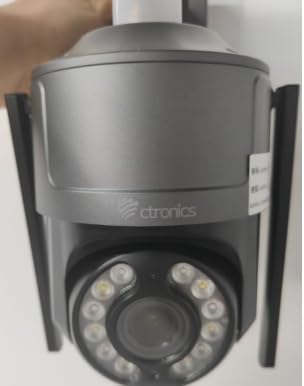
Figure 1: Ctronics 4K Outdoor Security Camera (Model CTIPC-950)
2 製品の特徴
- True 4K Ultra HD with Starlight Lens: Experience superior image clarity day and night. Features vivid color night vision up to 30 meters.
- Advanced AI Detection & Auto Tracking: Accurately detects humans, vehicles, and pets. Automatically tracks moving targets to minimize false alarms.
- Powerful Red & Blue Strobe Light with Siren Alarm: Deters intruders effectively with visual and audible alerts.
- 8 Preset Positions & 4 Custom Detection Zones: Configure specific camera positions for quick patrols and define areas for focused surveillance.
- Privacy Masking Feature: Protect sensitive areas by masking them from surveillance.
- Flexible Installation & Multi-Device Remote Access: Supports wall or ceiling mounting. Manage up to 36 cameras via the Ctronics app on mobile or PC, with split-screen viewing, group management, and multi-user sharing.
- デュアルバンドWi-Fi: Supports both 2.4GHz and 5GHz Wi-Fi for reliable and stable connection.
- IP66耐候性: Durable metal construction ensures reliable operation in various outdoor conditions.
3. パッケージ内容
パッケージにすべてのアイテムが揃っていることを確認します。
- Ctronics 4K Security Camera (CTIPC-950 / 950C-4KB)
- 取扱説明書(本書)
- 取り付けネジと壁プラグ
- 電源アダプター
4. セットアップ
4.1 Initial Power-On and Network Configuration
- 接続電源: Plug the power adapter into the camera's power jack and then into a power outlet. The camera will power on and perform a self-test.
- Ctronics アプリをダウンロードしてください: 検索する "Ctronics" in your mobile device's app store (iOS or Android) and download the official application.
- 登録/ログイン: アプリを開いて新しいアカウントを作成するか、既存のアカウントでログインします。
- カメラを追加: Tap the "+" icon in the app to add a new device. Select "Wireless Installation" or scan the QR code located on the camera body.
- Wi-Fiに接続します: Follow the on-screen prompts to connect the camera to your home's dual-band (2.4GHz or 5GHz) Wi-Fi network. Ensure your phone's volume is turned up to maximum during sound-based configuration.
Video 1: Wi-Fi Setting via Sound (S20-G model, similar process for CTIPC-950)
This video demonstrates the Wi-Fi setup process using sound configuration, which is applicable to various Ctronics camera models including the CTIPC-950. It shows how to power on the camera, open the rubber cover, and use the mobile app to connect to your home Wi-Fi network by entering the password and allowing the phone to transmit sound signals to the camera for configuration.
5. インストール
5.1取り付け位置
Choose a suitable outdoor location for mounting. The camera supports both wall and ceiling installation. Ensure the chosen spot provides a clear view 監視したいエリアの近くに設置し、電源にアクセスできる場所に設置します。
5.2 取り付け手順
- ドリル穴をマークする: Use the provided mounting template or the camera's base to mark the positions for drilling on the wall or ceiling.
- ドリル穴: Drill pilot holes at the marked positions. Insert wall plugs if mounting on masonry or concrete.
- 基地の確保: Attach the camera's mounting base to the wall or ceiling using the provided screws.
- カメラを取り付ける: Securely attach the camera unit to the mounted base.
6. 操作手順
6.1 ライブ View パン/チルトコントロール
Access the live feed through the Ctronics app. Use the on-screen controls to pan the camera horizontally up to 355° and tilt vertically up to 90° to adjust the view角度。
Video 2: Ctronics 4K Security Camera Overview (Model 930C, similar features for CTIPC-950)
このビデオはオーバーを提供しますview of a Ctronics 4K security camera, highlighting its 355° pan and 90° tilt capabilities, 4K UHD resolution, starlight lens for night vision, AI detection for humans, pets, and vehicles, and the red and blue alarm light with siren. It also shows the metal body, IP67 weatherproof rating, 24/7 recording, dual-band Wi-Fi, and cloud/SD card storage options.
6.2 AI検出と自動追跡
The camera's advanced AI can differentiate between humans, vehicles, and pets. When motion is detected, the camera can automatically track the moving object and send real-time notifications to your linked devices.
6.3 ナイトビジョンモード
カメラには複数の夜間視力オプションがあります。
- カラーナイトビジョン: Utilizes the starlight lens to provide full-color images in low-light conditions up to 30 meters.
- 赤外線(IR)ナイトビジョン: 完全な暗闇でも鮮明な白黒画像を提供します。
6.4つのアラーム機能
Upon detection of an intruder, the camera can activate its red and blue strobe lights and a loud siren to deter unwanted visitors. You will also receive instant alerts on your mobile device.
6.5 プリセット位置と検出ゾーン
Configure up to 8 preset camera positions for quick navigation to frequently monitored areas. Define up to 4 customizable motion detection zones to focus surveillance on critical areas and reduce irrelevant alerts.
6.6 双方向オーディオ
内蔵マイクとスピーカーを使用して、アプリを通じて直接訪問者と通信したり、侵入者を阻止したりできます。
7. 仕様
| 特徴 | 説明 |
|---|---|
| モデル名 | CTIPC-950 (950C-4KB) |
| 屋内/屋外での使用 | 屋外 |
| ビデオキャプチャ解像度 | 3840(4K UHD) |
| 実効静止画解像度 | 8 MP |
| 暗視範囲 | 50 Meters (Color Night Vision up to 30m) |
| 接続技術 | Wireless (Dual-Band Wi-Fi: 2.4GHz, 5GHz), Ethernet, ONVIF, RTSP |
| 電源 | コード式電気(12ボルト、12ワット) |
| コントローラータイプ | Ctronicsアプリ |
| 取り付けタイプ | ウォールマウント、天井マウント |
| 国際保護格付け | IP66(耐候性) |
| 材料 | 金属 |
| 商品の寸法 (長さ x 幅 x 高さ) | 5.91 x 5.91 x 5.91インチ |
| アイテム重量 | 2.2ポンド |
| ストレージオプション | Micro SD (up to 256GB), FTP, NAS, Cloud Storage |
8. メンテナンス
- 定期清掃: カメラのレンズとハウジングを定期的に柔らかくてきれいな布で拭いてください。amp 鮮明な画像を保つために布で拭いてください。刺激の強い化学薬品は使用しないでください。
- ファームウェアの更新: Check the Ctronics app regularly for firmware updates to ensure optimal performance and security.
- 電源チェック: 電源アダプタとケーブルが損傷しておらず、正しく接続されていることを確認してください。
- ネットワークの安定性: Verify your Wi-Fi network is stable to maintain continuous camera operation.
9。 トラブルシューティング
- カメラが Wi-Fi に接続していない:
- カメラが Wi-Fi ルーターの範囲内にあることを確認してください。
- Wi-Fi パスワードが正しいことを確認します。
- カメラとルーターを再起動してみてください。
- Ensure your router supports 2.4GHz or 5GHz bands and that the camera is attempting to connect to the correct band.
- 画質が悪い:
- カメラのレンズを掃除してください。
- ネットワーク接続速度を確認してください。接続速度が遅いとストリーミング品質に影響する可能性があります。
- カメラの視界を遮るものがないことを確認してください view.
- 誤報:
- アプリでモーション検出の感度設定を調整します。
- Configure detection zones to exclude areas with frequent irrelevant motion (e.g., moving trees).
- Ensure AI detection for humans/vehicles/pets is enabled to filter out other movements.
- 電源なし:
- Check if the power adapter is securely plugged into both the camera and the power outlet.
- 別のデバイスで電源コンセントをテストして、機能することを確認します。
10. 保証とサポート
Your Ctronics 4K Outdoor Security Camera is covered by a manufacturer's warranty. For specific warranty terms and conditions, please refer to the documentation included with your purchase or visit the official Ctronics website. For technical support, troubleshooting assistance, or any product-related inquiries, please contact Ctronics customer service through the contact information provided on their webサイトまたは Ctronics アプリ内からアクセスできます。