
1. はじめに
Thank you for choosing the KLIM KLCD-0582 CD Cassette Boombox. This versatile audio system combines classic and modern features, allowing you to enjoy music from various sources including CDs, cassette tapes, AM/FM radio, Bluetooth-enabled devices, USB drives, and auxiliary input. This manual provides detailed instructions for safe operation, setup, and maintenance of your device. Please read it thoroughly before use and retain it for future reference.
2. 重要な安全上の注意事項
- ユニットを操作する前に、これらの指示をよくお読みください。
- 今後の参照用にこれらの手順を保管してください。
- 製品および取扱説明書のすべての警告に注意してください。
- すべての指示に従ってください。
- この装置を水の近くで使用しないでください。
- 乾いた布でのみ清掃してください。
- 通気口を塞がないでください。メーカーの指示に従って設置してください。
- ラジエーター、暖房レジスター、ストーブ、その他の機器(以下を含む)などの熱源の近くに設置しないでください。 amp熱を発生する装置。
- 特にプラグ、コンセント、および装置から出ている部分で、電源コードが踏まれたり挟まれたりしないように保護してください。
- メーカー指定のアタッチメント/アクセサリのみを使用してください。
- 雷雨のときや長期間使用しない場合は、この装置のプラグを抜いてください。
- すべての修理は資格のあるサービス担当者に依頼してください。電源コードやプラグが破損している、液体がこぼれた、装置内に物が落ちた、装置が雨や湿気にさらされた、正常に動作しない、装置を落としたなど、装置が何らかの損傷を受けた場合は修理が必要です。
3. パッケージ内容
パッケージに以下の項目が含まれているか確認してください。
- KLIM CD Cassette Player (KLCD-0582)
- 電源コード(ACケーブル)
- AAA alkaline batteries * 2 (for remote control)
- KLIM envelope
- 取扱説明書(本書)
4.製品オーバーview
Familiarize yourself with the main components and controls of your KLIM KLCD-0582 boombox.
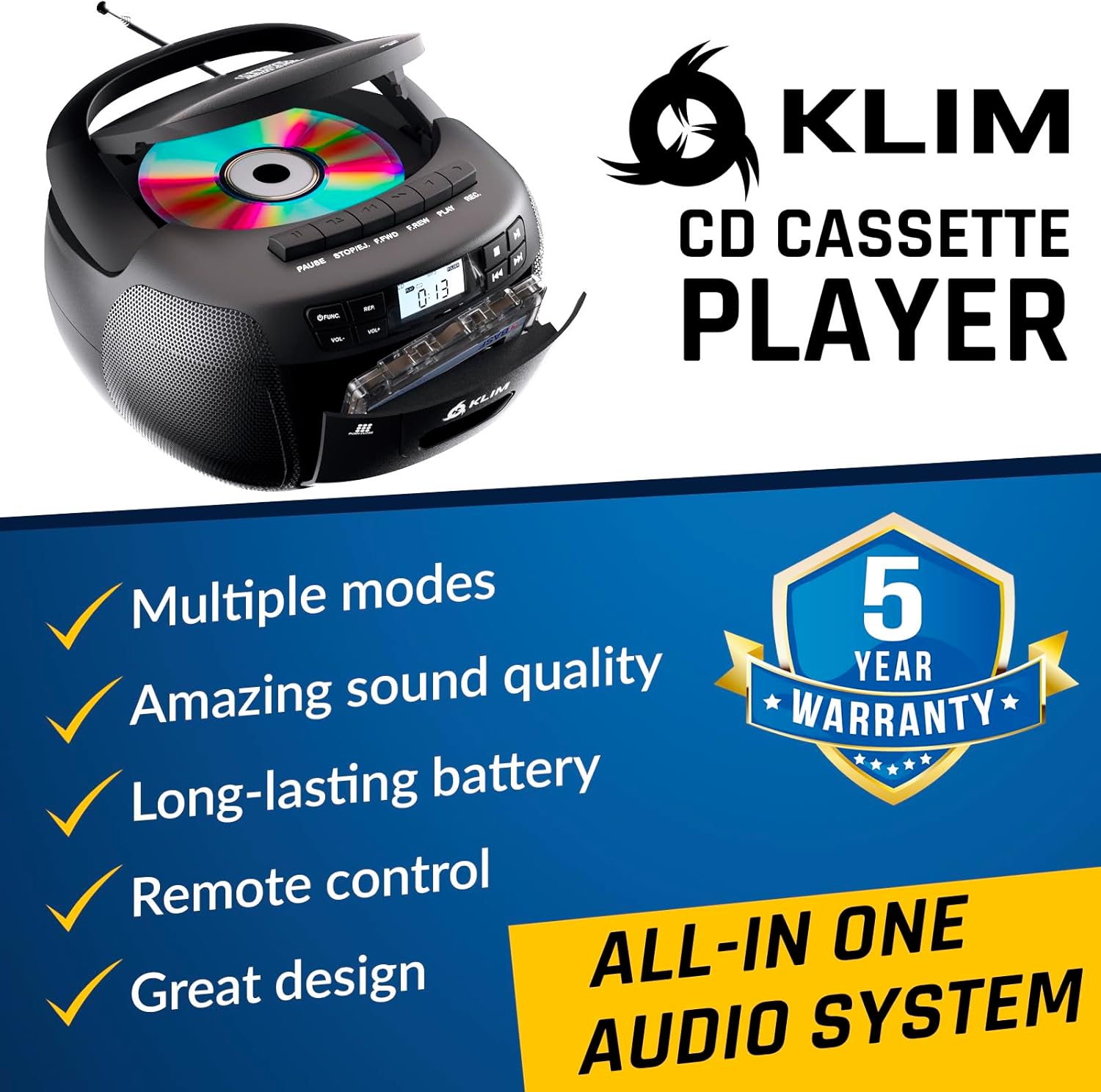
図4.1: 前面 view of the KLIM KLCD-0582 CD Cassette Boombox, showing the CD lid, cassette deck, and control buttons.
フロントパネルのコントロール:
- 電源ボタン: ユニットの電源をオンまたはオフにします。
- 機能/モードボタン: Switches between CD, Cassette, Radio, Bluetooth, USB, and AUX modes.
- Volume Control (VOL+/-): 再生音量を調整します。
- Play/Pause Button (CD/USB): CD/USB の再生を開始または一時停止します。
- Stop Button (CD/USB/Cassette): 再生を停止します。
- スキップ/検索ボタン (<< / >>): Skips tracks or searches within a track (CD/USB). Tunes radio stations.
- Repeat Button (CD/USB): 現在のトラックまたはすべてのトラックを繰り返します。
- Program Button (CD/USB): Programs track order for CD/USB playback.
- Record Button (Cassette): Initiates recording to cassette tape.
- Eject Button (Cassette): Opens the cassette deck.
- LCDディスプレイ: 現在のモード、トラック番号、無線周波数などを表示します。

図4.2:詳細 view of the LCD display and speaker area, highlighting the digital interface.
Side/Rear Panel Connections:
- AC電源入力: AC電源コードを接続します。
- バッテリーコンパートメント: Holds 6 C-size batteries for portable use.
- USBポート: オーディオ再生用 file■USBドライブから。
- AUX入力(3.5mm): 外部オーディオデバイスを接続します。
- ヘッドホンジャック(3.5mm): プライベートリスニング用。
- 伸縮アンテナ: AM/FMラジオ受信用。

Figure 4.3: Product label on the bottom of the unit, indicating model number and electrical ratings.
5. セットアップ
5.1 ユニットの電源供給
ブームボックスは、AC 電源または電池で駆動できます。
AC電源(屋内使用):
- ユニットの電源がオフになっていることを確認してください。
- Connect the supplied AC power cord to the AC power input on the rear of the boombox.
- Plug the other end of the AC power cord into a standard wall outlet (110-120V, 60Hz).
DC Power (Battery Operation - Portable Use):
- ユニットの電源がオフになっており、AC 電源から切断されていることを確認します。
- 本体下部の電池ケースカバーを開きます。
- Insert 6 C-size (UM-2) batteries, ensuring correct polarity (+/-) as indicated inside the compartment.
- 電池カバーをしっかりと閉じてください。
注記: 長期間使用しない場合は、液漏れや損傷を防ぐため、電池を取り外してください。
5.2 リモコン電池の取り付け
- リモコンの背面にある電池ボックスを開きます。
- Insert 2 AAA alkaline batteries, observing the correct polarity.
- 電池ボックスのカバーを閉じます。

Figure 5.1: The boombox shown with its remote control, which requires AAA batteries.
5.3 アンテナのセットアップ
FMラジオを最適に受信するには、伸縮アンテナを完全に伸ばしてください。AMラジオを受信するには、本体を回転させ、最適な信号レベルに調整してください。
6. 操作
6.1 基本的な制御
- 電源オン/オフ: を押す 力 ボタン。
- モードの選択: を押す 関数 or モード button repeatedly to cycle through CD, Cassette, Radio (AM/FM), Bluetooth, USB, and AUX modes.
- 音量を調整: 使用 巻+ そして vol- ボタン。
6.2 CD再生
- を押す 関数 ボタンをクリックしてCDモードを選択します。
- CDコンパートメントの蓋を開けます。
- Place a CD (audio CD or MP3/WMA CD) with the label side facing up.
- Close the CD compartment lid. The unit will read the disc and begin playback automatically or display the total number of tracks.
- プレス 再生/一時停止 再生を開始または一時停止します。
- プレス 停止 再生を停止します。
- 使用 スキップ (<< / >>) buttons to skip tracks. Hold to fast forward/rewind within a track.
- プログラム再生: 停止モードで、を押します プログラム。 使用 スキップ to select desired tracks, then press プログラム again to confirm each track. Press 遊ぶ プログラム再生を開始します。
- 再生を繰り返す: プレス 繰り返す once for single track repeat, twice for all tracks repeat.
6.3 カセットの再生と録音
- を押す 関数 ボタンを押してTAPEモードを選択します。
- を押す 排出 カセットデッキを開くボタン。
- Insert a cassette tape and close the deck.
- プレス 遊ぶ 再生を開始します。
- 使用 早送り(FFWD) or 巻き戻し(REW) テープをナビゲートするためのボタン。
- プレス 停止 再生を停止します。
カセットへの録音:
- Insert a blank, recordable cassette tape.
- Select the desired source (CD, Radio, AUX, Bluetooth, USB).
- Start playback on the source (e.g., play a CD track, tune to a radio station).
- を押す 記録 ラジカセのボタン。 遊ぶ ボタンも作動します。録音が始まります。
- プレス 停止 録音を終了します。
重要: Ensure the cassette tape has its record-protection tabs intact for recording.
6.4 AM/FMラジオ
- を押す 関数 button to select RADIO mode.
- Extend the telescopic antenna for FM reception. For AM, rotate the unit.
- 使用 チューニング ノブまたは スキップ (<< / >>) buttons to tune to your desired station. The frequency will be displayed on the LCD.
6.5 Bluetooth接続
- を押す 関数 button to select BLUETOOTH mode. The LCD will display "BT" and the unit will enter pairing mode, indicated by a flashing Bluetooth icon.
- Bluetooth 対応デバイス (スマートフォン、タブレットなど) で Bluetooth を有効にし、利用可能なデバイスを検索します。
- Select "KLIM Boombox" from the list of devices.
- Once paired, the Bluetooth icon on the boombox's LCD will stop flashing. You can now play audio from your device through the boombox.
- Control playback (play/pause, skip tracks) either from your connected device or using the boombox's controls.
6.6 USB再生
- USB フラッシュドライブを USB ポートに挿入します。
- を押す 関数 ボタンを押してUSBモードを選択します。本機は自動的に対応オーディオを検出し、再生を開始します。 file(MP3/WMA)。
- 使用 再生/一時停止, 停止、 そして スキップ (<< / >>) buttons to control playback, similar to CD mode.
- プログラム再生: 停止モードで、を押します プログラム。 使用 スキップ to select desired tracks, then press プログラム again to confirm each track. Press 遊ぶ プログラム再生を開始します。
6.7 AUX入力
- Connect an external audio device (e.g., MP3 player, smartphone) to the AUX input jack using a 3.5mm audio cable (not included).
- を押す 関数 button to select AUX mode. The LCD will display "AUX".
- 外部デバイスで再生を開始します。音声はラジカセのスピーカーから出力されます。
- Volume can be adjusted on both the boombox and the external device. Playback controls are managed on the external device.
6.8 リモコンの使用
The included remote control allows convenient operation from a distance of up to 20 feet. Ensure line of sight to the boombox's front panel.
- 電源(赤いボタン): ユニットのオン/オフを切り替えます。
- ミュート: オーディオをミュート/ミュート解除します。
- VOL +/-: 音量を調整します。
- FUNC: Cycles through modes (CD, TAPE, FM, AM, BT, USB, AUX).
- REP: Repeat function for CD/USB.
- プログラム: Program function for CD/USB.
- PLAY/PAUSE, STOP, FFWD, REW: Playback controls for CD/USB/Cassette.
- Number Buttons (0-9, -10, +10): Direct track selection for CD/USB.
7. メンテナンス
7.1 ユニットのクリーニング
- 清掃する前に必ずユニットを電源から抜いてください。
- 外側の表面を清掃するには、柔らかく乾いた布を使用してください。
- 仕上げを傷める恐れがあるため、研磨剤入りの洗剤、ワックス、溶剤は使用しないでください。
- CD レンズには専用の CD レンズクリーナー ディスクを使用してください。
- カセットデッキの場合は、定期的に綿棒でテープヘッドとピンチローラーを軽く拭いてください。ampイソプロピルアルコールで消毒しました。
7.2 ストレージ
When not in use for extended periods, store the unit in a cool, dry place away from direct sunlight and extreme temperatures. Remove batteries from both the main unit and the remote control to prevent leakage.
8。 トラブルシューティング
If you encounter issues with your boombox, please refer to the following common problems and solutions before contacting support.
| 問題 | 考えられる原因 | 解決 |
|---|---|---|
| 電源なし | AC コードが接続されていません。電池が消耗しているか、正しく挿入されていません。 | AC コードの接続を確認してください。電池を交換するか、極性が正しいことを確認してください。 |
| 音が出ない | 音量が低すぎます。ミュート機能が有効です。間違ったモードが選択されています。ヘッドフォンが接続されています。 | Increase volume; Press MUTE on remote; Select correct mode; Disconnect headphones. |
| CDが再生されない/「ディスクなし」エラー | CD が正しく挿入されていない、CD が汚れているか傷がついている、CD コンパートメントが閉じられていない、ユニットのモードが間違っている。 | Insert CD label side up; Clean or replace CD; Close CD lid securely; Select CD mode. |
| カセットテープが再生/録音されない | Tape inserted incorrectly; Tape damaged; Record-protection tab missing (for recording); Unit in wrong mode. | Insert tape correctly; Use a new tape; Cover record-protection tab with tape; Select TAPE mode. |
| ラジオの受信状態が悪い | アンテナが伸びていません。ユニットの位置です。 | FM アンテナを完全に伸ばし、ユニットを回転させて AM 受信状態を改善します。 |
| Bluetooth ペアリングの失敗 | ブームボックスがペアリングモードではありません。デバイスの Bluetooth がオフです。デバイスが遠すぎます。 | Ensure boombox is in BT mode and flashing; Enable Bluetooth on device; Move device closer (within 30 ft). |
| リモコンが動作しない | 電池が消耗しているか正しく挿入されていない。リモコンと本体の間に障害物がある。 | Replace batteries; Ensure clear line of sight to the unit's front panel. |
9. 仕様
| 特徴 | 詳細 |
|---|---|
| モデル番号 | KLCD-0582 |
| ブランド | クリム |
| 接続技術 | 補助、Bluetooth 5.1、USB |
| 色 | 黒 |
| 商品の寸法 (長さ x 幅 x 高さ) | 8.5 x 8.39 x 4.92インチ |
| アイテム重量 | 1.5キログラム |
| 電源 | Corded Electric (AC 110-120V/60Hz), 6 x C-size batteries (DC 9V) |
| 対応デバイス | MP3 Player, Bluetooth-enabled devices |
| サポートされている標準 | CD、MP3、WMA |
| サポートされているオーディオ形式 | CD-DA、MP3、WMA |
| スピーカー | 3W Dual Speakers |
| ラジオバンド | FM/AM |
10. 保証とサポート
10.1 保証情報
The KLIM KLCD-0582 CD Cassette Boombox comes with a 5年間保証. This warranty covers manufacturing defects and ensures the product meets its specified performance. Please retain your proof of purchase for warranty claims.
10.2 カスタマーサポート
For any questions, technical assistance, or warranty claims, please contact KLIM customer support. You can typically find contact information on the manufacturer's website or through the retailer where you purchased the product. KLIM offers 24/7 customer support to assist you.
For more information, visit the official KLIM webサイトをご覧いただくか、製品パッケージに記載されている連絡先を参照してください。