
1. はじめに
The SUPERONE Bluetooth 5.3 Audio Adapter is a versatile 2-in-1 device functioning as both a transmitter (TX) and a receiver (RX). It enables wireless audio connectivity for a wide range of devices, from non-Bluetooth TVs and airplane entertainment systems to older speakers and car stereos. Featuring Bluetooth 5.3 technology, it ensures stable, low-latency audio transmission and reception, supporting universal compatibility with various Bluetooth versions.
This adapter includes an intuitive HD display for real-time battery and connection status, simplifying user interaction. It also supports dual pairing, allowing two Bluetooth headphones or AirPods to connect simultaneously for shared listening experiences.
2.製品オーバーview
2.1 主な特徴
- 2-in-1 機能: Bluetooth 送信機 (TX) と受信機 (RX) の両方として動作します。
- ブルートゥース 5.3 テクノロジー: Provides stable, low-latency, and high-quality audio. Backward compatible with Bluetooth 5.2/5.0/4.2 and earlier.
- HD ディスプレイ: Shows real-time battery charge and connection status.
- デュアルペアリング: Connects to two Bluetooth headphones or AirPods simultaneously in TX mode.
- 長いバッテリー寿命: Up to 20 hours in Transmitter mode, over 17 hours in Receiver mode.
- 急速充電: USB-C経由で約2時間で完全に充電されます。
- ユニバーサル互換性: 3.5mm Aux audio jack for wide device support.
2.2 パッケージ内容
すべての項目が揃っていることを確認してください:
- SUPERONE Bluetooth 5.3 Audio Adapter
- USB-C充電ケーブル
- ユーザーマニュアル(このドキュメント)

Image: The SUPERONE Bluetooth 5.3 Audio Adapter, shown with its integrated 3.5mm audio jack and USB-C charging port.
3. 安全情報
- バッテリーの取り扱い: Keep the battery out of reach of children. Do not expose the device to excessive heat or humidity. Dispose of the battery and device in accordance with local regulations.
- 干渉警告: このデバイスは他の無線デバイスと干渉する可能性があります。干渉を最小限に抑えるには、指示に従ってください。
- 一般的なケア: デバイスは丁寧に取り扱ってください。落としたり、強い衝撃を与えたりしないでください。
4. セットアップ
4.1 送信機(TX)モードの設定
Use TX mode to send audio from non-Bluetooth devices (e.g., airplane entertainment, TV, computer) to Bluetooth headphones or speakers.
- Slide the TX/RX switch on the adapter to the TX 位置。
- Press and hold the central button (play/pause/pairing) on the adapter for a few seconds until the display turns on and the headphone icons blink, indicating pairing mode.
- Put your Bluetooth headphones or AirPods into their pairing mode. The adapter will automatically search for and connect to nearby Bluetooth devices. The headphone icon will stop blinking when connected.
- Insert the adapter's 3.5mm audio jack into the audio output port of your source device (e.g., airplane seat audio jack, TV headphone jack).

Image: Visual guide for setting up the adapter in Transmitter (TX) mode, demonstrating connection to an airplane audio jack and AirPods.
4.2 受信機(RX)モードの設定
Use RX mode to receive audio from Bluetooth-enabled devices (e.g., smartphone, tablet) and play it through non-Bluetooth audio systems (e.g., car stereo, home speakers).
- Slide the TX/RX switch on the adapter to the RX 位置。
- Press and hold the central button on the adapter for a few seconds until the display turns on and the headphone icons blink, indicating pairing mode.
- On your Bluetooth-enabled device (e.g., smartphone), go to Bluetooth settings and select the SUPERONE adapter from the list of available devices to pair. The headphone icon will stop blinking when connected.
- Insert the adapter's 3.5mm audio jack into the AUX-IN port of your audio system (e.g., car stereo, home speaker).

Image: Visual guide for setting up the adapter in Receiver (RX) mode, demonstrating connection to a smartphone and a car's AUX-IN port.
5. 操作手順
5.1 電源オン/オフ
- 電源を入れるには: Press and hold the central button (play/pause/pairing) for approximately 2 seconds until the display illuminates.
- 電源を切るには: Press and hold the central button for approximately 3-5 seconds until the display turns off.
5.2 Pairing Additional Devices (Dual Pairing in TX Mode)
In TX mode, the adapter can connect to two Bluetooth headphones simultaneously.
- 最初のヘッドフォンがすでに接続されていることを確認します。
- Press the central button briefly. A second headphone icon on the display will begin blinking.
- Put the second pair of Bluetooth headphones into their pairing mode. The adapter will connect to them. The second headphone icon will stop blinking once connected.

Image: Illustration of dual pairing, showing two individuals listening to audio from a laptop via the adapter and two separate Bluetooth headphones.
5.3 モード切り替え
To switch between Transmitter (TX) and Receiver (RX) modes, use the physical TX/RX switch located on the side of the adapter.
5.4 表示情報
The HD display provides the following information:
- バッテリーパーセンtage: Indicates the current charge level.
- 接続ステータス: Headphone icons (1 and 2) indicate connected devices. Blinking icons signify pairing mode.
- 充電ステータス: A charging icon appears when the device is connected to power.
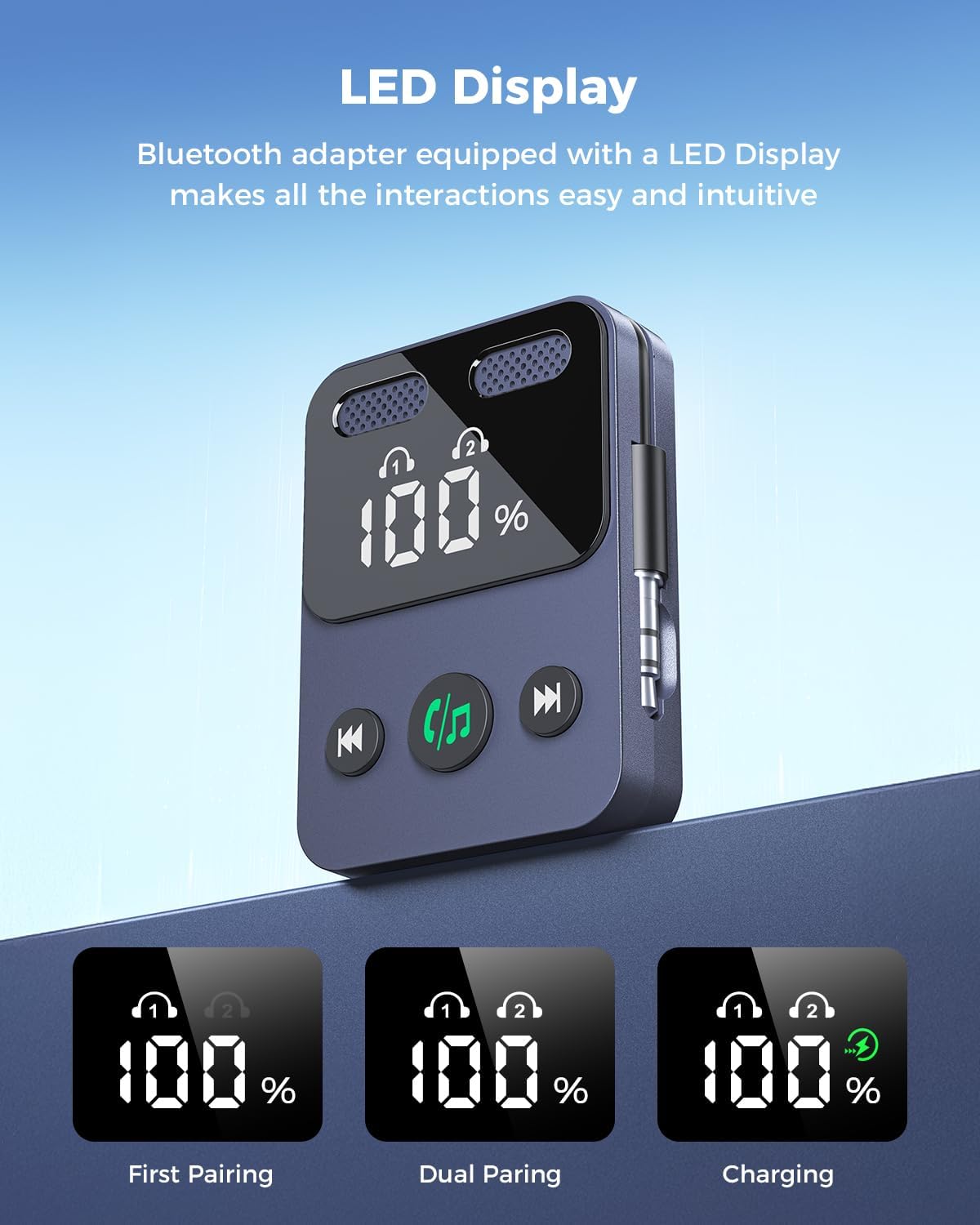
Image: The adapter's LED display, illustrating battery percentage and connection indicators for single and dual pairing, as well as charging status.
5.5バッテリーと充電
The adapter features a built-in rechargeable battery.
- バッテリー寿命: Up to 20 hours in TX mode, over 17 hours in RX mode.
- 充電: Connect the included USB-C cable to the adapter and a compatible USB power source (e.g., phone charger, computer USB port). A full charge takes approximately 2 hours.
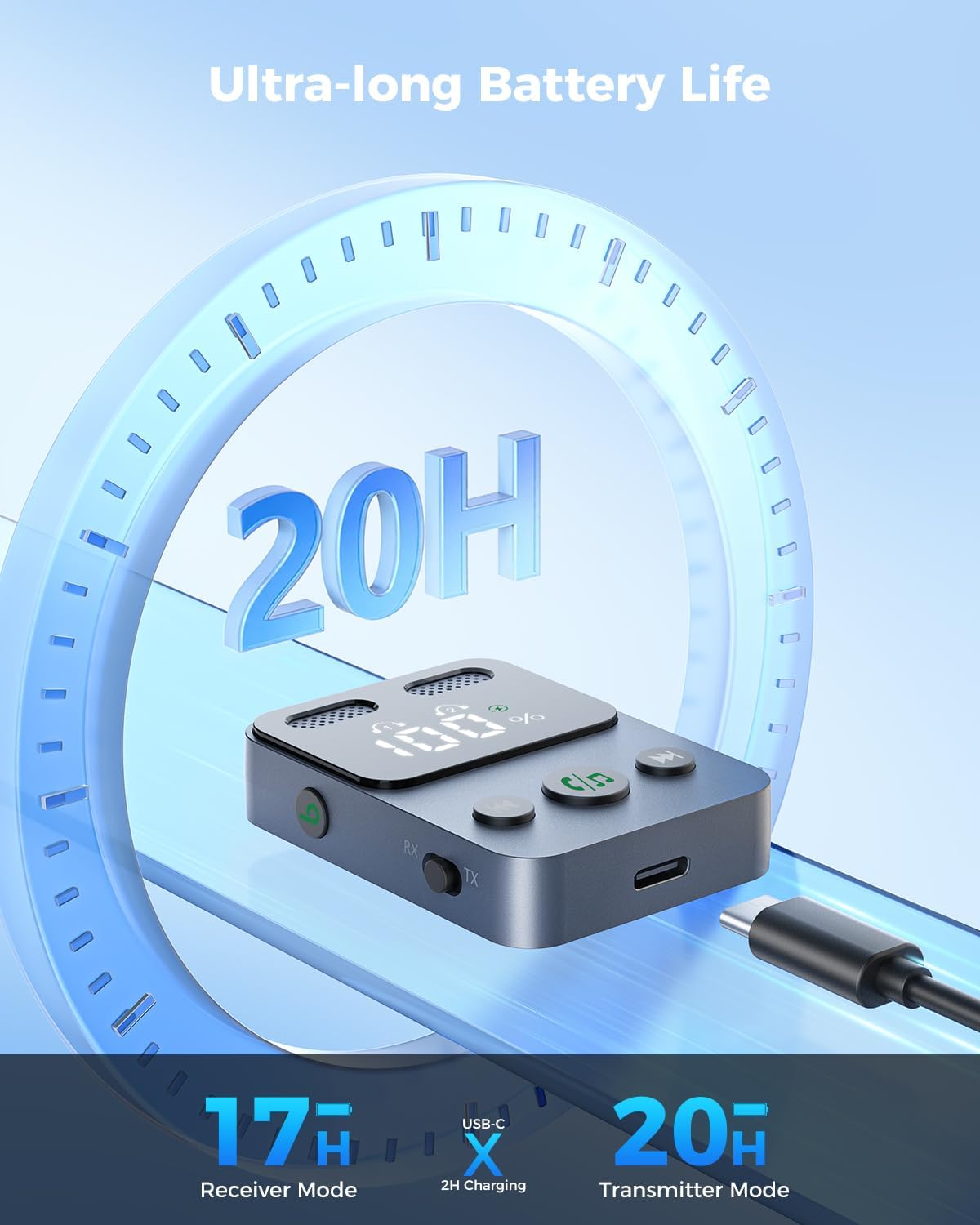
Image: The adapter connected to a USB-C charging cable, highlighting its long battery life and quick charging capability.
6. メンテナンス
- クリーニング: デバイスの清掃には、柔らかく乾いた布をご使用ください。刺激の強い化学薬品や研磨剤の使用は避けてください。
- ストレージ: アダプタは、直射日光や極端な温度を避け、涼しく乾燥した場所に保管してください。
- 取り扱い: The device is lightweight; handle it with care to prevent damage from drops or impacts.
7。 トラブルシューティング
| 問題 | 考えられる原因 | 解決 |
|---|---|---|
| デバイスの電源が入りません。 | バッテリー残量が少なくなりました。 | 付属の USB-C ケーブルを使用してデバイスを充電します。 |
| ヘッドフォン/スピーカーとペアリングできません。 | Incorrect mode (TX/RX), device not in pairing mode, or out of range. | Ensure the adapter is in the correct TX or RX mode. Press the central button to enter pairing mode (blinking headphone icons). Move devices closer together. Try restarting both the adapter and the Bluetooth device. |
| 音声が出ない、または音質が悪い。 | ケーブル接続が正しくない、音量が低い、または干渉がある。 | Ensure the 3.5mm audio jack is fully inserted into the correct port. Check volume levels on both the adapter and connected devices. Reduce distance between devices and avoid obstacles. |
| バッテリー寿命が予想より短いです。 | Usage patterns, environmental factors. | Battery life can vary based on volume levels and usage. Ensure the device is fully charged before use. |
8. 仕様
- モデル: B0F6TYHCSD
- ブランド: スーパーワン
- Bluetoothバージョン: 5.3
- 接続性: 3.5mm AUX/2RCA (via adapter, if applicable)
- 動作モード: 送信機(TX)と受信機(RX)
- 特別な機能: HD Display, Low Latency, Simple Setup, Quick Pairing, Volume Control, Built-in Rechargeable Battery, Dual Pairing
- TX Mode Playtime: 最大20時間
- RX Mode Playtime: 17時間以上
- 充電時間: 約2時間(USB-C経由)
- 電源: コード式電気(充電用)
- 商品の重量: 1.76オンス
- パッケージ寸法: 3.82 x 2.72 x 0.67インチ
9. 保証とサポート
SUPERONE provides a hassle-free 18ヶ月保証 for the Bluetooth 5.3 Audio Adapter. Additionally, lifetime technical support is available.
For any questions, concerns, or technical assistance, please contact the SUPERONE customer service team. They provide 24/7 support to address any issues you may encounter.
連絡先: Please refer to the product packaging or the official SUPERONE web最新の連絡先情報については、サイトをご覧ください。