1. はじめに
This manual provides essential instructions for the safe and efficient operation, setup, and maintenance of your Generic Commercial Heavy Duty A4 Paper Cutter. Please read this manual thoroughly before using the product to ensure proper function and to prevent injury or damage.
2. 安全に関する注意事項
WARNING: This paper cutter contains extremely sharp blades. Always exercise extreme caution during operation and maintenance.
- Always keep hands and fingers clear of the cutting blade area.
- Ensure the safety lock is engaged when the cutter is not in use or during maintenance.
- Operate the paper cutter on a stable, flat surface to prevent tipping.
- 紙以外の材料を切らないでください。
- Keep children and unauthorized personnel away from the paper cutter.
- Wear appropriate safety gloves when handling the blade for cleaning or replacement.
- After each cut, always raise the handle to its lock position to secure the blade.

Figure 2.1: Safety Lock Design. This mechanism helps prevent accidental blade descent.

Figure 2.2: Safety Handle. Always ensure the handle is in the locked position when not cutting.
3.製品オーバーview
The Generic Commercial Heavy Duty A4 Paper Cutter is designed for precise and efficient cutting of paper stacks up to 45mm thick. Key components include:
- カッティングブレード: Made of hardened steel for durability and sharpness.
- カッティングハンドル: 操作が楽になるように長くしました。
- Paper Pressing Device: Rotary design with a rotating handle to secure paper.
- Grid Ruler: Integrated into the base for accurate measurements in millimeters.
- Movable Positioning Stopper: Adjustable guide for precise paper alignment.
- 安全ロック: Mechanism to secure the cutting handle when not in use.
- 滑り止めゴム足: Located at each corner of the base for stability.
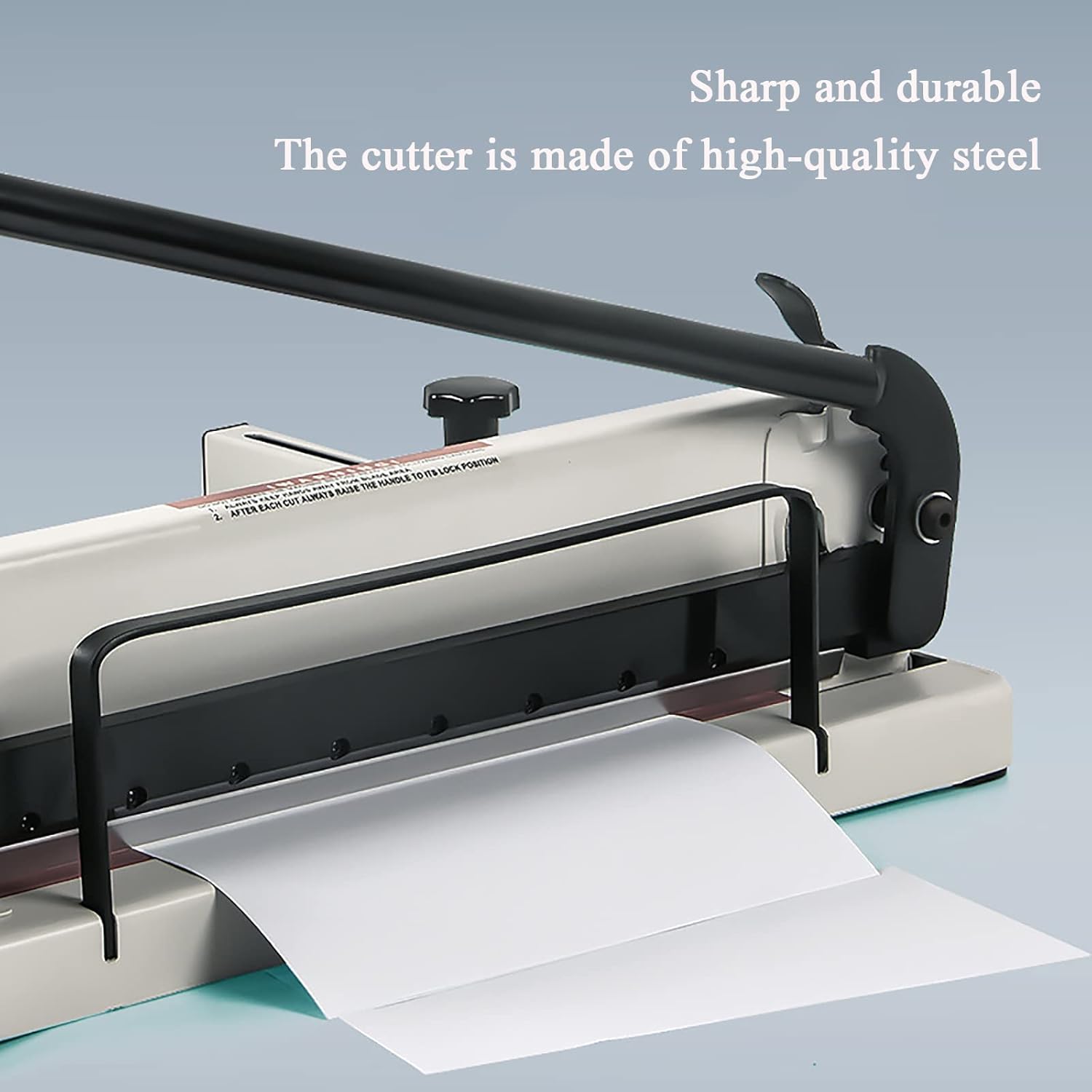
Figure 3.1: High-Quality Steel Blade. The blade is designed for sharp and durable performance.

Figure 3.2: Grid Ruler and Positioning Stopper. These features assist in precise paper alignment.

Figure 3.3: Detailed Grid Ruler. Provides measurements and common paper size guides for accurate cutting.
4. セットアップ
- 開梱: Carefully remove the paper cutter from its packaging. Retain packaging for future transport or storage.
- 配置: Place the paper cutter on a sturdy, level, and stable work surface. Ensure the non-skid rubber feet are firmly in contact with the surface to prevent movement during operation.
- クリアランス: Ensure adequate space around the cutter for safe operation and to accommodate paper sheets.
- 安全チェック: Before first use, verify that all components are securely fastened and that the safety lock mechanism functions correctly.
5. 操作手順
- 紙を準備する: Stack the paper neatly and align the edges. The maximum cutting capacity is 360 sheets of 80g paper or a thickness of 0.5-45mm. Do not exceed this capacity.
- Unlock Handle: Release the safety lock on the cutting handle.
- ポジションペーパー: Place the paper stack onto the cutting base, aligning it with the desired measurement on the grid ruler. Use the movable positioning stopper to hold the paper firmly against the back guide for consistent cuts.
- セキュアペーパー: Rotate the handle on the right side of the paper cutter to lower and tighten the paper pressing device. This secures the paper stack, preventing shifting during the cut.
- カットを実行: Firmly grasp the lengthened cutting handle. With a smooth, continuous motion, pull the handle down to cut through the paper stack. Apply steady pressure.
- Release Paper: Once the cut is complete, lift the cutting handle back to its upright position and engage the safety lock. Then, loosen the paper pressing device by rotating its handle.
- 切り取った紙を取り除く: Carefully remove the cut paper from the base.
6. メンテナンス
- クリーニング: Regularly wipe down the cutter's surfaces with a dry, soft cloth. Remove any paper dust or debris from the cutting area.
- 刃のお手入れ: The blade is made of high-quality steel and designed for longevity. If the blade becomes dull, it may require professional sharpening or replacement. Always engage the safety lock and wear protective gloves when inspecting the blade.
- 潤滑: Periodically apply a small amount of light machine oil to moving parts, such as the handle pivot points and the paper pressing mechanism, to ensure smooth operation.
- ストレージ: When not in use, store the paper cutter in a clean, dry environment with the safety lock engaged.
7。 トラブルシューティング
- 不均一なカット: Ensure the paper stack is evenly aligned and securely clamped by the paper pressing device. Check that the movable positioning stopper is set correctly.
- 切断難易度: Verify that the paper thickness does not exceed the maximum capacity (45mm or 360 sheets of 80g paper). The blade may be dull and require sharpening or replacement.
- ハンドルの固着: Check for any obstructions in the handle mechanism. Apply lubrication to pivot points if necessary.
- Paper Slipping: Ensure the paper pressing device is tightened sufficiently to hold the paper stack firmly.
8. 仕様
| 製品タイプ | A4 Paper Cutter |
| 材料 | 鋼鉄 |
| Paper Thickness Capacity | 0.5-45mm (approx. 360 sheets of 80g paper) |
| 切断幅 | A4 |
| Paper Size (Base) | 400×310ミリ |
| 製品重量 | 18キロ |
| ASIN | B0F6SFG6R |
9. 保証とサポート
この製品には、 3ヶ月保証 ご購入日から製造上の欠陥が保証対象となります。保証請求の際は、購入証明書を保管してください。
For technical support, warranty inquiries, or replacement parts, please contact your retailer or the manufacturer's customer service department. Provide your product model number (A4 Paper Cutter) and ASIN (B0F6SFG6R) when contacting support.


