
1. はじめに
This manual provides essential instructions for the safe and effective use of your Hello Kitty Kuromi Wireless Bluetooth Earbuds. Please read this manual thoroughly before using the product and retain it for future reference.
2. パッケージ内容
パッケージにすべてのアイテムが揃っていることを確認します。
- Hello Kitty Kuromi Wireless Bluetooth Earbuds (2)
- Rotating Charging Case
- USBケーブル
- ユーザーマニュアル(このドキュメント)
3.製品オーバーview
3.1 コンポーネント
The Hello Kitty Kuromi Wireless Bluetooth Earbuds system consists of two earbuds and a rotating charging case. The charging case features a unique flip-face design, allowing you to change Kuromi's expression.
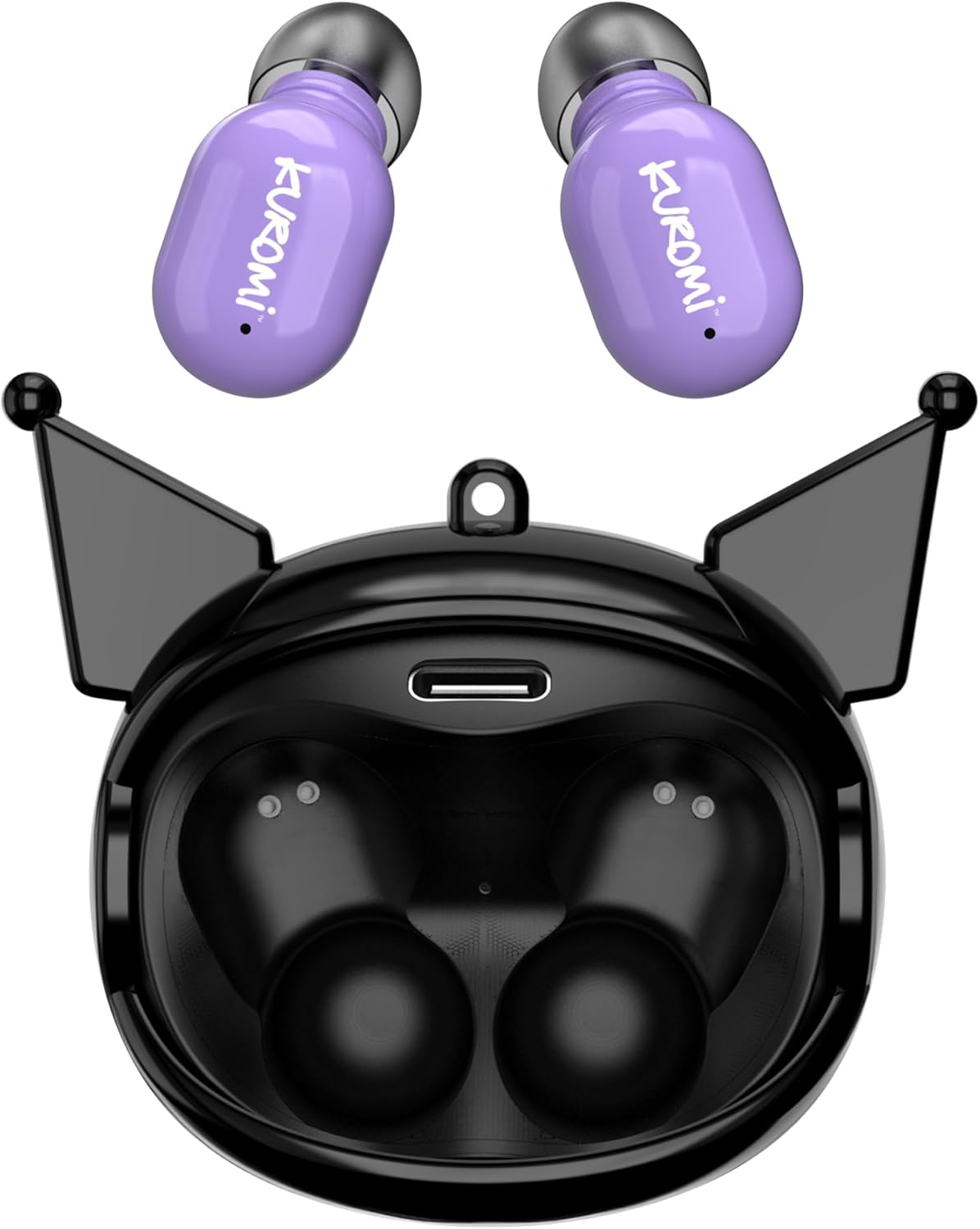
This image displays the two purple Kuromi wireless earbuds positioned above their open black charging case. The charging case features the Kuromi character design with pointed ears and an open compartment for the earbuds, revealing the charging contacts and a USB-C port.

The closed black charging case is shown, featuring Kuromi's default facial expression with a pink skull on her forehead and a neutral mouth.

The closed black charging case displays Kuromi's winking facial expression, with one eye closed and a small pink heart near her mouth.

The closed black charging case features Kuromi's heart-eyes facial expression, with two pink hearts replacing her eyes and an open-mouthed smile.
3.2 コントロール
The earbuds feature touch controls for various functions. Specific touch gestures may vary; refer to the 'Operating Instructions' section for details.
4. セットアップ
4.1 初期充電
初めて使用する前に、イヤホンと充電ケースを完全に充電してください。
- Connect the provided USB cable to the charging port on the case and to a compatible USB power source.
- 両方のイヤホンを充電ケースに入れます。しっかりと固定されていることを確認してください。
- The charging indicator lights (if present) will illuminate to show charging status. A full charge typically takes approximately 1 hour.
4.2Bluetoothペアリング
イヤホンをデバイスに接続するには:
- イヤホンが充電されていることを確認し、充電ケースから取り出してください。自動的にペアリングモードになります。
- デバイス(スマートフォン、タブレットなど)で Bluetooth を有効にします。
- 検索する 利用可能なBluetoothデバイス。
- Select "HKTWSRKU" or a similar name from the list of devices.
- 接続されると、イヤホンはペアリングが成功したことを示します (例: 音声プロンプトまたは LED の変化)。
- デバイスで Bluetooth が有効になっている場合、イヤホンはケースから取り出すと最後にペアリングしたデバイスに自動的に再接続されます。
5. 操作手順
5.1 電源オン/オフ
- 電源オン: イヤホンを充電ケースから取り出します。自動的に電源が入ります。
- 電源を切る: イヤホンを充電ケースに戻します。自動的に電源がオフになり、充電が開始されます。
5.2音楽の再生
Use the touch controls on the earbuds:
- 再生/一時停止: どちらかのイヤフォンをXNUMX回タップします。
- 次のトラック: 右のイヤフォンをダブルタップします。
- 前のトラック: 左のイヤフォンをダブルタップします。
- 音量コントロール: 音量は通常、接続されたデバイスを介して制御されます。
5.3 通話管理
内蔵マイクによりハンズフリー通話が可能:
- 通話に応答: 電話がかかってきたら、どちらかのイヤホンを 1 回タップします。
- 通話終了: 通話中にどちらかのイヤホンを 1 回タップします。
- 通話を拒否: Press and hold either earbud for approximately 2 seconds.
5.4 Flip-Face Feature
The charging case features a rotating mechanism to change Kuromi's facial expression. Gently rotate the front panel of the case to cycle through the available expressions.
6. 充電
6.1イヤフォンの充電
Place the earbuds into the charging case. They will automatically begin to charge from the case's internal battery.
6.2 ケースの充電
When the charging case battery is low, connect it to a power source using the provided USB cable. The case's indicator lights will show charging status. A full charge for the case typically takes about 1 hour.
7. メンテナンスとケア
- クリーニング: イヤホンと充電ケースのお手入れには、柔らかく乾いた布をご使用ください。刺激の強い化学薬品や研磨剤は使用しないでください。
- ストレージ: イヤホンを保護し、充電を保つため、使用しない時は充電ケースに保管してください。極端な温度を避けてください。
- 水への露出: このイヤホンは防水ではありません。水や過度の湿気にさらさないでください。
- インパクト: 落下や衝撃による損傷を防ぐため、イヤホンとケースを慎重に取り扱ってください。
8。 トラブルシューティング
問題が発生した場合は、次の表を参照してください。
| 問題 | 考えられる解決策 |
|---|---|
| イヤホンがペアリングされない | イヤホンが充電されていることを確認してください。デバイスのBluetoothをオフにしてからオンにしてください。Bluetooth設定でデバイスを削除し、再度ペアリングしてください。 |
| イヤフォンから音が出ない | デバイスの音量を確認してください。イヤホンが接続されていることを確認してください。別のオーディオを再生してみてください。 |
| イヤホンが充電されない | Ensure earbuds are correctly seated in the case. Check if the charging cable is securely connected to the case and power source. |
| マイクが機能しない | Ensure earbuds are properly connected. Check microphone permissions on your device. |
9. 仕様
Key technical details for the Hello Kitty Kuromi Wireless Bluetooth Earbuds:
| 特徴 | 詳細 |
|---|---|
| モデル名 | Wireless Earbuds (HKTWSRKU) |
| 接続技術 | ブルートゥース5.3 |
| バッテリー寿命(再生時間) | 1回の充電で最大4時間 |
| 充電時間 | 約1時間 |
| 制御方法 | 触る |
| 耳の位置 | 耳に装着 |
| 特集 | Rotating Charging Case with Flip-Face Feature |
| 含まれるコンポーネント | Rotating Charging Case, USB Cable, User Manual |
| メーカー | サザンテレコム |
| アイテム重量 | 3.52オンス |
10. 保証情報
For warranty details, please refer to the documentation included with your purchase or contact the retailer where the product was acquired. Warranty terms and conditions may vary by region and retailer.
11. サポート
If you require further assistance or have questions not covered in this manual, please contact the manufacturer or your retailer's customer support. Keep your purchase receipt and product model number (HKTWSRKU) available when seeking support.