1. はじめに
The TP-Link TL-MR110-Outdoor is a robust 4G LTE Wi-Fi router specifically designed for outdoor use. It provides reliable internet connectivity in various environments, from gardens to construction sites or remote areas. This manual provides essential information for the proper installation, configuration, and operation of your device.
主な機能は次のとおりです。
- IP65認証: 耐候性casing, protected against dust and water.
- 4G LTE Cat 4: Download speeds up to 150 Mbps for stable internet.
- 300 Mbps Wi-Fi (2.4 GHz): Fast wireless connection for up to 32 devices simultaneously.
- 広い温度範囲: Operates reliably from -30 ℃ to +60 ℃.
- 強化された保護: 6 kV lightning protection and 15 kV electrostatic discharge (ESD) protection.
- 柔軟な電源: Supports 12 V DC, passive PoE (48 V), and 802.3af PoE (44-57 V).
- 簡単な取り付け: Can be installed on a pole, wall, or window.
- テザーアプリ: Convenient management via smartphone (iOS/Android).
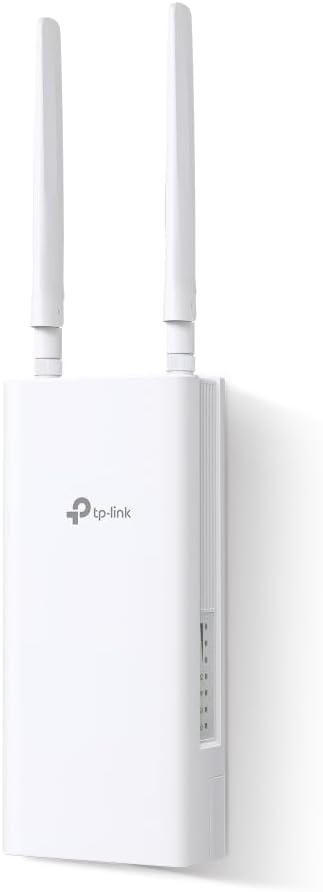
Image 1.1: TP-Link TL-MR110-Outdoor 4G LTE Router, front view アンテナ付き。
2. パッケージ内容
パッケージに次のアイテムが含まれていることを確認してください。
- 1 x TL-MR110-Outdoor Unit
- 1 x 10m RJ45 Ethernet Cable
- 1×PoEアダプタ
- 電源ケーブル x 1
- クイックインストールガイド x 1
- Mounting Kits (for Window/Pole/Wall)
3. フィジカルオーバーview
The TL-MR110-Outdoor features a durable, weather-resistant casing designed for outdoor deployment. It includes external antennas for optimal signal reception and transmission. The device typically has a SIM card slot, an Ethernet port (for PoE and data), and a power input port.

Image 3.1: TL-MR110-Outdoor router mounted outdoors, illustrating fast 4G Wi-Fi and stable connection.
4. セットアップ
4.1SIMカードのインストール
- デバイスの電源がオフになっていることを確認してください。
- デバイスの SIM カード スロット カバーを見つけます。
- Open the cover and insert your 4G SIM card into the slot until it clicks into place.
- Close the SIM card slot cover securely to maintain IP65 protection.
4.2取り付けオプション
The TL-MR110-Outdoor offers versatile mounting options:
- ポールマウント: Use the provided pole mounting kit to attach the device to a pole.
- 壁掛け: Use the provided wall mounting kit to secure the device to a wall.
- 窓への取り付け: Use the provided window mounting kit for installation on a window.
Choose a location that provides optimal 4G signal reception and Wi-Fi coverage.

Image 4.1: Versatile mounting options for the TL-MR110-Outdoor.
4.3 デバイスへの電源供給
The router supports flexible power options:
- PoE(パワーオーバーイーサネット): Connect the router to the PoE adapter using the Ethernet cable. The PoE adapter then connects to a power outlet. This is the recommended method for outdoor installations as it simplifies cabling.
- DC電源: Connect the provided power cable to the DC input port on the router and then to a power outlet.

Image 4.2: Flexible power options: PoE, DC, and solar compatibility.
4.4初期構成
The TL-MR110-Outdoor is designed for quick Plug & Play setup with a SIM card, often requiring no complex configuration. However, for advanced settings, you can use the Tether app or the web 管理インターフェース。
5. ルーターの操作
5.1 デバイスの接続
Once powered on and connected to the 4G network, the router will broadcast a Wi-Fi signal. You can connect devices via:
- Wi-Fi: 検索する the router's Wi-Fi network name (SSID) on your devices and enter the password (found on the product label).
- イーサネット: Connect devices directly to the router's Ethernet port using an RJ45 cable.
The router supports up to 32 simultaneous wireless connections.
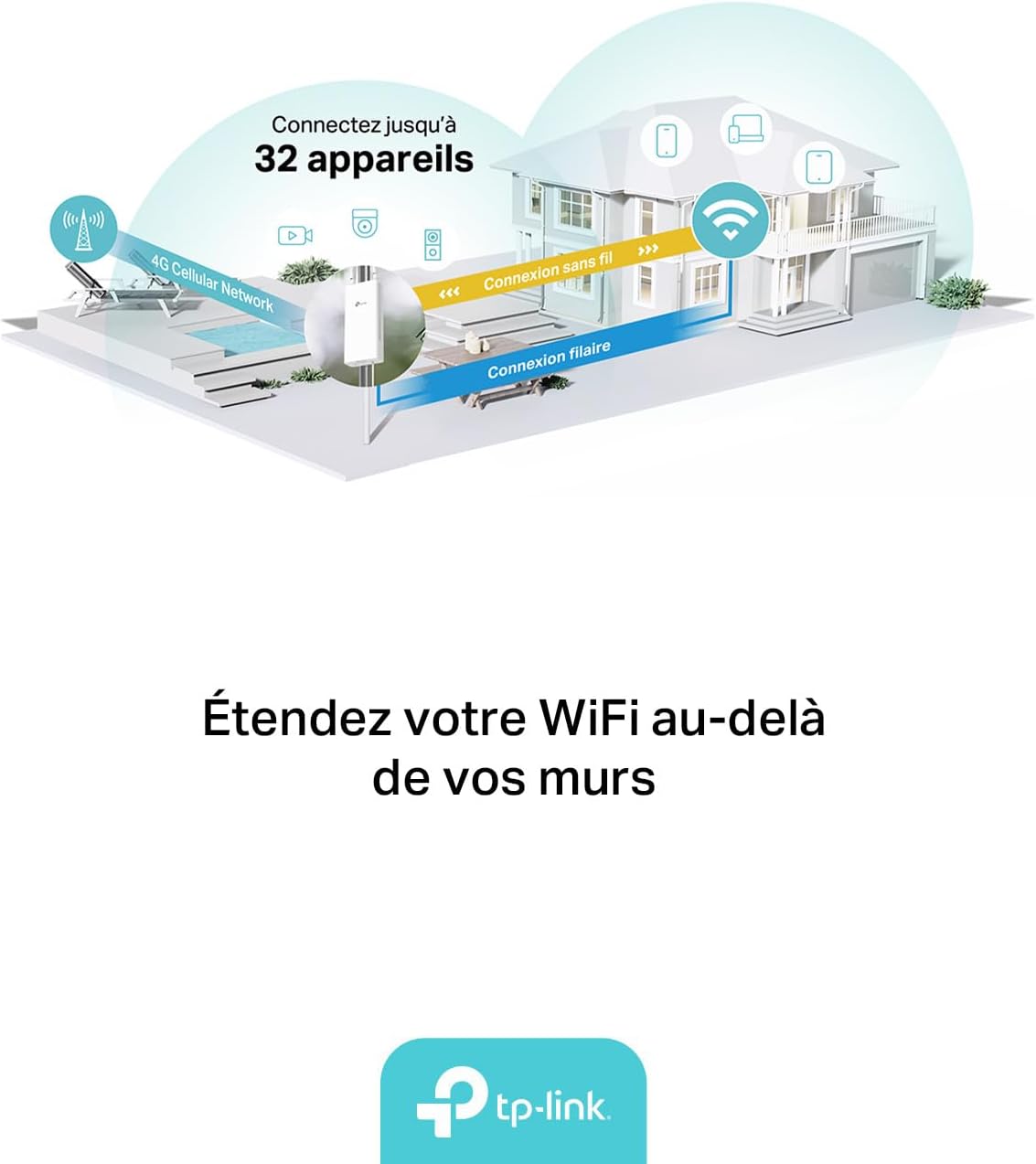
Image 5.1: Router distributing Wi-Fi and wired internet to multiple devices.
5.2 Managing the Router
You can manage your TL-MR110-Outdoor using the TP-Link Tether app or a web ブラウザ。
- テザーアプリ: Download the TP-Link Tether app from the App Store (iOS) or Google Play Store (Android). The app allows for easy setup, network management, parental controls, and more.
- Web 管理インターフェース: Connect a device to the router's Wi-Fi or Ethernet. Open a web ブラウザを開き、デフォルトのIPアドレス(通常は
192.168.0.1ortplinkwifi.net) to access the management page.

Image 5.2: TP-Link Tether app for smartphone management.
Tether アプリの詳細については、以下をご覧ください。 TP-Link テザー アプリ
6. メンテナンス
6.1 環境への配慮
The TL-MR110-Outdoor is designed for harsh outdoor conditions:
- IP65 評価: Ensures protection against dust ingress and low-pressure water jets from any direction.
- 温度範囲: Operates effectively between -30 ℃ and +60 ℃.
- 雷およびESD保護: Built-in 6 kV lightning protection and 15 kV ESD protection safeguard the device from electrical surges.

Image 6.1: Robust outdoor design features.
6.2 クリーニング
Periodically inspect the device for any dirt or debris accumulation. Clean the exterior with a soft, dry cloth. Do not use liquid cleaners or aerosols.
6.3ファームウェアアップデート
TP-Linkを定期的にチェックする website or the Tether app for available firmware updates to ensure optimal performance and security.
7。 トラブルシューティング
7.1 インターネット接続なし
- SIM カードが正しく挿入され、アクティブであることを確認します。
- Check the signal strength indicators on the device or via the Tether app.
- Verify that the router is powered on and all cables are securely connected.
- ルータと接続されているデバイスを再起動します。
- Confirm your SIM card has an active data plan.
7.2 Wi-Fiが表示されない、または接続できない
- Ensure the Wi-Fi function is enabled (check via Tether app or web インタフェース)。
- Wi-Fi ネットワーク名 (SSID) とパスワードを確認します。
- 信号強度を改善するには、ルーターに近づいてください。
- Reset the router to factory defaults if issues persist (refer to the Quick Installation Guide for instructions).
8. 仕様
| 特徴 | 詳細 |
|---|---|
| ブランド | TPリンク |
| モデル名 | TL-MR110-Outdoor |
| オペレーティング·システム | TP-Linkファームウェア |
| 接続技術 | Ethernet, Wi-Fi 2.4 GHz |
| 無線通信規格 | 802.11n |
| 周波数帯域クラス | シングルバンド |
| 4G LTE速度 | Up to 150 Mbps (Cat 4) |
| Wi-Fi速度 | 最大300 Mbps(2.4 GHz) |
| 対応デバイス | パソコン、ノートパソコン、スマートフォン、タブレット |
| 特集 | IP65Casing, PoE/DC Power, Operating Temperature -30 ℃ to +60 ℃, 6 kV Lightning Protection, 15 kV ESD Protection |
| 電源 | 12 V DC, Passive PoE (48 V), 802.3af PoE (44-57 V) |
| 推奨用途 | 屋外 |
| 含まれるコンポーネント | TL-MR110 Outdoor Unit, 10m RJ45 Ethernet Cable, PoE Adapter, Power Cable, Quick Installation Guide, Mounting Kits |

Image 8.1: Key features summary of the TL-MR110-Outdoor.
9. 保証とサポート
保証情報、テクニカルサポート、その他のリソースについては、TP-Linkの公式ウェブサイトをご覧ください。 website or contact their customer support. Details regarding warranty periods and service procedures are typically provided with your product documentation or on the manufacturer's webサイト。
メーカー: TPリンク
原産国: 中国