
導入
The KGUSS xDuoo TA20 Plus is a desktop balanced tube headphone amplifier designed to deliver high-fidelity audio. It features a hybrid "Tube + Transistors" structure, utilizing two 12AU7 tubes for signal amplification in the pre-stage and high-quality transistors for a Class A buffer in the post-stage. This design aims to combine the delicate and soft vocal characteristics of tubes with the dynamic power and speed of musical instruments.
の amplifier boasts comprehensive input and output interfaces, including two RCA and one XLR balanced input, along with 6.35mm unbalanced, 4.4mm balanced, and 4-pin balanced headphone outputs. Its fully balanced circuit design from input to output significantly enhances crosstalk, resolution, and signal-to-noise ratio (SNR), providing an unparalleled listening experience. The TA20 Plus is suitable for driving a wide range of headphones with impedances from 16Ω to 600Ω.

Image: The xDuoo TA20 Plus ampライフショーasing its design and highlighted features such as VU meter, balanced input/output, and tube rectification.
セットアップ手順
- 電源接続: 付属のAC電源ケーブルを amplifier's power input and then to a suitable wall outlet (AC 110V or 220V, depending on your region).
- オーディオソースの接続:
- のために RCA入力, connect your audio source (e.g., CD player, DAC) to the RCA input jacks on the rear panel.
- のために XLRバランス入力, connect your audio source to the XLR balanced input jack on the rear panel.
- ヘッドホン接続: Connect your headphones to one of the available output jacks on the front panel:
- のために 6.35mm unbalanced headphones, use the 6.35mm jack.
- のために 4.4mm balanced headphones, use the 4.4mm balanced jack.
- のために 4-pin XLR balanced headphones, use the 4-pin XLR balanced jack.
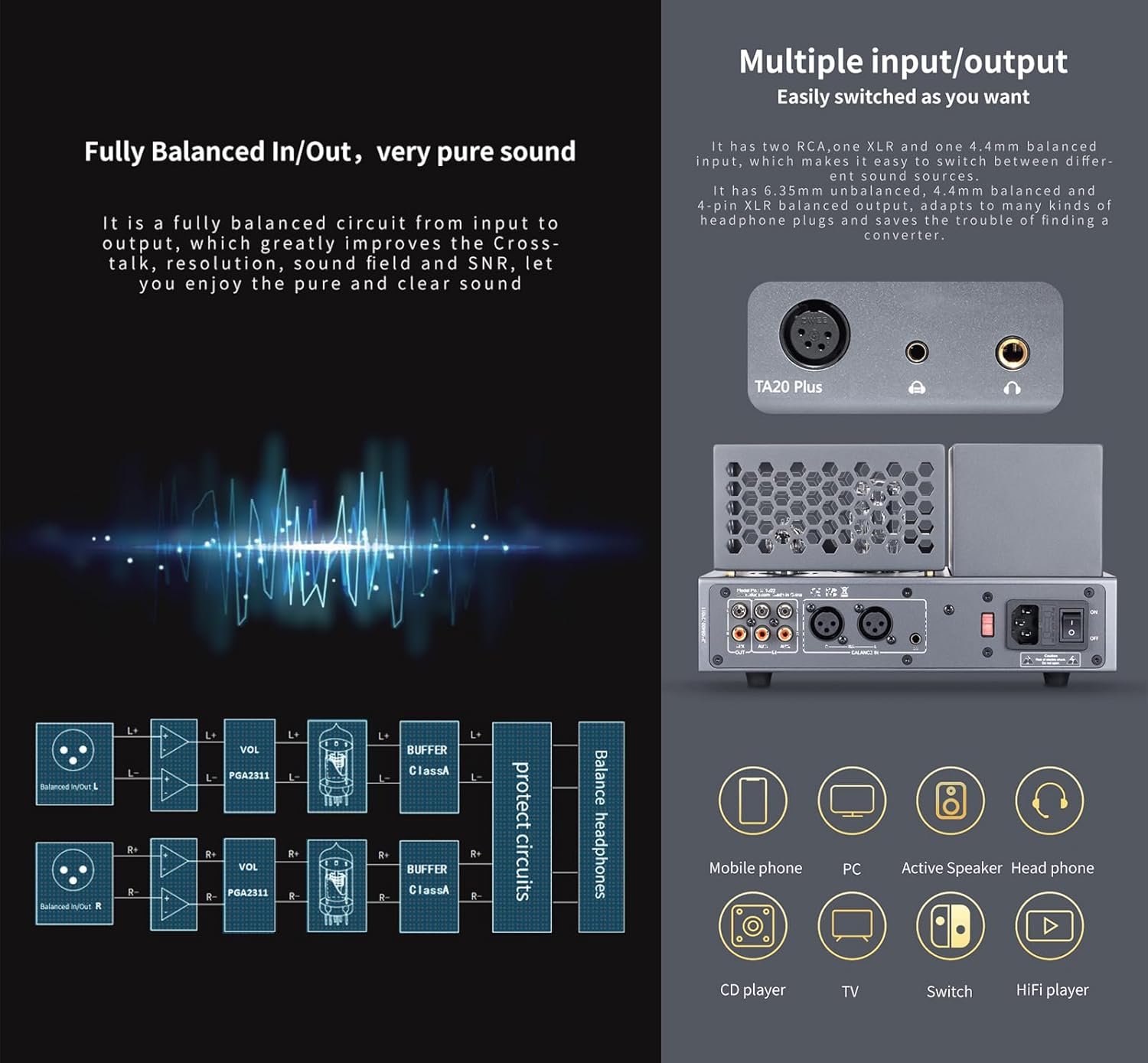
画像: 詳細 view の amplifier's front and rear panels, illustrating the various input and output options for audio sources and headphones.
操作手順
- 電源オン/オフ: 前面パネルにある電源ボタンを押して電源を入れます。 amplifier on or off. A built-in mute circuit prevents 'POP' noise during startup and ensures the tubes operate optimally.
- 音量調整: Use the volume knob on the front panel to adjust the output level. The amplifier incorporates digital volume adjustment chips to maintain balanced left and right channels, even at low volumes.
- VU メーター: Observe the retro mechanical VU meter on the front panel, which displays the output level in real-time. The pointer will move in rhythm with the music.
- チューブのウォームアップ: Allow a few moments after powering on for the tubes to warm up and stabilize for optimal sound performance.

画像: のクローズアップ amplifier's dynamic VU meter, indicating audio output levels.
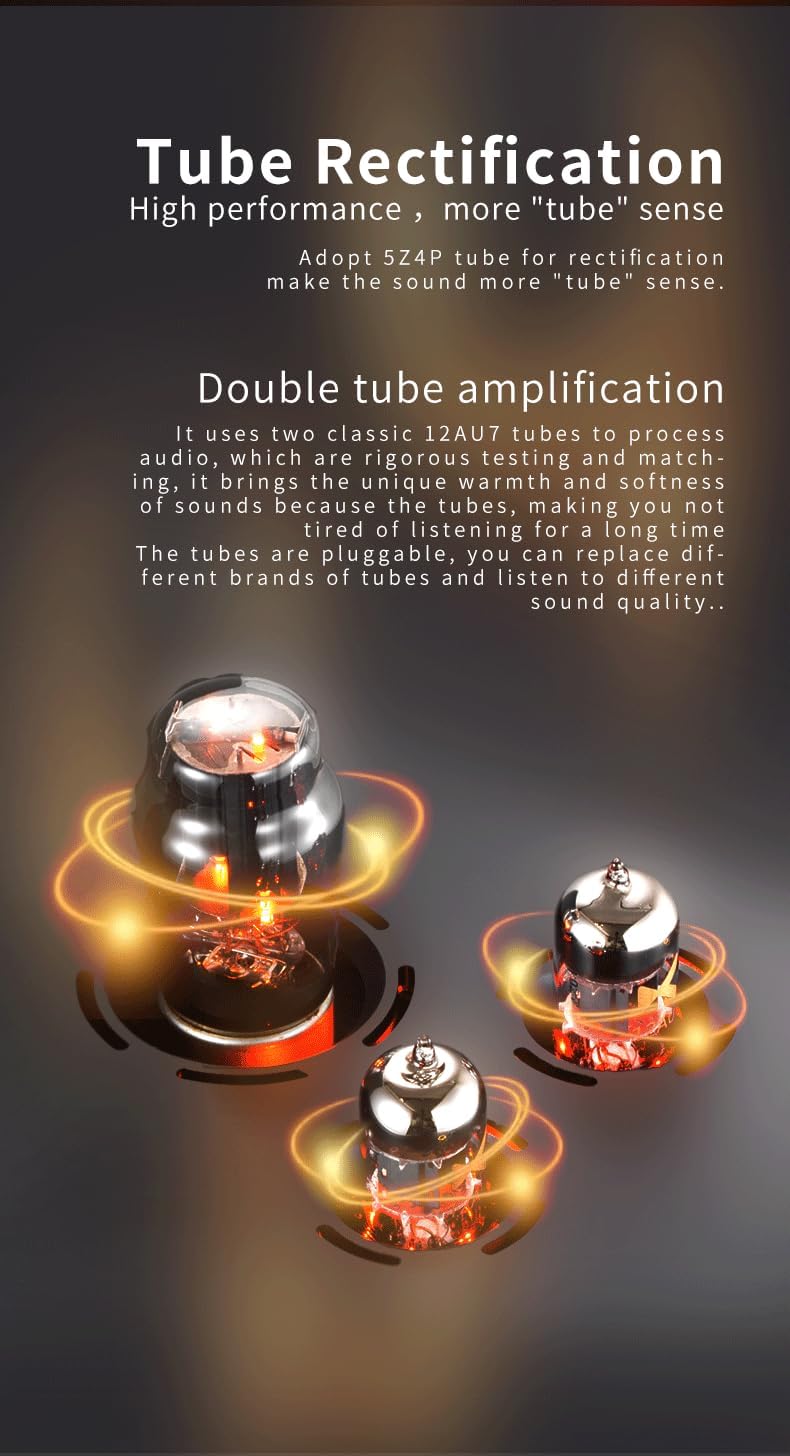
Image: The glowing 12AU7 amplification tubes and 5Z4P rectification tube, central to the amplifier's sound characteristics.
メンテナンス
- クリーニング: 定期的に拭き取ってください amplifier's exterior with a soft, dry cloth. Avoid using liquid cleaners or abrasive materials, as they may damage the finish.
- チューブの交換: 12AU7 amplification tubes are pluggable, allowing for replacement. If you notice a degradation in sound quality or tube failure, consult a qualified technician or refer to specific tube replacement guidelines. Ensure the amplifier is powered off and unplugged before attempting any tube replacement. Only use compatible and matched tubes.
- 換気: 確実に amplifier has adequate ventilation to prevent overheating. Do not block the ventilation grilles.
トラブルシューティング
- サウンド出力なし:
- 確認してください amp電源がオンになり、電源インジケータが点灯します。
- Verify all audio cables (input and headphone) are securely connected.
- Ensure the volume knob is not set to minimum.
- Confirm the audio source is active and playing.
- 歪んだ音:
- 両方の音量レベルを下げます ampライターとオーディオソース。
- Check if the headphone impedance is within the suitable range (16Ω~600Ω).
- オーディオ ケーブルに損傷や接続の緩みがないか検査します。
- Consider if the tubes might need replacement if distortion persists and is not related to volume or connections.
- 電力の問題:
- If the unit does not power on, check the AC power cable connection and the wall outlet.
- 正しい巻を確認してくださいtage (110V or 220V) is supplied to the unit.
仕様
| パラメータ | 価値 |
|---|---|
| 電源 | AC 110V (100-120V) / 220V (220-240V) |
| 得 | +18dB |
| 6.35mmヘッドフォン出力 | 2000mW(32Ω負荷) |
| 6.35mm Frequency Response | 10Hz~80kHz (±0.5dB) |
| 6.35mm Crosstalk | 74デシベル |
| 6.35mm SNR | 113デシベル |
| 6.35mm THD+N | 0.05% |
| 4.4mm/XLR Balanced Headphone Output Power | 2600mW(32Ω負荷) |
| 4.4mm/XLR Frequency Response | 10Hz~80kHz (±0.5dB) |
| 4.4mm/XLR Crosstalk | 95デシベル |
| 4.4mm/XLR SNR | 113デシベル |
| 4.4mm/XLR THD+N | 0.05% |
| 適切なヘッドホンインピーダンス | 16Ω〜600Ω |
| サイズ | 26 x 17.7 x 15.3 cm |
| 重さ | 4.3kg(9.48ポンド) |
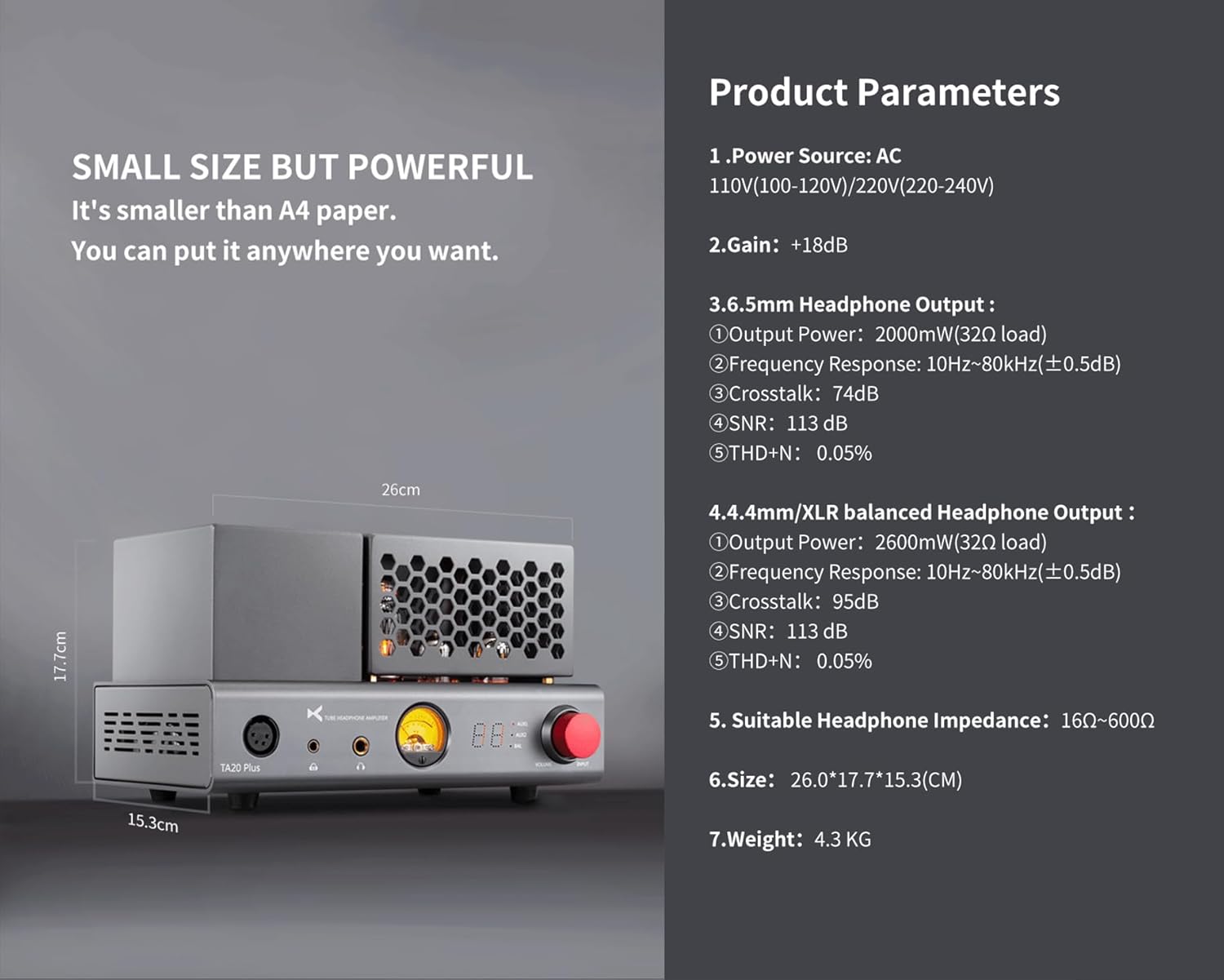
画像: 視覚的に表現した amplifier's dimensions and a summary of its key technical specifications.
保証とサポート
This product includes a Warranty Card. Please refer to the terms and conditions outlined on the card for details regarding warranty coverage and duration. Keep your purchase receipt as proof of purchase for any warranty claims.
For technical support, service, or further inquiries, please contact the manufacturer or your authorized dealer. Contact information can typically be found on the Warranty Card or the manufacturer's official webサイト。