
1. はじめに
Welcome to the user manual for your new Nubia Flip 5G smartphone. This guide provides essential information to help you set up, operate, and maintain your device. The Nubia Flip 5G combines a compact, foldable design with advanced features, including a dual AMOLED display, a versatile external screen, and AI-powered functionalities.
Key features of your Nubia Flip 5G include:
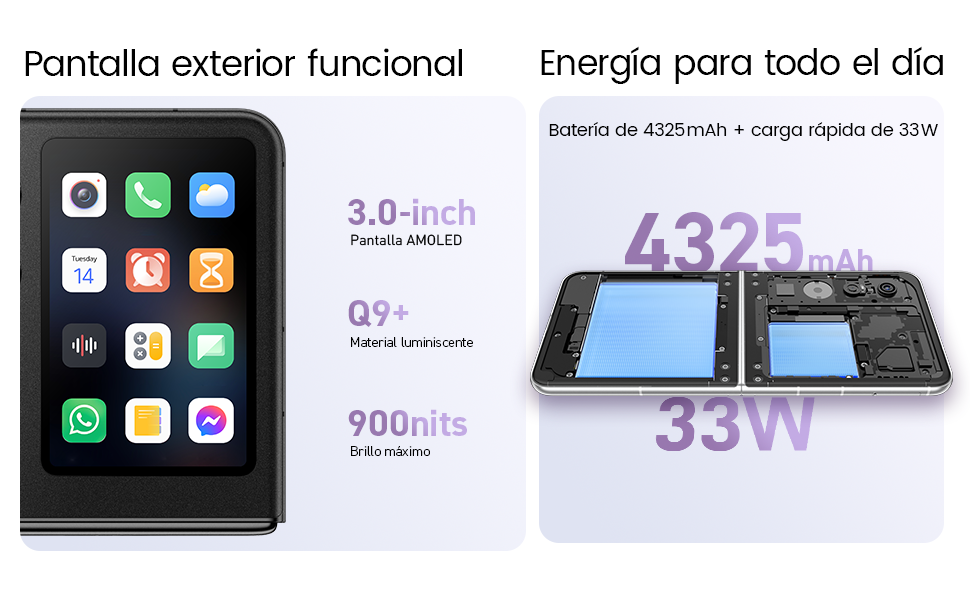
- Dual AMOLED Displays: Enjoy a fluid 120 Hz refresh rate on both the 6.9-inch internal display and the 3-inch external display.
- Fully Functional External Display: Access 100% of your applications directly from the external screen without unfolding the phone.
- 高度なカメラシステム: Capture high-quality photos with the 50 MP main camera, supported by AI features and 4K stabilized video recording. Utilize the external screen for high-resolution selfies.
- AIを活用した機能強化: Benefit from features like AI Magic Photos for editing and live translation for voice calls.
- 長持ちバッテリー: Equipped with a 4325 mAh battery and 33W fast charging, allowing 50% charge in under 20 minutes.
2. セットアップ
2.1. 開梱と初期検査
すべての部品をパッケージから慎重に取り出してください。以下の部品が揃っていることを確認してください。
- Nubia Flip 5Gスマートフォン
- USBケーブル
- 携帯ケース
- 保護フィルム
Inspect the device for any visible damage. If any components are missing or damaged, contact customer support.
2.2. SIMカードの挿入
- デバイスの電源をオフにします。
- 携帯電話の側面にある SIM カード トレイを見つけます。
- Use the SIM ejector tool (not included, typically found with your SIM card) to open the tray.
- Nano-SIMカードを、金色の接点を下にしてトレイに挿入してください。このデバイスはデュアルSIMをサポートしています。
- トレイを慎重に電話機に再度挿入します。
2.3. 電源投入と初期設定
- Nubia ロゴが表示されるまで電源ボタンを押し続けます。
- 画面上の指示に従って言語を選択し、Wi-Fi ネットワークに接続し、Google アカウントを設定します。
- 指紋ロック解除や顔認識などのセキュリティ機能の設定手順が案内されます。
3.デバイスの操作
3.1. Understanding the Dual Display

Your Nubia Flip 5G features two displays: a large 6.9-inch internal foldable AMOLED screen and a compact 3-inch external AMOLED screen. Both screens offer a smooth 120 Hz refresh rate for an enhanced visual experience.
- 内部ディスプレイ: Ideal for immersive content consumption, gaming, and detailed tasks.
- 外部ディスプレイ: Provides quick access to notifications, widgets, music controls, and even full applications without needing to unfold the phone. Swipe left or right to navigate through different functions.
3.2. カメラ機能

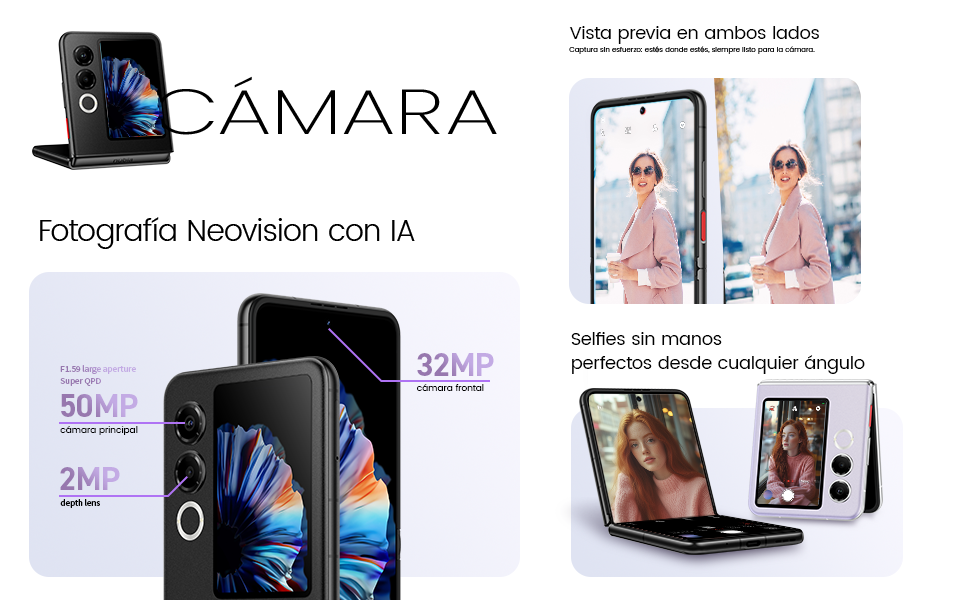
The Nubia Flip 5G is equipped with a powerful 50 MP main camera and a secondary portrait camera, enhanced with AI for superior image quality. The 32 MP front camera ensures clear video calls and selfies.
- High-Resolution Selfies: Use the external screen as a viewfinder to take selfies with the high-quality rear cameras.
- Hands-Free Photography: Partially fold the phone and place it on a flat surface to capture photos and videos without needing a tripod.
- 4K Stabilized Video: Record smooth, high-definition videos with advanced stabilization.
3.3. AI機能
The device integrates several AI functions to enhance user experience:
- AI Magic Photos: Utilize AI for intelligent photo editing and enhancement.
- Live Call Translation: Experience real-time translation during voice calls, breaking down language barriers.
3.4. ビデオ終了view
公式製品ビデオショーasing the Nubia Flip 5G's design, versatile external display, hands-free selfie capabilities, and long-lasting battery.
4. バッテリーと充電

The Nubia Flip 5G is equipped with a 4325 mAh battery, designed to provide extended usage. It supports 33W fast charging, allowing you to quickly replenish the battery. A 50% charge can be achieved in less than 20 minutes.
- Use the provided USB cable and a compatible 33W charger for optimal fast charging.
- Avoid using non-certified chargers or cables to prevent damage to the device.
5. メンテナンス
Proper care ensures the longevity and optimal performance of your Nubia Flip 5G.
- スクリーンのお手入れ: The foldable screen is delicate. Avoid pressing hard on the screen, especially near the crease. Keep sharp objects away from the display.
- クリーニング: 画面と本体の清掃には、柔らかく糸くずの出ない布をご使用ください。刺激の強い化学薬品や研磨剤は使用しないでください。
- 耐水性: While the device may have some level of splash resistance, it is not fully waterproof. Avoid submerging the phone in water or exposing it to excessive moisture.
- 温度: 推奨温度範囲内でデバイスを操作してください。極端な高温または低温は、バッテリーの寿命とパフォーマンスに影響を与える可能性があります。
- ソフトウェアアップデート: Regularly update your device's software to ensure you have the latest features, security patches, and performance improvements.
6。 トラブルシューティング
If you encounter issues with your Nubia Flip 5G, try the following common troubleshooting steps:
- デバイスの電源が入らない: バッテリーが充電されていることを確認してください。充電器を接続し、数分待ってから再度電源を入れてください。
- 画面が反応しない: Restart the device by pressing and holding the Power button. If unresponsive, perform a forced restart (refer to device-specific instructions if standard restart fails).
- アプリがクラッシュする: 問題のあるアプリのキャッシュをクリアするか、再インストールしてください。デバイスのソフトウェアが最新であることを確認してください。
- バッテリー寿命が短い: Adjust screen brightness, disable unnecessary background apps, and turn off features like GPS or Bluetooth when not in use.
- 接続の問題 (Wi-Fi/Bluetooth): Toggle Wi-Fi or Bluetooth off and on. Restart your router or the connected device.
- 過熱: Close demanding applications, reduce screen brightness, and avoid direct sunlight. If overheating persists, contact support.
For more complex issues, refer to the official Nubia support webサイトにアクセスするか、カスタマーサービスにお問い合わせください。
7. 仕様
Below are the detailed technical specifications for the Nubia Flip 5G (Model: 123447101014):
| 特徴 | 仕様 |
|---|---|
| オペレーティング·システム | アンドロイド14 |
| アイテム重量 | 193グラム |
| パッケージ寸法 | 21.1 x 9 x 3.2 cm; 193 グラム |
| バッテリー | C電池1個が必要です。(付属) |
| モデル番号 | 123447101014 |
| 接続技術 | Bluetooth、NFC、USB、Wi-Fi |
| GPS | 真実 |
| 特集 | Stereo speakers, Mobile Hotspot capability, Dual SIM, Built-in GPS |
| その他の表示機能 | 無線 |
| ヒューマンインターフェイス入力 | タッチスクリーン |
| スキャナーの解像度 | 2790×1188 |
| その他のカメラ機能 | フロントリア |
| オーディオジャック | 未知 |
| フォームファクター | 折りたたみ式スクリーン |
| 色 | 黒 |
| バッテリー電力定格 | 4325mAh |
| 電話通話時間 | 24時間 |
| RAMサイズ | 8ギガバイト |
| CPUモデル | メディアテック ディメンシティ 9000 |
| CPU速度 | 2GHz帯 |
| メモリ容量 | 8ギガバイト |
| 画面サイズ | 6.9インチ |
| リフレッシュレート | 120Hz |
| モデル名 | ZTE Nubia Flip |
8. 保証とサポート
Your Nubia Flip 5G smartphone comes with a standard manufacturer's warranty. Please refer to the warranty card included in your product packaging for specific terms and conditions, including coverage duration and claim procedures.
For technical support, service, or additional information, please visit the official Nubia website or contact their authorized customer service channels. Keep your purchase receipt and device serial number handy when seeking support.


