
1. はじめに
Thank you for choosing the VOKSUN Wireless Weather Station. This device provides accurate indoor and outdoor temperature and humidity readings, along with a 12-hour weather forecast, comfort indicator, alarm clock, calendar, time, and moon phase display. Please read this manual carefully before use to ensure proper operation and to maximize the product's lifespan.

Image 1.1: The VOKSUN Wireless Weather Station main unit and its accompanying outdoor sensor.
2.製品オーバーview
2.1 主な特徴
- 屋内および屋外の温度と湿度のモニタリング
- 12-Hour Weather Forecast based on atmospheric pressure changes
- Comfort Indicator (Humid, Good, Dry)
- スヌーズ機能付き目覚まし時計
- Calendar and Time Display
- Moon Phase Display and Tide Indicator
- DCF Radio Controlled Clock for automatic time synchronization
- Adjustable Backlight with 4 brightness levels
- Supports up to 3 remote outdoor sensors (one included)
- Two Power Supply Methods: DC adapter or AA batteries

Image 2.1: Visual representation of the weather station's key functions, including temperature, calendar, weather forecast, moon phase, alarms, humidity, sunrise/sunset times, alerts, comfort index, and atmospheric pressure.
2.2 コンポーネント
パッケージには以下が含まれます:
- 1 x VOKSUN Wireless Weather Station (Main Unit)
- ワイヤレス屋外センサー x 1
- 1xDC電源アダプター
- ユーザーマニュアル x 1
2.3 Main Unit and Sensor Layout

Image 2.2: Detailed diagram showing the labeled parts of the main unit's LCD display (A) and back panel (B).
Part A - Positive LCD Display:
- 屋外無線チャンネルと受信アイコン
- 室内温度
- 室内湿度
- 室内快適インジケーター
- 時間
- 月と日付
- 週
- 天気予報
- 屋外温度
- 大気圧
- 屋外湿度
- Histogram of historical pressure trends
- Outdoor comfort indicator
- 日の出時刻
- 月の満ち欠け
- 選択した都市
- 潮位
- 日没時刻
Part B - Back Button and Power:
- "/zZ" Touch field
- サポートフレーム
- 電池室
- 吊り穴
- "▼" Button
- "▲/☀" Button
- "▲" Button
- "◎" Button
- """ Button
- "DC" Button
- 電源ソケット
- USB充電器出力ソケット

Image 2.3: Detailed diagram showing the labeled parts of the wireless remote sensor (C).
Part C - Wireless Remote Sensor:
- LCDディスプレイ - 温度
- LCDディスプレイ - 湿度
- 送信信号LED
- "°C /°F" button
- "TX" button
- "CHANNEL 1 or 2 or 3" switch
- 電池室
3. セットアップ
3.1 デバイスへの電源供給
The weather station main unit and the outdoor sensor can be powered in two ways:
- 本体: Use the included DC power adapter for continuous backlight, or 2 x AA batteries (not included) for temporary backlight (15 seconds after touch).
- 屋外センサー: 単三電池2本が必要です(別売)。
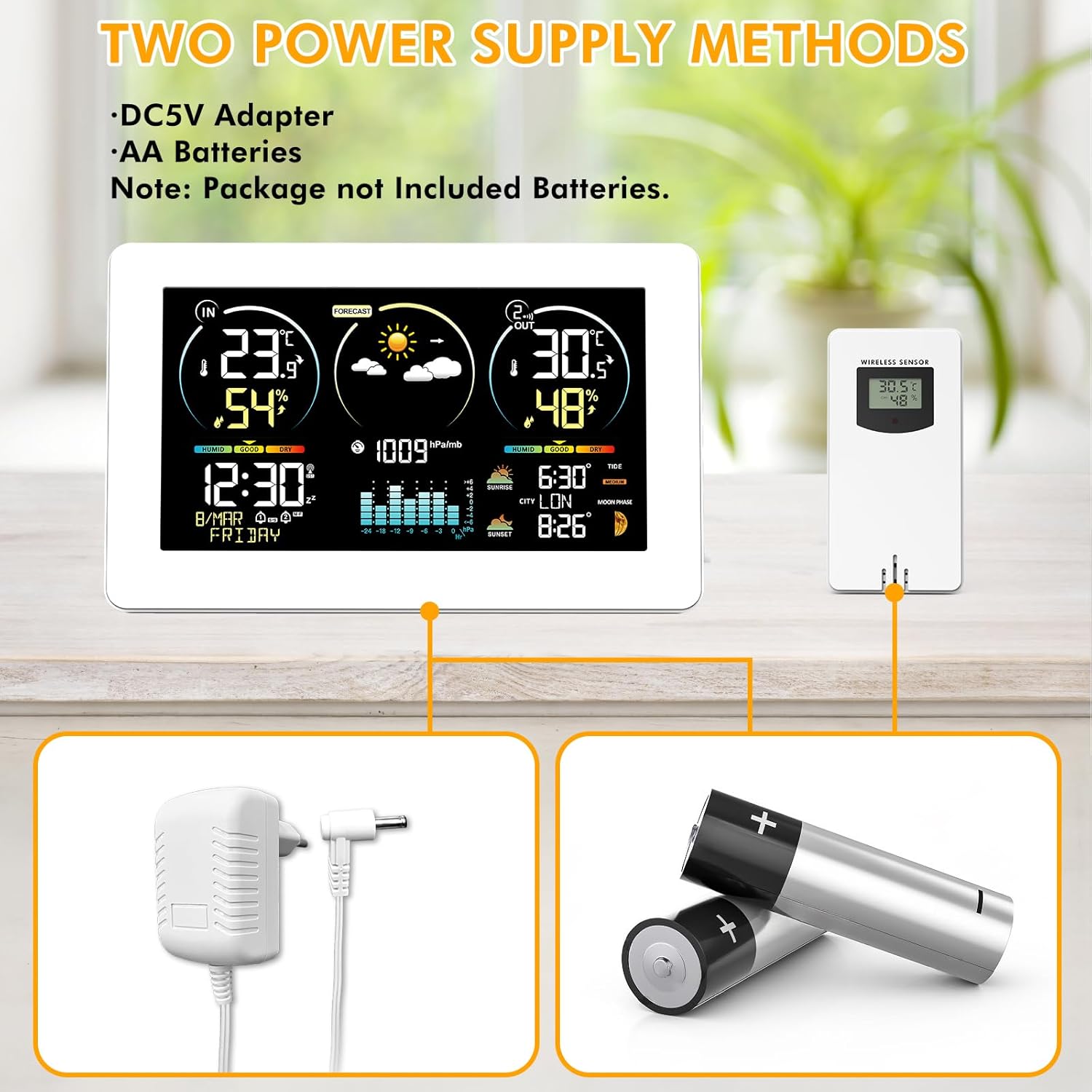
Image 3.1: Illustration of the two power supply methods: DC5V adapter for the main unit and AA batteries for both the main unit and the wireless sensor.
インストール手順:
- Insert 2 x AA batteries into the outdoor sensor, ensuring correct polarity. Select a channel (1, 2, or 3) using the switch inside the battery compartment.
- Insert 2 x AA batteries into the main unit (optional, for backup power) or connect the DC power adapter to the main unit.
- The main unit will automatically search for the outdoor sensor signal. The outdoor temperature and humidity should appear on the main unit's display within a few minutes.
3.2 センサーの配置
Place the outdoor sensor in a shaded, dry location away from direct sunlight and precipitation to ensure accurate readings. The wireless sensors have a transmission range of 200ft/60m in open spaces.

図3.2: 例amples of suitable locations for the outdoor sensor, such as under an eave, near a window, or in a garden shed, demonstrating its 60m/200ft transmission range.
3.3 メインユニットの配置
The main unit can be placed on a desk using its integrated stand or mounted on a wall using the hanging hole on the back.

Image 3.3: The weather station can be conveniently placed on a desk or mounted on a wall.
4. 操作手順
4.1 自動時刻同期(DCF)
The weather station features a DCF radio-controlled clock function. It automatically synchronizes the time daily or upon power-up to ensure accuracy. The DST (Daylight Saving Time) function is also supported.

Image 4.1: The weather station automatically synchronizes its clock with the radio signal, ensuring precise timekeeping across various regions.
If the DCF signal is weak in your location, you can disable this function and set the time manually.
4.2 手動で時刻と日付を設定する
Refer to the detailed instructions in the included paper manual for specific button presses to manually set the time, date, and other parameters.
4.3天気予報
The weather station calculates 12-hour weather forecasts based on outdoor sensor data and atmospheric pressure changes. During initial use, the device requires a 7-day learning and calibration period for accurate personalized forecasts.

Image 4.2: The weather station displays various weather conditions, including sunny, partly cloudy, cloudy, rainy, stormy, and snowy.
4.4 快適インジケーター
The comfort indicator provides a quick reference to the indoor environmental comfort level based on humidity:
- ドライ: 湿度1-35%RH
- 良い: 湿度35-44%RH
- 快適: 湿度45-65%RH
- ウェット: 湿度66-80%RH
- TO WET: 湿度80-99%RH

Image 4.3: The comfort indicator provides an easy-to-read display of current indoor comfort conditions.
4.5目覚まし時計
The weather station includes two independent alarms that can be set for weekdays, weekends, or both. A snooze function is available, adjustable from 5 to 60 minutes.

Image 4.4: The dual alarm feature allows for flexible scheduling, ensuring you wake up on time.
4.6 Moon Phases and Tide Indicator
The display shows 12 different moon phases and 3 types of tide phases based on the programmed calendar.

Image 4.5: The weather station provides detailed moon phase information and a tide level indicator.
4.7 City Selection for Sunrise/Sunset Times
Press the "City" button on the side of the weather station to enter city selection mode. Sunrise and sunset times will be automatically calculated and displayed based on your selected city's location, time zone, and current time.

Image 4.6: Manually select your city to display accurate sunrise and sunset times.
5. メンテナンス
- ディスプレイを清掃し、asin柔らかく乾いた布で拭いてください。研磨剤入りの洗剤や溶剤は使用しないでください。
- Ensure the outdoor sensor is kept dry and protected from extreme weather conditions.
- ディスプレイに電池残量低下インジケーターが表示されたら、両方のユニットの電池を交換してください。
- 長期間使用しない場合は、液漏れを防ぐために電池を取り外してください。
6。 トラブルシューティング
| 問題 | 考えられる原因 | 解決 |
|---|---|---|
| 屋外の温度/湿度の読み取りなし | センサーがペアリングされていないか範囲外です。センサーの電池残量が少なくなっています。 | Ensure sensor is within 60m/200ft of the main unit. Press the TX button on the sensor. Replace sensor batteries. Re-pair by removing batteries from both units, then reinserting into sensor first, then main unit. |
| 不正確な温度/湿度 | Sensor exposed to direct sunlight or moisture; ventilation issues. | Relocate the outdoor sensor to a shaded, dry area. Ensure proper air circulation around both units. |
| 時刻が同期していない(DCF) | Weak DCF signal; interference. | Move the main unit to a location with better signal reception (e.g., near a window). If signal remains weak, disable DCF and set time manually. |
| Display backlight turns off quickly | Unit is running on batteries. | This is normal behavior to conserve battery power. For continuous backlight, use the DC power adapter. |
7. 仕様
- 商品モデル番号: 3378YC
- ブランド: ヴォクスン
- 表示タイプ: カラーディスプレイ
- 接続技術: 無線
- センサー技術: 無線
- 電源: AC/DC Adapter or Battery (2 x AA for main unit, 2 x AA for sensor)
- 温度精度: ±1 °C
- 室内温度範囲: -9.9°C (+14°F) ~ +50°C (+122°F)
- 屋外温度範囲: -50°C(-58°F)から+ 70°C(+ 158°F)
- Humidity Range (Indoor & Outdoor): 20%RHから95%RH
- 無線範囲: 60m / 200フィート(オープンスペース)
- 含まれるコンポーネント: 取扱説明書
- パッケージ寸法: 22.7 x 15.5 x 7.4 cm; 600 グラム
- 電池は含まれていますか?: いいえ
8. 保証とサポート
保証情報およびテクニカルサポートについては、ご購入時に提供された連絡先を参照するか、VOKSUNの公式ウェブサイトをご覧ください。 webサイトでご確認ください。購入証明として購入レシートを保管してください。