
導入
This manual provides comprehensive instructions for the OMAIC EN2Q36H replacement remote control, designed for Hisense Smart TVs. It covers essential information regarding setup, operation, and maintenance to ensure optimal performance and user experience. This remote offers a direct replacement solution without the need for complex programming.
設定
The OMAIC EN2Q36H remote control is designed for immediate use with compatible Hisense Smart TVs. No programming or pairing is required.
バッテリーの取り付け
- リモコンの背面にある電池収納部を見つけます。
- 電池カバーを下方向または矢印の方向にスライドして開きます。
- 単 4 アルカリ電池 2 本 (別売) を挿入し、プラス (+) とマイナス (-) の端子がコンパートメント内のマークと正しく揃っていることを確認します。
- 電池カバーをカチッと音がするまで元の位置に戻して、しっかりと固定します。
Once batteries are installed, the remote is ready to operate your Hisense Smart TV.

操作手順
This remote control utilizes infrared (IR) technology for communication with your Hisense Smart TV. Ensure a clear line of sight between the remote and the TV's IR receiver for optimal performance.
主な特徴
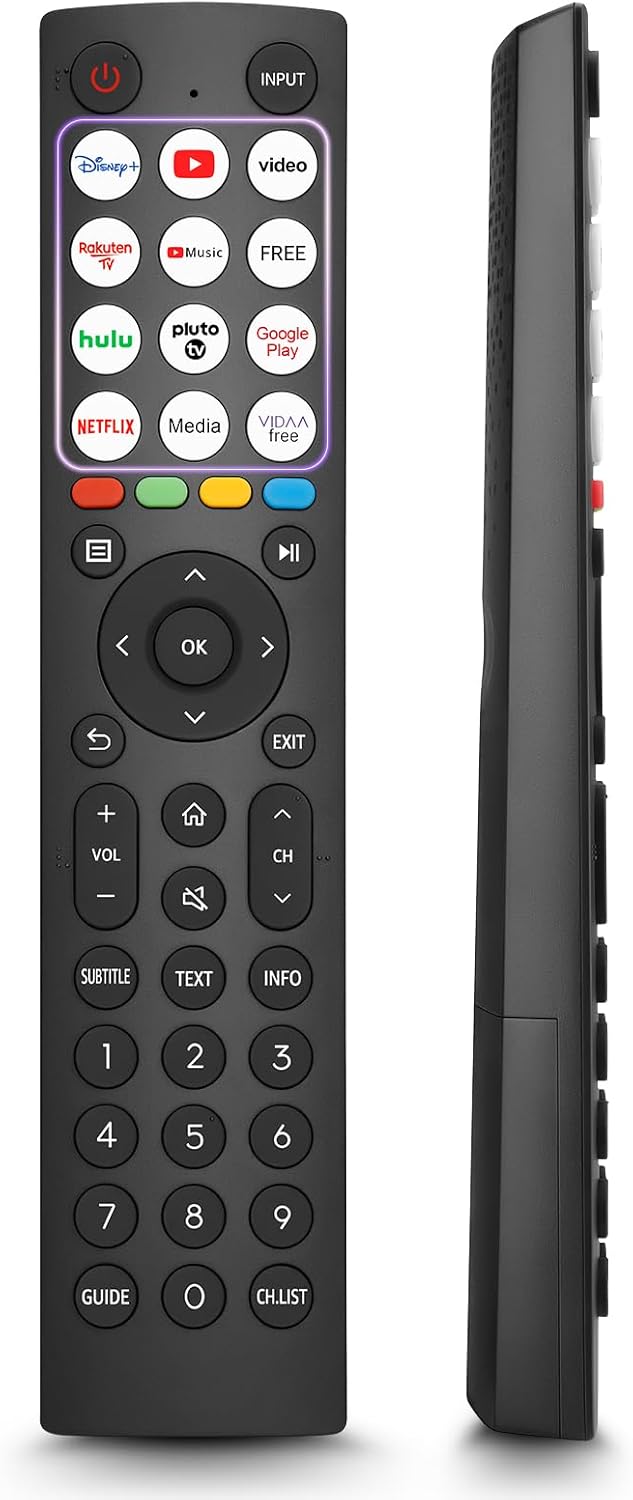
- 12つのショートカットボタン: Quickly access popular streaming services and applications with dedicated buttons.
- Strong IR Signal: Provides a longer transmission distance and quick response without noticeable delay.
- 耐久性のある構造: Made from high-quality ABS and silicone materials for extended lifespan.

ボタンの機能
Familiarize yourself with the functions of each button on your OMAIC EN2Q36H remote control:
| ボタン | 関数 |
|---|---|
| 力 | Switches the TV on or into standby mode. |
| 入力 | 入力ソース(HDMI、AVなど)を選択します。 |
| APP Buttons | Quick access buttons for specific applications (e.g., Disney+, Netflix, YouTube). |
| メニュー | Displays the Quick Setup menu. |
| メディアコントロール | Buttons for Play, Pause, Stop, Fast Forward, Rewind. |
| ナビゲーション(上/下/左/右) | Navigates on-screen menus and adjusts system settings. |
| OK | Confirms selection in on-screen menus. |
| 戻る | 前のメニューに戻ります。 |
| EXIT | 現在のメニューを終了します。 |
| ボリューム +/- | 音量レベルを調整します。 |
| 家 | Enters the Home screen. |
| ミュート | テレビの音声をミュートまたは復元します。 |
| CH ^/v | Switches channels. |
| SUBTITLE | Activates or deactivates subtitle mode. |
| 文章 | Turns teletext function on and off. |
| 情報 | 現在のプログラム情報を表示します。 |
| NUMBER Buttons (0-9) | Direct channel selection or number input. |
| ガイド | Displays the Electronic Programme Guide (DTV input). |
| CH.リスト | Displays the Channel List on the screen. |

Compatible Hisense TV Models
The OMAIC EN2Q36H replacement remote control is compatible with the following Hisense VIDAA 4K HDTV Smart TV series:
- 32A4K, 40A4K, 43A4K
- 32A5KQ, 40A5KQ
- 43A6K, 50A6K, 55A6K, 58A6K, 65A6K, 70A6K, 75A6K, 85A6K
- 55U6KQ, 65U6KQ
- 43A7KQ, 50A7KQ, 55A7KQ, 65A7KQ, 75A7KQ
- 43E7KQ, 50E7KQ, 55E7KQ, 65E7KQ, 75E7KQ
メンテナンス
リモコンの寿命と正常な機能を保つために、次のメンテナンス ガイドラインに従ってください。
- クリーニング: Use a soft, dry cloth to clean the remote. Avoid using liquid cleaners or abrasive materials, as they may damage the surface or internal components.
- バッテリー交換: Replace batteries when the remote's response becomes sluggish or stops working. Always replace both batteries at the same time with new ones of the same type (AAA alkaline).
- ストレージ: リモコンは、直射日光、極端な温度、高湿度を避け、涼しく乾燥した場所に保管してください。
- ドロップを避ける: リモコンを落とすと内部回路が損傷する恐れがあるため、リモコンを物理的な衝撃から保護してください。
トラブルシューティング
リモコンで問題が発生した場合は、次のトラブルシューティング手順を参照してください。
| 問題 | 考えられる原因 | 解決 |
|---|---|---|
| リモートが応答しない | 電池が切れているか、正しく挿入されていない。 | 極性が正しいことを確認して、新しい AAA アルカリ電池と交換してください。 |
| リモートが応答しない | リモコンとテレビの間に障害物があります。 | Ensure a clear line of sight to the TV's IR receiver. Remove any objects blocking the path. |
| リモートが応答しない | リモコンがテレビから遠すぎます。 | Move closer to the TV. The remote has an extended range, but extreme distances may affect performance. |
| ボタンが固まったり反応しなくなったりする | ボタンの下に汚れやゴミが付着しています。 | Gently clean around the buttons with a soft, dry cloth. Avoid liquids. |
| 特定の機能が動作しない | TV model incompatibility (rare). | Verify your Hisense TV model is listed in the 'Compatible Hisense TV Models' section. |
仕様
| 特徴 | 詳細 |
|---|---|
| モデル名 | EN2Q36H |
| ブランド | オマイク |
| 対応デバイス | Hisense Smart TVs |
| 接続技術 | 赤外線(IR) |
| ボタンの数 | 48 |
| コントロールタイプ | ボタンコントロール |
| 特集 | Universal, Comfortable |
| 色 | 黒 |
| バッテリーの説明 | AAA(アルカリ) |
| Supported Devices (Max) | 1 |
| 製品寸法(約) | 34.7 x 24.7 x 2.2 cm |
| 製品重量(約) | 80グラム |

保証とサポート
OMAIC is committed to the quality and compatibility of its replacement remote controls. We provide professional after-sales support to ensure customer satisfaction.
If you have any questions or concerns regarding your OMAIC EN2Q36H remote control or your order, please contact us directly. Our support team aims to respond to inquiries within 12 working hours.