
1.製品オーバーview
The SPYPOINT Force 24 is a non-cellular trail camera designed for capturing high-quality images and videos of wildlife and for security monitoring in areas without cellular coverage. It records 2K video with sound and captures 24-megapixel still photos. The camera features a fast 0.5-second trigger speed, a 70-foot detection range, and low-glow infrared LEDs for clear day and night captures without disturbing subjects. Footage is saved directly to an SD card, eliminating the need for data plans or subscriptions.

図1: 前面 view of the SPYPOINT Force 24 Trail Camera.
2. パッケージ内容
セットアップを続行する前に、すべてのアイテムが揃っていることを確認してください。
- SPYPOINT Force 24 Trail Camera
- 取り付けストラップ
- ユーザーマニュアル(このドキュメント)
3. セットアップ
3.1. バッテリーの取り付け
The Force 24 camera requires 8 AA batteries. For optimal performance and extended battery life, lithium or high-quality alkaline batteries are recommended. Rechargeable batteries can also be used.
- Open the camera latch on the side to access the internal compartment.
- バッテリー収納部を見つけます。
- 電池ボックス内の指示に従って、極性 (+/-) が正しいことを確認して、単 3 電池 8 本を挿入します。
- 電池ケースをしっかりと閉めてください。
3.2. SDカードの挿入
A MicroSD card (not included) is required to store photos and videos. The camera supports cards up to 32 GB.
- カメラを開いたら、SD カード スロットを見つけます。
- Insert a formatted MicroSD card into the slot until it clicks into place. Ensure the card is inserted in the correct orientation.
- 初めて使用する前に、カメラのメニューを使用して SD カードをフォーマットすることをお勧めします。
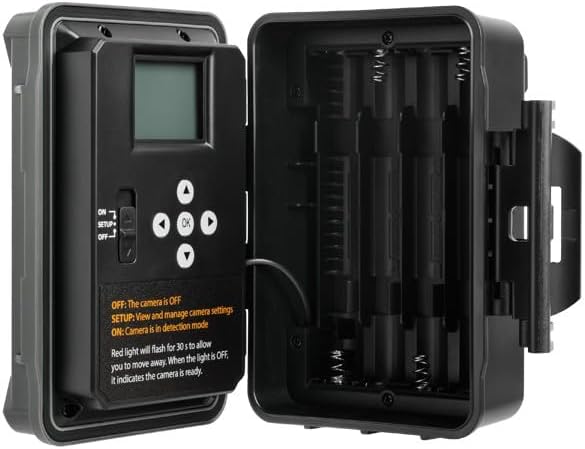
図2:内部 view of the camera showing the control panel and battery compartment.
4。 動作モード
The SPYPOINT Force 24 offers four versatile operating modes:
- 写真モード: 静止画像をキャプチャします。
- ビデオモード: 音声付きのビデオクリップを録画します。
- タイムラプスモード: 一定期間にわたって設定された間隔で画像をキャプチャします。
- Time-Lapse Plus Mode: タイムラプス写真とモーショントリガーキャプチャを組み合わせます。
4.1. モードの選択
Use the camera's internal control panel to navigate through the menu and select your desired operating mode. Refer to the on-screen instructions for specific settings within each mode.
4.2. モーション検出とトリガー速度
The camera features a 0.5-second trigger speed and a 70-foot detection range to ensure quick capture of moving subjects. The low-glow infrared LEDs provide discreet illumination for night captures.
5. Camera Interface and Controls
The camera's internal display and buttons allow for easy configuration and review of captured media.
- ON/SETUP/OFF Switch: Controls the camera's power and enters setup mode.
- ナビゲーションボタン: Used to move through menu options and review 画像/ビデオ。
- OKボタン: 選択を確定します。
- メニューボタン: メイン設定メニューにアクセスします。
When in SETUP mode, the red light will flash for 30 seconds, allowing you time to move away before the camera enters detection mode. When the light is OFF, the camera is ready.
6. メンテナンス
- バッテリー交換: Replace batteries when the low battery indicator appears on the screen or in the app.
- SDカード管理: SDカードの容量を定期的に確認してください。重要なデータを転送してください。 files to a computer and format the card periodically to maintain optimal performance.
- クリーニング: Keep the camera lens, PIR sensor, and infrared LEDs clean from dirt, dust, and debris using a soft, dry cloth.
- 環境保護: Ensure the camera is securely mounted and latches are closed to protect against weather elements.
7。 トラブルシューティング
- カメラの電源が入らない: 電池の取り付けを確認し、電池が新しいものであることを確認します。
- 写真/ビデオは撮影されませんでした: Verify the SD card is inserted correctly and has sufficient space. Check motion detection settings and ensure the camera is in ON mode.
- 画質が悪い: Clean the camera lens and ensure there are no obstructions. Check the camera's position relative to the subject and lighting conditions.
- バッテリー寿命が短い: Ensure high-quality batteries are used. Adjust camera settings such as detection delay and video length to conserve power.
8. 仕様
- モデル: フォース-24
- 写真解像度: 24メガピクセル
- ビデオ解像度: 2K with Sound
- トリガー速度: 0.5秒
- 検出範囲: 70フィート
- フラッシュ範囲: 70 feet (Low Glow IR)
- 電源: 単三電池8本(別売)
- ストレージ: MicroSD Card (up to 32 GB, not included)
- 寸法: 8 x 4 x 3インチ
- 商品の重量: 1ポンド
9. 保証とサポート
The SPYPOINT Force 24 trail camera comes with a two-year warranty, ensuring reliable performance. For technical assistance, troubleshooting, or warranty claims, please refer to the official SPYPOINT support channels or visit their webサイト。
追加情報とリソースについては、次のサイトを参照してください。 SPYPOINT Store.