
Baseus PPKPC-0520S
Baseus Picogo パワーバンク ユーザーマニュアル
Model: PPKPC-0520S
1. はじめに
Thank you for choosing the Baseus Picogo Power Bank. This ultra-mini magnetic portable charger is designed to provide convenient and fast power for your mobile devices on the go. Featuring Qi2 certified 15W wireless charging and a 20W USB-C port, along with a built-in kickstand, it offers a versatile charging solution for your daily needs.

Figure 1.1: Baseus Picogo Power Bank magnetically attached to a smartphone, demonstrating its compact size and seamless integration.
2. 箱の中身
パッケージの内容を確認し、すべてのアイテムが揃っていることを確認してください。
- 1x Baseus PicoGo 5000mAh Ultra-Mini Magnetic Power Bank
- 60Wナイロン編みUSB-Cケーブル×1
- ユーザーマニュアル (本書) x 1
- 1x 24-Month Warranty + Lifetime Support Information
Video 2.1: An unboxing video demonstrating the contents of the Baseus Picogo Power Bank package, including the power bank, USB-C cable, and user manual.
3.製品オーバーview
Familiarize yourself with the components of your Baseus Picogo Power Bank:
- A. Magnetic Charging Surface: For wireless charging compatible devices.
- B. LED Indicators: バッテリーレベルと充電状態を表示します。
- C.電源ボタン: To turn on/off and activate low current mode.
- D. USB-C Port: For wired charging and recharging the power bank.
- E. Built-in Kickstand: ハンズフリー用 view充電しながら。

図 3.1: 拡大図 view of the Baseus Picogo Power Bank, highlighting its integrated kickstand and the soft silicone material on the magnetic charging surface.

Figure 3.2: Size comparison of the Baseus Picogo Power Bank, illustrating its ultra-mini dimensions relative to a smartphone and a standard soda can.
4. セットアップ
4.1 パワーバンクの初期充電
Before first use, it is recommended to fully charge your Baseus Picogo Power Bank. Connect the provided USB-C cable to the power bank's USB-C port and the other end to a compatible USB power adapter (not included). The LED indicators will illuminate to show the charging progress.
4.2 バッテリー残量の確認
電源ボタンを1回押すと、現在のバッテリー残量を確認できます。LEDインジケーターが点灯します。
- 1 LED: 0~25%
- 2つのLED: 25〜50%
- 3つのLED: 50〜75%
- 4つのLED: 75〜100%
5. 操作手順
5.1 Magnetic Wireless Charging (Qi2 15W)
For magnetic wireless charging, ensure your device is MagSafe compatible (e.g., iPhone 12-16 Series) or has a magnetic case. Simply align the power bank with the back of your phone. The strong magnets will securely attach, and charging will begin automatically. The LED indicator for magnetic charging will illuminate.
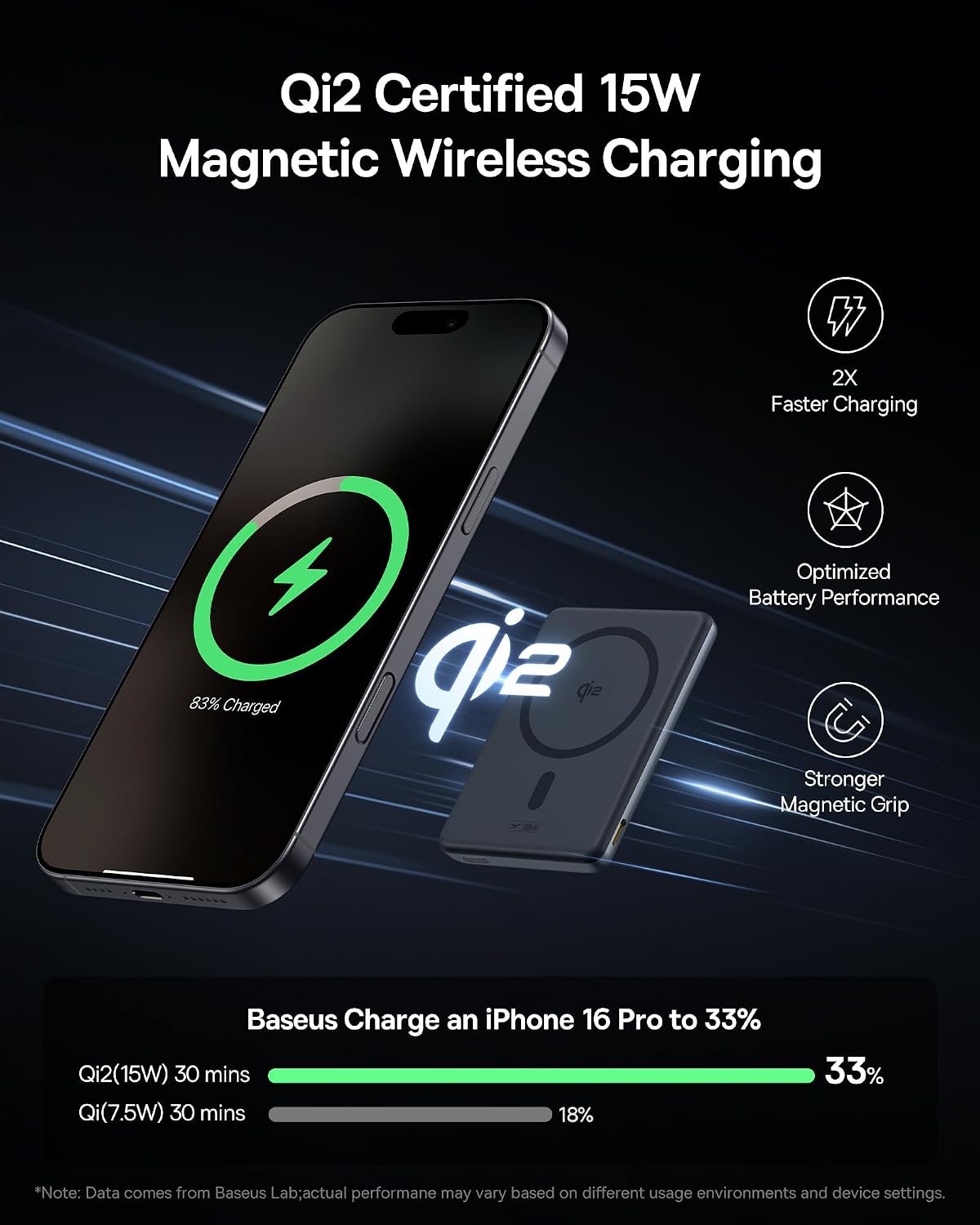
Figure 5.1: The Baseus Picogo Power Bank demonstrating Qi2 certified 15W wireless charging, showing the power bank magnetically attached to an iPhone.
5.2 Wired Charging (USB-C 20W)
To charge your device via cable, connect one end of the provided 60W Nylon Braided USB-C cable to the power bank's USB-C port and the other end to your device's charging port. The power bank will automatically detect the device and begin charging at up to 20W output.

Figure 5.2: Illustration of the Baseus Picogo Power Bank's dual charging capabilities, supporting both 15W wireless and 20W USB-C wired charging simultaneously.
5.3 内蔵キックスタンドの使用
The integrated aluminum kickstand allows for hands-free viewing while your device charges. Simply pull out the kickstand from the back of the power bank and position your phone horizontally or vertically on a flat surface. This is ideal for watching videos, making video calls, or browsing content.
Video 5.3: A demonstration of the Baseus Picogo Power Bank's built-in kickstand, showing how it can be used to prop up a phone for hands-free view充電しながら。
5.4 低電流モード
For charging low-power devices like AirPods or smartwatches, double-press the power button to activate low current mode. This ensures optimal and safe charging for smaller devices.
6. メンテナンス
- パワーバンクを水、火、極端な温度から遠ざけてください。
- 柔らかく乾いた布でデバイスを拭いてください。刺激の強い化学薬品や研磨剤は使用しないでください。
- 使用しないときは涼しく乾燥した場所に保管してください。
- パワーバンクを落としたり、強い衝撃を与えたりしないでください。
7。 トラブルシューティング
7.1 Power Bank Not Charging Device
- Ensure the power bank is sufficiently charged. Check LED indicators.
- For wireless charging, ensure proper alignment and MagSafe compatibility.
- For wired charging, ensure the cable is securely connected and not damaged.
- 電源ボタンを押してパワーバンクを再起動してみてください。
7.2 Charging Slows Down at 80%
Your iPhone may slow charging at 80% to protect the battery. This can happen if it gets too warm during charging as part of iOS's thermal control strategy. Charging will resume once the device cools down. Moving your phone to a cooler area may help.

Figure 7.1: The Baseus Picogo Power Bank showcasing its enhanced cooling features, including aluminum alloy for heat dissipation and an NTC Smart Temperature Control chip.
8. 仕様
| 特徴 | 詳細 |
|---|---|
| ブランド | ベースス |
| モデル番号 | PPKPC-0520S |
| バッテリー容量 | 5000mAh |
| USB-C入力 | 5V=3A; 9V=2.22A |
| USB-C出力 | 5V=2.4A; 9V=2.22A; 12V=1.5A (最大 20W) |
| ワイヤレス出力 | 5W / 7.5W / 15W (Qi2 Certified) |
| 寸法 | 3.4 x 2.3 x 0.5インチ |
| アイテム重量 | 0.29 ポンド (5.9 オンス) |
| 材料 | シリコン、アルミニウム合金 |
| 互換性 | iPhone 12-16 Series, AirPods, Apple Watch, Galaxy S21-S24 Series, and other Qi2/USB-C compatible devices. |

Figure 8.1: Visual representation of the Baseus Picogo Power Bank's broad compatibility with both Apple Essentials (iPhone 12-16 Series, AirPods, Apple Watch) and various Android devices (Galaxy S21-S24 Series).
9. 安全情報
安全な操作を確保し、パワーバンクの寿命を延ばすために、次の安全ガイドラインに従ってください。
- バッテリー パックを分解したり、開けたり、切り裂いたりしないでください。
- パワーバンクを熱や火にさらさないでください。直射日光の当たる場所に保管しないでください。
- バッテリーパックをショートさせないでください。
- パワーバンクを機械的衝撃にさらさないでください。
- 電池が液漏れした場合は、液が皮膚や目に触れないようにしてください。万が一目に入った場合は、患部を大量の水で洗い流し、医師の診察を受けてください。
- パワーバンクはお子様の手の届かないところに保管してください。
- Dispose of the power bank in accordance with local regulations. Do not dispose of it as household waste.
- The product meets global standards and is certified by FCC, UL, TÜV, DOE, CEC, UN, IEC, and RoHS, ensuring safety and environmental compliance.
10. 保証とサポート
Baseusは 24ヶ月保証 for your PicoGo Power Bank, ensuring worry-free ownership. Additionally, you receive lifelong 24/7 professional support. For any technical assistance, product guidance, or warranty claims, please contact our customer service team. Free returns or replacements are available for guaranteed satisfaction.
For more information or support, please visit the official Baseus Brand Store: Baseusブランドストア
Ask a question about this manual
Ask about setup, troubleshooting, compatibility, parts, safety, or missing instructions. Manuals+ will review the question and use this page’s manual context to help answer it.