
1. はじめに
ご購入ありがとうございますasing the JVC XS-N3214PB Portable Bluetooth Party Speaker. This manual provides important information regarding the setup, operation, and maintenance of your speaker. Please read it thoroughly before using the product to ensure proper function and to maximize your listening experience. Keep this manual for future reference.
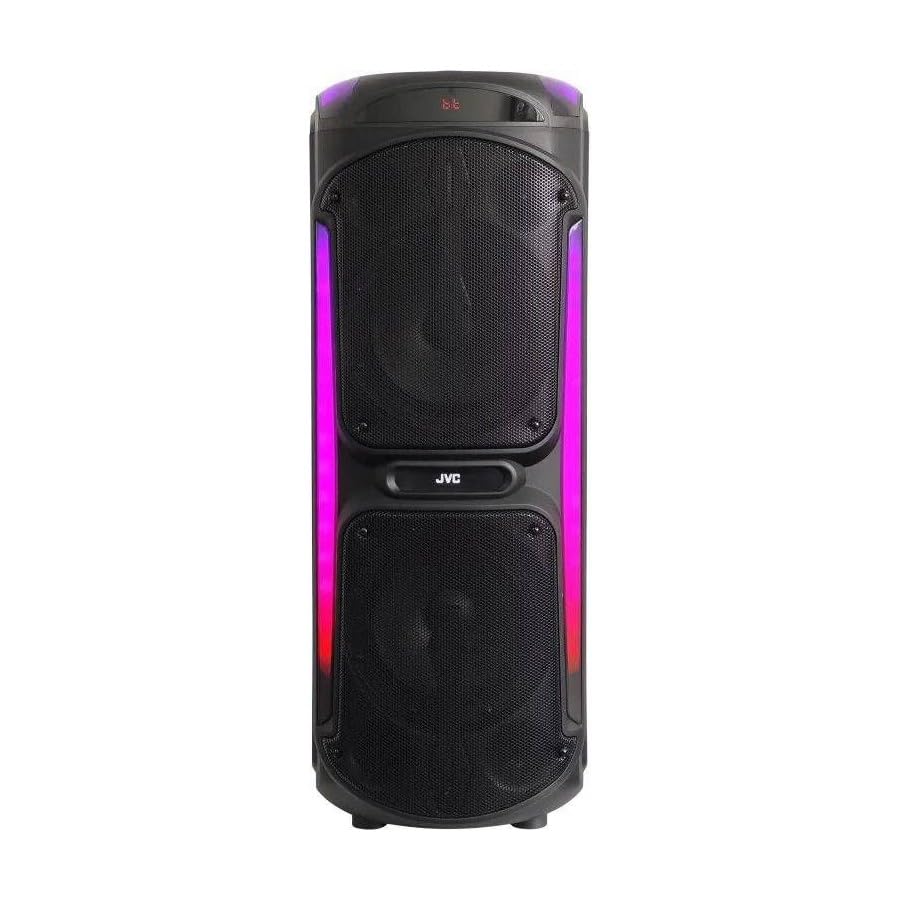
Image: The JVC XS-N3214PB Portable Bluetooth Party Speaker, shown with two microphones, highlighting its versatile connectivity options including Bluetooth, FM Radio, MP3 playback, AUX input, and USB input. The speaker features integrated LED lighting.
2. 安全情報
安全な操作を確保し、損傷を防ぐために、次の注意事項を守ってください。
- スピーカーを水、湿気、または極端な温度にさらさないでください。
- スピーカーを分解したり改造したりしないでください。修理は必ず資格のある専門家にご依頼ください。
- スピーカーを熱源、直射日光、可燃物から遠ざけてください。
- 指定された充電アダプターのみを使用してください。
- スピーカーの上に重い物を置かないでください。
- スピーカーは柔らかく乾いた布で拭いてください。液体クリーナーやエアゾールは使用しないでください。
- 使用中はスピーカーの周囲が適切に換気されるようにしてください。
3. パッケージ内容
パッケージにすべてのアイテムが揃っていることを確認します。
- JVC XS-N3214PB Portable Bluetooth Party Speaker (1 unit)
- Power Adapter/Charging Cable (1 unit)
- リモコン(1台)
- ユーザーマニュアル(このドキュメント)
- (Optional: Microphone, if included with your specific purchase)
4.製品オーバーview
4.1. 特徴
- Powerful 800W Audio Output
- Bluetoothワイヤレス接続
- 携帯性のための内蔵充電式バッテリー
- Integrated LED Party Lights
- FMラジオチューナー
- USB再生
- AUX入力
- カラオケ用マイク入力
- リモコン操作
- Deep Bass Performance
4.2. コントロールとポート
Familiarize yourself with the speaker's control panel and connection ports. (Refer to diagrams in the full printed manual for exact locations).
- 電源ボタン: スピーカーのオン/オフを切り替えます。
- モードボタン: Switches between Bluetooth, FM, USB, and AUX modes.
- 音量コントロール: マスターボリュームを調整します。
- 再生/一時停止ボタン: メディアの再生を制御します。
- 前/次のトラック ボタン: トラックまたは FM 局をナビゲートします。
- LEDライトボタン: Toggles LED lighting effects.
- マイクの音量/エコーコントロール: Adjusts microphone input and echo effect.
- USBポート: USBドライブの再生用。
- AUX入力(3.5mm): 外部オーディオ機器を接続します。
- マイク入力(6.35mm): 有線マイクを接続します。
- DC INポート: For connecting the power adapter to charge the speaker.
5. セットアップ
5.1.スピーカーの充電
- Connect the power adapter to the DC IN port on the speaker.
- 電源アダプタのもう一方の端を壁のコンセントに差し込みます。
- The charging indicator light will illuminate (color may vary) to show the speaker is charging.
- Allow approximately 4-6 hours for a full charge. The indicator light may change or turn off when fully charged.
- Disconnect the power adapter once charging is complete or when using the speaker on battery power.
5.2.電源のオン/オフ
- 電源を入れるには: ディスプレイが点灯するまで、電源ボタンを数秒間押し続けます。
- 電源を切るには: ディスプレイがオフになるまで、もう一度電源ボタンを数秒間押し続けます。
6. 操作手順
6.1.Bluetoothペアリング
- スピーカーの電源を入れます。自動的にBluetoothペアリングモードになり、Bluetoothアイコンの点滅または音声プロンプトが表示されます。
- モバイル デバイス (スマートフォン、タブレットなど) で Bluetooth を有効にし、利用可能なデバイスを検索します。
- Select "JVC XS-N3214PB" from the list of devices.
- Once paired, the speaker will confirm with an audible tone or a solid Bluetooth icon.
- これで、デバイスからのオーディオをスピーカーから再生できるようになりました。
6.2. FMラジオ
- Press the Mode button until "FM" is displayed.
- 再生/一時停止ボタンを押すと、利用可能な FM 局が自動的にスキャンされて保存されます。
- 保存したステーション間を移動するには、[前のトラック]/[次のトラック] ボタンを使用します。
6.3.USB再生
- MP3オーディオが入ったUSBフラッシュドライブ(FAT32でフォーマット)を挿入します。 filesUSBポートに接続します。
- The speaker will automatically switch to USB mode and begin playing the first track. If not, press the Mode button to select USB.
- 再生を制御するには、再生/一時停止ボタンと前のトラック/次のトラックボタンを使用します。
6.4.AUX入力
- 3.5mm オーディオ ケーブル (付属していません) の一方の端をスピーカーの AUX IN ポートに接続します。
- ケーブルのもう一方の端を外部デバイス (MP3 プレーヤー、ラップトップなど) のオーディオ出力に接続します。
- Press the Mode button until "AUX" is displayed.
- 外部デバイスから再生と音量を制御します。
6.5. Microphone and Karaoke Function
- 有線マイク(別売)をマイク入力ポートに接続します。
- Adjust the microphone volume and echo effect using the dedicated controls on the speaker.
- Play music via Bluetooth, USB, or AUX, and sing along through the microphone.
6.6. LEDパーティーライト
Press the LED Light button to cycle through different lighting modes or to turn the lights off.
6.7. リモートコントロール
The included remote control allows for convenient operation of the speaker from a distance. Functions include power on/off, mode selection, volume adjustment, track control, and LED light control. Ensure the remote control has working batteries and is pointed towards the speaker's sensor.
7. メンテナンス
- クリーニング: スピーカーの外装は、柔らかく乾いた糸くずの出ない布で拭いてください。研磨剤入りの洗剤、ワックス、溶剤は使用しないでください。
- ストレージ: If storing the speaker for an extended period, ensure it is fully charged, then power it off. Store in a cool, dry place away from direct sunlight. Recharge the battery every few months to maintain its lifespan.
- バッテリーのケア: To prolong battery life, avoid fully discharging the speaker frequently. Charge it before the battery is completely depleted.
8。 トラブルシューティング
| 問題 | 考えられる原因 | 解決 |
|---|---|---|
| スピーカーの電源が入りません。 | Battery is depleted. Power cable not connected. | Charge the speaker. Ensure power cable is securely connected to both speaker and outlet. |
| 音が出ません。 | Volume is too low. Incorrect mode selected. Device not paired (Bluetooth). AUX cable loose. | Increase volume on speaker and source device. Press Mode button to select correct input. Re-pair Bluetooth device. Check AUX cable connection. |
| Bluetoothデバイスをペアリングできません。 | スピーカーがペアリングモードではありません。デバイスが遠すぎます。干渉があります。 | Ensure speaker is in Bluetooth mode and flashing. Move device closer to speaker. Turn off other Bluetooth devices. |
| USB再生が機能しません。 | USB drive not formatted correctly (FAT32). Unsupported file format. USB drive faulty. | Ensure USB drive is FAT32 and contains MP3 files. 別の USB ドライブを試してください。 |
| リモコンが機能しない。 | Batteries depleted. Obstruction between remote and speaker. | Replace remote control batteries. Ensure clear line of sight to speaker's IR sensor. |
9. 仕様
| モデル番号 | XS-N3214PB |
| ブランド | JVC |
| 出力電力 | 800W(ピーク) |
| 接続性 | Bluetooth, USB, AUX (3.5mm), FM Radio, Microphone Input (6.35mm) |
| オーディオ出力モード | ステレオ |
| 材料 | プラスチック |
| 取り付けタイプ | 床立ち |
| 制御方法 | リモート、ボタン |
| 寸法(D x W x H) | 35D x 31W x 94H センチメートル |
| 含まれるコンポーネント | 1 x JVC XS-N3214PB 800W Party Portable Bluetooth Speaker, Power Adapter, Remote Control, User Manual |
10. 保証とサポート
10.1. 保証情報
This JVC XS-N3214PB speaker comes with a 1年間保証 ご購入日から1年間有効です。本保証は、通常の使用における製造上の欠陥および仕上がりの品質を保証するものであり、誤用、事故、不正な改造、または通常の摩耗や損耗による損傷は保証の対象外となります。保証請求のために、購入証明書を保管してください。
10.2. カスタマーサポート
For technical assistance, warranty claims, or product inquiries, please contact JVC customer support through the retailer where the product was purchased or visit the official JVC webお住まいの地域に固有の連絡先情報については、こちらのサイトをご覧ください。