
製品終了view
The COWSAR 10000 BTU Window Air Conditioner is designed to provide efficient cooling for rooms up to 450 sq.ft. This versatile unit offers multiple operating modes including Cool, Fan, Auto, Dry, and Eco, along with three fan speeds to customize your comfort. It features a 24-hour timer for flexible scheduling, quiet operation for minimal disturbance, and a convenient remote control for easy adjustments. The unit also includes a reusable filter for simplified maintenance.
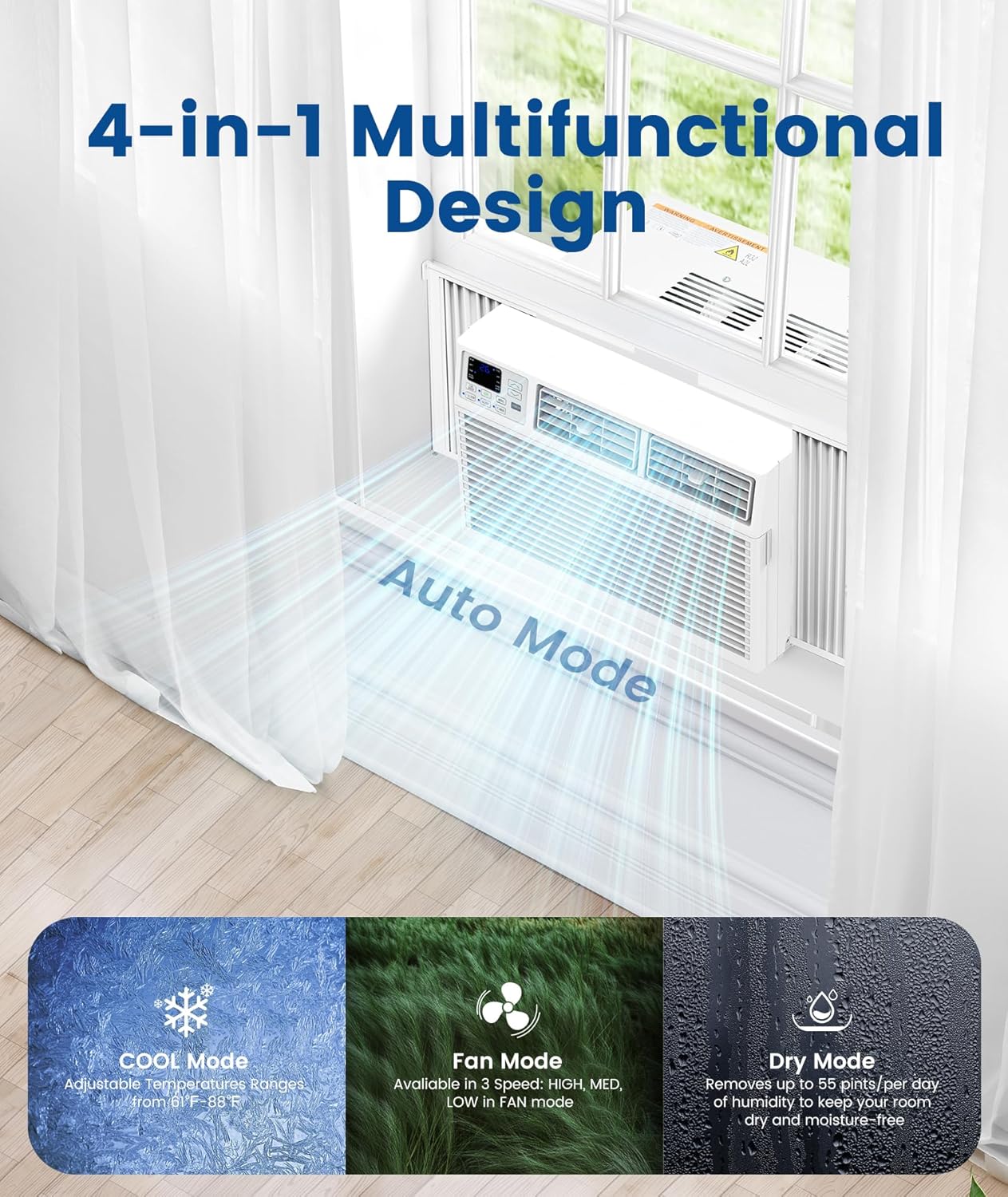
図1: 前面 view of the COWSAR 10000 BTU Window Air Conditioner.
主な特徴
- 高い冷却能力: Delivers maximum 360m³/h cold airflow, quickly cooling rooms up to 450 sq.ft. Cooling temperature range is 61°F-88°F.
- 4-in-1機能: Offers Cool, Fan, Auto, Dry, Eco, and Sleep modes, functioning as an air cooler, dehumidifier, or fan.
- リモートコントロール: All modes and settings can be conveniently controlled via the included remote.
- 省エネ: UL and DOE certified with a Combined Energy Efficiency Rate (CEER) of 10.9. Eco mode automatically adjusts operation to save energy.
- 静かな動作: Operates at a low 54 decibels, ensuring a peaceful environment.
- 24時間タイマー: Provides flexibility to schedule operation times.
- 再利用可能なフィルター: Features a washable and reusable slide-outlet filter for easy cleaning and maintenance.
- 簡単なインストール: Designed to fit double-hung windows with opening widths of 23 to 36 inches and a minimum height of 14.5 inches. All necessary installation accessories are included.

Figure 2: The air conditioner offers 4-in-1 multifunctional design including Cool, Fan, Auto, and Dry modes.
セットアップおよびインストールガイド
Follow these steps for proper installation of your COWSAR Window Air Conditioner:
- 準備ウィンドウ: Ensure your double-hung window has an opening width between 23 and 36 inches and a minimum height of 14.5 inches.
- フォームシールを貼る: Attach the provided shock-absorbing foam to the window sill to create a tight seal and reduce vibrations.
- ユニットを配置します。 Carefully lift and place the air conditioner unit onto the prepared window sill. Ensure it is centered and stable.
- ユニットを固定する: Use the provided screws and brackets to firmly secure the unit to the window frame. Adjust the side panels to fill any gaps.
- シールギャップ: Apply additional foam seals or weather stripping to any remaining gaps around the unit and window to prevent air leakage.
- プラグイン: Once securely installed and sealed, plug the unit into a compatible electrical outlet.

Figure 3: Unit dimensions and window requirements for easy installation.
インストールビデオ
Video 1: Detailed installation guide for a window air conditioner unit.
Video 2: Step-by-step instructions on how to set up a window AC unit.
エアコンの操作
Your COWSAR air conditioner offers various modes and settings for optimal comfort. Use the control panel on the unit or the remote control to adjust settings.
コントロールパネルとリモート
The unit features an intuitive control panel with a digital display. All functions can also be accessed via the included remote control, allowing you to adjust settings from anywhere in the room.

Figure 4: User-friendly control panel with digital display.

図5: 操作が便利なリモコン。
動作モード
- クールモード: Provides powerful cooling. Adjust temperature using the up/down arrows.
- ファンモード: 冷却せずに空気を循環させます。ファン速度は低、中、高からお選びいただけます。
- 自動モード: Automatically selects the appropriate operating mode (Cool, Fan, Dry) and fan speed based on the room temperature to maintain desired comfort.
- ドライモード: Functions as a dehumidifier, removing excess moisture from the air.
- エコモード: Optimizes energy consumption by automatically turning off the fan and compressor when the room reaches the set temperature.
- スリープモード: Gradually adjusts temperature and fan speed to ensure comfortable sleep while saving energy.
タイマー機能
Set the 24-hour timer to program when the unit turns on or off, providing greater flexibility and energy savings.
メンテナンスとケア
定期的なメンテナンスにより、エアコンの最適なパフォーマンスと寿命が確保されます。
再利用可能なフィルターのクリーニング
The COWSAR air conditioner features a reusable filter that should be cleaned periodically to maintain air quality and unit efficiency. To clean, simply open the front panel, remove the filter, rinse it under running water, and allow it to dry completely before reinserting. Refer to the user manual for specific cleaning frequency recommendations.
一般的な問題のトラブルシューティング
エアコンに問題が発生した場合は、次の一般的なトラブルシューティングのヒントを参照してください。
- ユニットの電源が入らない: Check if the power cord is securely plugged into a working outlet. Ensure no circuit breaker has tripped.
- 不十分な冷却: 設定温度が室温より低いことを確認してください。エアフィルターが汚れておらず、目詰まりしていないことを確認してください。暖かい空気が入らないように、窓やドアが閉まっていることを確認してください。
- 異常な音: A slight splashing sound is normal due to the unit's design for efficient cooling. If loud or unusual noises persist, contact customer support.
- 水漏れ: Ensure the unit is properly tilted slightly outwards to allow condensation to drain outside. Check for any blockages in the drainage system.
For more detailed troubleshooting or issues not listed here, please consult the full user manual or contact customer support.
製品仕様
| 仕様 | 詳細 |
|---|---|
| ブランド | カウサー |
| 製品寸法(奥行き×幅×高さ) | 奥行き15.59インチ x 幅18.58インチ x 高さ13.31インチ |
| 冷却能力 | 10,000 BTU |
| 総合エネルギー効率(CEER) | 10.9 |
| 騒音レベル | 54デシベルまで |
| Window Opening Width | 23~36インチ |
| Window Minimum Height | 14.5インチ |
保証とサポート
保証情報
Specific warranty details for your COWSAR 10000 BTU Window Air Conditioner are typically provided within the product packaging or can be found on the official COWSAR webサイトでご確認ください。保証請求のために購入証明書を保管してください。
カスタマーサポート
For any questions, technical assistance, or service inquiries regarding your air conditioner, please contact COWSAR customer service. Refer to the contact information provided in your product manual or on the manufacturer's webサイト。