
1. はじめに
The Divoom Dipow 35W GaN Fast Charger is a compact and efficient power adapter designed for a wide range of USB-C compatible devices. It features advanced Gallium Nitride (GaN) technology for fast and cool charging, along with a unique pixel screen that can be customized via the Divoom application. This manual provides essential information for the safe and effective use of your Dipow 35W charger.

Image: The Divoom Dipow 35W GaN Fast Charger, showcasing its compact design and pixel screen.
2. 主な特徴
- Adorable Pixel Display with DIY Clock: Features a retro diving helmet design with a customizable pixel screen. Users can personalize the display with over 1000 designs or create their own using the Divoom app. The screen activates when the charger is plugged in.
- Fast & Efficient GaN Charging: Equipped with 35W GaN technology, allowing for rapid charging of compatible devices. For example, an iPhone 15 Pro Max can charge to 56% in approximately 30 minutes. GaN technology ensures the charger remains compact and operates at a cooler temperature.
- コンパクトで旅行に便利: Designed to be pocket-sized with a 90° foldable plug, making it convenient for travel and use in tight outlets without obstructing adjacent sockets.
- ユニバーサル互換性: Supports various fast charging protocols including PD 3.0, QC, and PPS through its single USB-C port, ensuring compatibility with a wide range of devices such as iPhones (15/16 series), Samsung Galaxy, Xiaomi, iPads, MacBooks, and Nintendo Switch.
- スマートな安全保護: Incorporates multiple protection features against overcurrent, overheating, overvoltage, and short circuits to ensure safe charging for your devices.
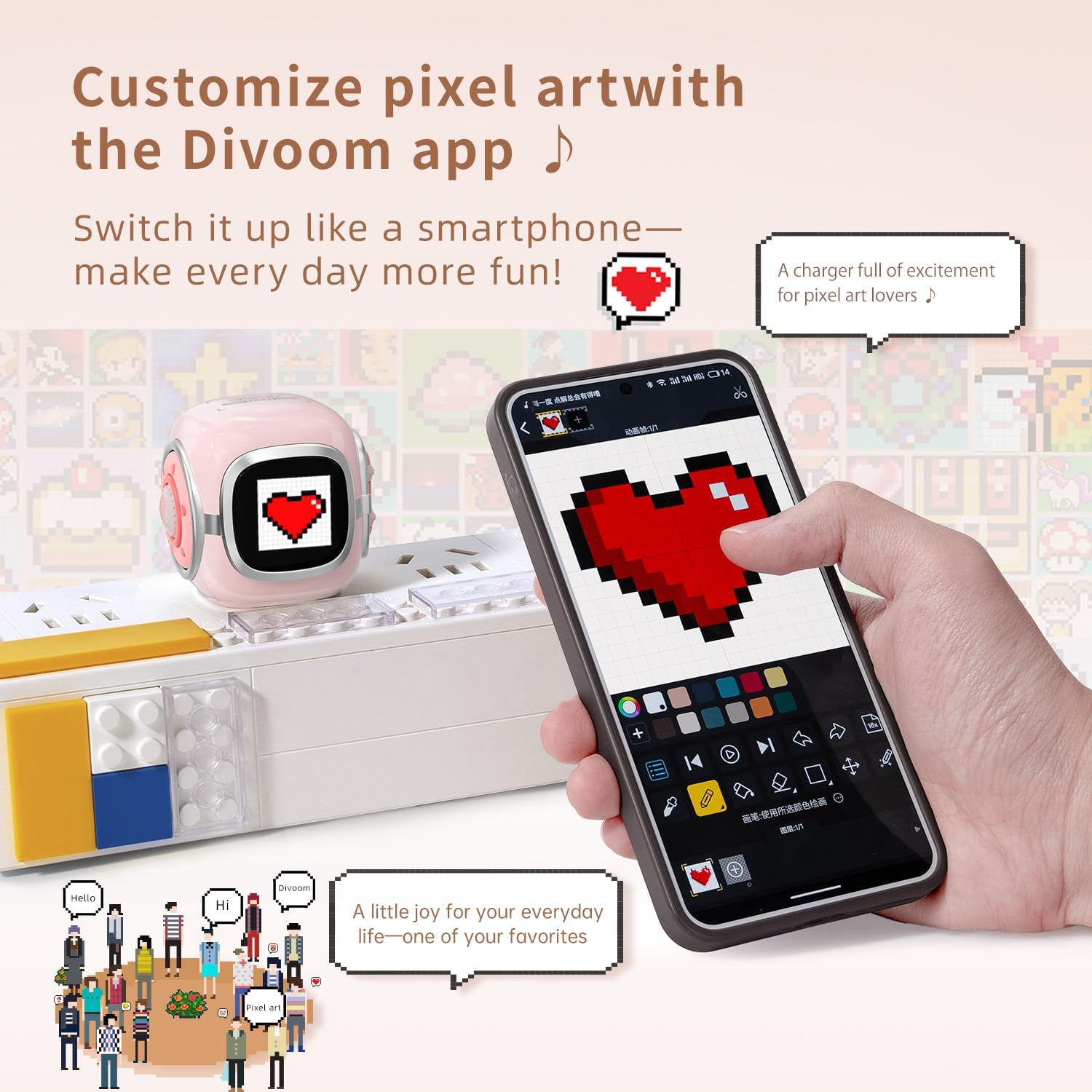
Image: The Divoom Dipow charger connected to a power strip, displaying pixel art, alongside a smartphone demonstrating the Divoom app's customization features.

Image: A visual comparison demonstrating the Divoom Dipow charger's 35W ultra-fast charging capability, achieving 56% charge in 30 minutes versus 20% with a typical charger.

Image: The Divoom Dipow charger demonstrating its compact size by fitting into a handbag and its foldable plug design when inserted into a wall outlet.
3. セットアップ
3.1 初期接続
- プラグを展開します: Gently unfold the 90° foldable plug from the charger body.
- 電源コンセントに差し込みます: Insert the charger into a standard wall outlet. The pixel screen will light up upon connection.
- デバイスを接続します。 Use a compatible USB-C charging cable (not included) to connect your device to the USB-C port on the charger. Ensure the connection is secure.
3.2 Divoom App Setup (for Pixel Screen Customization)
- アプリをダウンロード: 検索する "Divoom" in your device's app store (iOS or Android) and download the official Divoom application.
- Bluetooth経由でペアリング: Open the Divoom app and follow the on-screen instructions to pair your smartphone with the Dipow 35W charger via Bluetooth. Ensure Bluetooth is enabled on your device.
- Access Customization: Once paired, you can access various customization options for the pixel screen, including pixel art, animations, and clock faces.
4. 操作手順
4.1 デバイスの充電
Once the charger is plugged into a power outlet and your device is connected via a USB-C cable, charging will begin automatically. The pixel screen may display charging status or a customized animation/clock face.
4.2 Customizing the Pixel Screen
The Divoom app provides extensive options for personalizing the pixel screen:
- ピクセルアートギャラリー: Browse a vast community gallery of pixel art designs. Select a design to instantly display it on your charger's screen.
- 自分で作成する: Use the app's design tools to create custom pixel art or animations. These can be uploaded to your charger in real-time.
- 時計の文字盤: Choose from a variety of dynamic clock faces to display time, date, and other information.
- 明るさ調整: Adjust the screen brightness through the app to suit your environment.
Video: A demonstration of the Divoom Dipow 35W charger's functions, including pixel screen customization and fast charging capabilities.
5. メンテナンス
- クリーニング: 清掃する前に、充電器をコンセントから抜いてください。表面は柔らかく乾いた布で拭いてください。液体クリーナーや研磨剤の使用は避けてください。
- ストレージ: When not in use, fold the plug and store the charger in a cool, dry place away from direct sunlight and moisture.
- 取り扱い: Avoid dropping the charger or subjecting it to strong impacts, as this may damage internal components or the pixel screen.
6。 トラブルシューティング
6.1 Charger Not Powering On / Screen Not Lighting Up
- Ensure the charger is securely plugged into a functional power outlet.
- Try plugging another device into the same outlet to confirm the outlet is working.
6.2 デバイスが充電されない
- USB-C ケーブルが充電器とデバイスの両方に正しく接続されていることを確認します。
- ケーブルに欠陥がないか確認するために、別の USB-C ケーブルを使用してみてください。
- Ensure your device is compatible with USB-C charging and the charger's output specifications.
6.3 Divoom App Connectivity Issues
- Make sure Bluetooth is enabled on your smartphone and the charger is powered on.
- Restart the Divoom app and attempt to reconnect.
- If issues persist, try unpairing and re-pairing the charger through your phone's Bluetooth settings and the Divoom app.
7. 仕様
| モデル番号 | ディポウ-35 |
| ブランド | ディヴォーム |
| 出力電力 | 35W |
| コネクタタイプ | USBタイプC |
| 対応デバイス | Smartphones, Headphones, Tablets, Game Consoles (e.g., iPhone 16/16 Pro Max/16 Pro/15 Pro Max/15 Pro/15/14 Pro Max/14 Pro/14/13 Pro/13 Pro Max/13 Mini/13/12 Pro Max/12 Mini/12/11/11Pro/11Pro Max/X/XR/Xs/Xs Max/8/8 Plus/7/7/6/6S/Plus, iPad, iPad air/ 2, iPad mini 4 3 2 1, iPad Pro, Samsung Galaxy Note 20/10/S23/S24/S22 Ultra/S22+/S21/S20/Huawei, Xiaomi and other USB-C outlet devices) |
| 特集 | Fast Charging, Pixel Screen, Foldable Plug |
| 色 | ピンク |
| 入力ボリュームtage | 240ボルト |
| 出力電流 | 3 Amps |
| 出力巻tage | 5ボルト |
| アイテム重量 | 3.03オンス |
| パッケージ寸法 | 3.54 x 3.15 x 2.56インチ |
8. 安全情報
- 充電器を水、湿気、または極端な温度にさらさないでください。
- 充電器の分解や改造は避けてください。
- お子様の手の届かない場所に保管してください。
- 過熱を防ぐため、充電中は適切な換気を行ってください。
- 充電器に損傷の兆候が見られる場合は、直ちに使用を中止してください。
9. 保証とサポート
The Divoom Dipow 35W GaN Fast Charger is covered by a manufacturer's warranty. For specific warranty terms, conditions, and customer support, please refer to the official Divoom webご購入の際は、ウェブサイトをご覧いただくか、カスタマーサービスに直接お問い合わせください。保証請求の際は、購入証明書を保管してください。