
Dolinvo CUPUS004
12段階調節可能な電動カッピング装置のユーザーマニュアル
Model: CUPUS004 | Brand: Dolinvo
導入
Thank you for choosing the Dolinvo 12 Level Adjustable Electric Cupping Device. This portable device combines powerful massage and adsorption technology to provide a deep soothing experience, relieve muscle tension, and assist in skin tightening. Designed for convenience and effectiveness, it allows you to enjoy the benefits of cupping therapy from the comfort of your home, gym, or while traveling.

Image: The Dolinvo Electric Cupping Device, showcasing its ergonomic green design with gold accents and control panel.
安全情報
Read this instruction manual carefully before use to ensure safe and effective cupping massage. Always consult with a healthcare professional before starting any new therapy, especially if you have pre-existing medical conditions. Do not use on broken, irritated, or sensitive skin. Discontinue use if you experience discomfort or adverse reactions.
栄養補助食品に関する記述は FDA によって評価されておらず、いかなる病気や健康状態の診断、治療、治癒、予防を目的としたものではありません。
パッケージ内容
パッケージを開封したら、以下にリストされているすべてのアイテムが揃っていて良好な状態であることを確認してください。
- 1x Electric Cupping Massager
- 1x USB Cケーブル
- 取扱説明書 x 1
- 4x Cotton Balls
- 1x Essential Oil (may vary by package)

画像: 製品パッケージに含まれるアイテムの視覚的な表現。
製品の特徴
- 多機能マッサージ: Combines powerful massage and adsorption technology for muscle tension relief and a deep soothing experience.
- 調整可能な強度: Features 12 adjustable temperature levels and massage beads at the bottom, allowing for personalized settings. The device automatically stops after 20 minutes to prevent overheating.
- Portable & Multi-functional: Lightweight and compact design for easy portability. Combines cupping and scraping techniques for body massage, relaxation, skin firming, and post-workout recovery.
- Versatile and Safe: Suitable for all skin types, enabling gentle and safe use for smooth, healthy skin and a relaxing full-body massage at home.
- Ergonomic and Rechargeable: Ergonomic handle, lightweight design, and a rechargeable 2000mAh battery providing up to 60 minutes of use.

Image: An illustration highlighting the device's core functions: Red Light therapy, Massage, Dynamic Suction, Heating, and Flameless Electric operation.

Image: A visual guide to the 12 adjustable suction levels, categorized into low, mid-range, and strong intensity.
設定
初期充電
Before first use, fully charge the device using the provided USB-C cable. Connect the USB-C end to the device's charging port and the other end to a compatible USB power adapter (not included). The charging indicator light will show the charging status. The built-in 2000mAh rechargeable battery provides up to 60 minutes of continuous use.
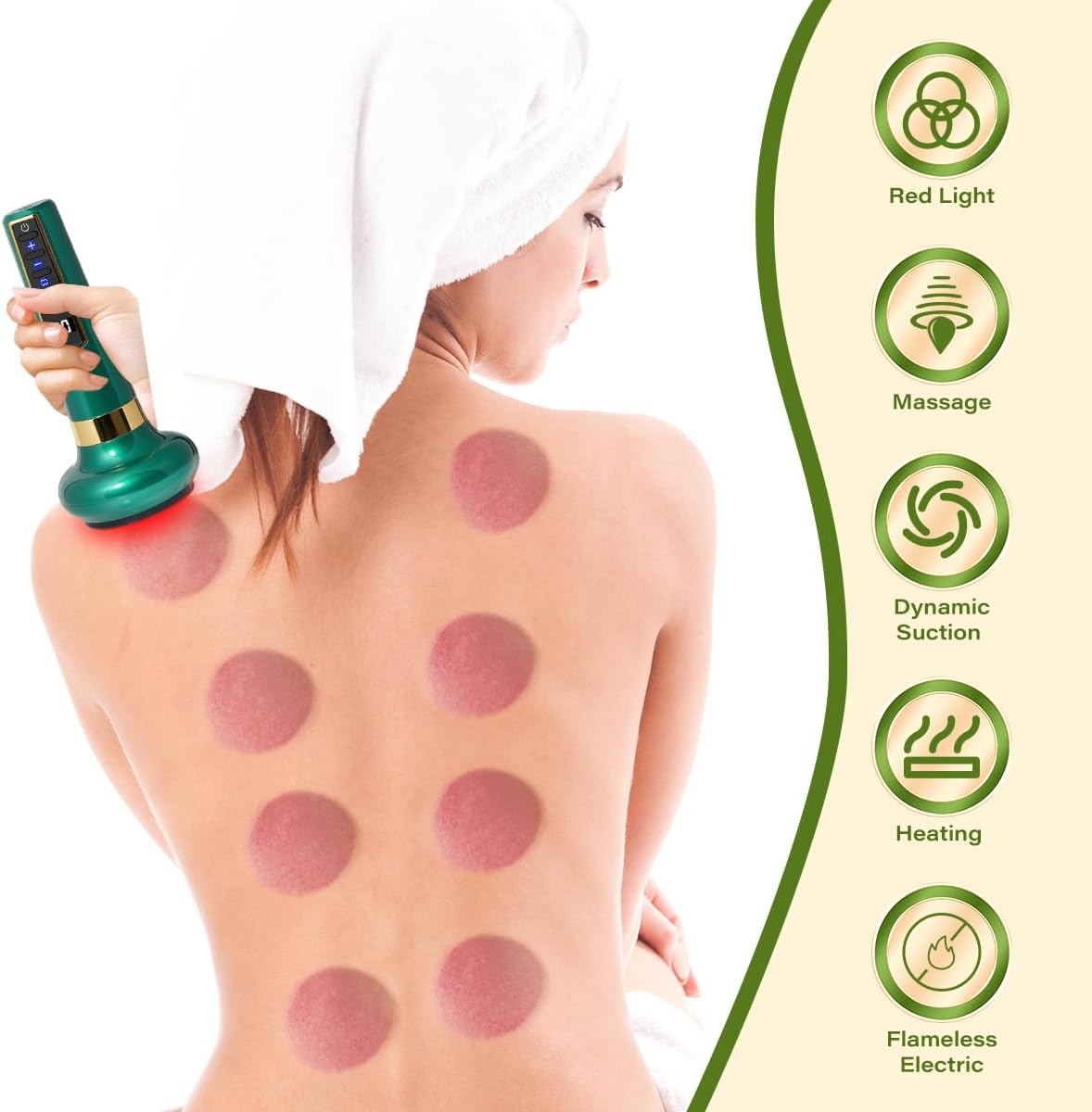
Image: The device connected to a USB-C charging cable, illustrating its rechargeable battery feature.
操作手順
コントロールオーバーview

画像: 詳細な view of the device's control panel, indicating the functions of each button.
- 電源ボタン(オン/オフ): 長押しすると、デバイスの電源がオンまたはオフになります。
- Suction Adjustment (+/-): Use these buttons to increase or decrease the suction intensity (1-12 levels).
- 圧力緩和ボタン: Press to release suction from the skin.
- 温度ボタン: Press to cycle through temperature levels.
応用
Ensure your skin is clean and dry. For best results and to allow the device to glide smoothly, apply a small amount of essential oil or massage cream to the area you wish to treat. Place the device firmly on the skin, ensuring a good seal.

Image: The cupping device in use on a person's back, demonstrating its ergonomic design for comfortable application.
Adjusting Intensity and Temperature
Once the device is on and applied to the skin, use the '+' and '-' buttons to adjust the suction intensity to your preferred level. Start with a lower intensity and gradually increase as comfortable. Use the temperature button to select your desired heat level. The device will automatically stop after 20 minutes of continuous operation to prevent overheating.

画像: Examples of the device's versatile use for relaxation and massage on different body parts.
推奨アプリケーション領域
The device can be used on various parts of your body, including the neck, shoulders, back, upper arms, waist, hips, and legs. Avoid using on bony areas, open wounds, or areas with varicose veins.

Image: A guide to different body areas where the cupping device can be effectively applied for muscle tension and pain relief.
Understanding Cupping Marks
After using the device, you may observe round marks on your skin. These are normal and indicate the effect of the cupping therapy. The color of these marks can vary:
- Bright Red: Generally indicates good circulation.
- Dark Purple: May suggest areas of stagnation or tension.
- 水ぶくれ: Not good. This indicates excessive suction or prolonged application. Reduce intensity and duration.
These marks typically fade and disappear within a week. If the skin turns red, it is a normal reaction and will subside within a couple of days.
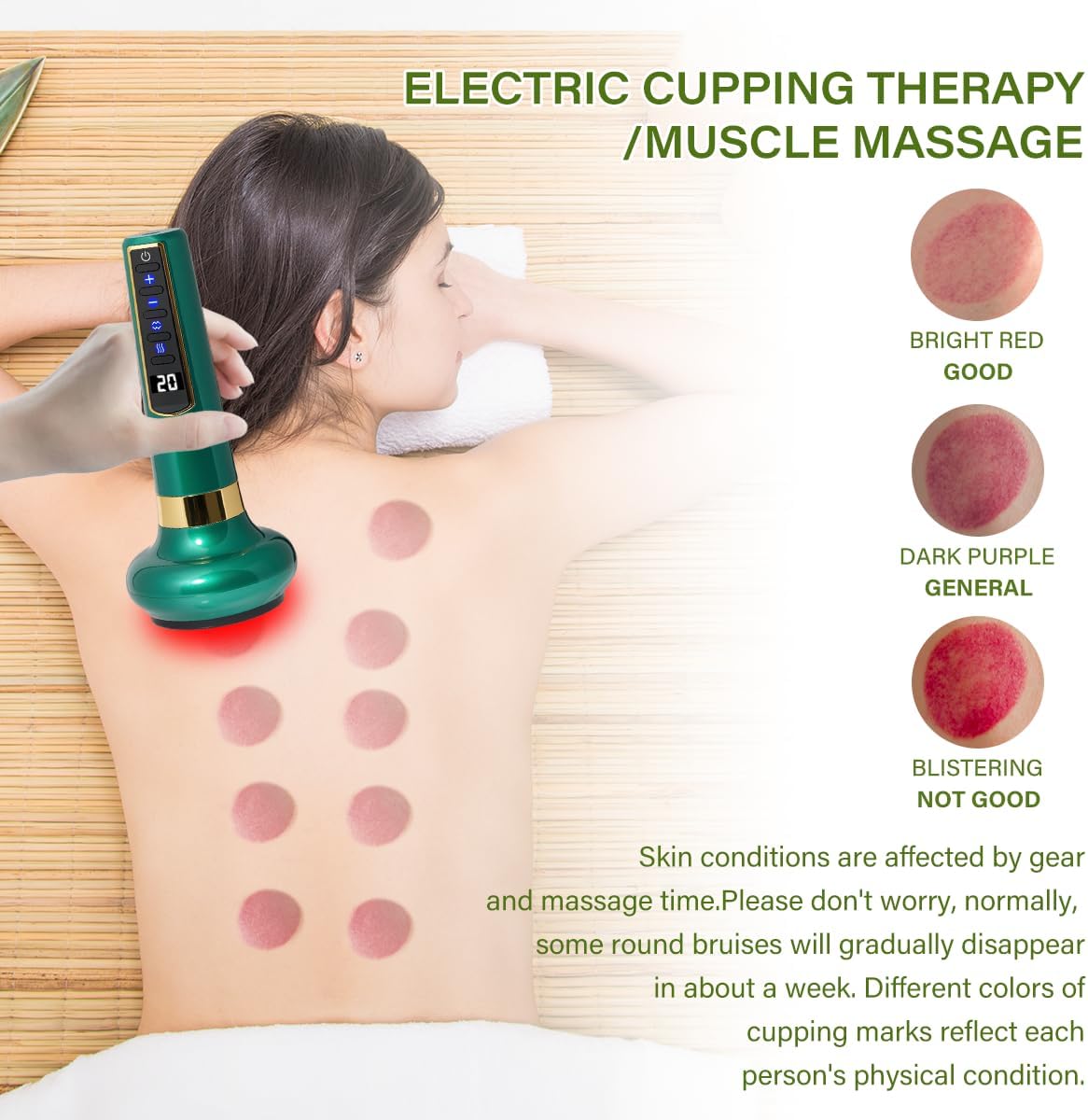
Image: A visual explanation of different cupping marks and their significance, along with an example on a person's back.

画像: 元ample of skin redness after using the device, clarifying it as a normal and temporary reaction.
メンテナンス
デバイスのクリーニング
After each use, wipe the suction cup and the device's surface with a soft, damp cloth. You may use a mild disinfectant if necessary. Ensure the device is completely dry before storing. Do not immerse the device in water or use abrasive cleaners.
ストレージ
Store the device in a cool, dry place away from direct sunlight and extreme temperatures. Keep out of reach of children.
トラブルシューティング
| 問題 | 考えられる原因 | 解決 |
|---|---|---|
| デバイスの電源が入らない。 | バッテリー残量が少ないか、消耗しています。 | 付属のUSB-Cケーブルを使用してデバイスを完全に充電します。 |
| 吸引力がない、または吸引力が弱い。 | Poor seal on skin; suction level too low. | Ensure the device is firmly pressed against the skin to create a seal. Increase suction intensity using the '+' button. Apply essential oil or cream to improve glide and seal. |
| Device stops automatically. | 自動シャットオフ機能が有効になりました。 | This is a normal safety feature. The device is designed to stop after 20 minutes of continuous use to prevent overheating. You can restart it after a brief pause. |
| Skin irritation or blistering. | Suction intensity too high or prolonged application in one spot. | Reduce suction intensity. Do not leave the device in one spot for too long. Move it continuously or apply for shorter durations. Consult a healthcare professional if irritation persists. |
仕様
| 特徴 | 詳細 |
|---|---|
| 製品寸法 | 8.6 x 5 x 3.9インチ |
| アイテム重量 | 14.46オンス(410グラム) |
| モデル番号 | CUPUS004 |
| バッテリー | 1 A 電池が必要 (付属) |
| 電源 | 電池駆動 |
| 材料 | プラスチック |
| ブランド | ドリンヴォ |
| メーカー | ドリンヴォ |
保証とサポート
For any questions, concerns, or support needs regarding your Dolinvo Electric Cupping Device, please refer to the contact information provided with your purchase or visit the official Dolinvo webサイトでご確認ください。保証請求の際に必要となりますので、購入証明書を保管してください。
The standard return policy allows for returns or replacements within 30 days of purchase, subject to the seller's terms and conditions.
Ask a question about this manual
Ask about setup, troubleshooting, compatibility, parts, safety, or missing instructions. Manuals+ will review the question and use this page’s manual context to help answer it.