
導入
Thank you for choosing the Acctim Jaxon Digital Alarm Clock. This modern alarm clock combines functionality with aesthetic appeal, featuring a color-changing LED display, USB-C power, and a convenient USB-C charging port. This manual will guide you through the setup, operation, and maintenance of your new device to ensure optimal performance and longevity.

Image: The Acctim Jaxon Digital Alarm Clock displayed on a bedside table, showing its compact design and blue LED time display in a bedroom setting.
安全情報
- 使用前にすべての指示を読み、将来の参考のために保管してください。
- デバイスを水や過度の湿気にさらさないでください。
- 時計を熱源の近くや直射日光の当たる場所に置かないでください。
- Use only the provided USB-C power cable or a certified equivalent.
- ご自身でデバイスの分解や修理を試みないでください。資格のあるサービス担当者にご連絡ください。
- お子様の手の届かない場所に保管してください。
パッケージ内容
- Acctim Jaxon Digital Alarm Clock
- USB-C電源ケーブル
- ユーザーマニュアル(このドキュメント)
製品終了view
Familiarize yourself with the buttons and display of your Acctim Jaxon Digital Alarm Clock.

画像: 上 view of the Acctim Jaxon Digital Alarm Clock, highlighting the control buttons for alarm, time, light/dimmer, snooze, color, and volume.
コントロールボタン:
- ALARM SET / ALARM ON/OFF: Press to set the alarm time. Press briefly to activate/deactivate the alarm.
- 時間設定: を押して現在時刻を設定します。
- ライト/調光器: Press to adjust display brightness.
- スヌーズ: Press to temporarily silence the alarm.
- 色: Press to cycle through display color options.
- ボリューム: Press to adjust alarm volume.
画面:
- Large LED display shows time in 12 or 24-hour format.
- AM/PM indicator for 12-hour format.
- Multiple color options for the LED digits.
設定
1. 電源接続
- Connect the provided USB-C power cable to the "DC IN" port on the back of the alarm clock.
- USB-C ケーブルのもう一方の端を互換性のある USB 電源アダプター (別売) に差し込み、次に壁のコンセントに差し込みます。
- ディスプレイが点灯し、時計の電源がオンになっていることを示します。
2. バッテリーバックアップ(オプション)
外出時のバックアップ電源tages, install 3 AAA batteries (not included) into the battery compartment on the bottom of the clock. The batteries will retain time settings but will not power the display continuously.
操作手順
時間の設定
- を押し続けます 時間設定 時間の数字が点滅し始めるまでボタンを押します。
- を押す 時間設定 ボタンを繰り返し押して時間を調整します。
- を押す アラームセット button to confirm the hour and move to minute adjustment.
- を押す 時間設定 ボタンを繰り返し押して分を調整します。
- を押す アラームセット button to confirm the minutes and exit time setting mode.
- 12時間形式と24時間形式を切り替えるには、 時間設定 button briefly while the time is displayed (not in setting mode). The AM/PM indicator will appear for 12-hour format.
アラームを設定する
- を押し続けます アラームセット アラームの時間の数字が点滅し始めるまでボタンを押します。
- を押す アラームセット ボタンを繰り返し押してアラームの時間を調整します。
- を押す 時間設定 button to confirm the alarm hour and move to alarm minute adjustment.
- を押す アラームセット ボタンを繰り返し押してアラームの分数を調整します。
- を押す 時間設定 button to confirm the alarm minutes and exit alarm setting mode.
アラームの有効化/無効化
- 短く押すと アラームのオン/オフ ボタンを押すとアラームのオン/オフが切り替わります。アラームがオンになると、ディスプレイにアラームアイコンが表示されます。
スヌーズ機能
- アラームが鳴ったら、を押します スヌーズ ボタンを押すと一時的にアラームが鳴り止みます。約9分後に再びアラームが鳴ります。
- To turn off the alarm completely, press any other button (e.g., ALARM ON/OFF).
表示色の変更
The clock features 7 different LED display colors. Press the 色 button repeatedly to cycle through the available color options:
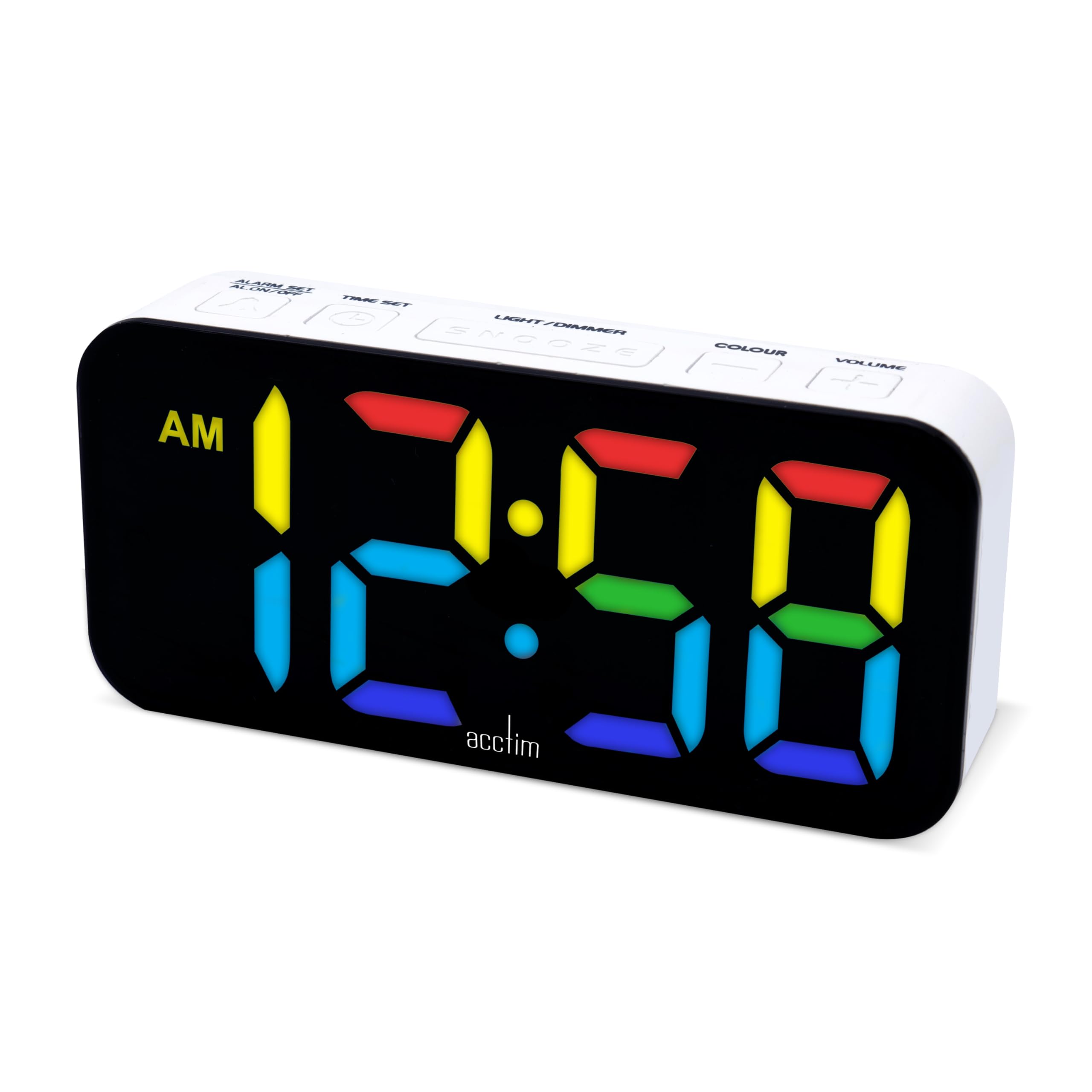
Pink Display

ブルーディスプレイ

Light Blue Display

グリーンディスプレイ

赤色表示

ホワイトディスプレイ

黄色の表示
ディスプレイの明るさを調整する
- を押す LIGHT / DIMMER button repeatedly to cycle through different brightness levels.
アラーム音量の調整
- を押す 音量 button repeatedly to cycle through different alarm volume levels.
Using the USB-C Charging Port
- The clock features an additional USB-C port (labeled "USB OUT") that can be used to charge other devices, such as smartphones or tablets.
- Connect your device's USB-C charging cable to this port. Ensure the alarm clock is powered via its main USB-C input.
メンテナンス
- クリーニング: 時計は柔らかく乾いた布で拭いてください。研磨剤入りの洗剤や溶剤は使用しないでください。
- ストレージ: 時計を長期間保管する場合は、液漏れを防ぐために単 4 電池を取り外してください。
トラブルシューティング
| 問題 | 考えられる原因 | 解決 |
|---|---|---|
| ディスプレイがオフまたは暗い。 | No power, power cable loose, brightness set too low. | Ensure USB-C power cable is securely connected. Check power adapter. Press LIGHT / DIMMER ボタンを押して明るさを上げます。 |
| アラームは鳴りません。 | Alarm is not activated, alarm volume is too low. | プレス アラームのオン/オフ to activate (check for alarm icon). Press 音量 アラームの音量を上げます。 |
| 電源を切った後の時刻が正しくないtage. | バックアップ電池はありません、または電池が消耗していません。 | バックアップ用に新しい単4電池を取り付けてください。時刻は手動でリセットしてください。 |
| USB-C charging port not working. | Clock not powered, cable issue, device incompatibility. | Ensure the clock is connected to main power. Try a different USB-C cable or device. |
仕様
| ブランド | アクティム |
| モデル番号 | 16512 (Jaxon) |
| 色 | 白 |
| 材料 | プラスチック |
| 製品寸法(長さ x 幅 x 高さ) | 9.1 x 3.81 x 5.6 cm |
| アイテム重量 | 112グラム |
| 表示タイプ | Digital LED (Color Changing) |
| 電源 | Electric Cord (USB-C) |
| バッテリー要件 | 3 x AAA batteries (for backup, not included) |
| 特集 | Charging Port, Backlight |
保証とサポート
Acctim products are designed for reliability and performance. Spare parts availability is indicated for 2 years from the date of purchase.
For any questions, technical support, or warranty claims, please contact your retailer or visit the official Acctim webカスタマーサービス情報のサイト。