
1. はじめに
The LexonElec M96 is a versatile wireless keyboard designed for various computing needs, offering multi-mode connectivity, a compact 94-key layout, and customizable RGB backlighting. This manual provides detailed instructions for setting up, operating, and maintaining your keyboard.

Image 1.1: LexonElec M96 Wireless Keyboard with its 2.4G USB receiver.
2. 箱の中身
- LexonElec M96 Wireless Keyboard
- USB-C - USB-A ケーブル
- 2.4Gワイヤレスレシーバー
- ユーザーマニュアル
3. セットアップと接続
The LexonElec M96 keyboard supports three connection modes: 2.4G wireless, Bluetooth, and wired USB-C.

画像3.1: 以上view 利用可能な 3 つの接続方法のうちの 1 つです。
3.1. 2.4Gワイヤレス接続
- Locate the 2.4G wireless receiver stored in the keyboard's bottom compartment.
- 2.4G ワイヤレス レシーバーをコンピューターの使用可能な USB-A ポートに接続します。
- 側面にある電源スイッチを使用してキーボードの電源をオンにします。
- The keyboard will automatically connect to your device. The display will indicate "2.4G".
3.2.Bluetooth接続
- 電源スイッチを使用してキーボードの電源をオンにします。
- を押す FN + W, FN + E、 または FN + R keys to select Bluetooth channels BT1, BT2, or BT3 respectively. The display will show the selected channel.
- For initial pairing, press and hold ESC + Q simultaneously until the keyboard enters pairing mode (indicated by a flashing light).
- On your device (PC, Mac, Android, etc.), go to Bluetooth settings and search for "LexonElec M96" or a similar device name.
- Select the keyboard to pair. Once connected, the display will show the active Bluetooth channel.
3.3.有線接続
- Connect the provided USB-C to USB-A cable to the keyboard's USB-C port and to a USB-A port on your computer.
- The keyboard will automatically switch to wired mode. The display will indicate "USB".
4. 操作手順
4.1. Multi-Function Display & Knob
The keyboard features a smart display and a multi-function knob for easy control.

Image 4.1: Close-up of the multi-function display and control knob.
- 情報を表示します。 Shows battery level, current connection mode (2.4G, BT1, BT2, BT3, USB), and charging status.
- Knob Function (Multimedia Mode):
- Turn left: Decrease volume.
- Turn right: Increase volume.
- 押す: オーディオをミュート/ミュート解除します。
- Knob Function (Backlight Mode): Press and hold the knob for 5 seconds to switch to backlight mode.
- Turn left: Decrease backlight brightness.
- Turn right: Increase backlight brightness.
- Press: Switch backlight effects.
4.2.キーの組み合わせ機能
活用する FN key in combination with other keys for additional functions:
- FN + F1-F12: Access multimedia controls (e.g., play/pause, volume, previous/next track).
- FN + 矢印キー: Adjust backlight speed and direction.
- FN + 挿入: 20 種類の RGB 照明効果を切り替えます。
- FN + 勝利: Windows キーをロック/ロック解除します。
5.バッテリーと充電
The keyboard is equipped with a built-in 3000 mAh rechargeable battery.
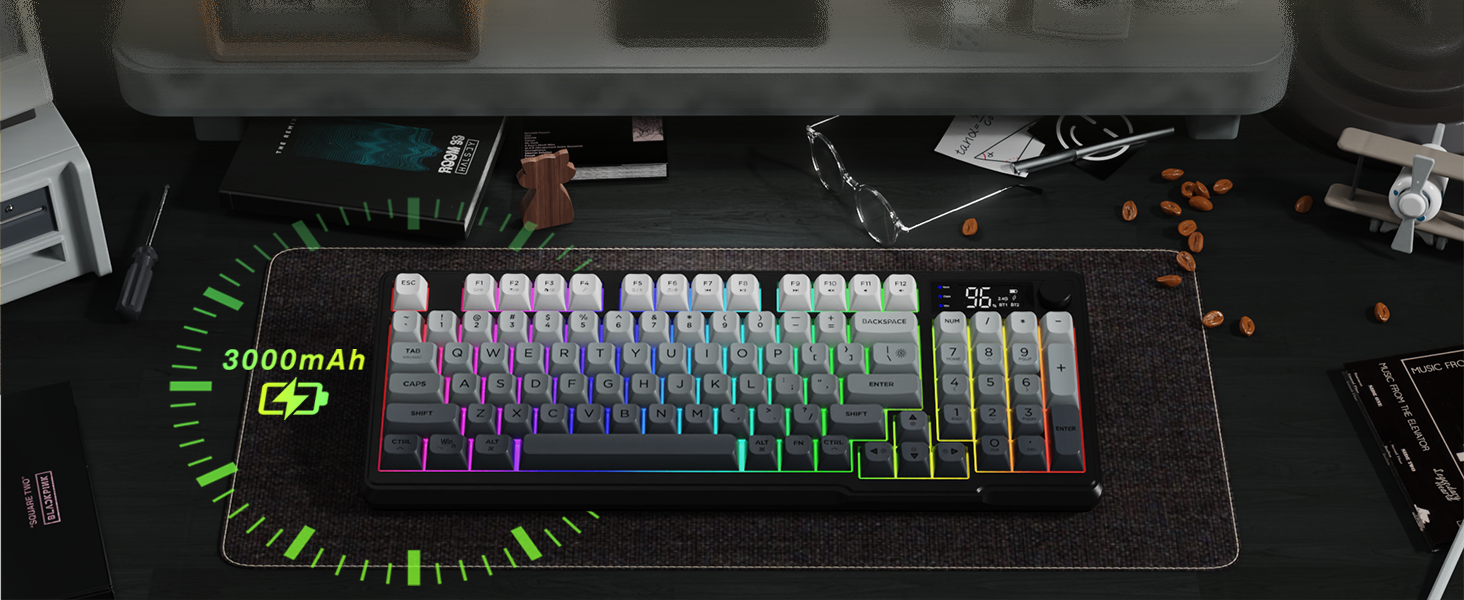
画像 5.1: バッテリー容量と推定使用時間。
- 使用時間: バックライトオンで約 60 時間、バックライトオフで最大 200 時間。
- 充電: Connect the keyboard using the USB-C cable to a 5V USB port on your computer or a compatible charger. The display will show the charging status.
- 低バッテリー警告: The display will indicate a low battery level when charging is required.
6. 人間工学に基づいたデザイン
The LexonElec M96 keyboard features an ergonomic design for enhanced comfort during extended use.

Image 6.1: Adjustable feet for customizing keyboard height.
- 調節可能な足: The keyboard includes 2-in-1 adjustable feet, allowing you to set the keyboard at three different heights for optimal typing posture.
- PBT キーキャップ: Durable PBT keycaps provide a comfortable and long-lasting typing experience.
7. 互換性
The LexonElec M96 keyboard is widely compatible with various operating systems and devices.

Image 7.1: Wide compatibility across different operating systems.
- サポートされているオペレーティングシステム: Windows Vista/7/8/10/11, macOS, Linux, Android.
- 対応デバイス: PCs, Laptops, Tablets, Smartphones (with Bluetooth).
8. メンテナンス
To ensure the longevity and optimal performance of your LexonElec M96 keyboard, follow these maintenance guidelines:
- クリーニング: キーボードの表面は、柔らかく乾いた布で拭いてください。よりしっかりとクリーニングするには、圧縮空気を使ってキーキャップ間の埃やゴミを取り除きます。刺激の強い化学薬品や研磨剤の使用は避けてください。
- 液体への暴露: Keep the keyboard away from liquids. In case of accidental spills, immediately disconnect the keyboard and allow it to dry completely before re-using.
- ストレージ: キーボードは、直射日光や極端な温度を避け、涼しく乾燥した場所に保管してください。
9。 トラブルシューティング
If you encounter any issues with your LexonElec M96 keyboard, refer to the following troubleshooting tips:
- キーボードが接続されない:
- キーボードの電源がオンになっていることを確認してください。
- For 2.4G, verify the receiver is securely plugged into a USB port.
- Bluetoothの場合は、キーボードがペアリングモードになっていることを確認してください(ESC + Q) and visible in your device's Bluetooth settings. Try re-pairing.
- For wired, ensure the USB-C cable is properly connected to both the keyboard and your device.
- バックライトが機能しない/調整できない:
- キーボードのバッテリーが十分に充電されていることを確認してください。
- Press and hold the knob for 5 seconds to enter backlight mode, then turn or press the knob to adjust brightness or switch effects.
- 使用 FN + arrow keys to adjust backlight speed/direction.
- キーが反応しない:
- 接続モードを確認してください。
- バッテリーが充電されていることを確認してください。
- コンピュータとキーボードを再起動します。
10. 仕様
| 特徴 | 詳細 |
|---|---|
| 製品寸法 | 15.75 x 6.5 x 1.77インチ |
| アイテム重量 | 1.74ポンド |
| メーカー | レクソンエレック |
| 商品型番 | M96 |
| 対応デバイス | Laptop, Linux, MAC, PC |
| 接続技術 | 2.4Gワイヤレス、Bluetooth、USB-C有線 |
| キーボードの説明 | Wireless Gaming Keyboard (Membrane Semi-Mechanical) |
| 特集 | 94 Keys PBT Keycap, Low-Profile Key, Rainbow Backlit, Smart Display, Volume Roller |
| キーボードバックライト | RGB |
| バッテリー容量 | 3000mAh |
11.保証とサポート
For warranty information or technical support, please refer to the documentation included in your product packaging or contact LexonElec customer service directly. Keep your proof of purchase for any warranty claims.