
導入
The DEWENWILS Wi-Fi Matter Smart Dimmer Plug (Model MRD01) is designed to provide intelligent control over your outdoor lighting. This device allows you to manage on/off functions, adjust brightness, and set schedules for various lighting setups, including string lights, landscape lighting, patio lights, and holiday decorations. It features Matter certification for broad compatibility with leading smart home platforms and is built for outdoor durability.
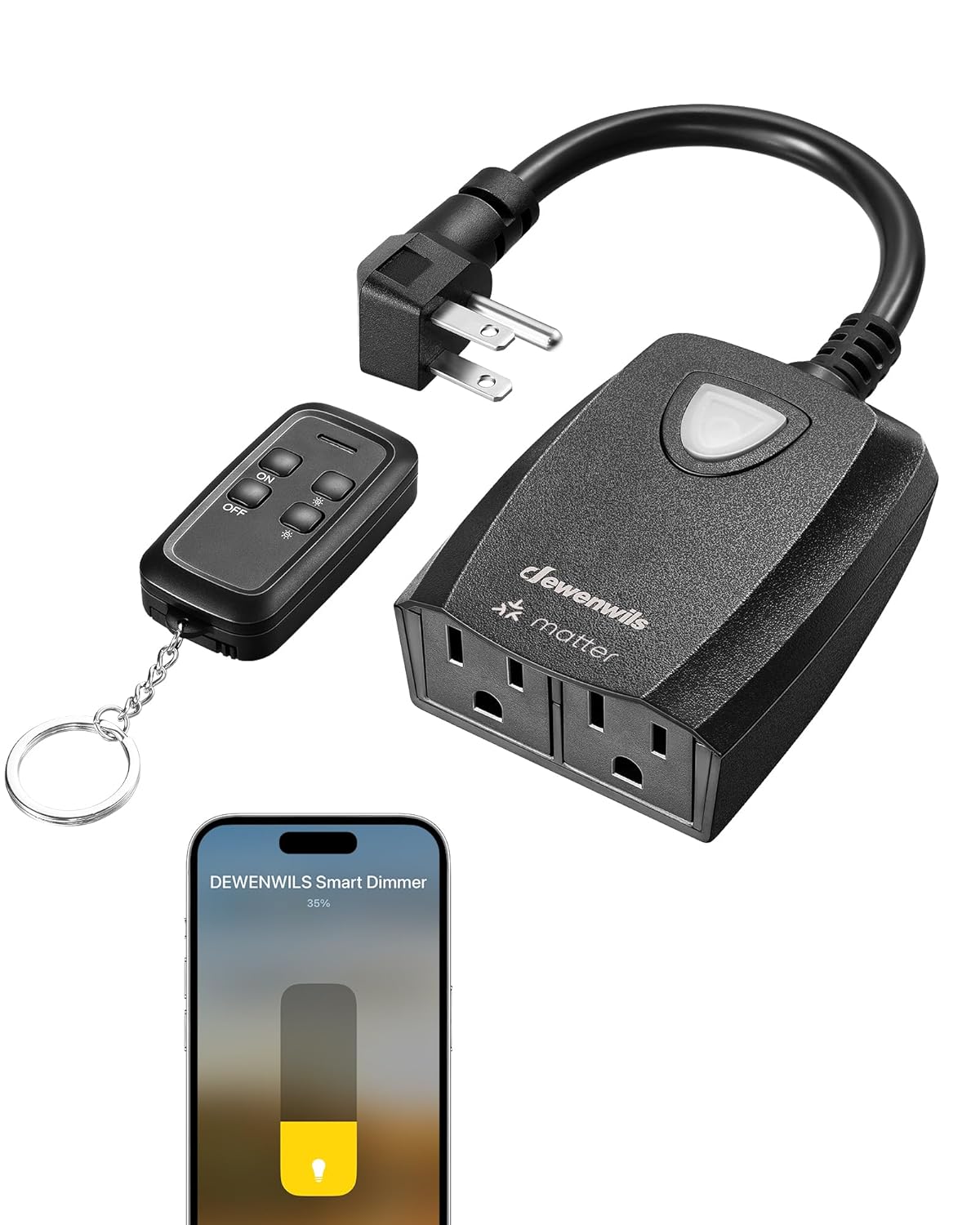
The DEWENWILS Smart Dimmer Plug, highlighting its features including smooth dimming, remote control, voice control, weatherproof design, scheduling, and group control.

The DEWENWILS outdoor dimmer plug seamlessly integrated with string lights in a backyard environment.
安全情報
本製品をご使用になる前に、すべての安全に関する指示をよくお読みになり、理解してください。指示に従わない場合、感電、火災、または重傷を負う可能性があります。
- デバイスを水に浸したり、過度の湿気にさらしたりしないでください。
- 総ワット数を確認するtage of connected devices does not exceed the maximum load capacity (200W for dimmable LED, 400W for tungsten).
- Only use with dimmable light bulbs. Non-dimmable bulbs may cause damage or malfunction.
- Keep children away from electrical devices.
- Do not disassemble or modify the device. Contact customer support for service.
- Ensure the device is securely plugged into a grounded outlet.
パッケージ内容
パッケージにすべてのアイテムが含まれていることを確認します。
- DEWENWILS Wi-Fi Matter Smart Dimmer Plug (Dimmer body)
- リモコン(特定のモデルに付属している場合)
- ユーザーマニュアル(このドキュメント)
仕様
| 特徴 | 詳細 |
|---|---|
| モデル | MR01 ... |
| 営業巻tage | 120ボルト |
| 現在の評価 | 2A |
| 最大ワットtage (Tungsten) | 400ワット |
| 最大ワットtage(調光可能なLED) | 200ワット |
| 接続プロトコル | Wi-Fi(2.4GHzのみ) |
| 制御方法 | リモコン、アプリ、音声 |
| 対応デバイス | Apple Home, Alexa, Google Home, SmartThings (Gateway Required) |
| 国際保護格付け | IP20 (Note: Product is designed for outdoor use, but ensure vertical downward placement for water resistance) |
| 動作温度 | -4°F ~ 113°F (-20°C ~ 45°C) |
| 商品の寸法 (長さ x 幅 x 高さ) | 5.56 x 3.93 x 1.55インチ |
| アウトレット | 2つの接地コンセント |

閉じる view of the dimmer plug's two grounded outlets and supported wattage for tungsten and dimmable LED bulbs.

Visual representation of the dimmer's compatibility with LED bulbs (Max 200W) and Tungsten bulbs (Max 400W).
設定
1. インストール前のチェックリスト
- Ensure your outdoor lights are 調光可能. This dimmer is not compatible with non-dimmable lights.
- Confirm your Wi-Fi network operates on the 2.4GHz帯このデバイスは5.0GHz Wi-Fiをサポートしていません。
- Have your Matter-compatible smart home hub or gateway ready (e.g., Apple HomePod, Amazon Echo, SmartThings Hub).
2. 物理的な設置
- Plug the DEWENWILS Smart Dimmer Plug into a grounded outdoor electrical outlet.
- Connect your dimmable outdoor lights to the outlets on the dimmer plug.
- For optimal weather resistance, ensure the dimmer is positioned vertically downward.
3. Matter Pairing with Smart Home Platforms
The DEWENWILS Smart Dimmer Plug is Matter-certified, allowing integration with various smart home ecosystems. A Matter-compatible gateway or hub is required for this process.
- Ensure your Matter gateway (e.g., Apple Home, Alexa, Google Home, SmartThings) is set up and connected to your 2.4GHz Wi-Fi network.
- Open your preferred smart home app (e.g., Apple Home app, Alexa app, Google Home app, SmartThings app).
- Follow the app's instructions to add a new Matter device. You may need to scan the QR code located on the dimmer plug or enter a pairing code.
- Once detected, follow the prompts to complete the pairing process. You can then assign the dimmer to a room and name it for easy control.

The Matter ecosystem, illustrating compatibility with Apple Home, Alexa, Google Home, and SmartThings (gateway required).

Visual guide to DEWENWILS Matter device compatibility with SmartThings, Apple Home, and Alexa devices.
操作手順
1.アプリ制御
Once paired with your smart home app, you can control the dimmer from your smartphone or tablet:
- オン/オフ: Tap the power icon in the app to turn connected lights on or off.
- 調光: スライダーまたはパーセントを使用するtage controls in the app to adjust brightness from 1% to 100%.
- スケジュール: Create custom schedules to automatically turn lights on/off or adjust brightness at specific times or based on sunrise/sunset.

Controlling outdoor string lights using the DEWENWILS Smart Dimmer app on a smartphone.

The smart dimming interface within the app, allowing precise brightness adjustments.

Example of scheduling: lights automatically turning on at 8 PM and off at 6 AM.

The app's scheduling interface, allowing users to set custom routines for their outdoor lighting.
2. リモートコントロール
Use the included remote control for convenient operation up to 100 feet away:
- オン/オフ: Press the 'ON' or 'OFF' button to toggle power.
- 調光: 「+」ボタンと「-」ボタンを使用して明るさを上げたり下げたりします。
- プリセットレベル: Some remotes may include buttons for preset dimming levels (e.g., 25%, 50%, 75%, 100%).

The remote control in use, demonstrating various dimming levels for string lights.

Remote dimming from a distance of up to 100 feet, providing flexible control.
3. 音声コントロール
Integrate with voice assistants like Alexa or Google Assistant for hands-free control:
- Ensure your smart dimmer is linked to your voice assistant account through the respective app.
- 次のようなコマンドを使用します。
- 「アレクサ、[デバイス名]をオンにして。」
- 「OK Google、[デバイス名] の明るさを 50% に下げて。」
- "Siri, set [device name] to full brightness."

A family using a smart speaker to control the brightness of their outdoor string lights via voice commands.

Voice control in action, demonstrating how to adjust light brightness using a smart speaker.
4.手動制御
The physical button on the dimmer plug can also be used for basic control:
- Press the button once to turn the connected lights on or off.
- Press and hold the button to cycle through brightness levels. Release when the desired brightness is reached.

詳細 view of the dimmer plug, highlighting the flat plug, ground outlets, switches/dimming button, and mounting hole.
メンテナンス
To ensure the longevity and optimal performance of your DEWENWILS Smart Dimmer Plug, follow these maintenance guidelines:
- クリーニング: Disconnect the dimmer from power before cleaning. Wipe the exterior with a soft, damp 布で拭いてください。強力な化学薬品や研磨剤入りの洗剤は使用しないでください。
- 天候保護: The dimmer is designed to be weatherproof (IP20 rated, suitable for outdoor use). For best performance and water resistance, always ensure the dimmer is installed with the outlets facing vertically downward. This prevents water accumulation.
- 検査: 電源コードとプラグに損傷がないか定期的に点検してください。損傷が見つかった場合は、使用を中止し、カスタマーサポートにご連絡ください。

The dimmer plug shown in a rainy outdoor setting, emphasizing its weatherproof design. Ensure vertical downward placement for optimal protection.

The durable weatherproof cover of the smart dimmer, designed to withstand various outdoor elements.
トラブルシューティング
If you encounter issues with your DEWENWILS Smart Dimmer Plug, refer to the following common problems and solutions:
- Device appears "Offline" in Google Home or other apps:
- Wi-Fiネットワークが2.4GHzであることを確認してください。デバイスは5.0GHzネットワークをサポートしていません。
- Verify the dimmer is within range of your Wi-Fi router and Matter gateway.
- Restart the dimmer by unplugging it for 10 seconds and plugging it back in.
- Check your router settings to ensure there are no restrictions for new devices.
- Lights are not dimming or flickering:
- Confirm that the connected light bulbs are explicitly labeled as 調光可能調光できない電球はこの調光器では正しく機能しません。
- 総ワット数を確認するtage of connected lights does not exceed the dimmer's maximum capacity (200W for LED, 400W for tungsten).
- Test with a different set of dimmable bulbs to rule out bulb compatibility issues.
- リモコンが動作しません:
- リモコンの電池を確認し、必要に応じて交換してください。
- Ensure you are within the 100-foot operating range of the dimmer.
- If the remote was not pre-paired, refer to the remote's specific pairing instructions (usually involves pressing and holding a button on the dimmer and remote simultaneously).
- Wi-Fiに接続できません:
- Wi-Fi ネットワークが 2.4GHz であることを確認します。
- Ensure your phone is connected to the 2.4GHz network during the setup process.
- Move the dimmer closer to your Wi-Fi router during initial setup.
- Temporarily disable 5GHz Wi-Fi on your router if you have a combined network, then re-enable after setup.
保証とサポート
DEWENWILS products are designed for reliability and performance. For warranty information, technical support, or any questions regarding your Smart Dimmer Plug, please contact DEWENWILS customer service through their official web製品を購入したサイトまたは小売店。
Please have your model number (MRD01) and purchase details ready when contacting support.