
1. はじめに
This manual provides detailed instructions for the operation and maintenance of your Generic XL-026N Electronic Stopwatch. Designed for precision timing, this device features a double-row display, 10-memory storage, and multiple functions including a clock, calendar, countdown timer, alarm, and metronome. Please read this manual thoroughly to ensure proper use and to maximize the lifespan of your stopwatch.
2.製品オーバーview
The XL-026N stopwatch is built with an ABS plastic shell, offering wear-resistant, drop-resistant, shock-resistant, and anti-skid properties. Its life waterproof design allows for use in various conditions, including light rain. The large screen display ensures numbers are clear and easy to read.
主な特徴:
- Double Row Display
- 10 メモリストレージ
- Clock and Calendar Display
- カウントダウンタイマー
- 4 Groups of Alarm Clocks
- メトロノーム機能
- 1/100 Second Timing Accuracy
- 3-Key Operation for simplicity
- Life Waterproof Design
- Durable ABS Plastic Shell
- Powered by 1 x CR2032 Button Battery
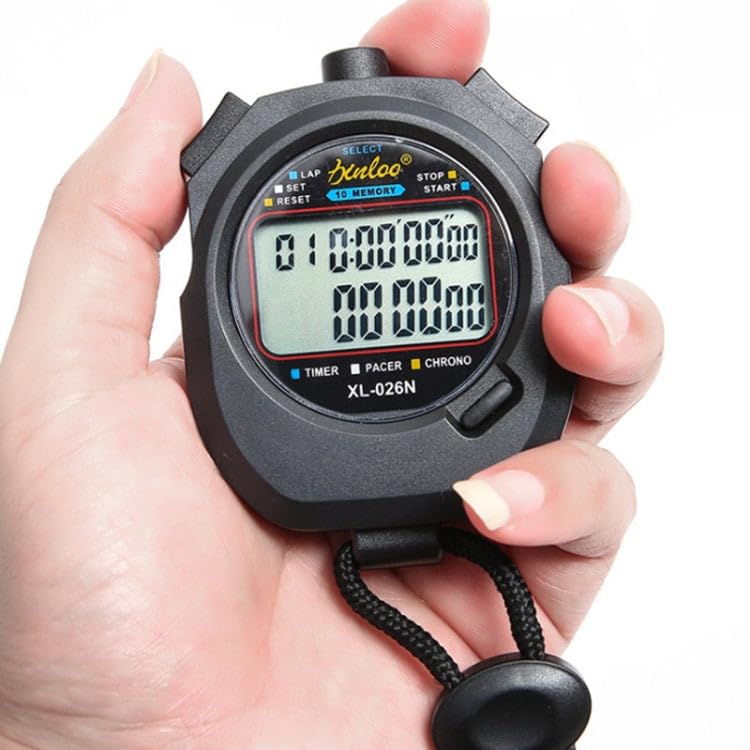
図2.1: 前面 view of the XL-026N Electronic Stopwatch, showing the display and main buttons. The stopwatch is held in a hand, illustrating its compact size.
3. セットアップ
3.1 バッテリーの取り付け
The XL-026N stopwatch is powered by one CR2032 button battery. The battery is typically pre-installed. If the display is dim or unresponsive, the battery may need replacement.
- ストップウォッチの背面にある電池ボックスを見つけます。
- Use a small screwdriver or coin to open the battery cover by turning it counter-clockwise.
- 古い CR2032 電池を取り外します。
- 新しい CR2032 電池をプラス (+) 側を上に向けて挿入します。
- 電池カバーを元に戻し、時計回りに回して固定します。
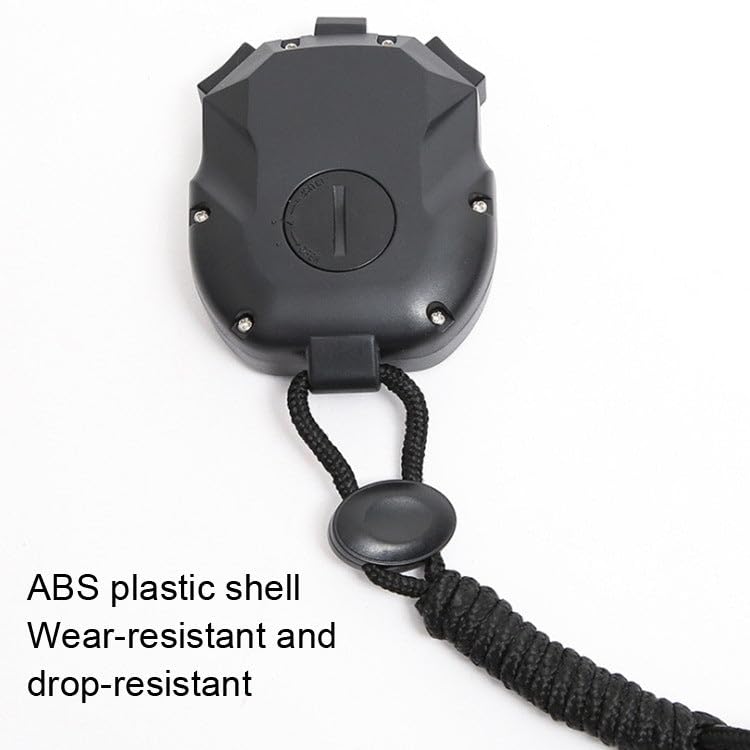
図3.1:背面 view of the XL-026N Electronic Stopwatch, indicating the battery compartment for CR2032 battery replacement.
3.2初期電源オン
Upon battery installation or first use, the stopwatch should automatically power on and display the current time or a default screen. If not, press any button to activate the display.
4. 操作手順
The XL-026N stopwatch features a simple 3-key operation. Familiarize yourself with the buttons:
- 選択: Used to switch between modes (Time, Stopwatch, Countdown, Alarm, Metronome) and to confirm settings.
- LAP/SET: Used to record lap times in stopwatch mode, and to enter/adjust settings in setup modes.
- START/STOP/RESET: Used to start, stop, and reset the timer functions.
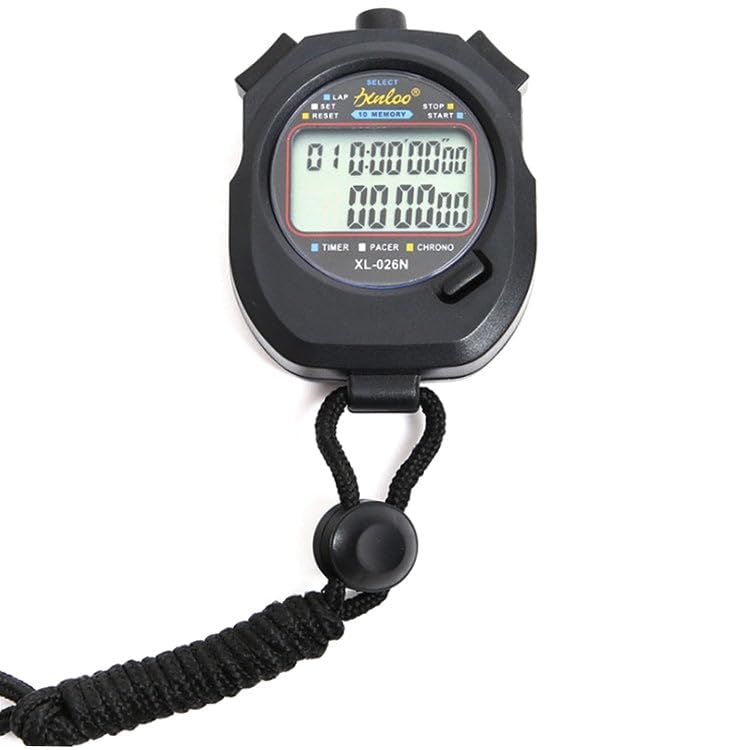
図4.1:詳細 view of the XL-026N stopwatch's front panel, highlighting the SELECT, LAP/SET, and START/STOP/RESET buttons.
4.1 Time and Calendar Display
In the default mode, the stopwatch displays the current time (hour, minute, second) and date (month, day, day of the week).
- From any mode, press the 選択 button repeatedly until the clock icon or "TIME" indicator is visible on the display.
- 日時を設定するには:
- 時間モードでは、長押しします LAP/SET until the digits begin to flash.
- プレス 選択 to cycle through hours, minutes, seconds, month, day, and year.
- 使用 スタート/ストップ/リセット 点滅値を調整します。
- すべての設定が正しければ、 LAP/SET もう一度押すと設定モードが終了します。
4.2 Stopwatch Function (1/100 Timing)
This mode is used for precise timing of events.
- プレス 選択 until the "CHRONO" or stopwatch icon appears.
- プレス スタート/ストップ/リセット タイマーを開始します。
- ラップタイムを記録するには、 LAP/SET. The lap time will be displayed on the upper row, while the running total time continues on the lower row.
- プレス LAP/SET 再び view the next lap time or return to the running display.
- To stop the timer, press スタート/ストップ/リセット.
- To reset the timer to zero, press LAP/SET while the timer is stopped.
4.3 10 Memory Storage
The stopwatch can store up to 10 lap/split times.
- After stopping the stopwatch (see 4.2), press LAP/SET to enter memory recall mode.
- 使用 選択 to scroll through the stored lap times. The memory number will be displayed.
- プレス LAP/SET もう一度押すと、メモリ呼び出しが終了します。
4.4カウントダウンタイマー
Set a specific time for the stopwatch to count down from.
- プレス 選択 until the "TIMER" or countdown icon appears.
- カウントダウン時間を設定するには、長押しします LAP/SET 数字が点滅するまで。
- 使用 選択 時間、分、秒の間を移動します。
- 使用 スタート/ストップ/リセット 点滅値を調整します。
- プレス LAP/SET to confirm the setting and exit.
- プレス スタート/ストップ/リセット カウントダウンを開始します。
- プレス スタート/ストップ/リセット もう一度押すと一時停止/再開します。
- カウントダウンがゼロになるとアラームが鳴ります。アラームを止めるには、いずれかのボタンを押してください。
4.5 Alarm Clocks (4 Groups)
The stopwatch supports setting up to 4 independent alarms.
- プレス 選択 until the "ALARM" icon appears. Repeated presses of 選択 in this mode will cycle through AL1, AL2, AL3, AL4.
- アラームを設定するには、希望するアラーム(例:AL1)を選択し、長押しします。 LAP/SET 時間の数字が点滅するまで。
- 使用 選択 時間と分を切り替えます。
- 使用 スタート/ストップ/リセット 点滅値を調整します。
- プレス LAP/SET アラーム時間を確認します。
- To turn an alarm ON/OFF, in the alarm display mode, press スタート/ストップ/リセットアラームアイコンが表示されたり消えたりして、そのステータスを示します。
- When an alarm sounds, press any button to silence it.
4.6 メトロノーム機能
The metronome provides a rhythmic beat for training or pacing.
- プレス 選択 until the "PACER" or metronome icon appears.
- To set the beat per minute (BPM), press and hold LAP/SET until the BPM value flashes.
- 使用 スタート/ストップ/リセット BPMを調整します。
- プレス LAP/SET BPMを確認します。
- プレス スタート/ストップ/リセット メトロノームを開始します。
- プレス スタート/ストップ/リセット もう一度押すとメトロノームが停止します。
5. メンテナンス
5.1 クリーニング
ストップウォッチは柔らかく乾いた布で拭いてください。頑固な汚れには、軽く湿らせた布で拭いてください。amp cloth can be used. Avoid using harsh chemicals, abrasive cleaners, or solvents, as these can damage the casing またはディスプレイ。
5.2 耐水性
The XL-026N features a life waterproof design, meaning it is resistant to splashes and light rain. It is ない suitable for swimming, showering, or submersion in water. Do not press buttons while the stopwatch is wet to prevent water ingress.
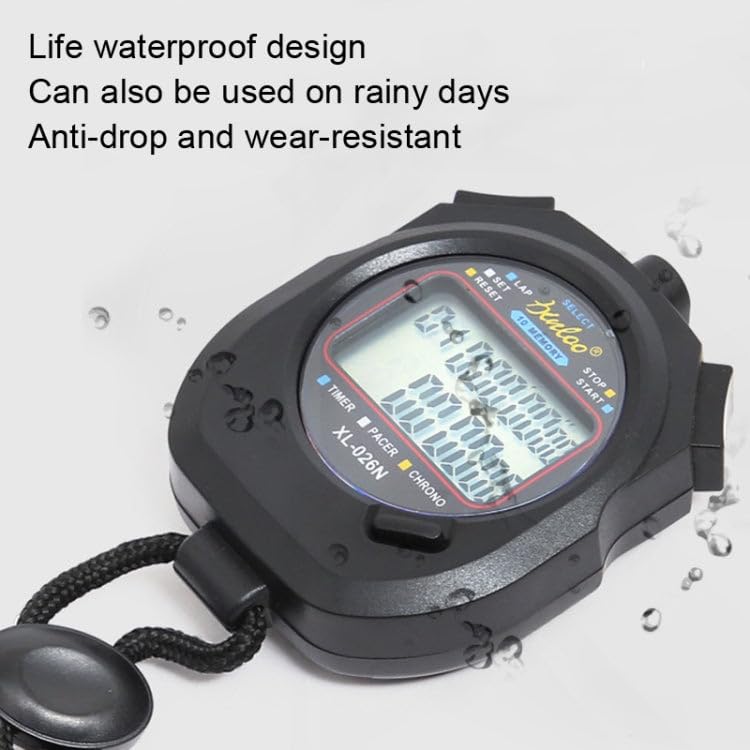
Figure 5.1: The XL-026N stopwatch demonstrating its life waterproof capability with water droplets on its surface.
5.3 電池の交換
Refer to Section 3.1 for instructions on replacing the CR2032 button battery. Ensure the battery is disposed of properly according to local regulations.
6。 トラブルシューティング
| 問題 | 考えられる原因 | 解決 |
|---|---|---|
| ディスプレイが空白または暗い。 | バッテリー残量が少ないか切れています。 | CR2032電池を交換してください(セクション3.1を参照)。 |
| ボタンが反応しません。 | Temporary software glitch or moisture. | Remove and reinsert the battery to perform a soft reset. Ensure the stopwatch is dry. |
| 時刻/日付が正しくありません。 | 時刻/日付が正しく設定されていません。 | Refer to Section 4.1 to set the time and calendar. |
| Stopwatch not timing accurately. | Rarely a defect; usually user error. | Ensure you are in the correct mode and operating the buttons as described in Section 4.2. |
7. 仕様
- モデル: XL-026N
- 機能: Stopwatch (1/100s), Lap/Split Memory (10), Clock, Calendar, Countdown Timer, 4 Alarms, Metronome
- 画面: Double Row, Large Screen
- 材料: ABSプラスチック
- 電源: CR2032ボタン電池1個
- 寸法(約): 7.9 cm x 6.2 cm x 2 cm (長さ x 幅 x 高さ)
- 重量(約): 85グラム
- 耐水性: Life Waterproof (splash/rain resistant, not submersible)
8. 保証とサポート
This product is manufactured by Generic. For any queries or support, please refer to your retailer or the point of purchase. Please retain your proof of purchase for any warranty claims. Specific warranty terms may vary by region and retailer.
For general inquiries, please contact the seller directly as indicated on your purchase platform.