
導入
Thank you for choosing the NOVOO 12-in-1 USB-C Docking Station. This manual provides essential information for setting up, operating, and maintaining your device. This docking station is designed to expand the connectivity of your USB-C enabled laptop, offering multiple ports for displays, data transfer, and power delivery.
製品終了view
The NOVOO 12-in-1 USB-C Docking Station is a versatile hub that provides extensive connectivity options through a single USB-C connection to your host device. It features a comprehensive array of ports to enhance your productivity and expand your workspace.

Image: NOVOO 12-in-1 USB-C Docking Station showing all available ports and their functions.
主な特徴:
- 12-in-1接続: Includes 2 x 4K HDMI, 1 x VGA, 3 x USB-A 3.0 (5Gbps), 1 x USB-C 3.0 Data, 2 x USB-A 2.0, 1 x SD Card Reader, 1 x TF Card Reader, and 1 x 100W Power Delivery (PD) charging port.
- トリプルディスプレイサポート: Connect up to three external displays. Windows supports Extend Mode (4K@30Hz + 1080P with two monitors; 1080P@60Hz with three monitors). macOS supports Mirror Mode only. HDMI 1 supports up to 4K@60Hz when used alone. Requires a DP1.4 laptop and monitor for optimal performance.
- 高速データ転送: USB-A 3.0 and USB-C 3.0 ports offer 5Gbps data transfer. USB-A 2.0 ports provide 480Mbps.
- 100W電力供給: The PD port supports up to 100W input for stable power supply and up to 85W USB-C output for fast charging compatible laptops and devices. Note: The PD charging port is compatible only with devices that support the PD protocol.
- SD / TFカードリーダー: 簡単にアクセス files from SD and Micro SD cards with simultaneous reading support.
- ポータブルデザイン: Compact and lightweight with a 30cm (11.8 inches) extension cable for flexible use, ideal for travel and various workspaces.
設定
NOVOO 12-in-1 USB-C ドッキング ステーションをセットアップするには、次の手順に従ってください。
- ラップトップの互換性を確認する: Ensure your laptop's USB-C port supports Data, Power Delivery, and DisplayPort Alt Mode for full functionality. Refer to the diagram below for port capabilities.
- ラップトップに接続: ドッキング ステーションの統合 USB-C ケーブルを、ノートパソコンの使用可能な USB-C ポートに接続します。
- 電源を接続する(オプションですが推奨): For best performance and to charge your laptop, connect your laptop's power adapter (65W+ recommended) to the 100W PD USB-C input port on the docking station.
- 外部ディスプレイを接続する: Use HDMI or VGA cables to connect your monitors to the corresponding ports on the docking station.
- 周辺機器を接続します。 Plug in your USB devices (keyboard, mouse, external drives, etc.) into the available USB-A or USB-C data ports. Insert SD or TF cards into the card reader slots as needed.

Image: USB-C port compatibility guide for various functions including data, power delivery, and display output.
セットアップ ビデオ:
Video: Official NOVOO video demonstrating the setup and features of the 12-in-1 USB-C Docking Station.
操作手順
ディスプレイ構成:
The docking station supports various display configurations depending on your operating system and laptop's DisplayPort (DP) version.

画像: Example of a multi-screen display setup using the docking station.
- Windows システム: Supports both Mirror Mode (duplicate displays) and Extend Mode (separate displays). You can achieve up to three extended displays.
- macOS システム: Supports Mirror Mode (duplicate displays) across all external monitors. Extend Mode is not supported for multiple external displays; all external displays will mirror each other.
Windows Display Resolution:
| インターフェイスプロトコル | モード | HDMI1 | HDMI2 | アナログ |
|---|---|---|---|---|
| DP1.4 | シングルディスプレイ | 4K@60Hz | 4K@30Hz | 1080P @ 60Hz |
| デュアルディスプレイ | 4K@30Hz | 1080P @ 60Hz | - | |
| トリプル表示 | 1080P @ 60Hz | 1080P @ 60Hz | 1080P @ 60Hz | |
| DP1.2 | シングルディスプレイ | 4K@30Hz | 4K@30Hz | 1080P @ 60Hz |
| デュアルディスプレイ | 1080P @ 60Hz | - | 1080P @ 60Hz | |
| トリプル表示 | 1080P @ 60Hz | 1080P @ 60Hz | 640*480@30Hz |
macOS Display Resolution:
| インターフェイスプロトコル | モード | HDMI1 | HDMI2 | アナログ |
|---|---|---|---|---|
| DP1.4 | シングルディスプレイ | 4K@60Hz | 4K@30Hz | 1080P @ 60Hz |
| デュアルディスプレイ | 4K@30Hz | - | 1080P @ 60Hz | |
| トリプル表示 | 1080P @ 60Hz | 1080P @ 60Hz | 1080P @ 60Hz | |
| DP1.2 | シングルディスプレイ | 4K@30Hz | 4K@30Hz | 1080P @ 60Hz |
| デュアルディスプレイ | 4K@30Hz | - | 1080P @ 60Hz | |
| トリプル表示 | 1080P @ 60Hz | 1080P @ 60Hz | 640*480@30Hz |
電力供給(PD)充電:
The dedicated USB-C PD port allows you to charge your laptop while using the docking station. Connect your laptop's original power adapter (or a compatible 65W+ USB-C PD charger) to this port. The docking station will pass through up to 85W of power to your laptop, reserving 15W for its own operation.

Image: Diagram illustrating 100W PD input and 85W output for laptop charging.
Data Transfer and Card Reader:
Utilize the USB-A 3.0, USB-C 3.0, and USB-A 2.0 ports for connecting various peripherals and transferring data. The SD and TF card slots enable quick access to memory card content.
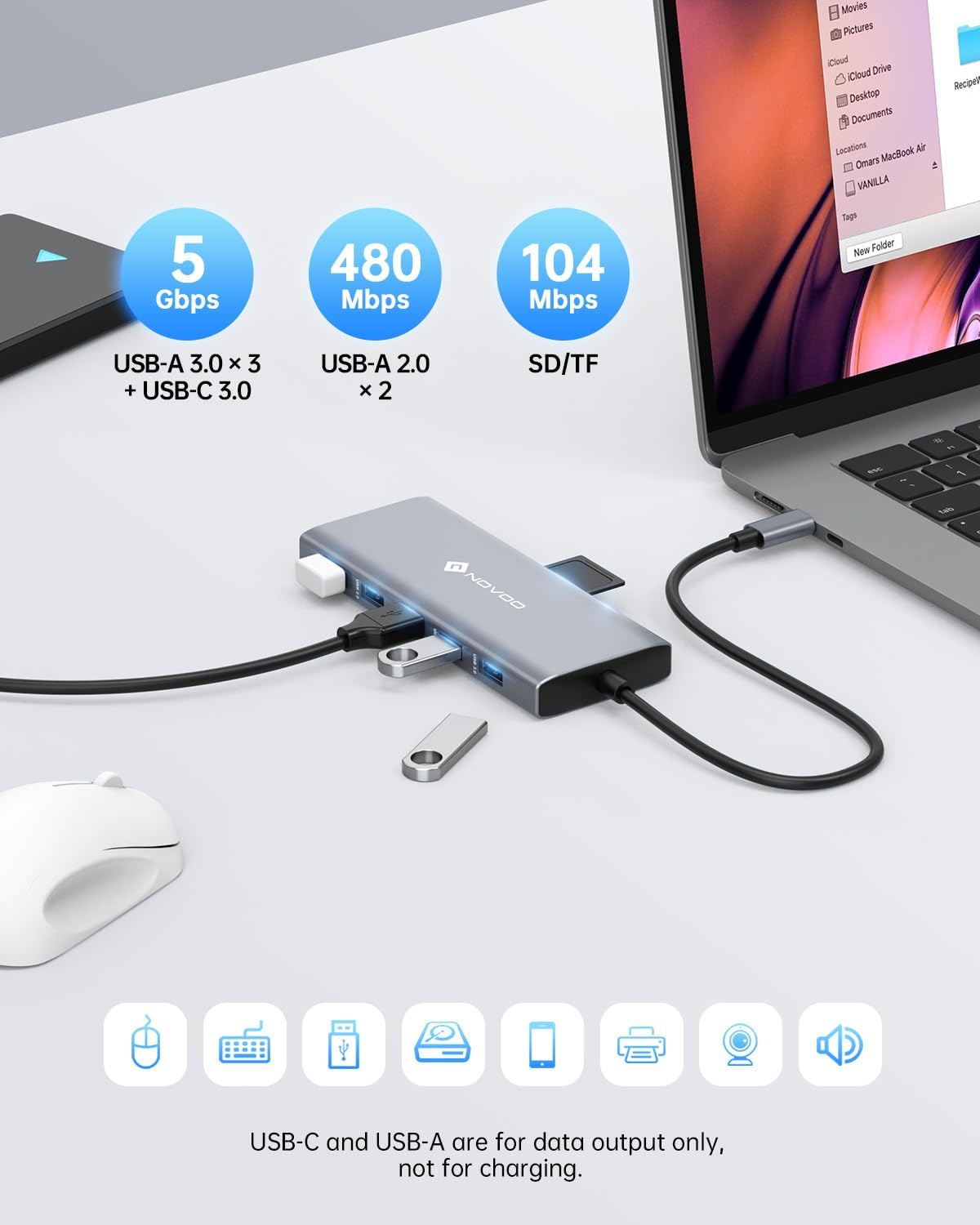
Image: High-speed data transfer capabilities with USB 3.0 and SD/TF card reader.
仕様
| 特徴 | 詳細 |
|---|---|
| 製品寸法 | 1.85 x 0.57 x 5.16インチ |
| アイテム重量 | 4.6オンス |
| モデル番号 | NHM12S-MH12 |
| ブランド | ノヴォー |
| 色 | グレー |
| ハードウェアインターフェイス | USBタイプC |
| 特集 | 急速充電、ポータブル |
| 対応デバイス | MacBook Pro, Dell, HP, Surface (any USB-C laptop supporting DP Alt Mode and PD) |
トラブルシューティング
- ディスプレイ出力なし:
- ノートパソコンの USB-C ポートが DisplayPort Alt モードをサポートしていることを確認します。
- Check all cable connections (USB-C to laptop, HDMI/VGA to monitors).
- Verify monitor input settings are correct (e.g., HDMI 1, HDMI 2, VGA).
- For Windows, check display settings (Display Settings > Multiple Displays) to detect and configure monitors.
- For macOS, remember only Mirror Mode is supported for multiple external displays.
- データ転送が遅い:
- Ensure you are using USB 3.0 ports for high-speed devices. USB 2.0 ports offer slower speeds.
- The performance of the connected device (e.g., external hard drive) can also affect transfer speeds.
- ノートパソコンが充電されない:
- Confirm your laptop supports Power Delivery (PD) via its USB-C port.
- Ensure your power adapter is connected to the docking station's PD port and is 65W or higher.
- 電源アダプター自体が正しく機能しているかどうかを確認します。
- 断続的な接続:
- すべてのケーブルがしっかりと接続されていることを確認してください。
- Avoid excessive bending or strain on the docking station's integrated USB-C cable.
- Try connecting the docking station to a different USB-C port on your laptop if available.
メンテナンス
To ensure the longevity and optimal performance of your NOVOO 12-in-1 USB-C Docking Station, follow these maintenance guidelines:
- クリーニング: Use a soft, dry cloth to wipe the surface of the docking station. Avoid using liquid cleaners or abrasive materials, which can damage the finish or internal components.
- ストレージ: 使用していないときは、ドッキング ステーションを直射日光や極端な温度を避け、涼しく乾燥した場所に保管してください。
- 取り扱い: Avoid dropping or subjecting the device to strong impacts. Do not pull on the integrated USB-C cable forcefully.
- 換気: Ensure the docking station has adequate airflow to prevent overheating, especially during prolonged use with multiple connected devices and displays.
保証とサポート
NOVOO products are designed for reliability and performance. For warranty information, technical support, or any inquiries regarding your 12-in-1 USB-C Docking Station, please refer to the official NOVOO web公式サイトをご覧いただくか、カスタマーサービスに直接お問い合わせください。保証請求のために購入時のレシートを保管してください。
メーカー: ノヴォー