
1. はじめに
This manual provides detailed instructions for the safe and efficient use of your Techkey MFi Certified 3-in-1 USB 3.0 Flash Drive. Please read this manual thoroughly before using the device to ensure optimal performance and to prevent damage.
The Techkey flash drive is designed for convenient data transfer and storage across various devices, including iPhones, iPads, Android phones, and personal computers. Its multi-interface design and MFi certification ensure broad compatibility and reliable performance.
2 製品の特徴
- MFi認定: Ensures compatibility and reliable performance with Apple devices.
- 3-in-1 Interface Design: Equipped with USB, Lightning, and Type-C connectors for universal compatibility.
- 高速USB 3.0: Offers fast read and write speeds for efficient data transfer.
- 256GBのストレージ容量: 提供する ample space for photos, videos, documents, and other files.
- データ暗号化: Supports Touch ID/Passcode encryption for enhanced data security.
- 耐久性のある構造: Made from high-quality metal with dustproof, drop-proof, and anti-magnetic properties.
- コンパクトで持ち運びに便利: Lightweight design with a keychain for easy carrying.
- 自動ストレージ: In-app camera captures automatically save to the drive.
- On-the-Go Playback: Directly play stored movies and music from the drive.
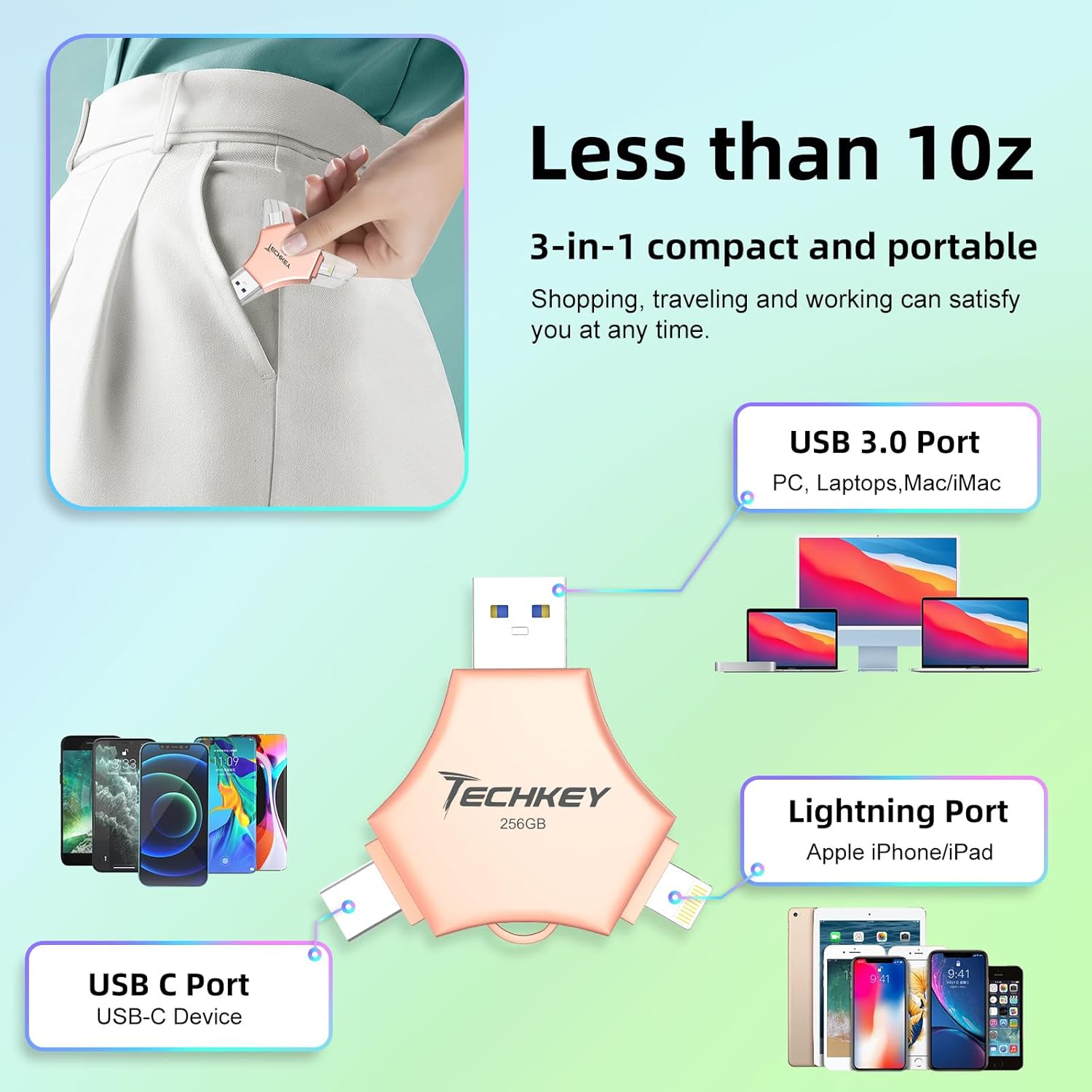
Image: The Techkey 3-in-1 USB Flash Drive showing its USB 3.0, Lightning, and USB-C ports, highlighting its compact and portable design.

Image: A diagram illustrating the three distinct connectors: Lightning for iPhone/iPad, Type-C for iPhone/iPad/Android, and USB for PC.

Image: An illustration of a high-tech chip, symbolizing the advanced technology and MFi certification integrated into the flash drive.

Image: Certificates of authority, indicating the product's compliance with industry standards and quality assurance.
3. パッケージ内容
パッケージにすべてのアイテムが含まれていることを確認します。
- Techkey MFi Certified 3-in-1 USB 3.0 Flash Drive (256GB)
- Protective Caps (may include extra)
- Keychain/Lanyard
- ユーザーマニュアル(このドキュメント)
4. セットアップ
4.1. 初期接続
The Techkey flash drive features three types of connectors: USB, Lightning, and Type-C. Select the appropriate connector for your device.
- iOSデバイス(iPhone/iPad)の場合: Insert the Lightning connector into your device's Lightning port.
- Androidデバイスの場合: Insert the Type-C connector into your device's USB-C port. Ensure your Android device supports OTG (On-The-Go) functionality.
- PC/Macの場合: USB コネクタをコンピューターの使用可能な USB ポートに挿入します。
4.2. App Installation (iOS Devices Only)
For iOS devices (iPhone/iPad), the "U-Disk" application is required for full functionality. When you connect the flash drive to an iOS device for the first time, a prompt to download the "U-Disk" app from the App Store should appear. Follow the on-screen instructions to install it.
- If the prompt does not appear, manually search for "U-Disk" in the Apple App Store and install it.
- Android and PC devices do not require a dedicated app for basic file 管理。
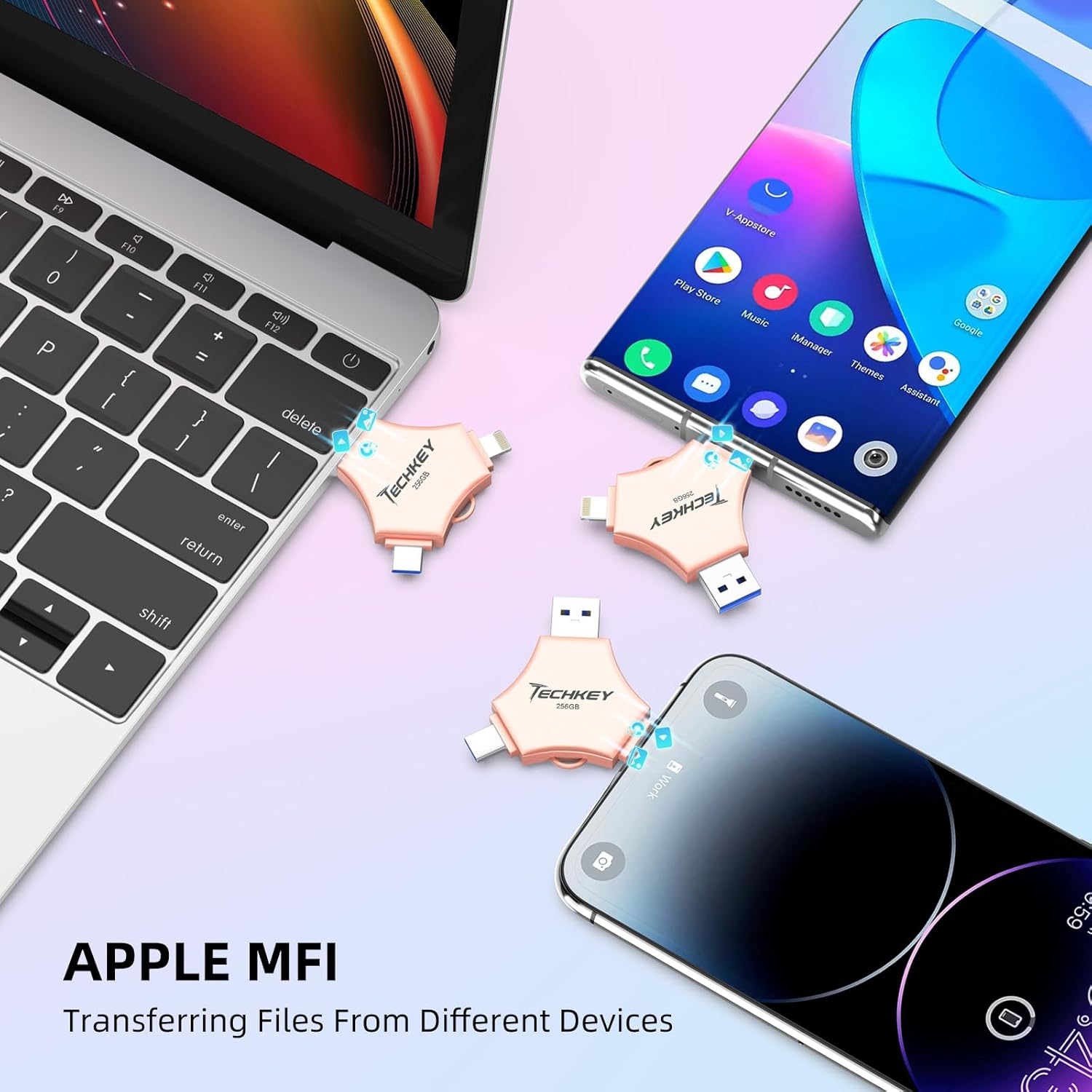
Image: The Techkey flash drive connected to an iPhone and iPad, illustrating its MFi compatibility and ease of use with Apple devices.
5. 操作手順
5.1. データ転送
The flash drive supports high-speed data transfer. Actual speeds may vary based on device, file size, and system conditions.
- For iOS Devices (via U-Disk App):
- Connect the flash drive to your iPhone/iPad.
- Open the "U-Disk" app.
- 目的の場所に移動します files on your device or within the app.
- 選択 files and use the app's functions to copy or move them to the flash drive.
- To transfer from the flash drive to your device, select files on the drive and use the app's functions to copy them to your device.
- Androidデバイスの場合:
- Connect the flash drive to your Android device.
- Access the flash drive through your device's file マネージャー(例:「Files," "My Files")。
- コピーまたは移動 files between your device's internal storage/SD card and the flash drive.
- PC/Macの場合:
- Connect the flash drive to your computer's USB port.
- The drive will appear as a removable storage device (e.g., "USB Drive," "NO NAME").
- ドラッグアンドドロップ files between your computer and the flash drive, or use copy/paste functions.
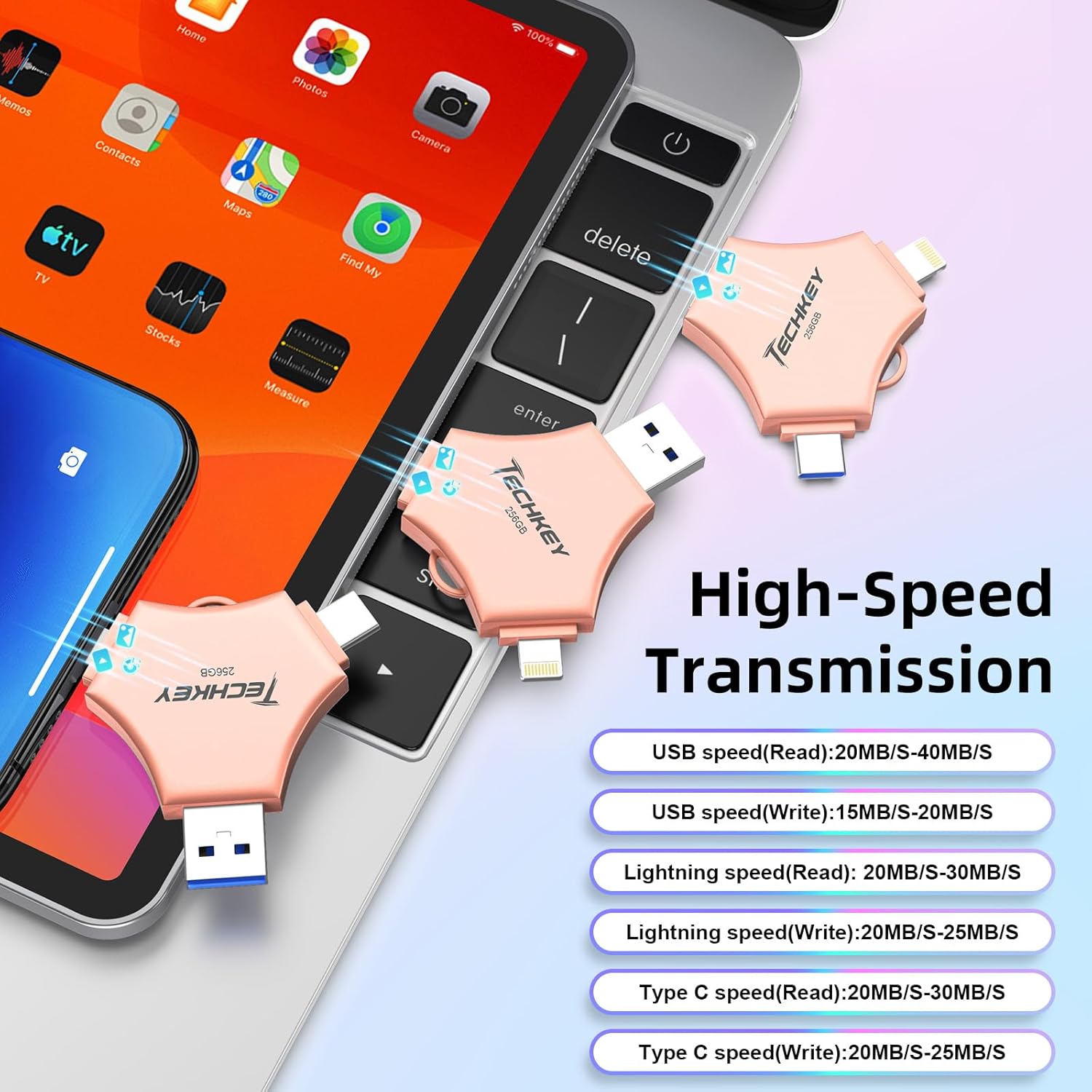
Image: A graphic detailing the high-speed transmission rates for the USB (Read: 20-40MB/s, Write: 15-20MB/s), Lightning (Read: 20-30MB/s, Write: 20-25MB/s), and Type-C (Read: 20-30MB/s, Write: 20-25MB/s) interfaces.
5.2. One-Click Backup (iOS Devices Only)
The "U-Disk" app allows for one-click backup of photos, videos, and contacts from your iOS device to the flash drive.
- Connect the flash drive and open the "U-Disk" app.
- Locate the "One-Click Backup" or similar function within the app.
- Follow the prompts to back up your selected data. This process copies files to the drive, freeing up space on your device. Remember to manually delete files from your device after confirming they are safely backed up on the flash drive.
5.3. データ暗号化
To protect your sensitive data, the "U-Disk" app (for iOS) offers encryption features.
- Open the "U-Disk" app with the flash drive connected.
- Navigate to the security or settings section within the app.
- You can choose to enable Touch ID/Passcode to encrypt the entire flash drive or select specific files for encryption.
- Follow the on-screen instructions to set up and manage your encryption preferences.
5.4. On-the-Go Playback
You can directly play media files stored on the flash drive without transferring them to your device's internal storage.
- Store your favorite movies, music, or documents on the flash drive.
- Connect the drive to your device (using the "U-Disk" app for iOS).
- 閲覧する files on the flash drive through the app or file マネージャー。
- メディアを選択 file 直接再生します。

Image: A visual representation of the flash drive supporting various file formats, including MP4, MOV, RM, RMVB for videos; MP3, AIF, WAV, WMA, AAC for music; BMP, JPG, GIF, ICO, TIFF, PNG for pictures; and PDF, WORD, EXCEL, PPT, HTML, TXT for office documents.
6. メンテナンス
- 適切な取り扱い: Always hold the flash drive by its body, not by the connectors.
- コネクタの保護: Use the provided protective caps to cover the connectors when not in use to prevent dust and damage.
- 安全な取り外し Always safely eject the flash drive from your computer (PC/Mac) before physically removing it to prevent data corruption. For mobile devices, ensure no data transfer is active before disconnecting.
- クリーニング: Use a soft, dry cloth to clean the exterior of the drive. Avoid liquid cleaners or abrasive materials.
- ストレージ: Store the flash drive in a cool, dry place away from extreme temperatures, direct sunlight, and strong magnetic fields.
7。 トラブルシューティング
7.1. デバイスが認識されない
- 接続を確認してください: Ensure the flash drive is fully and correctly inserted into the port.
- 別のポート/デバイスを試す: Test the flash drive on a different USB port, or a different compatible device (e.g., another computer, phone) to determine if the issue is with the drive or the port.
- デバイスを再起動します: Sometimes, restarting your phone or computer can resolve connection issues.
- iOSアプリ: For iOS devices, confirm the "U-Disk" app is installed and updated.
- Android OTG: For Android, verify your device supports OTG and that OTG functionality is enabled in settings if required.
7.2. 転送速度が遅い
- USBポートタイプ: Ensure you are using a USB 3.0 port on your computer for optimal speeds. Connecting to a USB 2.0 port will result in slower transfer rates.
- File サイズ/タイプ: 多くの小さな file単一の大きなデータを転送するよりも遅くなる場合があります file 合計サイズは同じです。
- デバイスのパフォーマンス: The speed of your host device (phone, computer) can affect transfer rates.
- バックグラウンドプロセス: Close unnecessary applications on your device during transfer.
7.3. Data Corruption/Loss
- 安全な排出: Always safely eject the drive from computers. Avoid disconnecting during active data transfer.
- 電力変動: Ensure stable power supply to your computer during transfers.
- 物理的ダメージ: Inspect the drive for any visible physical damage.
7.4. App Issues (U-Disk)
- アプリを更新: Ensure the "U-Disk" app is updated to the latest version.
- アプリを再インストールする: 問題が解決しない場合は、アプリをアンインストールして再インストールしてみてください。
- iOSバージョン: iOS デバイスが iOS 12.1 以上を実行していることを確認してください。
8. 仕様
| ブランド | テックキー |
| モデル番号 | 641837950528 |
| メモリストレージ容量 | 256ギガバイト |
| 接続技術 | USB, Lightning, USB Type C |
| 読み取り速度 | 最大40MB/秒 |
| 書き込み速度 | 最大80MB/秒 |
| 製品寸法(長さx幅x高さ) | 5.43 x 3.94 x 0.04インチ |
| アイテム重量 | 2.39オンス |
| 特集 | Wear Resistant, MFi Certified, Data Encryption |
| 互換性のあるオペレーティングシステム | iOS 12.1 and above, OTG Android, Windows 7 and above, macOS 10.6 and above |
9. 保証とサポート
This Techkey product comes with a standard manufacturer's warranty. Please refer to the packaging or the official Techkey web具体的な保証条件については、サイトをご覧ください。
For technical support, troubleshooting assistance, or warranty claims, please contact Techkey customer service through their official channels. Contact information can typically be found on the product packaging or the manufacturer's webサイト。
注意: 保証のために購入証明として購入レシートを保管してください。