
導入
Thank you for choosing the Micool Mini Sleep Earbuds Wireless. These earbuds are designed for ultimate comfort and discretion, especially for sensitive sleepers. Featuring IPX5 waterproofing, Bluetooth 5.3 connectivity, and a lightweight, invisible design, they provide a peaceful audio experience for relaxation, sleep, or discreet listening.

Image: Micool Mini Sleep Earbuds in their charging case.
パッケージ内容
- Micool Mini Sleep Earbuds (Left and Right)
- 充電ケース
- USB-C充電ケーブル
- ユーザーマニュアル
設定
1. 初期充電
- 両方のイヤフォンを充電ケースに入れます。
- Connect the USB-C charging cable to the port on the charging case and to a power source.
- 充電ケースのデジタルディスプレイにバッテリー残量が表示されますtage. 初めて使用する前に、イヤホンが完全に充電されていることを確認してください。
2.Bluetoothペアリング
- 充電ケースを開けると、イヤホンは自動的にペアリングモードになります。
- On your device (e.g., smartphone, tablet, laptop), enable Bluetooth.
- 検索する available Bluetooth devices and select "Micool Q26" (or similar name) from the list.
- 接続すると音声プロンプトが聞こえ、イヤホンが使用できるようになります。
操作手順
イヤホンの装着
The Micool Mini Sleep Earbuds are designed to fit snugly and discreetly within your ear, making them ideal for side sleepers. Gently insert each earbud into your ear canal until it feels secure and comfortable. The soft silicone ear tips adapt to your ear shape, minimizing pressure for extended wear.
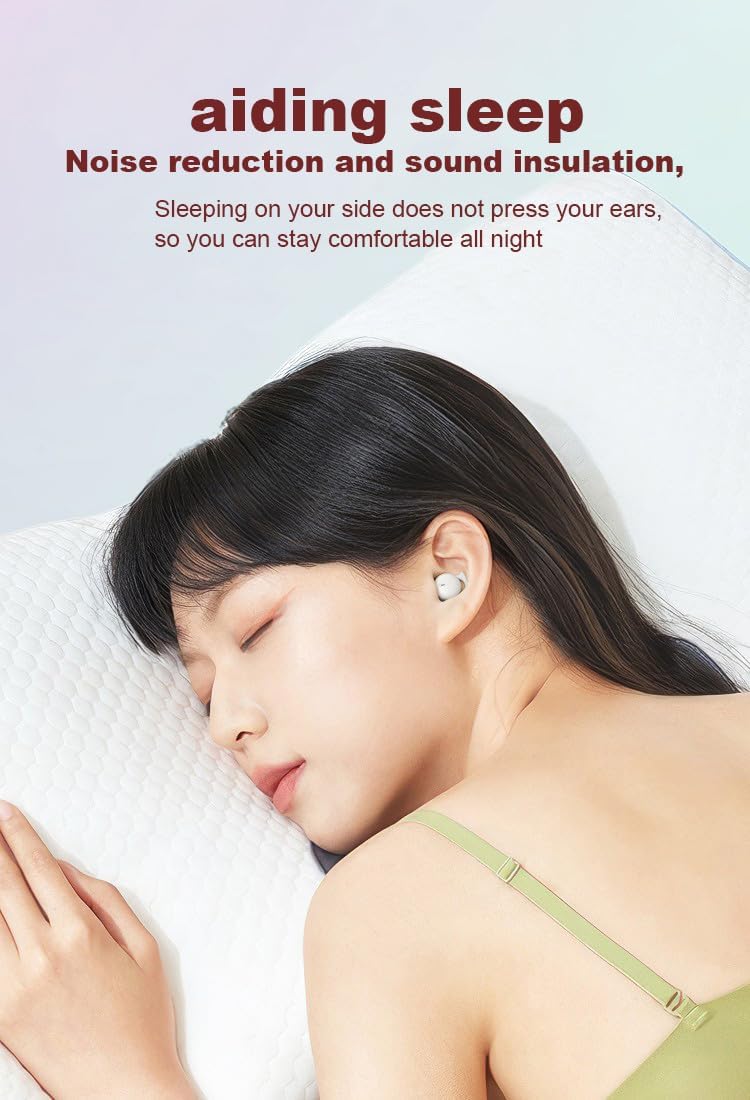
Image: Earbud worn discreetly for sleep.
タッチコントロール
Each earbud features a touch-sensitive button for easy control of your audio and calls.

Image: Touch button controls diagram.
- 再生/一時停止: どちらかのイヤホンを 1 回タップします。
- 応答/電話を切る: 着信中または通話中にどちらかのイヤホンを 1 回タップします。
- 次の曲: 右のイヤホンをダブルタップします。
- 前の曲: 左のイヤホンをダブルタップします。
- 通話を拒否: 着信中にどちらかのイヤホンを 2 秒間押し続けます。
- 音声アシスタントを有効にする: どちらかのイヤホンをトリプルタップします。
独立したイヤホンの使用
Both earbuds can be used independently. You can use one earbud while the other charges in the case, effectively extending your listening time. Simply remove one earbud from the case to use it in mono mode.
防水性能(IPX5)
The earbuds are rated IPX5 water-resistant, meaning they can withstand splashes of water and sweat. They are suitable for use during light rain or workouts, but should not be submerged in water.
メンテナンス
- イヤホンと充電ケースは、定期的に柔らかく乾いた布で拭いてください。
- 研磨剤入りのクリーナーや溶剤の使用は避けてください。
- 適切に充電するために、イヤホンとケースの両方の充電接点を清潔に保ってください。
- イヤホンを保護し、バッテリー寿命を維持するために、使用していないときは充電ケースに保管してください。
トラブルシューティング
イヤホンがペアリングされない
- 両方のイヤホンが完全に充電されていることを確認してください。
- デバイスの Bluetooth をオフにしてから、再度オンにします。
- Forget/delete "Micool Q26" from your device's Bluetooth list and attempt to pair again.
- イヤホンをケースに戻し、蓋を閉じて数秒待ってから開けて、ペアリング モードを再開します。
音が出ない、または音量が小さい
- デバイスとイヤホンの両方の音量レベルを確認してください。
- イヤホンが耳に正しく装着されていることを確認してください。
- イヤホンをデバイスに再接続します。
充電の問題
- USB-C ケーブルがケースと電源の両方にしっかりと接続されていることを確認します。
- イヤホンとケース内部の充電用接点が清潔でゴミがないことを確認してください。
- 別の USB-C ケーブルまたは電源アダプターを使用してみてください。
仕様
| モデル名 | Q26 |
| ブランド | ミクール |
| 接続技術 | ワイヤレス(Bluetooth 5.3) |
| 耐水性 | IPX5 |
| 耳の位置 | 耳に装着 |
| フォームファクター | 耳に装着 |
| 材料 | プラスチック |
| 含まれるコンポーネント | ケーブル、ユーザーマニュアル |
| 欧州連合 | 770029329733 |
| メーカー | ミクール |
| 初回利用可能日 | 12年2023月XNUMX日 |
保証とサポート
Specific warranty information for the Micool Mini Sleep Earbuds (Model Q26) is not provided in the product details. Please refer to the warranty card included in your package or contact Micool customer support for detailed warranty terms and conditions.
For further assistance, technical support, or inquiries, please visit the official Micool website or contact their customer service department. Contact information can typically be found in the included user manual or on the product packaging.