
導入
Thank you for choosing the Billboard Soul Advance True Wireless Stereo (TWS) Earbuds. These earbuds are designed to provide a superior audio experience with Active Noise Cancellation (ANC), Environmental Noise Cancellation (ENC), and a comfortable, splash-resistant design. This manual will guide you through the setup, operation, and maintenance of your new earbuds.
安全情報
- イヤホンや充電ケースを長時間、極端な温度や直射日光にさらさないでください。
- デバイスを落としたり、過度の力を加えたりしないでください。
- Keep the earbuds and charging case away from water and liquids, except for light splashes as per IPX4 rating. Do not submerge.
- 製品を分解または改造しないでください。保証が無効になります。
- 付属の充電ケーブルまたは認定された同等品のみを使用してください。
- Listening at high volumes for prolonged periods can cause hearing damage. Adjust volume to a safe level.
パッケージ内容
- Billboard Soul Advance TWS Earbuds (Left and Right)
- 充電ケース
- USB充電ケーブル
- ユーザーマニュアル
製品終了view
Familiarize yourself with the components of your Billboard Soul Advance TWS Earbuds and charging case.
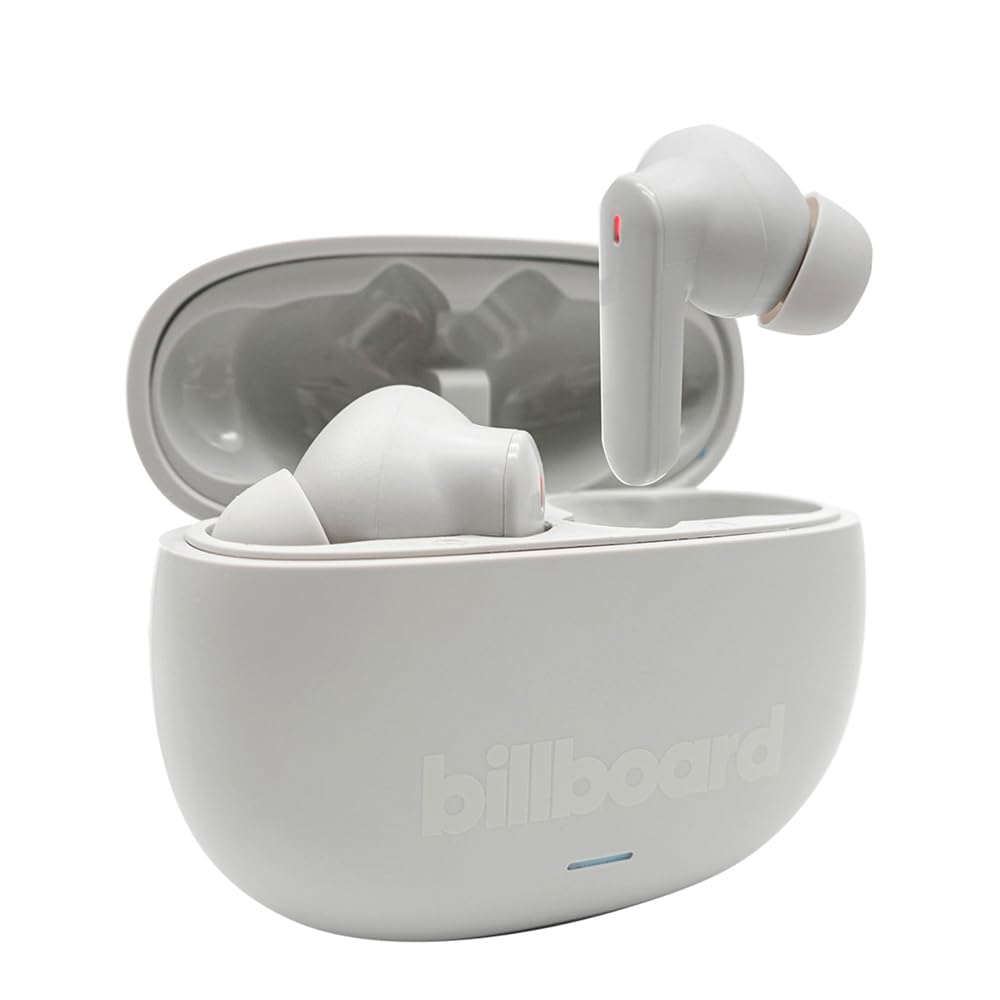
Image: The Billboard Soul Advance TWS Earbuds resting inside their open charging case. The earbuds are grey with red indicator lights visible, and the case is also grey with the 'billboard' logo embossed on the front.

Image: The Billboard Soul Advance TWS Earbuds charging case in a closed position. The case is grey with the 'billboard' logo embossed on the front and a small indicator light at the bottom.
Image: A person holding a single Billboard Soul Advance TWS earbud and the open charging case, demonstrating the compact size and design.
設定
1. イヤホンとケースの充電
初めて使用する前に、イヤホンと充電ケースを完全に充電してください。
- イヤホンを充電ケースに入れます。それぞれのスロットに正しく装着されていることを確認してください。
- USB 充電ケーブルをケースの充電ポートと USB 電源 (コンピューター、壁のアダプターなど) に接続します。
- The indicator light on the case will show charging status. Once fully charged, the indicator will change or turn off. A full charge takes approximately 5 hours for the case and earbuds.
2. デバイスとのペアリング
To connect your earbuds to a smartphone or other Bluetooth-enabled device:
- 充電ケースを開けます。イヤホンは自動的にペアリングモードに入り、イヤホンのライトが点滅します。
- デバイスで Bluetooth 設定に移動し、Bluetooth が有効になっていることを確認します。
- 検索する available devices and select "Billboard Soul Advance" from the list.
- 接続されると、イヤホンのインジケーターライトの点滅が停止します。
- デバイスで Bluetooth が有効になっている場合、イヤホンはケースから取り出すと最後にペアリングしたデバイスに自動的に再接続されます。
オペレーティング
タッチコントロール
The earbuds feature touch-sensitive controls on their outer surface. Specific functions may vary slightly by device or app.
| アクション | 関数 |
|---|---|
| シングルタップ(左/右) | 音楽の再生/一時停止、通話の応答/終了 |
| ダブルタップ(右) | 次のトラック |
| ダブルタップ(左) | 前のトラック |
| トリプルタップ(左/右) | 音声アシスタントを有効にする |
| 長押し(左/右) | ANC/透明モードを切り替える |
| 着信長押し | 通話を拒否 |
アクティブノイズキャンセレーション(ANC)と環境ノイズキャンセレーション(ENC)
The Soul Advance earbuds feature both ANC and ENC for an optimized listening and calling experience.
- アクティブノイズキャンセリング (ANC): Reduces external ambient noise, allowing for a more immersive audio experience. Activate/deactivate by long-pressing an earbud.
- 環境ノイズキャンセリング (ENC): Utilizes 4 built-in microphones to filter out background noise during calls, ensuring clearer conversations for both you and the listener. This feature is active automatically during calls.

Image: A graphic illustrating the concept of Ultra ANC (Active Noise Cancellation), showing sound waves being blocked by headphones, emphasizing a quiet listening experience.
メンテナンス
クリーニング
- 柔らかく乾いた糸くずの出ない布でイヤホンと充電ケースを優しく拭いてください。
- 研磨剤入りの洗剤、アルコール、化学溶剤は使用しないでください。
- 最適な充電のために、イヤホンとケースの両方の充電接点が清潔で乾燥していることを確認してください。
ストレージ
使用しないときは、イヤホンを保護し、充電を保つために充電ケースに保管してください。
トラブルシューティング
| 問題 | 解決 |
|---|---|
| イヤホンがペアリングされない | イヤホンが充電されていることを確認してください。デバイスのBluetoothをオフにしてからオンにしてください。Bluetooth設定でデバイスを削除し、再度ペアリングしてください。 |
| イヤホンが XNUMX つしか機能していない | Place both earbuds back in the case, close it, then open again. Ensure both are charged. |
| 音が出ない | デバイスの音量を確認してください。イヤホンが接続されていることを確認してください。別のオーディオを再生してみてください。 |
| 充電の問題 | Ensure charging cable is securely connected. Clean charging contacts. Try a different USB port or cable. |
仕様
- モデル名: Soul Advance
- 接続技術: 無線
- 含まれるコンポーネント: 充電ステーション
- 具体的な用途: アウトドア、スポーツ
- 充電時間: 約5時間
- 対応デバイス: 携帯電話、タブレット
- 耐水性レベル: IPX4(防滴)
- 平均バッテリー寿命: 27時間(充電ケース使用時)
- 耳の配置: インイヤー
- フォームファクター: インイヤー
- 騒音制御: アクティブノイズキャンセリング

Image: A graphic highlighting long battery life, showing headphones with '40H' and earbuds with '42H*' (battery + case), indicating extended usage times.
公式製品ビデオ
Video: Product demonstration video (0:49 duration).
Video: Product feature overview (0:44 duration).
Video: Additional product details (0:44 duration).
Video: Short product highlight (0:24 duration).
Video: Product feature showcase (0:24 duration).
Video: Detailed product review/demonstration (1:57 duration).
Video: Quick product overview (0:34 duration).
Video: Comprehensive product guide (2:00 duration).
保証とサポート
Your Billboard Soul Advance TWS Earbuds come with a standard manufacturer's warranty. For detailed warranty information, please refer to the warranty card included in your package or visit the official Billboard website. For technical support or customer service, please contact the retailer or manufacturer directly.
For returns, a 30-day free return policy is available from the purchase date.