
1. はじめに
This manual provides essential information for the proper use and care of your Epico Mag+ Mobile Phone Case. Designed for mobile phones with a 17.5 cm (6.9") display, this case offers reliable protection and magnetic compatibility for enhanced functionality. Please read this manual thoroughly to ensure optimal performance and longevity of your product.
2.製品オーバーview
The Epico Mag+ Mobile Phone Case is crafted from durable plastic with integrated magnets, providing both protection and compatibility with magnetic accessories. Its slim profile ensures your device remains comfortable to handle while being shielded from daily wear.
主な特徴:
- 互換性: Specifically designed for mobile phones with a 17.5 cm (6.9") display size.
- 磁気統合: Features integrated magnetic technology for secure attachment to compatible accessories.
- Protective Construction: Durable material shields against scratches and minor impacts.
- スリムなデザイン: Maintains the phone's sleek form factor without adding unnecessary bulk.
- 正確なカットアウト: Ensures full access to all ports, buttons, and camera functions.

図2.1: 前面 view of the Epico Mag+ Mobile Phone Case. This image displays the case's front, highlighting the camera module cutout and the overall brown finish.
3. セットアップとインストール
Follow these steps to correctly install your mobile phone into the Epico Mag+ case:
- デバイスをクリーニングする: Before installation, ensure your mobile phone is clean and free of dust or debris.
- ケースの位置合わせ: カメラの切り欠きを携帯電話のカメラモジュールに合わせてケースを持ちます。
- 上端を挿入: Gently insert the top edge of your phone into the top edge of the case.
- 押す: Apply gentle pressure to the remaining edges of the phone, working your way around until the phone is fully seated within the case. Ensure all corners are securely covered.
- 適合を確認: Check that all buttons and ports are accessible and that the case fits snugly around your device.
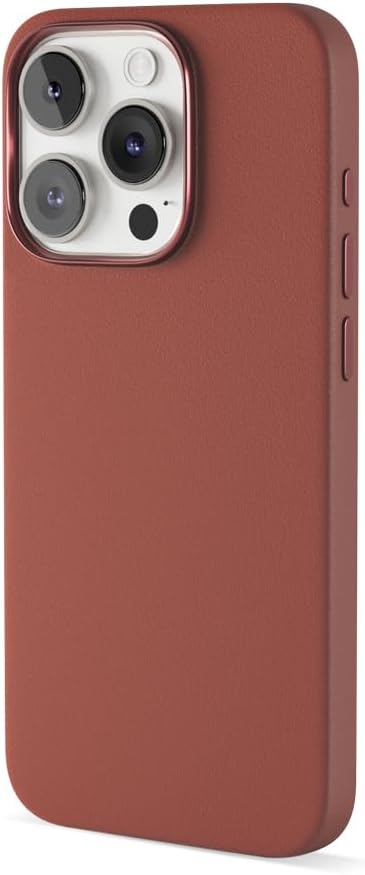
図3.1:側面 view of the Epico Mag+ Mobile Phone Case. This image illustrates the slim design and the precise button covers on the side of the case.
4. Usage and Magnetic Features
The Epico Mag+ case is designed for everyday use and features integrated magnets for enhanced functionality.
一般的な用途:
- The case provides a comfortable grip and protects your phone from minor drops, scratches, and daily wear.
- The precise cutouts ensure that all phone functions, including charging, audio, and camera, remain fully accessible.
磁気適合性:
- The integrated magnets allow for secure attachment to compatible magnetic accessories, such as car mounts, wireless chargers, and wallets.
- To use, simply align the back of your cased phone with the magnetic accessory. The magnets will provide a firm hold.
- Ensure the magnetic accessory is strong enough to support the weight of your phone with the case.
5. メンテナンスとケア
To keep your Epico Mag+ Mobile Phone Case in optimal condition, follow these simple cleaning guidelines:
- 定期清掃: ケースは定期的に柔らかくて乾いた布で拭いてください。amp ほこりや指紋を取り除くための布。
- 頑固な汚れ: For more stubborn stains, use a small amount of mild soap diluted in water. Apply with a soft cloth and gently wipe the affected area.
- 刺激の強い化学物質を避ける: 研磨剤入りの洗剤、溶剤、または刺激の強い化学薬品は使用しないでください。ケースの素材や仕上げが損傷する可能性があります。
- 乾燥: Allow the case to air dry completely before reattaching it to your phone.
6。 トラブルシューティング
If you encounter any issues with your Epico Mag+ Mobile Phone Case, consider the following:
- Case Not Fitting Correctly: Ensure your phone model matches the specified compatibility (17.5 cm / 6.9" display). Remove any screen protectors or skins that might interfere with the fit. Re-install the case carefully, ensuring all edges are properly seated.
- 磁気アタッチメントの問題: Verify that the accessory you are using is indeed magnetic-compatible. Ensure there are no obstructions between the case and the accessory. The strength of the magnetic hold can vary depending on the accessory.
- ボタンが反応しない: Check that the case is correctly aligned and not obstructing the phone's buttons. Remove and re-install the case to ensure proper alignment.
問題が解決しない場合は、セクション 8 に記載されているサポート情報を参照してください。
7. 仕様
| 特徴 | 詳細 |
|---|---|
| モデル番号 | Mag+ |
| ブランド | エピコ |
| 対応デバイス | Smartphone (Generic 6.9 Inch Smartphones) |
| 材料 | Plastic, Magnet |
| 色 | 茶色 |
| 製品寸法 | 6.89 x 6.89 x 0.59インチ |
| アイテム重量 | 2.6オンス |
| メーカー | エピコ |
8. 保証とサポート
For warranty information and customer support, please refer to the documentation provided with your purchase or visit the official Epico webサイトでご確認ください。保証請求に備えて購入証明書を保管してください。