
1. はじめに
Welcome to the user manual for your new FLEXISPOT 63x28 Inch Dual Motor Electric Standing Desk. This manual provides essential information for the safe assembly, operation, maintenance, and troubleshooting of your desk. Please read it thoroughly before use and retain it for future reference.
2. 安全に関する注意事項
- 組み立て前に、すべての部品が揃っていて損傷がないことを確認してください。部品が不足または損傷している場合は使用しないでください。
- 怪我を防ぐため、操作中は子供やペットをデスクから遠ざけてください。
- 高さ調整中は、机の可動部分の近くに手や体の他の部分を置かないでください。
- 転倒を防止するために、机が水平な面に設置されていることを確認してください。
- デスクに過度の荷重をかけないでください。最大荷重については仕様を参照してください。
- Keep all electrical cords organized and away from moving parts to prevent damage or entanglement.
- 清掃やメンテナンスを行う前に、デスクの電源プラグをコンセントから抜いてください。
- デスクはワークステーションとしての本来の目的にのみ使用してください。
3. パッケージ内容
以下にリストされているすべてのアイテムがパッケージに含まれていることを確認してください。
- Desktop Surface (Black)
- Desk Frame (Black, including dual motors and lifting columns)
- Control Panel with Memory Controller
- 電源アダプターとケーブル
- 組み立てハードウェア(ネジ、工具など)
- 取扱説明書

画像: 上view of the FLEXISPOT 63x28 Inch Dual Motor Electric Standing Desk, showing the desktop, frame, and control panel.
4. セットアップ手順
4.1 開梱
Carefully remove all components from the packaging. Place them on a soft, clean surface to prevent scratches or damage during assembly. Keep all packaging materials until assembly is complete and you are satisfied with the product.
4.2 フレームの組み立て
Follow the detailed diagrams provided in the separate assembly guide to connect the lifting columns to the crossbar and attach the footings. Ensure all screws are tightened securely.
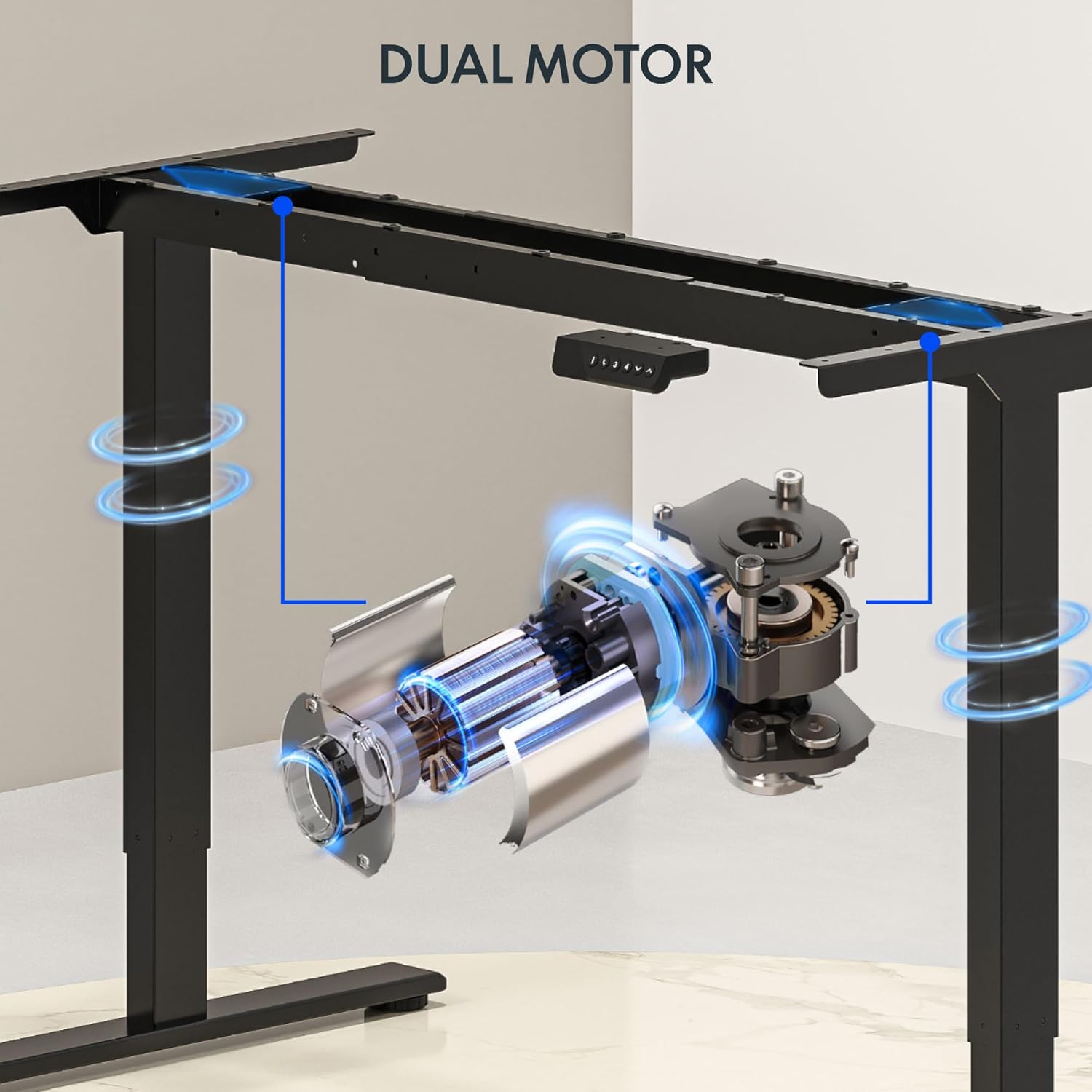
画像: 詳細 view of the dual motor desk frame, illustrating the motor placement and structural components.
4.3 デスクトップの取り付け
Carefully place the desktop upside down on a soft surface. Align the assembled frame with the pre-drilled holes on the desktop. Secure the desktop to the frame using the provided screws. Once secured, carefully flip the desk upright with assistance.
4.4 コントロールパネルと電源の接続
Connect the control panel cable to the control box, and then connect the power adapter to the control box. Plug the power cable into a standard electrical outlet. The desk is now ready for initial operation.

Image: Close-up of the desk's control panel, showing the LED display and buttons for height adjustment and memory presets.
Video: Demonstrates the dual-motor strength and smooth operation of the FLEXISPOT standing desk, highlighting its robust design and functionality.
5. 操作手順
5.1 高さ調整
- を押す 上(∧) 机を上げるボタン。
- を押す 下(∨) 机を下げるボタン。
- 希望の高さでボタンを離します。LEDディスプレイに現在の高さが表示されます。
5.2 メモリプリセットの使用
The control panel features four memory presets (1, 2, 3, 4) to save and recall your preferred sitting and standing heights.
- 上/下ボタンを使用して、デスクを希望の高さに調整します。
- を押す 「M」 button (or similar memory set button, indicated by 'i' on some models) once. The display will flash.
- すぐに数字ボタン (1、2、3、または 4) のいずれかを押して、現在の高さをそのプリセットに保存します。
- 保存した高さを呼び出すには、対応する数字ボタン(1、2、3、または4)を押すだけです。デスクは自動的に保存した位置に移動します。

Image: Close-up of the memory controller, highlighting the numbered preset buttons and the up/down controls for precise height adjustments.
5.3 衝突防止システム
デスクには衝突防止システムが搭載されています。高さ調整中に障害物に遭遇した場合、自動的に停止し、わずかに後退して損傷を防ぎます。この機能により、操作時の安全性が向上します。
6. メンテナンス
- クリーニング: 机の表面とフレームを柔らかくて乾いた布で拭いてください。amp 布で拭いてください。仕上げを傷める可能性のある研磨剤入りの洗剤や刺激の強い化学薬品は使用しないでください。
- 検査: Regularly check all screws and connections to ensure they are tight. Re-tighten if necessary.
- ケーブル管理 Ensure all cables are neatly organized and not pinched or tangled, especially during height adjustments.
- 電源コード: 電源コードに損傷がないか確認してください。損傷している場合は使用を中止し、カスタマーサポートにご連絡ください。
7。 トラブルシューティング
| 問題 | 考えられる原因 | 解決 |
|---|---|---|
| 机は動きません。 | Power cable disconnected; motor cable loose; overload. | Check power connection; ensure all cables are securely plugged in; reduce weight on desk. |
| 机の動きが不均一であったり、異常な音がしたりします。 | 不均一な負荷、緩んだ接続、障害。 | Distribute weight evenly; check and tighten all screws; remove any obstructions. |
| 高さプリセットが機能しません。 | Presets not properly set. | Re-program the memory presets following section 5.2. |
| 衝突防止システムが頻繁に作動します。 | Obstacles in the path of movement; sensitivity setting too high. | Clear the area around the desk; consult the full manual for adjusting anti-collision sensitivity if available. |
If you encounter issues not listed here or if the solutions do not resolve the problem, please contact FLEXISPOT customer support.
8. 仕様
| 特徴 | 詳細 |
|---|---|
| ブランド | フレキシポット |
| モデル | 63x28 Inch Dual Motor Electric Standing Desk |
| デスクトップの寸法 | 幅63インチ x 奥行き28インチ |
| 高さ範囲 | 28.3インチから47.6インチ |
| 最大重量容量 | 198ポンド |
| モータータイプ | デュアルモーター |
| コントロールパネル | 4つのプリセットを備えたメモリコントローラ |
| デスクトップ素材 | Engineered Wood (Black Top) |
| フレーム素材 | Alloy Steel (Black Frame) |
| 特集 | Dual Motor, 198 lbs Heavy-Duty Capacity, Memory Controller, 63"x28" Large Desktop |

Image: Diagram illustrating the dimensions of the FLEXISPOT 63x28 Inch Electric Standing Desk, including height range, width, and depth.
9. 保証とサポート
9.1 限定保証
This FLEXISPOT product comes with a limited warranty against defects in materials and workmanship. The specific terms and duration of the warranty may vary. Please refer to the warranty card included in your package or visit the official FLEXISPOT web詳細な保証情報については、サイトをご覧ください。
The warranty typically covers the desk frame, motors, and control panel under normal use conditions. Damage resulting from misuse, accidents, unauthorized modifications, or improper assembly is not covered.
9.2 カスタマーサポート
For technical assistance, warranty claims, or any questions regarding your FLEXISPOT standing desk, please contact our customer support team:
- Webサイト: www.flexispot.com
- メールアドレス: support@flexispot.com
- 電話: (Refer to your product packaging or web地域の連絡先電話番号のサイト
Please have your model number (B0F29ZD4DN) and purchase date ready when contacting support.