
1. はじめに
This manual provides detailed instructions for the setup, operation, maintenance, and troubleshooting of your Yeabomy Smart Bluetooth Glasses E13C. Please read this manual thoroughly before using the product to ensure proper function and longevity.

A pair of black smart Bluetooth sunglasses, view角度から見ると、asing the integrated technology in the temples.
2.製品オーバーview
2.1 パッケージ内容
パッケージにすべてのアイテムが揃っていることを確認します。
- Smart Bluetooth Glasses (E13C)
- 磁気充電ケーブル
- クリーニングクロス
- Eyeglasses Storage Bag
- メガネケース
- ユーザーマニュアル(このドキュメント)
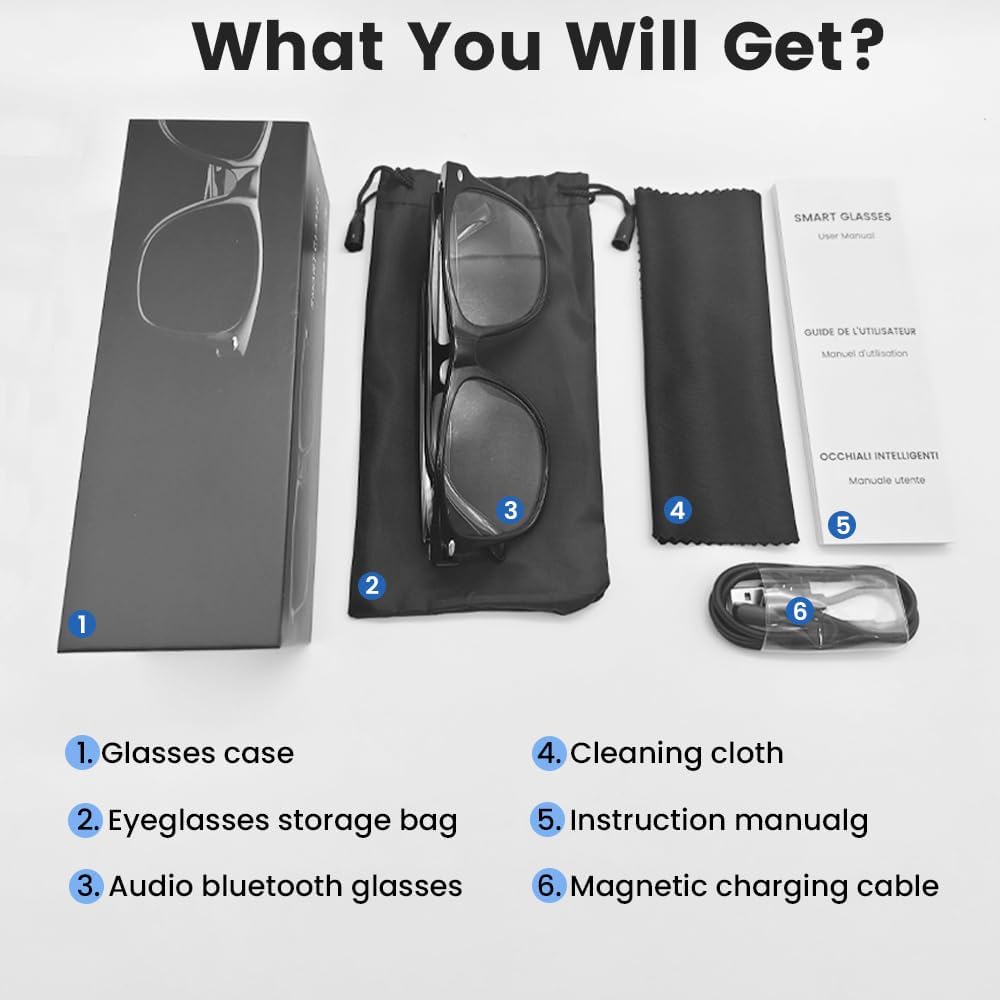
An image displaying the package contents: a glasses case, an eyeglasses storage bag, the audio Bluetooth glasses, a cleaning cloth, an instruction manual, and a magnetic charging cable.
2.2 主な特徴
- インテリジェント音声制御: Operate functions using voice commands.
- 偏光レンズ: Effective blue light filtering and 100% UV protection. Lenses are replaceable with prescription lenses.
- 幅広い互換性: Connects with various devices including smartphones (Android, iOS) and computers via Bluetooth 5.4.
- ワンステップペアリング: Automatic reconnection to the last paired device.
- 防水(IPX5): 汗や雨にも強い。
- 軽量設計: Weighs approximately 27g for comfortable extended wear.
- Dual Magnetic Charging: Efficient and secure charging.
- 直感的なタッチコントロール: For media playback, calls, and voice assistant activation.
3. セットアップ
3.1 メガネの充電
Before first use, fully charge the smart glasses. Use the provided magnetic charging cable.
- Connect the magnetic charging cable to the charging contacts on the temple of the glasses.
- ケーブルの USB 端子を標準の USB 電源アダプター (別売) またはコンピューターの USB ポートに接続します。
- The indicator light will show yellow during charging.
- Charging is complete when the indicator light turns green. A full charge takes approximately 1.5 hours.
The glasses provide approximately 4-6 hours of media playback and over 300 hours of standby time on a full charge.

An illustration showing the magnetic charging cable connecting to the glasses' temple, with indicators for charging (yellow light) and fully charged (green light). Battery capacity, charging time, playback time, and calling time are also displayed.
3.2Bluetoothペアリング
To connect your smart glasses to a device:
- メガネが充電され、電源がオンになっていることを確認してください。
- スマートフォンまたはその他のデバイスでBluetoothを有効にします。
- 検索する available Bluetooth devices. The glasses will appear as "E13".
- Select "E13" to pair. Once paired, the glasses will automatically reconnect to this device when powered on and within range (up to 33 feet).

A person wearing the smart glasses while running, with a smartphone screen showing Bluetooth settings and the glasses (E13) connected. The image highlights the 33ft Bluetooth 5.4 transmission range and voice control functionality.
4. 操作手順
4.1 電源オン/オフ
- 電源オン: Long touch the control area for 5 seconds.
- 電源を切る: Long touch the control area for 5 seconds.
4.2 タッチコントロール
The smart glasses feature intuitive touch controls located on the temples:
- 音楽の再生/一時停止: Once-Tap
- 次のトラック: 2回タップ
- 前のトラック: 2回タップ
- 通話に応答: Once-Tap
- 電話を切る: Once-Tap
- 音声アシスタントを有効にする: Long Touch for 2 seconds
- リモート写真: Double click to control your smartphone's camera.

A diagram illustrating the touch control gestures on the smart glasses for various functions: pick up calls, turn on music, open navigation, take photos, previous/next track, play/pause, voice assistant, answer/hang up calls, and power on/off.
4.3 音声制御
After activating the voice assistant (Long Touch for 2 seconds), you can use voice commands for various functions, such as:
- Making calls (e.g., "Call [Contact Name]")
- Playing music (e.g., "Play [Song Title]")
- メッセージを送信する
- Opening navigation
5. メンテナンス
- クリーニング: 付属のクリーニングクロスでレンズとフレームを優しく拭いてください。刺激の強い化学薬品や研磨剤は使用しないでください。
- 耐水性: The glasses are IPX5 water-resistant, meaning they can withstand sweat and light rain. Do not submerge them in water or expose them to strong jets of water.
- ストレージ: When not in use, store the glasses in the provided eyeglasses storage bag or glasses case to protect them from scratches and dust.
- 温度: バッテリーの寿命や電子部品に影響を及ぼす可能性があるため、メガネを極端な温度(高温または低温)にさらさないでください。

A pair of smart glasses resting on a surface, emphasizing their lightweight design (27g) and comfort for extended wear. A magnified inset shows the dual magnetic charging contacts.
6。 トラブルシューティング
- 電源が入らない: Ensure the glasses are fully charged. Connect to the magnetic charging cable and check the indicator light.
- デバイスとペアリングできません:
- デバイスで Bluetooth が有効になっていることを確認してください。
- Make sure the glasses are within the 33-foot Bluetooth range.
- Turn the glasses off and on again, then try pairing.
- 携帯電話の Bluetooth 設定からデバイスを削除し、再度ペアリングを試みてください。
- 音が出ない/音量が低い:
- Check the volume settings on both the glasses (if applicable via touch control) and your connected device.
- メガネが Bluetooth 経由で正しく接続されていることを確認します。
- Confirm that the audio output on your device is set to the smart glasses.
- タッチコントロールが反応しない: メガネの電源が入っていて接続されていることを確認してください。メガネを再起動してみてください。
7. 仕様
| モデル | E13C |
| ブランド | Yeabomy |
| 接続技術 | ブルートゥース5.4 |
| オペレーティングシステムの互換性 | Android、iOSデバイス |
| 特集 | Music Player, Phone Call, Voice Control, UV Protection, Polarized Lenses, Remote Photography |
| バッテリー容量 | 1 Amp Hours (80mAh per temple) |
| 充電時間 | 約1.5時間 |
| Continuous Playback Time (Music) | 約5時間 |
| Continuous Calling Time | 約4時間 |
| 待機時間 | 300時間以上 |
| アイテム重量 | 0.07ポンド(約27g) |
| 耐水性 | IPX5 |
| パッケージ寸法 | 6.65 x 2.4 x 2.24インチ |
| 画面サイズ | 1.96インチ(画面の対角線) |
| メモリストレージ容量 | 128MB |
| GPS | GPSなし |

An image detailing the physical dimensions of the smart glasses, including lens width, frame width, and temple length. It also shows various face shapes (oval, triangle, round, square, diamond) indicating suitability.
8. 保証とサポート
For warranty information or technical support, please refer to the contact details provided with your purchase documentation or visit the official Yeabomy webサイトでご確認ください。保証請求に備えて購入証明書を保管してください。