
Macap MI40 Touch
Macap MI40 Touch インスタントバーコーヒーグラインダー ユーザーマニュアル
Model: MI40 Touch
Brand: Macap
1.製品オーバーview
The Macap MI40 Touch Instant Burr Coffee Grinder is a high-performance appliance designed for precise and consistent coffee grinding. Featuring 65mm flat burrs, a responsive 3.5-inch touchscreen, and multiple operating modes, it is suitable for various brewing methods from espresso to cold brew. Its robust construction ensures quiet operation and stability.
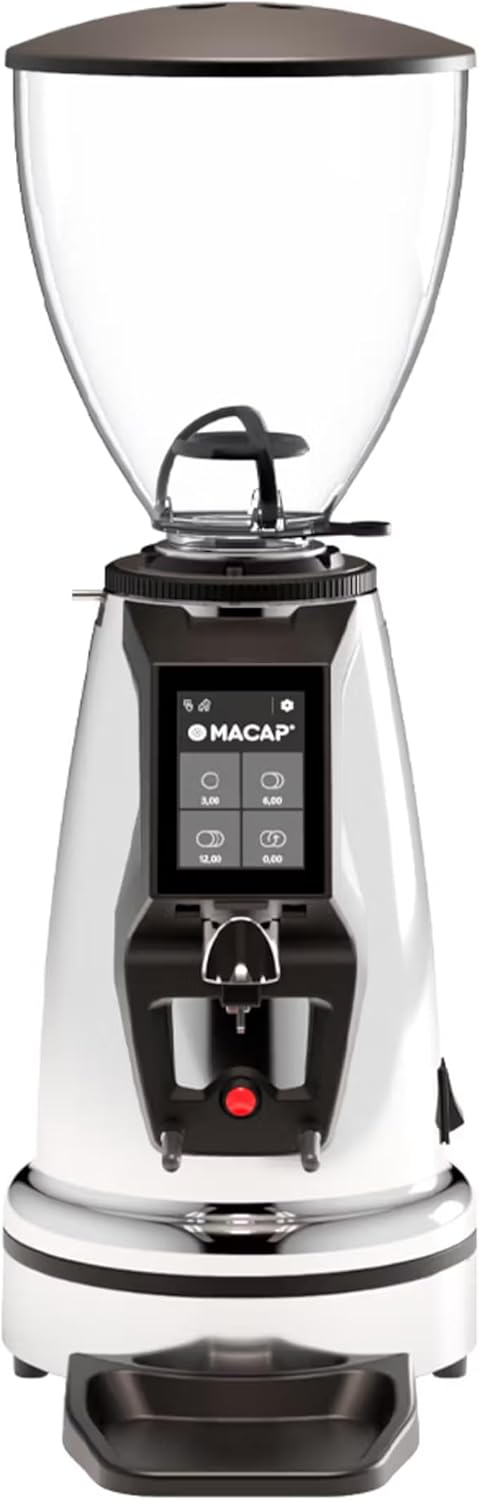
フロント view of the Macap MI40 Touch Instant Burr Coffee Grinder, showcasing its sleek chrome finish and integrated touchscreen display.
2. 安全情報
Please read all safety instructions carefully before operating the grinder to prevent injury or damage.
- Always unplug the grinder from the power outlet before cleaning, maintenance, or if it will be left unattended.
- グラインダー、電源コード、プラグを水やその他の液体に浸さないでください。
- Keep hands and utensils out of the bean hopper and grind chute during operation.
- Ensure the bean hopper lid is securely in place before grinding.
- この器具は焙煎コーヒー豆の挽き専用です。他の物質を挽くことはできません。
- コードやプラグが破損している場合、または機器が故障している場合や何らかの損傷がある場合は、グラインダーを操作しないでください。
- 本機器はお子様の手の届かない場所に保管してください。
3。 構成部品
Familiarize yourself with the main components of your MI40 Touch coffee grinder:
豆ホッパー: Transparent container for holding whole coffee beans. Capacity: 1.2 Kilograms.

3.5'' Touchscreen Display: Intuitive interface for controlling grind settings, dose programming, and operating modes.

グラインド調整カラー: Stepless micrometric adjustment for precise control over grind particle size.

Portafilter Fork & Drip Tray: Adjustable fork to hold your portafilter for hands-free grinding, with a removable drip tray for easy cleaning.
4. セットアップ
Follow these steps to set up your Macap MI40 Touch grinder:
- 開梱: Carefully remove the grinder and all accessories from the packaging. Retain the packaging for future transport or storage.
- 配置: グラインダーは安定した平らで乾燥した場所に設置してください。本体の周囲に十分な換気があることを確認してください。
- ホッパーの取り付け: Place the bean hopper onto the grinder body, aligning the tabs. Rotate the hopper clockwise until it locks securely into place.
- ドリップトレイの取り付け: Slide the removable drip tray into its designated slot at the base of the grinder.
- 電源接続: 電源コードをアース付きコンセントに差し込みます。
- 初期クリーニング: 初めて使用する前に、外側を広告で拭いてくださいamp cloth. Ensure the burrs and grind chute are free of any packing debris.

側 view of the Macap MI40 Touch grinder, illustrating its compact design and the placement of the bean hopper and drip tray.
5. 操作手順
5.1. グラインド調整
The MI40 Touch features stepless micrometric grind adjustment, allowing for precise control over particle size. To adjust the grind:
- Ensure the grinder is off or not actively grinding.
- Rotate the grind adjustment collar located below the bean hopper.
- 回転 時計回り for a finer grind (e.g., for espresso).
- 回転 反時計回り for a coarser grind (e.g., for drip, French press, or cold brew).
- Make small adjustments and test the grind to achieve the desired consistency for your brewing method.
閉じる view of the grind adjustment collar, showing the numerical markings for reference.
5.2. タッチスクリーンインターフェース
The 3.5-inch touchscreen allows for intuitive control and customization of your grinding experience. It features four programmable dose buttons and various settings.
The 3.5-inch touchscreen display showing the main interface with programmable dose buttons.
For a detailed demonstration of the touchscreen interface and its functionalities, please refer to the official video below:
This video demonstrates the various features and customization options of the 3.5-inch touchscreen interface on the Macap MI Series coffee grinders, including dose programming, color customization, and different operating modes.
5.3。 動作モード
The MI40 Touch offers three primary operating modes:
- 標準モード: Allows you to select a pre-programmed dose by pressing the corresponding button on the touchscreen. The grinder will dispense the set amount of coffee.
- プッシュ アンド グラインド モード: Grinding starts when the portafilter activates the button on the fork and stops when the portafilter is removed. This mode is ideal for manual control.
- Barista Hands-Free Mode: Similar to Push and Grind, but designed for continuous grinding as long as the portafilter is in place, allowing baristas to multitask.
6. メンテナンスと清掃
Regular cleaning and maintenance will ensure optimal performance and longevity of your grinder.
6.1.毎日の清掃
- Grind Chute: Use a brush or vacuum to clear any residual coffee grounds from the grind chute after each use.
- 受け皿: Remove and empty the drip tray regularly. Wipe it clean with a damp 布で拭いて完全に乾かしてください。
- 外観: グラインダーの外側を柔らかくて乾いた布で拭きます。amp 布で拭いてください。研磨剤や溶剤は使用しないでください。

The removable drip tray and portafilter fork area, designed for easy cleaning.
6.2. 徹底的な掃除(毎週/隔週)
- グラインダーのプラグを抜きます。
- 豆ホッパーを削除します。 Empty any remaining beans. Rotate the hopper counter-clockwise to unlock and remove it.
- クリーンバリ: Use a stiff brush or a specialized grinder brush to remove accumulated coffee oils and grounds from the burrs. You may need to remove the upper burr for thorough cleaning (refer to specific instructions in the full manual for burr removal).
- Clean Grind Chamber: Use a vacuum cleaner with a narrow attachment to remove grounds from the grind chamber.
- 組み立て直す: Reinstall the burrs (if removed) and the bean hopper securely.
7。 トラブルシューティング
If you encounter issues with your MI40 Touch grinder, refer to the table below for common problems and solutions.
| 問題 | 考えられる原因 | 解決 |
|---|---|---|
| グラインダーがオンになりません。 | プラグが差し込まれていない、電源スイッチがオフ、回路ブレーカーが落ちている。 | Check power connection; ensure power switch is on; reset circuit breaker. |
| コーヒーは出ません。 | Hopper empty; grind chute clogged; burrs jammed. | Fill hopper; clean grind chute; clear any foreign objects from burrs (unplug first). |
| 一貫性のないグラインド。 | Burrs dirty or worn; grind setting too coarse/fine. | Clean burrs thoroughly; adjust grind setting incrementally. Consider burr replacement if worn. |
| グラインダーの騒音が大きすぎます。 | バリに異物が混入、部品が緩んでいる。 | Unplug and inspect burrs for foreign objects; check for loose parts. If noise persists, contact support. |
| タッチスクリーンが反応しない。 | 一時的なソフトウェアの不具合、電源の問題。 | Unplug the grinder for 30 seconds, then plug back in. If issue persists, contact support. |
8. 仕様
Key technical specifications for the Macap MI40 Touch Instant Burr Coffee Grinder:
| 特徴 | 仕様 |
|---|---|
| モデル | MI40 Touch |
| バリの種類 | フラットバー |
| バリ径 | 65mm |
| モーター出力 | 480W |
| ホッパー容量 | 1.2キログラム |
| グラインド調整 | 無段階マイクロメトリック |
| 画面 | 3.5'' Touchscreen |
| 製品寸法(長さ x 幅 x 高さ) | 12インチ x 7.63インチ x 22インチ |
| アイテム重量 | 19.58ポンド |
| 原産国 | イタリア |
9. 保証とサポート
Macap products are manufactured to high standards and undergo rigorous quality control. For warranty information, technical support, or service inquiries, please refer to the warranty card included with your product or visit the official Macap website. Please have your model number (MI40 Touch) and purchase date available when contacting support.
Ask a question about this manual
Ask about setup, troubleshooting, compatibility, parts, safety, or missing instructions. Manuals+ will review the question and use this page’s manual context to help answer it.