導入
This manual provides detailed instructions for the operation and maintenance of your DINGETU V099 5K 64MP Camcorder. Please read this manual thoroughly before using the device to ensure proper functionality and to maximize your user experience. This camcorder is designed for capturing high-resolution video and still images, featuring advanced capabilities such as IR Night Vision, Wi-Fi connectivity, and a 3.0-inch touch screen.
箱の中身
以下にリストされているすべてのアイテムがパッケージに含まれていることを確認してください。
- 1 x DINGETU V099 5K Camcorder
- 1x外部マイク
- 2 x Rechargeable Li-ion Batteries (NP-40)
- DVバッグ1個
- レンズキャップ×1
- レンズフード×1
- USBケーブル1本
- ユーザーマニュアル x 1
- 1 x Battery Holder (Charger)
- 1 x 32GB SDカード
- 2.4Gリモコン×1

Image: The DINGETU V099 5K 64MP Camcorder shown with its included accessories, including the external microphone, lens hood, remote control, and batteries.
設定
- バッテリーの充電: Insert the provided Li-ion batteries into the battery holder and connect it to a power source using the USB cable. Ensure batteries are fully charged before first use.
- SDカードを挿入します: Open the SD card slot cover. Insert the 32GB SD card (or another Class 10 or above SD/SDHC card up to 256GB) into the slot until it clicks.
- SDカードのフォーマット: Before first use, it is required to format the SD card within the camcorder. Navigate to the 'Settings' menu on the camcorder's touch screen, locate 'Format SD Card', and confirm. This prepares the card for optimal performance with the device.
- バッテリーの取り付け: Open the battery compartment cover and insert a charged battery, ensuring correct polarity. Close the cover securely.
- Attach External Microphone: Connect the external microphone to the designated microphone port on the camcorder. Ensure it is securely attached for optimal audio recording.
- Attach Lens Hood: Align the lens hood with the front of the camcorder lens (37MM standard mount) and twist to secure it. The lens hood helps reduce glare and protects the lens.

Image: A circular diagram illustrating the camcorder and its various included accessories, such as batteries, charger, lens hood, microphone, and remote control.
操作手順
電源オン/オフと基本的なナビゲーション
- 電源オン: LCD 画面が点灯するまで電源ボタンを押し続けます。
- 電源を切る: 画面がオフになるまでもう一度電源ボタンを押し続けます。
- LCDタッチスクリーン: The 3.0-inch IPS touch screen allows for intuitive navigation through menus and settings. Tap icons or swipe to access different functions. The screen can rotate 270 degrees for flexible view角度を変える。
ビデオ録画
The camcorder supports various video resolutions:
- 5K / 30FPS
- 4.7K / 30FPS
- 4K/(60/30FPS)
- 2.7K / 30FPS
- FHD/(60/30FPS)
- HD/(120/60/30FPS)
- 記録の開始/停止: In video mode, press the record button to start recording. Press it again to stop.
- 解像度の選択: Access the video settings menu via the touch screen to select your desired video resolution.
- 一時停止機能: During recording, you can pause and resume video capture without creating a new file. This is useful for editing and continuity.
- 充電中の録音: The camcorder supports recording while connected to a power source, extending recording time for longer sessions.
- Circular Video Recording: This feature allows the camcorder to continuously record, overwriting the oldest file■SDカードがいっぱいになったとき。
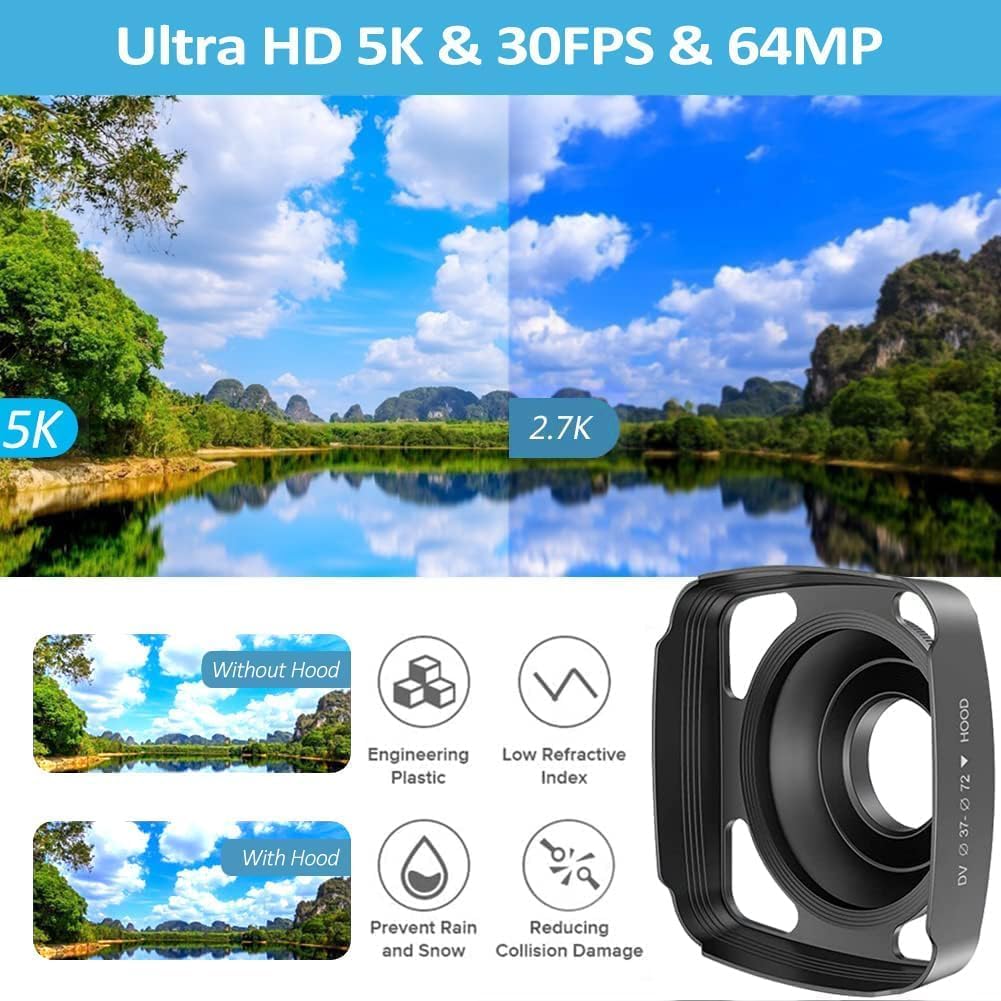
Image: A visual comparison demonstrating the difference in detail and clarity between 5K and 2.7K video resolutions captured by the camcorder.

画像: コラージュショーasing the camcorder's capabilities: live webcam output to a laptop, HDMI output to a television, and the ability to record while connected to a power bank for extended use.
写真のキャプチャ
The camcorder supports various photo resolutions:
- 64M/48M/30M/24M/20M/12M/8M/5M/3M
- 写真を撮る: Switch to photo mode and press the photo button to capture a still image.
- 連続撮影: Enable this feature in the settings to capture a rapid sequence of photos with a single press.
- タイムドフォト: Set a timer (e.g., 3S, 10S, 15S, 20S) for delayed photo capture, allowing you to be in the shot.
特集
- IRナイトビジョン: Activate IR Night Vision in low-light conditions to capture clear black and white footage or photos up to 7 meters.
- LEDフィルライト: Use the built-in LED fill light to illuminate subjects in dark environments for improved visibility.
- WiFi機能: Download the 'Hello Cam' app on your smartphone. Connect your camcorder to your phone via Wi-Fi to remotely control the camera, transfer files, and share content.
- Webカム機能: Connect the camcorder to your computer via USB to use it as a webcam for live streaming or video calls. Ensure the external microphone is connected for audio input.
- タイムラプス: Set the interval for time-lapse recording to capture changes over an extended period.
- スローモーション: Record videos in slow motion for dramatic effects.
- HDMI出力: Connect the camcorder to an HDTV using an HDMI cable (not included) to view 録画した内容を大きな画面で表示します。
- 画像の回転: Adjust the image orientation in playback mode.
- 18倍デジタルズーム: Use the zoom controls to magnify distant subjects.
- 2.4Gワイヤレスリモコン: Use the included remote control to operate the camcorder from a distance, ideal for self-recording or group photos.
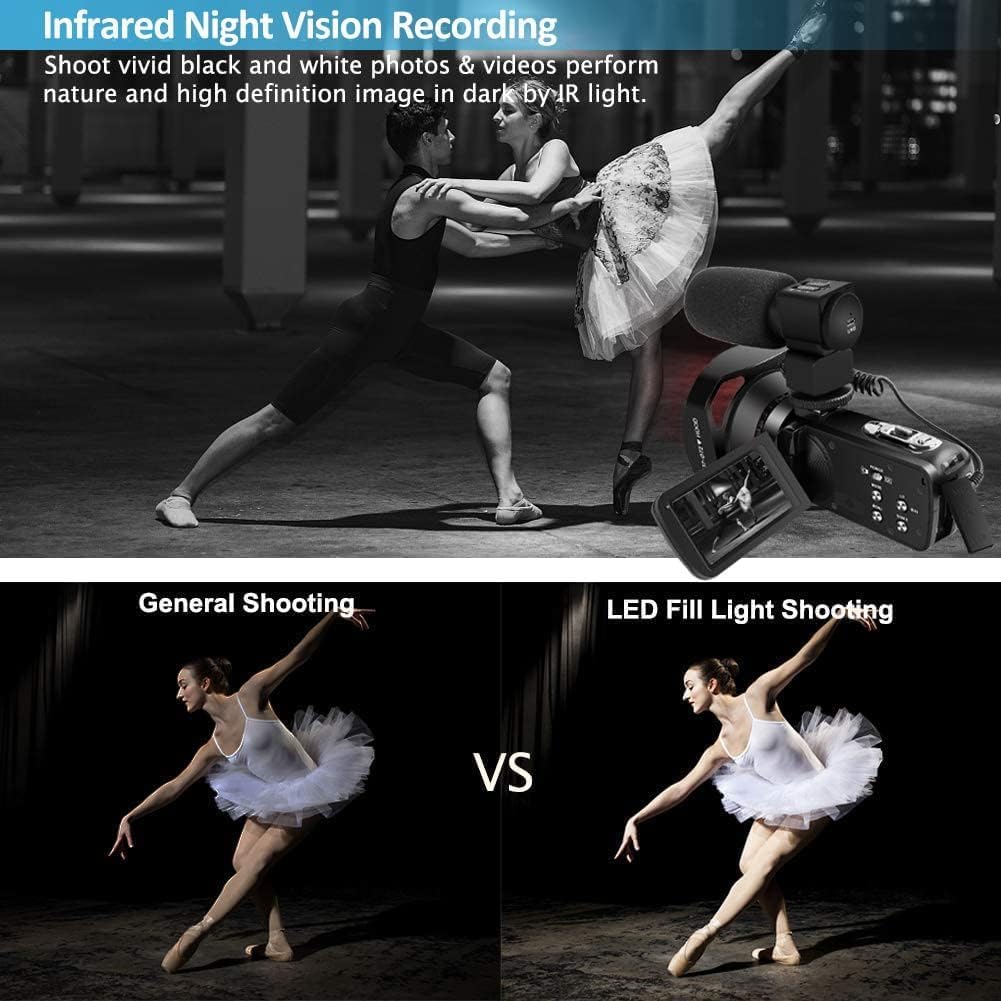
Image: A visual demonstration of the camcorder's low-light capabilities, showing a comparison between general shooting and shooting with the LED fill light, alongside an example of infrared night vision recording.

Image: The camcorder demonstrating its Wi-Fi connectivity for smartphone control and the use of the 2.4G wireless remote control for convenient operation.

Image: A collage illustrating various camcorder functions including recording while charging, anti-shake technology, touch screen interface, continuous shooting, time-lapse photography, and IR night vision.
メンテナンス
- レンズとスクリーンのクリーニング: Use a soft, lint-free cloth specifically designed for optical surfaces to clean the lens and LCD screen. Avoid abrasive materials or harsh chemicals.
- バッテリーのケア: Store batteries in a cool, dry place. Do not expose them to extreme temperatures. If the camcorder will not be used for an extended period, remove the batteries.
- ストレージ: When not in use, store the camcorder in its protective bag in a dry, dust-free environment away from direct sunlight.
- ファームウェアの更新: メーカーの web最適なパフォーマンスと新機能へのアクセスを確保するために、定期的にサイトでファームウェアのアップデートを確認してください。
トラブルシューティング
- SD カードが認識されません: Ensure the SD card is inserted correctly. If the issue persists, try formatting the card within the camcorder (this will erase all data). Ensure the card is Class 10 or above and up to 256GB.
- Camera Not Recognized by Computer (Webcam Function): Verify the USB connection. If compatibility issues arise, try a different USB port or computer. Ensure the external microphone is connected if using for audio input.
- Poor Video/Image Quality: Ensure adequate lighting conditions. Check the selected resolution settings (e.g., 5K, 64MP). Clean the lens.
- No Sound with External Microphone: Ensure the external microphone is securely plugged into the correct port. Check microphone settings in the camcorder menu.
- リモコンが動作しない: Ensure the remote control has working batteries. Point the remote directly at the camcorder's IR receiver.
仕様
| 特徴 | 仕様 |
|---|---|
| ビデオ解像度 | 5K/30FPS, 4.7K/30FPS, 4K/(60/30FPS), 2.7K/30FPS, FHD/(60/30FPS), HD/(120/60/30FPS) |
| ビデオフォーマット | MP4 |
| 画像解像度 | 64M/48M/30M/24M/20M/12M/8M/5M/3M |
| 写真フォーマット | JPEG |
| レンズ | F/3.6、f=7.36mm |
| 焦点距離 | 1.0m~+∞ |
| セルフタイマー | Off/ 3S/ 10S/ 15S/ 20S |
| 液晶画面 | 3.0" HD Touch Screen (270° rotation) |
| 露出補正 | –2.0EV ~ +2.0EV |
| IR Infrared Light Range | <7.0m |
| ホワイトバランス | Auto/Daylight/Cloudy/Tungsten/Fluorescent(H)/Fluorescent(L) |
| コンピュータインターフェース | USB2.0 (high speed) |
| 外部レンズサポート | 37MM Standard mount (UV mirror, wide-angle lens, extender - not included) |
| 電源 | Li-ion battery (NP-40) x2 |
| 寸法 | 126 (L) × 58 (H) × 57 (W) mm |
| 重さ | Approx. 300±5g (battery excluded) |
| サポートされているストレージ | SD/SDHC card up to 256GB (Class 10 or above) |
| 接続技術 | USB、WiFi |
| 特集 | IR Night Vision, WiFi Function, Webcam, Pause Function, External Microphone Support, 2.4G Remote Control, Time Lapse, Slow Motion, HDMI Output, Image Rotation, Interval Recording, Continuous Shooting, Circular Video Recording, Recording while Charging |
保証とサポート
For warranty information or technical support, please refer to the contact details provided with your purchase documentation or visit the official DINGETU webサイトをご覧ください。ご質問や問題が発生した場合には、弊社のカスタマーサービスチームがサポートいたします。