
1. セットアップ
1.1開箱
Carefully unpack all components from the box. Ensure all items listed in the package contents are present.

通常、パッケージには次のものが含まれます。
- 1 x Quieter 4C Mini PC
- 電源アダプター (1V/12A) x 2
- VESAマウント×1
- ユーザーマニュアル x 1
- 1 x UL Plug
1.2 周辺機器の接続
Connect your monitor, keyboard, and mouse to the MeLE Quieter 4C Mini PC. The device supports triple 4K display output via two HDMI ports and one full-function USB-C port.

The Mini PC features:
- USB-A 3.2 Gen1 (5Gbps) ports
- USB-A 3.2 Gen2 (10Gbps) ports
- USB-A 2.0 (480Mbps) ports
- Full-function USB-C port (Power Input, USB 10Gbps, DisplayPort)
- 2x HDMI 2.0 ports (4K@60Hz)
- ギガビットイーサネットポート
- 3.5mmオーディオコンボジャック
- Micro-SD (TF) Slot
- ケンジントン セキュリティ ロック スロット
1.3 VESAマウントの取り付け
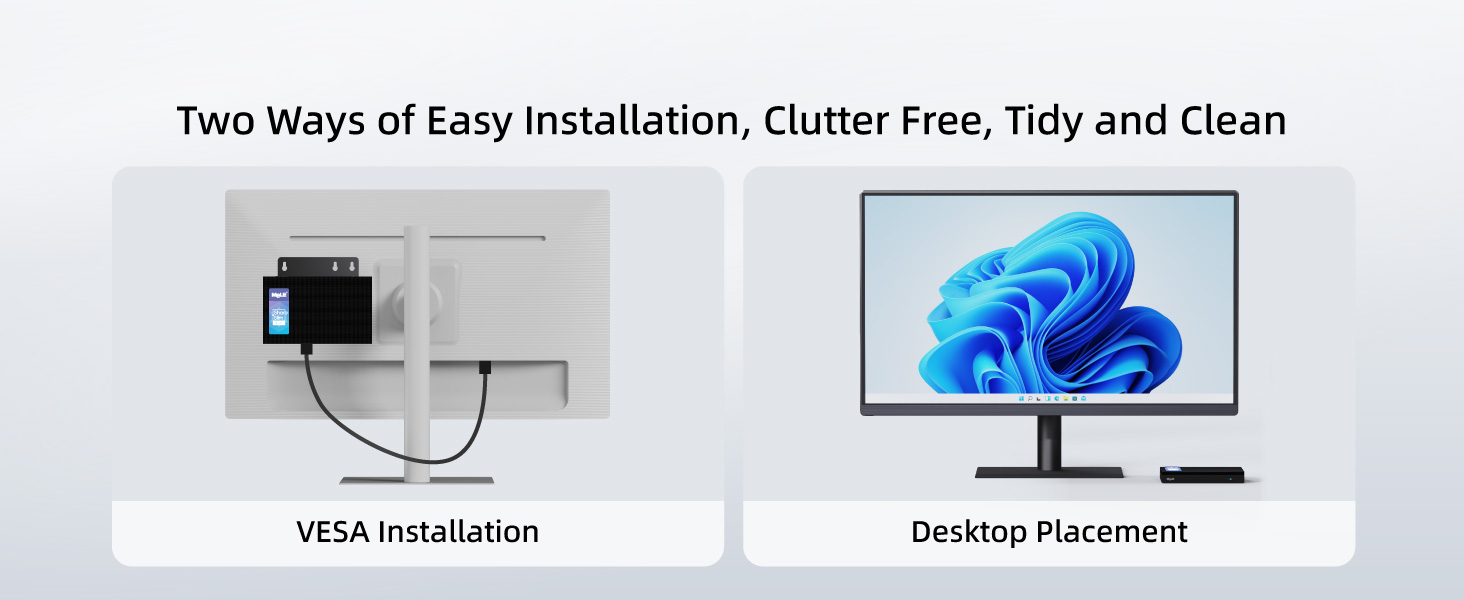
The MeLE Quieter 4C Mini PC can be installed in two ways: desktop placement or VESA mounting. For VESA mounting, follow these steps:
- Attach the VESA mount to the back of your monitor using the provided screws.
- Mini PC を VESA マウントに固定します。
2. 操作手順
2.1 電源オン/オフ
To power on the Mini PC, press the power button located on the front panel. The power button will illuminate when the device is on. To power off, use the standard Windows shutdown procedure.
2.2 BIOS 設定
The BIOS allows for advanced configuration, including enabling Auto Power On. To access and modify BIOS settings:
- Turn on your Mini PC and repeatedly press F7 to open the boot menu, or 消去 BIOSに直接入ります。
- Select "Enter Setup" and press 入力.
- Navigate to "Advanced" → "Customer Exclusive Functions" → "Auto Power On" and set it to "Enabled".
- Select "Save & Exit" → "Save Changes and Exit" → "Yes" (or press F4 to save and exit quickly).
2.3オペレーティングシステム
The MeLE Quieter 4C Mini PC comes pre-installed with Windows 11 Pro. It also supports other operating systems such as Linux and Ubuntu.

2.4 マルチディスプレイ設定
The Mini PC supports up to three 4K displays simultaneously. Connect your monitors to the two HDMI ports and the full-function USB-C port for an extended desktop experience.

3. メンテナンス
3.1 クリーニング
The MeLE Quieter 4C features a fanless design, which helps prevent dust accumulation. To clean the exterior, use a soft, dry cloth. Avoid using liquid cleaners directly on the device.
3.2 ストレージ拡張
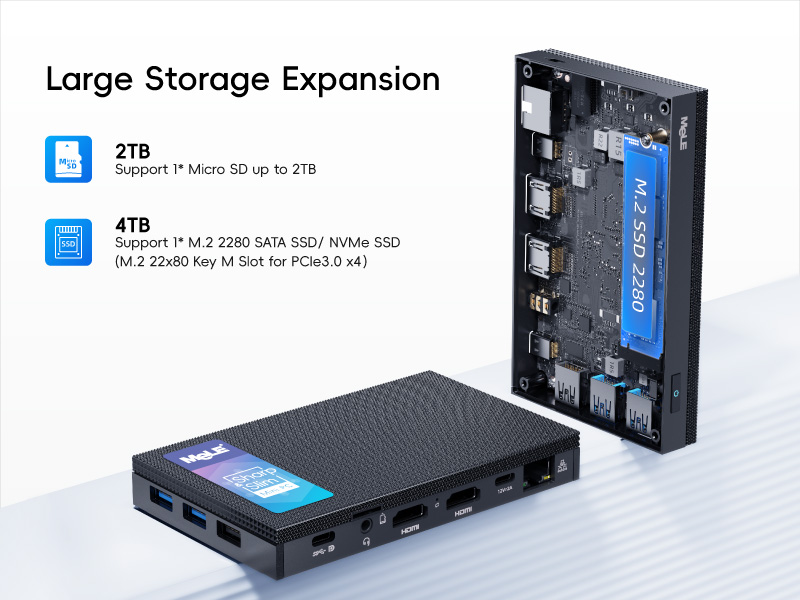
The Mini PC offers expandable storage options:
- Micro SD card slot: Supports up to 2TB.
- Internal M.2 2280 SSD slot: Supports up to 4TB (both NVMe and SATA M.2 SSD).
4。 トラブルシューティング
4.1 ネットワーク接続の問題
If you experience problems with network connectivity, you may need to reset your network settings. This will reinstall all network adapters and reset networking components to their original settings.
- Click Start, then select Settings.
- Go to Network & Internet.
- Click Advanced network settings.
- Click Network reset.
- Click Reset now, then choose Yes to confirm. Your computer will restart automatically.
After the restart, you will need to reconnect to your Wi-Fi network.
4.2 過熱の懸念
The MeLE Quieter 4C features a fanless passive cooling system. While this ensures silent operation and dust resistance, the surface temperature of fanless Mini PCs can reach 55°C to 70°C. This is normal and meets safety standards (IEC62368-1:2018). Ensure adequate airflow around the device and avoid placing it in enclosed spaces.
5. 仕様
| 特徴 | 詳細 |
|---|---|
| プロセッサ | Intel Celeron N150 (4 コア、4 スレッド、最大 3.6 GHz) |
| ラム | 16 GB DDR5 メモリ |
| ハードドライブ | 512 GB M.2 SSD |
| グラフィックス | 統合型 Intel UHD グラフィックス |
| 最大画面解像度 | 3840x2160(4K) |
| ワイヤレスタイプ | 802.11ac(Wi-Fi 5)、Bluetooth 5.1 |
| オペレーティング·システム | Windows 11 Pro(Linux、Ubuntuもサポート) |
| ポート | USB-A 3.2 Gen1, USB-A 3.2 Gen2, USB-A 2.0, Full-function USB-C, 2x HDMI 2.0, Gigabit Ethernet, 3.5mm Audio Jack, Micro-SD Slot |
| 電源入力 | 12V/2A (PD 3.0 technology, 12V to 20V) |
| 冷却 | ファンレスパッシブ冷却 |
| アイテム重量 | 16オンス |
| パッケージ寸法 | 6.5 x 4.2 x 2.5インチ |
6.保証とサポート
6.1 保証情報
MeLE offers a lifetime guarantee on its products, ensuring quality and reliability. For specific terms and conditions, please refer to the warranty card included with your product or visit the official MeLE webサイト。
6.2 カスタマーサポート
For technical assistance, troubleshooting, or any product-related inquiries, please contact MeLE customer support. Contact information can typically be found in the included user manual or on the official MeLE webサイト。