
導入
ご購入ありがとうございますasing the FunFlix P1 Android 4K Supported Bluetooth 5G Wi-Fi LED Full HD Projector. This manual provides essential information for setting up, operating, and maintaining your projector. Please read it thoroughly before use to ensure optimal performance and safety.
安全情報
- 電源: Use only the specified power adapter. Ensure the power outlet matches the projector's voltag要件。
- 換気: 通気口を塞がないでください。プロジェクターの周囲に十分なスペースを確保し、過熱を防ぐため、適切な空気の流れを確保してください。
- 目の保護: プロジェクターレンズを直接見ないでください。amp 点灯しています。明るい光は目を傷める可能性があります。
- 配置: プロジェクターは安定した水平な場所に設置してください。直射日光の当たる場所、熱源の近く、湿度や埃の多い場所に置かないでください。
- クリーニング: Disconnect the power before cleaning. Use a soft, dry cloth for the exterior and a lens cleaning cloth for the lens.
- 子供とペット: 事故を防ぐため、プロジェクターは子供やペットの手の届かないところに保管してください。
パッケージ内容
パッケージにすべてのアイテムが揃っていることを確認します。
- FunFlix P1 Projector
- 電源ケーブル
- HDMIケーブル
- AVケーブル
- リモートコントロール
- プロジェクターレンズキャップ
製品終了view
Familiarize yourself with the components of your FunFlix P1 projector.
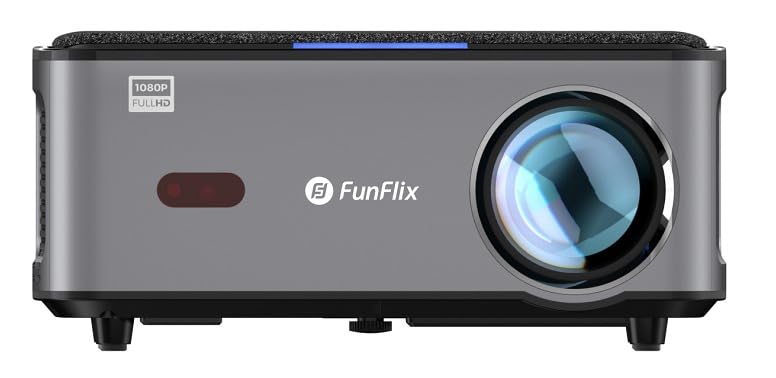
図1: フロント view of the FunFlix P1 Projector, showing the main lens and ventilation grilles.

図2: Rear panel of the FunFlix P1 Projector, featuring the power input, RJ45 Ethernet port, IR receiver, two USB ports, AV input, and two HDMI inputs (HDMI1, HDMI2).

図3: トップ view of the FunFlix P1 Projector, displaying the integrated control panel with power, return, OK, and navigation buttons.

図4: 底 view of the FunFlix P1 Projector, showing the adjustable feet and mounting points for ceiling or wall installation.
設定
1.配置
Position the projector on a flat, stable surface or mount it to the ceiling/wall. Ensure the lens is perpendicular to the projection surface for the best image quality. The projector supports a maximum image size of 300 inches and a throw distance between 1.5 and 10 meters.
2. 電源接続
電源ケーブルをプロジェクターの電源入力ポートに接続し、電源コンセントに差し込みます。
3. 初回電源投入
Press the power button on the projector or the remote control to turn on the device. The projector will perform automatic focus and keystone correction upon startup.
4. 画像調整
- 自動フォーカスとキーストーン: The FunFlix P1 features automatic focus and keystone correction for quick setup.
- Manual Four-Corner Correction: For detailed adjustments, navigate to the settings menu to manually correct each corner of the image.
- ズーム機能: Adjust the image size by up to 50% using the zoom function in the settings, without moving the projector.
5. ネットワーク接続(Wi-Fi)
Navigate to the Wi-Fi settings in the Android interface. Select your 5GHz Wi-Fi network and enter the password to connect to the internet.
6.Bluetoothペアリング
To connect external Bluetooth speakers or headphones, go to the Bluetooth settings. Enable Bluetooth, search for your device, and pair it.
操作手順
1. Android Smart Interface
The FunFlix P1 runs on an Android operating system, providing access to various applications. Navigate the interface using the remote control. You can download additional applications from the app store.
2. ワイヤレススクリーンミラーリング
The projector supports wireless screen mirroring (AirPlay and Miracast) from Android, iOS (Apple), and Windows devices. Select the appropriate mirroring function from the projector's menu and follow the on-screen instructions on your device.
3. USBメディア再生
Insert a USB flash drive or hard disk into one of the two USB ports. The projector supports 4K video playback and can display documents such as Word, Excel, PowerPoint, and PDF files directly from the USB storage.
4. HDMI Input Usage
Connect external devices like gaming consoles, satellite receivers, or media sticks to the HDMI1 or HDMI2 ports. Use the input source selection on the remote control to switch to the desired HDMI input.
5。 音声出力
The projector has a built-in 5W speaker. For enhanced audio, connect external speakers via Bluetooth 5.0 as described in the setup section.
6. 取り付けオプション
The FunFlix P1 can be used on a tabletop or mounted to a ceiling or wall using compatible mounting brackets. The bottom of the projector includes mounting holes for this purpose.
メンテナンス
1. レンズのクリーニング
Use a professional lens cleaning cloth or soft, lint-free cloth to gently wipe the projector lens. Avoid using abrasive cleaners or excessive force.
2. 外装の清掃
プロジェクターの外側は、柔らかく乾いた布で拭いてください。頑固な汚れには、軽く湿らせた布で拭いてください。amp 布で拭いた後、乾いた布で拭いてください。
3. HEPAフィルターのメンテナンス
The projector is equipped with a removable and replaceable high-efficiency HEPA filter. Regularly check and clean the filter to maintain optimal performance and prevent dust buildup. Refer to the filter compartment for removal and replacement instructions.
4. ルamp 人生
The LED light source has an estimated operating life of 50,000 hours, requiring minimal lamp 交換。
トラブルシューティング
| 問題 | 考えられる原因 | 解決 |
|---|---|---|
| 電源なし | 電源ケーブルが接続されていません。電源コンセントに障害があります。 | 電源ケーブルがしっかりと接続されていることを確認してください。別のデバイスで電源コンセントをテストしてください。 |
| 画像がない、または画像がぼやけている | Lens cap on; focus not adjusted; keystone not corrected; incorrect input source. | Remove lens cap. Use automatic focus or adjust manually. Perform keystone correction. Select the correct input source (HDMI, USB). |
| 音が出ない | Volume too low; external audio device not connected or selected; internal speaker disabled. | Increase volume. Check Bluetooth connection for external speakers. Ensure internal speaker is enabled in settings. |
| Wi-Fi接続の問題 | Incorrect password; out of range; router issues; temporary software glitch. | Verify Wi-Fi password. Move projector closer to router. Restart router and projector. Check for system updates. |
| Certain apps (e.g., Netflix) not working or low quality | Outdated Android OS; app compatibility issues; DRM limitations (L3 license). | Ensure apps are updated. For optimal streaming quality on platforms like Netflix, Max, or Prime, consider connecting an external L1 licensed TV Box (e.g., Amazon Fire Stick) via HDMI. The projector's internal Android system may have L3 DRM limitations. |
| ファンの騒音が目立つ | Normal operation; ventilation blocked; dust buildup. | Some fan noise is normal for cooling. Ensure ventilation is not blocked. Clean the HEPA filter. |
仕様
| 特徴 | 詳細 |
|---|---|
| ブランド | ファンフリックス |
| 推奨用途 | ホームシネマ |
| 主な特徴 | 自動フォーカス |
| 接続技術 | イーサネット、HDMI、USB、Wi-Fi |
| Display Resolution (Standard) | 1920 x 1080 (フルHD) |
| 最大ディスプレイ解像度 | 3840 x 2160 (4K対応) |
| 表示タイプ | 導かれた |
| フォームファクター | ポータブル |
| 取り付けタイプ | 卓上マウント、天井マウント |
| 輝度 | 8000ルーメン(8000 ANSIルーメン) |
| 対応デバイス | Smartphone, Laptop, Game Console, Tablet |
| 最大投射距離 | 10.0メートル |
| 光源の動作寿命 | 50,000時間 |
| 最大画像サイズ | 300インチ |
| 光源ワットtage | 150ワット |
| ハードウェアインターフェイス | HDMI、USB |
| 最小投射距離 | 1.5メートル |
| ビデオエンコーディング | 265 形式 |
| 含まれるコンポーネント | AV Cable, Power Cable, HDMI Cable, Projector Lens Cap, Remote Control |
| メーカー | ファンフリックス |
保証情報
The FunFlix P1 Projector comes with a 2-year importer warranty. Please retain your proof of purchase for warranty claims. The warranty covers manufacturing defects under normal use conditions. It does not cover damage caused by misuse, accidents, unauthorized modifications, or improper maintenance.
カスタマーサポート
If you encounter any issues or have questions regarding your FunFlix P1 Projector that are not addressed in this manual, please contact your retailer or the FunFlix customer support team. Refer to your purchase documentation for specific contact details.