
ヴィルタボ XM1
virtavo Cam XM1 Solar Wireless Security Camera User Manual
モデル: XM1 | ブランド: virtavo
導入
The virtavo Cam XM1 is a solar-powered wireless security camera designed for outdoor surveillance. It features a dual-lens system for a 160° panoramic view, 1080p Full HD resolution, color night vision, PIR motion detection, two-way audio, and flexible storage options. This manual provides detailed instructions for setting up, operating, and maintaining your camera to ensure optimal performance.
製品終了view
主な特徴
- 160°パノラマ View: Dual-lens stitching technology provides a seamless, distortion-free 160° field of view, covering more area than traditional single-lens cameras.
- Solar Powered & Long Battery Life: Equipped with a solar panel for continuous charging and a built-in 4400 mAh lithium battery, offering 1 to 3 months of operation even without sunlight.
- Clear Day and Color Night Vision: 1080p Full HD resolution with an F1.6 Starlight lens and 2 IR LEDs (850 nm) ensures sharp images day and night. Color night vision provides precise details in low-light conditions.
- PIRモーション検知と双方向オーディオ: Detects motion and sends instant alarms and notifications to your smartphone. The two-way audio feature allows real-time communication.
- 柔軟なストレージ オプション: Supports local storage via Micro SD card (up to 256GB) and optional cloud storage with AI detection for distinguishing people, cars, and pets.
パッケージ内容
The virtavo Cam XM1 package includes the following components:
- virtavo Cam XM1 Camera
- タイプCケーブル
- 取り付け部品
- ユーザーマニュアル
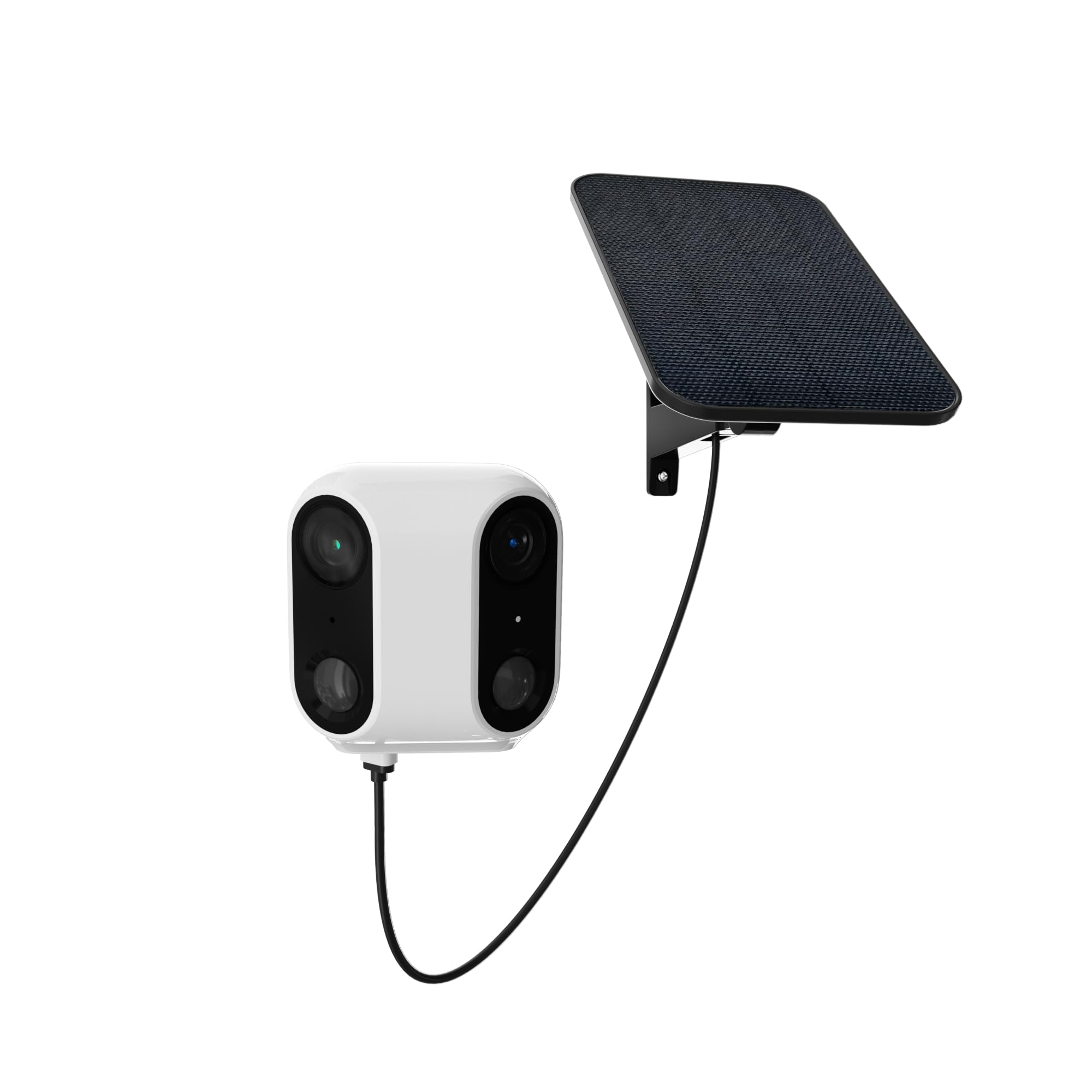
Image: The virtavo Cam XM1 camera, showing its main body, integrated solar panel, and mounting bracket. This image illustrates the complete product as it appears out of the box.
設定
1. 初期充電
Before initial use, fully charge the camera's built-in 4400 mAh lithium battery using the provided Type-C cable. This ensures the camera has sufficient power for setup and operation, especially if solar charging is not immediately optimal.
2. アプリのインストールとアカウント作成
Download the dedicated mobile application for the virtavo Cam XM1 from your smartphone's app store (iOS or Android). Follow the on-screen instructions to create an account and log in.
3. カメラのペアリング
- カメラの電源を入れます。
- Open the app and select "Add Device" or a similar option.
- Follow the in-app prompts to connect the camera to your Wi-Fi network. This typically involves scanning a QR code displayed on your phone with the camera or entering Wi-Fi credentials.
- 安定した接続を確保するため、カメラが Wi-Fi ルーターの範囲内にあることを確認してください。
4.カメラの取り付け
The virtavo Cam XM1 is designed for wall mounting. Choose a location that provides the desired surveillance coverage and receives adequate sunlight for the integrated solar panel. Use the provided mounting parts to securely attach the camera to a wall or suitable surface. Ensure the solar panel is positioned to maximize sun exposure throughout the day.
操作手順
ライブ View 録音
Once connected, open the app to access the live video feed from your camera. You can manually initiate recordings or capture screenshots directly from the live view インタフェース。
動きの検出とアラート
The camera utilizes Passive Infrared (PIR) motion detection to identify movement. When motion is detected, the camera will:
- Send an alarm notification to your smartphone.
- Initiate recording of the event.
- Activate an audible alarm (if enabled in settings).
Adjust motion detection sensitivity and alert preferences within the camera's settings in the mobile app.
双方向オーディオ
双方向オーディオ機能を使用するには、ライブ画面のマイクアイコンをタップします。 view interface of the app. You can then speak through your phone, and your voice will be broadcast through the camera's speaker. Similarly, you can hear audio from the camera's surroundings through your phone.
ストレージ管理
The virtavo Cam XM1 offers two storage options:
- マイクロSDカード: Insert a Micro SD card (up to 256GB, not included) into the designated slot on the camera. Recordings will be stored locally. Videos can be accessed via the app even if the camera is temporarily offline, and will sync once reconnected to Wi-Fi.
- クラウドストレージ: An optional subscription-based cloud storage service is available. This service typically offers 7 or 30 days of recording history and includes intelligent AI detection to differentiate between people, vehicles, and pets. Refer to the app for subscription details and pricing.
メンテナンス
バッテリー管理
The camera's integrated solar panel continuously charges the internal battery. For optimal performance, ensure the solar panel remains clean and free from obstructions (e.g., leaves, dirt) that could block sunlight. In periods of prolonged low sunlight, the battery may require manual charging via the Type-C port.
クリーニング
カメラのレンズとソーラーパネルを定期的に柔らかくて乾いた布で拭いてください。amp 布で拭いてください。表面を傷つける可能性のある、刺激の強い化学薬品や研磨剤の使用は避けてください。
トラブルシューティング
- カメラがWi-Fiに接続できない: Ensure the camera is within Wi-Fi range. Verify your Wi-Fi password. Try restarting your router and the camera.
- モーション検出アラートなし: Check the app settings to ensure motion detection is enabled and notification permissions are granted for the app on your smartphone. Adjust PIR sensitivity if necessary. Ensure the "Actuation" mode is active in the app's work mode settings, as noted by some users.
- 画像品質が悪い: カメラのレンズを清掃してください。カメラの視野内に障害物がないことを確認してください。 viewWi-Fi信号強度を確認してください。
- バッテリーが充電されない: Ensure the solar panel is clean and receiving direct sunlight. Check the Type-C cable connection if charging manually.
- 双方向オーディオが機能しない: Check microphone and speaker permissions for the app on your smartphone. Ensure the camera's microphone and speaker are not obstructed.
仕様
| 特徴 | 詳細 |
|---|---|
| モデル名 | XM600 |
| ブランド | ヴィルタボ |
| 接続プロトコル | Wi-Fi |
| 電源 | Solar Powered (with 4400 mAh Lithium-ion battery) |
| ビデオ録画解像度 | 1080pフルHD |
| 使用法 | 屋外セキュリティ |
| 取り付けタイプ | 壁掛け |
| 寸法(長さ×幅×高さ) | 9 x 9 x 5.5 cm |
| 重さ | 810グラム |
| 含まれるコンポーネント | Camera, Type-C cable, Mounting parts, User manual |
| 電池のタイプ | Lithium-ion (4400 mAh integrated) |
| 最大SDカード容量 | 256ギガバイト |
保証とサポート
Information regarding specific warranty terms and availability of spare parts for the virtavo Cam XM1 is not provided. For technical support or further assistance, please refer to the contact information provided with your purchase or visit the official virtavo webサイト。
Ask a question about this manual
Ask about setup, troubleshooting, compatibility, parts, safety, or missing instructions. Manuals+ will review the question and use this page’s manual context to help answer it.