
1. はじめに
Welcome to the DESLOC B200L Fingerprint Smart Lock. This manual provides detailed instructions for the installation, operation, and maintenance of your new smart lock. The DESLOC B200L offers advanced security features and multiple convenient unlocking methods to enhance your home's safety and accessibility.
ビデオの説明: このビデオでは、view of the DESLOC B200L Fingerprint Smart Lock with Handle, showcasinデザインと主な機能について説明します。
2. パッケージ内容
インストールを開始する前に、すべてのコンポーネントが揃っていることを確認してください。
- 1 x Exterior Lock
- 1 x Interior Lock
- 1 x取付プレート
- 1 xストライクプレート
- デッドボルト x 1
- 2 xメカニカルキー
- キーフォブ2個
- 単三電池4本
- デッドボルト/ストライクプレートネジ
- 取り付けプレートネジ
- 内部ロックネジ
- インストールマニュアル
- アプリマニュアル
3. 仕様
| 特徴 | 説明 |
|---|---|
| ブランド | デスロック |
| モデル番号 | B200L |
| ロックタイプ | 生体認証 |
| 材料 | アルミニウム |
| 色 | 黒 |
| 接続性 | Bluetooth (G2 Gateway for Wi-Fi, sold separately) |
| ロック解除方法 | Fingerprint (up to 50), PIN Code (up to 250), Mobile App, Key Fobs, Physical Key |
| バッテリー寿命 | Up to 12 months (4 AA batteries) |
| 非常用電源 | USB-Cポート |
| 耐候性 | IP54 Waterproof, -22°F to 158°F (-30°C to 70°C) |
| ドアの厚さ | 1-3/8インチ~2インチ(35mm~50mm) |
| Cross-bore Diameter | 2-1/8インチ(54mm) |
| バックセット | 2-3/8インチまたは2-3/4インチ(60mmまたは70mm) |

画像の説明: The DESLOC B200L smart lock is shown with a protective shield icon, highlighting its enhanced durability and robust construction from dual-sided aluminum alloy.
4.インストールガイド
Installation typically takes about 15 minutes with a screwdriver. No drilling is required for standard door preparations.
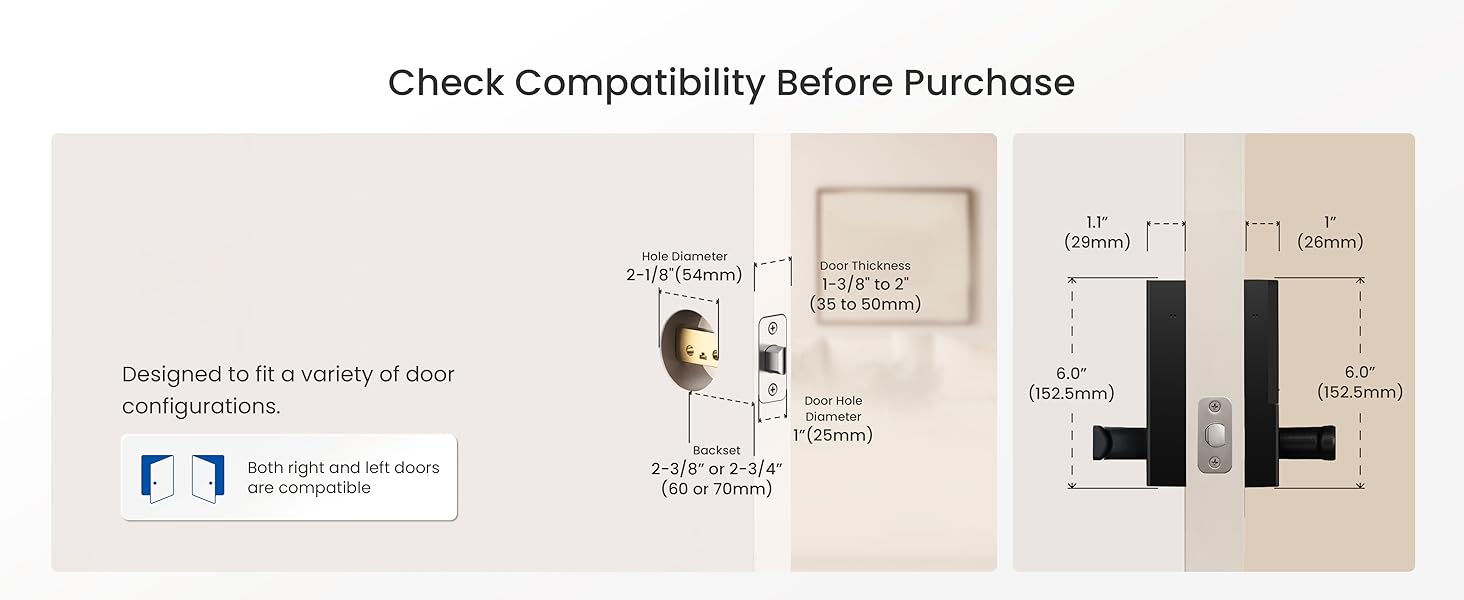
画像の説明: A detailed diagram shows the necessary door measurements for compatibility, including door thickness (1-3/8" to 2"), cross-bore diameter (2-1/8"), and backset (2-3/8" or 2-3/4").
インストール手順:
- Measure the Door Size: Verify your door's thickness, cross-bore diameter, and backset against the specifications. Ensure the door is compatible.
- ラッチを取り付けます。 Insert the deadbolt latch into the door edge and secure it with screws. Adjust the backset if necessary by rotating the faceplate 180 degrees.
- Adjust the Lock Handle's Direction: Ensure the exterior and interior handles are oriented correctly for your door's swing (left-hand or right-hand). The manual provides diagrams for proper orientation.
- Install the Front Panel and Mounting Plate: Carefully feed the cable through the door hole. Position the exterior lock panel and then attach the interior mounting plate, securing it with screws.
- Connect the Wire Connector: Connect the wire from the exterior panel to the corresponding port on the interior assembly.
- 背面パネルを取り付けます。 Attach the interior lock panel to the mounting plate, ensuring the spindle is correctly aligned. Secure with screws.
- Install the Batteries and Battery Cover: Insert 4 AA batteries into the battery compartment. Replace the battery cover.
- Insert the Key and Test the Installation: Use the mechanical key to test the lock and unlock function. Ensure smooth operation.
ビデオの説明: This official DESLOC video demonstrates the step-by-step installation process for the B200L smart lock, from measuring the door to final testing.
5. 操作手順
The DESLOC B200L offers multiple ways to unlock your door, providing flexibility and convenience.
ロック解除方法:
- 指紋によるロック解除: Simply grab the handle and place your finger on the integrated sensor. The lock will recognize your fingerprint in as fast as 0.3 seconds. The self-learning AI algorithm improves accuracy with each use.
- PINコード: Enter your programmed PIN code on the touchscreen keypad.
- モバイルアプリ: Use the TTLock app on your smartphone to unlock the door via Bluetooth (within 2 meters) or remotely with a G2 Gateway (sold separately).
- キーフォブ: Tap the provided key fob against the keypad to unlock.
- 物理キー: In case of emergency or battery depletion, use the mechanical key to unlock the door.

画像の説明: This image displays the diverse unlocking options available for the DESLOC B200L, such as physical keys, key fobs, mobile app control, fingerprint recognition, and PIN codes.
セキュリティ機能:
- オートロック: The lock can be configured to automatically lock after a set period of time.
- 覗き見防止機能: To prevent others from guessing your PIN code, you can enter random digits before or after your actual code. The lock will still recognize the correct sequence within the longer entry.
- High-Security Vane Lock: The B200L features an advanced vane lock, designed to prevent key replication and tampering, offering elevated protection compared to traditional pin tumbler locks.

画像の説明: This image illustrates the anti-peeping feature, showing how users can input extra random numbers before or after their actual PIN to obscure it from onlookers.
6. TTLock App Features
The TTLock app provides comprehensive control and management of your DESLOC B200L smart lock.
- Bluetoothコントロール: Manage your lock directly from your smartphone when within 2 meters via Bluetooth.
- リモート アクセス: Pair with a G2 Gateway (sold separately) for remote access from anywhere. This allows you to generate temporary or scheduled passcodes, receive real-time alerts, and review detailed access records.
- ユーザー管理: Easily add, delete, or modify user profiles, including fingerprints and PIN codes.
- リアルタイム通知: Receive instant alerts on your smartphone for any lock activity.
- アクセス記録: View a detailed history of who accessed your door and when.
- 音声コントロール: Integrate your lock with Amazon Alexa or Google Assistant for hands-free voice commands (G2 Gateway required).
ビデオの説明: This official DESLOC video demonstrates how to set up and connect the B200L smart lock with Amazon Alexa and Google Assistant for voice control.
7. メンテナンス
バッテリー交換:
The DESLOC B200L is powered by 4 AA batteries, offering up to 12 months of battery life. A low-battery indicator will alert you when it's time for replacement.
- When the low-battery indicator appears, replace all 4 AA batteries promptly.
- To replace, remove the interior battery cover, swap out the old batteries with new ones, and reattach the cover.
非常用電力:
In case the batteries completely drain, the lock is equipped with a USB-C emergency power port. Connect a power bank to this port to temporarily power the lock and gain access.

画像の説明: The DESLOC B200L smart lock is depicted with a USB-C cable plugged into its emergency power port, connected to a portable power bank, ensuring access even if the internal batteries are depleted.
8。 トラブルシューティング
- ロックが応答しない: Check battery levels and replace if necessary. Use the emergency USB-C port if batteries are completely dead.
- 指紋が認識されません: 指が清潔で乾いていることを確認してください。アプリで指紋を再登録してみてください。
- PINコードが機能しない: Double-check the entered code. Ensure the anti-peeping function is not causing issues by trying the exact code without extra digits.
- アプリの接続の問題: Ensure Bluetooth is enabled on your phone and you are within range. If using remote access, verify your G2 Gateway is properly connected to Wi-Fi and the lock.
- Handle turns but door remains locked: This may indicate an issue with the internal mechanism or spindle alignment during installation. Refer to the installation guide or contact support.
9.保証とサポート
The DESLOC B200L Fingerprint Smart Lock comes with a 12-month warranty from the date of purchase.
For any questions, technical assistance, or warranty claims, please contact our 24/7 professional customer support team:
- 電話: +1 (888) 572-6136
- メールアドレス: [製品パッケージまたは公式 webメールアドレスのサイト]
- オンラインチャット: Available on the official DESLOC webサイト。
Please have your product model number (B200L) and purchase information ready when contacting support.