
導入
Thank you for choosing the CHUWI Wireless Mouse S1. This 2.4GHz USB computer mouse is designed for comfort and efficiency, featuring a 1600 DPI optical sensor with 3-level adjustable DPI settings, long battery life, and broad compatibility with various devices. This manual provides essential information for setting up, operating, maintaining, and troubleshooting your new wireless mouse.
パッケージ内容
パッケージにすべてのアイテムが含まれていることを確認してください。
- CHUWI Wireless Mouse
- USBレシーバー
- ユーザードキュメント
- 単三電池 1 本 (プリインストールまたは別途付属)
セットアップガイド
Follow these steps to set up your CHUWI Wireless Mouse S1:
- USB レシーバーを見つけます。 Gently remove the bottom cover of the mouse by sliding it downward. The USB receiver and the battery compartment are located inside.
- バッテリーの取り付け: Insert the provided AA battery into the battery compartment, ensuring correct polarity.
- USBレシーバーを取得します。 Take out the small USB receiver from its storage slot.
- デバイスに接続します: USB レシーバーをコンピューター、ラップトップ、またはタブレットの使用可能な USB ポートに接続します。
- カバーを閉じます。 Replace the bottom cover of the mouse.
- 電源オン: Slide the power switch at the bottom of the mouse to the "on" position. The mouse should now be ready for use.

Figure 1: Locating the USB receiver and installing the AA battery.
操作手順
マウスの接続
The CHUWI Wireless Mouse S1 uses 2.4G wireless technology for a stable connection up to 33 feet (10 meters). Once the USB receiver is plugged into your device and the mouse is powered on, it will automatically establish a connection. No complex pairing is required.

Figure 2: Establishing a 2.4G wireless connection.
DPI調整
The mouse features three adjustable DPI (Dots Per Inch) settings: 800, 1200, and 1600. To switch between DPI levels, simply press the DPI button located below the scroll wheel. Each press cycles through the available settings, allowing you to adjust cursor sensitivity for different tasks such as general browsing, office work, graphic design, or gaming.

Figure 3: Adjusting DPI settings with the dedicated button.
ナビゲーションボタン
The mouse is equipped with convenient forward and back buttons on the side. These buttons allow for quick navigation through web pages, documents, and folders, enhancing your workflow efficiency.
サイレントクリック機能
The CHUWI Wireless Mouse S1 is designed with silent click buttons, making it suitable for quiet environments such as libraries, offices, or late-night use. This feature minimizes click noise without compromising tactile feedback.

Figure 4: The silent click feature for quiet operation.
人間工学に基づいたデザイン
The mouse features an ergonomic design that conforms to the natural curve of your hand, providing a comfortable grip for extended use. Its compact and lightweight build, along with rubber-coated side grips, helps reduce hand fatigue. The design is ambidextrous, accommodating both left-handed and right-handed users.

図 5: 快適に使用できる人間工学に基づいた設計。
バッテリー情報
The CHUWI Wireless Mouse S1 is powered by a single AA battery, offering an approximate battery life of 12-15 months. The mouse is designed for convenience with no on/off switch; simply pick it up and start using it. This design eliminates the need for frequent charging, providing hassle-free use for mobile work and daily tasks.
メンテナンス
To ensure optimal performance and longevity of your CHUWI Wireless Mouse S1:
- クリーニング: マウスの表面は、柔らかく乾いた布で拭いてください。頑固な汚れには、軽くamp布に水または中性洗剤を含ませて拭いてください。刺激の強い化学薬品や研磨剤の使用は避けてください。
- センサーのメンテナンス: Periodically clean the optical sensor area at the bottom of the mouse with a cotton swab to prevent dust buildup, which can affect tracking performance.
- ストレージ: When not in use for extended periods, consider removing the AA battery to prevent potential leakage. Store the USB receiver in its designated slot within the mouse to prevent loss.
- 環境保護: The mouse features a splash-proof and dust-proof design, contributing to its durability. However, avoid exposing it to excessive moisture or dust.
トラブルシューティング
If you encounter issues with your CHUWI Wireless Mouse S1, refer to the following common solutions:
- マウスが反応しない:
- 単三電池が正しく装着され、十分に充電されていることを確認してください。必要に応じて電池を交換してください。
- USBレシーバーがコンピュータの正常なUSBポートにしっかりと接続されていることを確認してください。別のUSBポートでお試しください。
- Make sure the mouse's power switch (if present, though this model is designed to be always on when battery is inserted) is in the 'on' position.
- コンピュータを再起動します。
- カーソルの動きが不規則:
- マウスの底部にある光学センサーを清掃します。
- マウスを適切な表面で使用してください。反射率の高い表面や透明な表面では、マウスのトラッキングに影響が出る可能性があります。マウスパッドの使用をお勧めします。
- Check for interference from other wireless devices. Move the mouse closer to the USB receiver.
- 接続の問題:
- If the connection is unstable, try plugging the USB receiver into a different USB port, preferably one closer to the mouse.
- Ensure there are no large metal objects between the mouse and the receiver that could block the signal.
- ボタンが機能しない:
- Check if the mouse is properly connected and powered on.
- 別のコンピューターでマウスをテストして、問題がマウスにあるのかコンピューターの設定にあるのかを判断します。
仕様
Detailed specifications for the CHUWI Wireless Mouse S1:
| 製品寸法 | 3.89 x 2.36 x 0.04インチ |
| アイテム重量 | 1.76オンス |
| 商品型番 | CHUWI Wireless Mouse S1 |
| バッテリー | 単三電池1本(付属) |
| 接続技術 | 2.4Gワイヤレス(USBレシーバー) |
| 動き検出技術 | 光学 |
| DPI設定 | 800、1200、1600(調整可能) |
| ボタン | 4 (左、右、スクロールホイール/中央、DPI、進む、戻る) |
| 色 | 黒 |
| 互換性 | PC, Mac, Laptop, Windows Tablets (Universal USB interface) |
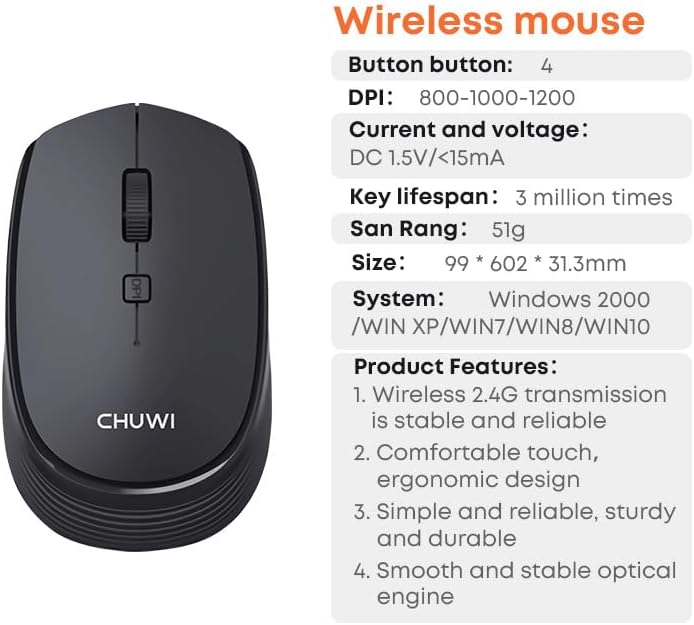
Figure 6: CHUWI Wireless Mouse S1 and its key specifications.
保証とサポート
CHUWI is committed to providing high-quality products and excellent customer service. While specific warranty details for this mouse are not provided, CHUWI generally offers professional support for its products.
- プロフェッショナルサポート: CHUWI offers lifetime factory professional support.
- オンラインサポート: 24 hours of online support is available to assist with any issues or questions you may have.
For further assistance, please visit the official CHUWI webサイトをご覧いただくか、カスタマー サービスに直接お問い合わせください。