
1.製品オーバーview
The CHOETECH B695 is a versatile 10000mAh magnetic power bank designed for convenient charging of multiple devices. It features both wireless charging capabilities and multiple wired output options, including built-in USB-C and Lightning cables. Its compact design and integrated safety features make it an ideal portable power solution.

画像: 前面と背面 view of the CHOETECH B695 Magnetic Power Bank, showcasinコンパクトなデザインとさまざまなポートを備えています。
主な特徴:
- 10000mAh容量: 提供する amp複数回の充電に十分な電力を供給します。
- 2-in-1充電: Supports both magnetic wireless charging and wired charging.
- 内蔵ケーブル: Integrated USB-C and Lightning cables for direct device connection.
- 複数の出力: Includes USB-A, Type-C (input/output), and dedicated wireless charging for phones and watches.
- 磁気アライメント: Ensures secure and efficient wireless charging for compatible devices.
- LEDデジタルディスプレイ: Clearly indicates remaining battery percentage.
- 包括的な安全保護: 過充電、過放電、過電流、過電圧に対する安全装置を内蔵tage, temperature, short circuit, overpower, recovery, and electromagnetic field issues.
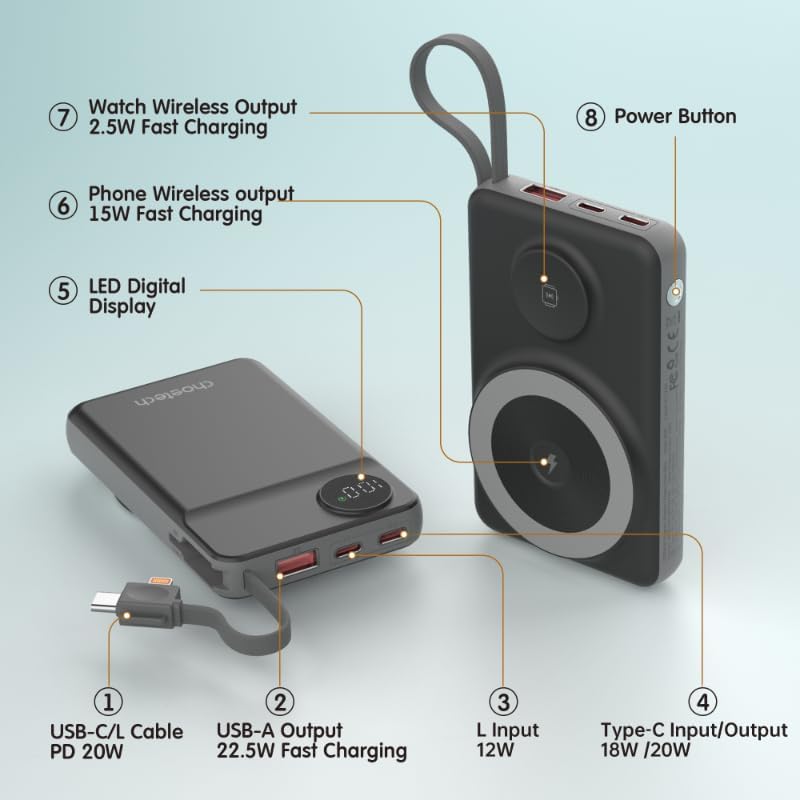
Image: Detailed diagram labeling the ports and features of the CHOETECH B695, including USB-C/L cable, USB-A output, L input, Type-C input/output, LED display, phone wireless output, watch wireless output, and power button.
2. はじめに: セットアップ
2.1 パワーバンクの充電
Before initial use, fully charge your CHOETECH B695 power bank. This ensures optimal performance and battery longevity.
- Connect a compatible USB-C charging cable (not included) to the Type-C Input/Output port (4) on the power bank.
- Connect the other end of the cable to a USB wall adapter (not included).
- The LED Digital Display (5) will show the charging progress. It will display "100" when fully charged.
- Alternatively, you can use the built-in Lightning input (3) to charge the power bank with a Lightning cable and adapter.
注記: For fastest charging of the power bank, use a PD (Power Delivery) compatible wall adapter with the Type-C port.
3. 操作手順
3.1 バッテリー残量の確認
Press the Power Button (8) once to activate the LED Digital Display (5), which will show the current battery percentage.
3.2 有線充電
The CHOETECH B695 offers multiple wired charging options:
- Using Built-in USB-C/L Cable (1):
- Pull out the integrated USB-C or Lightning cable from its storage slot.
- Connect the appropriate cable end to your device's charging port.
- 充電が自動的に開始されます。
- Using USB-A Output (2):
- Connect your device's USB charging cable to the USB-A Output port (2).
- ケーブルのもう一方の端をデバイスに接続します。
- 充電が始まります。
- Using Type-C Input/Output (4):
- Connect your device's USB-C charging cable to the Type-C Input/Output port (4).
- ケーブルのもう一方の端をデバイスに接続します。
- 充電が始まります。

Image: The CHOETECH B695 power bank connected to a smartphone via its built-in USB-C cable, demonstrating wired charging.
3.3 Wireless Charging (Phone)
The power bank supports magnetic wireless charging for compatible smartphones (e.g., iPhone 12 series and newer, or Android phones with magnetic cases).
- パワーバンクが十分に充電されていることを確認してください。
- Align your compatible smartphone with the larger magnetic charging pad (6) on the power bank.
- The phone should snap into place magnetically, and wireless charging will begin.

Image: A smartphone magnetically attached to the larger wireless charging pad and a smartwatch on the smaller pad of the CHOETECH B695, illustrating simultaneous wireless charging.
3.4 Wireless Charging (Watch)
The power bank includes a dedicated smaller magnetic charging pad for smartwatches.
- パワーバンクが十分に充電されていることを確認してください。
- Place your compatible smartwatch onto the smaller magnetic charging pad (7).
- The watch should align magnetically, and wireless charging will begin.
3.5 同時充電
The CHOETECH B695 can charge multiple devices simultaneously using a combination of its wired and wireless outputs.

Image: The CHOETECH B695 power bank connected to and wirelessly charging multiple devices, including smartphones and a smartwatch, demonstrating its multi-output capability.
4. 安全情報と保護機能
The CHOETECH B695 is equipped with multiple safety mechanisms to protect your devices and the power bank itself.
- 過充電保護: Prevents the battery from being charged beyond its capacity.
- 過放電保護: Protects the battery from being fully depleted, extending its lifespan.
- 過電流保護: 過剰な電流の流れを防止します。
- オーバーボルtag保護: ボリュームから保護tageサージ。
- 温度保護: 内部温度を監視・調節し、過熱を防止します。
- 短絡保護: ショートが発生した場合には自動的にシャットダウンします。
- オーバーパワープロテクション: Prevents power output beyond safe limits.
- 回復保護: Allows the device to recover from protection states.
- 電磁場保護: Shields against harmful electromagnetic interference.

Image: An infographic detailing the nine safety protection features integrated into the CHOETECH B695 power bank, including overcharge, overdischarge, overcurrent, overvoltage, temperature, short circuit, overpower, recovery, and electromagnetic field protection.
重要: Do not expose the power bank to extreme temperatures, direct sunlight, or water. Do not disassemble or attempt to repair the device. Keep out of reach of children.
5. メンテナンス
- クリーニング: Use a soft, dry cloth to clean the power bank. Avoid liquid cleaners.
- ストレージ: パワーバンクは、直射日光や極端な温度を避け、涼しく乾燥した場所に保管してください。
- バッテリーの状態: バッテリーの健康を維持するために、定期的に使用していない場合は、少なくとも 3 か月に 1 回はパワーバンクを完全に充電および放電してください。
- ケーブルのお手入れ: 内蔵ケーブルは丁寧に扱ってください。損傷を防ぐため、無理に曲げたり引っ張ったりしないでください。
6。 トラブルシューティング
6.1 パワーバンクが充電されない
- Ensure the charging cable is securely connected to both the power bank's input port and the wall adapter.
- 壁のアダプタが正しく機能しており、通電している電源コンセントに接続されていることを確認します。
- Try a different USB-C or Lightning charging cable and wall adapter.
6.2 デバイスがパワーバンクから充電されない
- 有線充電:
- パワーバンクに十分な充電があるかどうかを確認します(LED ディスプレイを参照)。
- 充電ケーブルがパワーバンクの出力ポートとデバイスの両方にしっかりと接続されていることを確認してください。
- 別の充電ケーブルまたはパワーバンクの別の出力ポートを試してください。
- Press the power button once to activate output if necessary.
- ワイヤレス充電:
- デバイスが磁気ワイヤレス充電に対応していることを確認してください。
- ワイヤレス充電の妨げになる可能性のある厚いケースや金属製の物体をデバイスから取り外します。
- Ensure your device is correctly aligned with the magnetic charging pad on the power bank.
- パワーバンクに十分な充電があるかどうかを確認します。
6.3 充電が遅い
- パワーバンクの充電とデバイスの充電の両方で、急速充電に対応したケーブルとアダプターを使用していることを確認してください。
- Some devices may limit charging speed when multiple devices are connected simultaneously.
- Environmental factors (e.g., high temperature) can affect charging efficiency.
6.4 LED Display Not Working
- 電源ボタンをしっかりと押します。
- パワーバンクの電池が完全に消耗している場合は、充電されるまでディスプレイが点灯しないことがあります。
7. 仕様
| モデル | B695 |
| バッテリー容量 | 10000mAh |
| 内蔵ケーブル出力 | USB-C/L Cable PD 20W |
| USB-A出力 | 22.5W急速充電 |
| タイプC入力/出力 | 18W / 20W |
| 雷入力 | 12W |
| 電話のワイヤレス出力 | 15W急速充電 |
| ワイヤレス出力を見る | 2.5W急速充電 |
| Dimensions (L x W x Thickness) | 7.7L x 9.7W x 16.2Thセンチメートル |
| アイテム重量 | 0.05キログラム(50g) |
| 色 | 黒 |
8. 保証とサポート
CHOETECH products are designed and manufactured to the highest quality standards. For warranty information and customer support, please refer to the warranty card included with your purchase or visit the official CHOETECH webサイト。
If you encounter any issues or have questions regarding your CHOETECH B695 power bank, please contact CHOETECH customer service for assistance.