
MRSCOZ TCR
MRSCOZ Toddlers Sleep Training Clock
Model: TCR
ユーザー取扱説明書
1. はじめに
The MRSCOZ Toddlers Sleep Training Clock is a multifunctional device designed to assist children with sleep training, provide alarm clock functionality, act as a Bluetooth music player, and offer various night light and sound machine features. Its intuitive design and multiple settings aim to create a comfortable and consistent sleep environment for toddlers and kids.

Image: The MRSCOZ Sleep Training Clock displaying different light colors, highlighting its versatile illumination options.
2. 安全情報
- この製品はおもちゃではありません。小さなお子様には大人の監督をおすすめします。
- 電気による危険を防ぐため、デバイスを水や過度の湿気から遠ざけてください。
- 充電には付属のUSB-Cケーブルのみを使用してください。破損したケーブルや充電器は使用しないでください。
- 自分でデバイスを分解したり修理したりしないでください。 サポートが必要な場合は、カスタマー サポートにお問い合わせください。
- Ensure the clock is placed on a stable, flat surface to prevent it from falling.
3. パッケージ内容
開封後はパッケージの内容をご確認ください。
- MRSCOZ Toddlers Sleep Training Clock (White)
- USB-C充電ケーブル
- ユーザーマニュアル(このドキュメント)
4.製品オーバーview
時計のコンポーネントとコントロールについて理解しておきましょう。

Image: The multifunctional MRSCOZ Sleep Training Clock highlighting its use as an alarm clock, night light, Bluetooth music player, and sound machine.
コントロールとインジケーター:
| ボタン/インジケーター | 関数 |
|---|---|
| Time Setting Button (Clock icon) | 押すと時間設定モードになります。 |
| Alarm Setting Button (Bell icon) | Press to set or adjust alarms. |
| Night Light Button (Sun icon) | Short press to change light color. Long press to adjust brightness. |
| Music/Sound Button (Music note icon) | Press to cycle through sleep sounds. |
| Bluetooth Button (M icon) | 長押しするとBluetoothペアリングモードに入ります。 |
| Volume Up/Down Buttons (+/-) | Adjust volume for sounds and music. |
| ディスプレイ画面 | Shows time, AM/PM, sleep/wake icons, and other indicators. |
| USB-C Port (Rear) | デバイスの充電用。 |
5. セットアップ
5.1デバイスの充電
Before first use, fully charge the sleep training clock. Connect the provided USB-C cable to the charging port on the back of the clock and plug the other end into a compatible USB power adapter (not included).

Image: The sleep training clock connected to a USB-C charging cable, indicating its portable night light feature.
5.2初期電源オン
The clock will automatically power on when connected to power or if it has sufficient battery charge. The display will light up.
5.3 Time Synchronization via Bluetooth
When connected to a smartphone via Bluetooth, the clock will automatically synchronize with your phone's time, simplifying initial setup.
6. 操作手順
6.1時間の設定
時間を手動で設定するには:
- を押す 時間設定ボタン (Clock icon) to enter time setting mode.
- 使用 +/-ボタン 時間を調整します。
- を押す 時間設定ボタン もう一度押すと分調整に移ります。
- 使用 +/-ボタン 議事録を調整します。
- を押す 時間設定ボタン one more time to confirm and exit setting mode.
For a visual guide on setting up the time, please refer to the video below:
Video: A short demonstration on how to set up the time on the MRSCOZ Sleep Training Clock.
6.2 睡眠トレーニング機能
この時計は視覚的な合図を使って、子供たちが寝る時間と起きる時間を理解できるようにしています。
- Time to Sleep: The clock displays a closed-eye icon and emits a blue light, indicating it's bedtime.
- Time to Wake Up: The clock displays an open-eye icon and emits a yellow light, signaling it's okay to wake up.
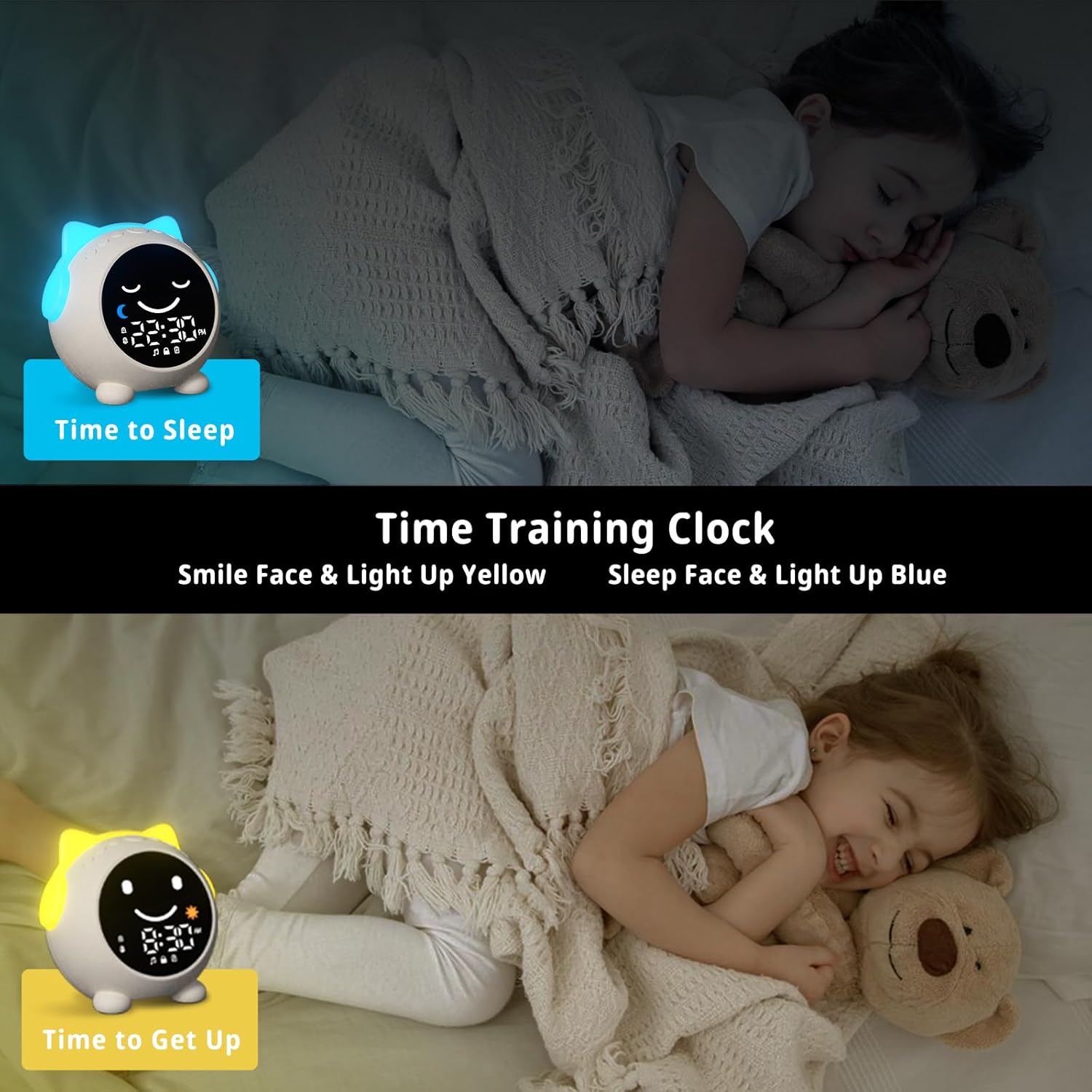
Image: The sleep training clock illustrating the "Time to Sleep" (blue light, closed eyes) and "Time to Get Up" (yellow light, open eyes) features.
6.3目覚まし時計の設定
The clock features dual alarms and a snooze function:
- を押す アラーム設定ボタン (Bell icon) to select Alarm 1 or Alarm 2.
- 使用 +/-ボタン 希望のアラーム時間を設定します。
- を押す アラーム設定ボタン 再度確認します。
- To activate the snooze function, simply touch the clock when the alarm sounds. It will ring again after 10 minutes, up to 3 times.
- To stop the alarm, press any button on the clock.
ビデオ: オーバーview of the Toddlers Sleep Training Clock and its alarm features, including snooze functionality.
6.4 夜間照明の操作
The clock offers 9 light colors and 2 brightness levels:
- 色の変更: を短く押す ナイトライトボタン (Sun icon) to cycle through the 9 available colors.
- 明るさの調整: 長押し ナイトライトボタン to switch between the 2 brightness levels.

Image: The sleep training clock demonstrating its 9 distinct night light colors and two brightness settings.
6.5 Sleep Sound Machine
Choose from 7 soothing sleep sounds to help your child relax:
- を押す Music/Sound Button (Music note icon) to cycle through the available sounds: Ocean Wave, Rain, Campfire, Summer Night, Bird Songs, Wind Bell, and Fan.
- 使用 +/-ボタン to adjust the volume of the selected sound.

Image: The sleep training clock illustrating its 7 white noise options, including natural sounds like ocean waves and rain.
6.6 Bluetooth音楽プレーヤー
Connect your smartphone or other Bluetooth-enabled device to play music through the clock's speaker:
- 長押し Bluetoothボタン (M icon) to enter Bluetooth pairing mode. The display will show a Bluetooth icon.
- On your device, enable Bluetooth and search for "C1" (or similar device name).
- Select "C1" to pair. Once connected, the clock will synchronize its time with your phone.
- You can now play music from your device through the clock. Use the +/-ボタン 音量を調整します。
7. メンテナンス
- 時計は柔らかく乾いた布で拭いてください。研磨剤入りの洗剤や溶剤は使用しないでください。
- デバイスを極端な温度や直射日光に長時間さらさないでください。
- 長期間使用しない場合は、時計を涼しく乾燥した場所に保管してください。
8。 トラブルシューティング
| 問題 | 考えられる解決策 |
|---|---|
| Clock display is blank or unresponsive. | Ensure the clock is charged. Connect it to a power source using the USB-C cable. If the issue persists, try resetting the device (if a reset button is available, otherwise let it fully discharge and recharge). |
| アラームは鳴りません。 | Check if the alarm is enabled and the volume is not set to zero. Verify the alarm time is correctly set. |
| Bluetooth経由で接続できません。 | Ensure the clock is in Bluetooth pairing mode (long press M button). Make sure Bluetooth is enabled on your device and it's within range. Try forgetting the device on your phone and re-pairing. |
| Time format stuck in 24-hour mode. | Refer to the time setting instructions. Some models may automatically switch based on phone sync, or require specific button combinations (e.g., long press time button) not explicitly detailed in general instructions. |
| Night light not changing colors/brightness. | Ensure you are using short presses for color change and long presses for brightness adjustment on the Night Light button. |
9. 仕様
| 特徴 | 詳細 |
|---|---|
| ブランド | MRSCOZ |
| モデル番号 | TCR |
| 色 | 白 |
| 表示タイプ | デジタル |
| 製品寸法 | 幅3.8インチ x 高さ3.9インチ |
| 電源 | コード式電気(充電式バッテリー) |
| 材料 | アクリロニトリルブタジエンスチレン(ABS) |
| 特集 | Bluetooth, Timer, Adjustable Brightness, LED Display, Adjustable Volume, Sleep Training, Night Light, Sound Machine |
| 電池の数 | 12Vバッテリー1個必要(内蔵) |
| アイテム重量 | 9.6オンス |
10. 保証とサポート
This MRSCOZ product comes with a limited warranty. For detailed warranty information, product support, or to report any issues, please contact MRSCOZ customer service through the retailer's platform or the official brand webサイトでご確認ください。保証請求のために購入証明書を保管してください。
Ask a question about this manual
Ask about setup, troubleshooting, compatibility, parts, safety, or missing instructions. Manuals+ will review the question and use this page’s manual context to help answer it.