
導入
This manual provides detailed instructions for the JOMAA 20-Key Macro Programmable Numeric Gaming Keyboard. It covers setup, operation, maintenance, troubleshooting, and product specifications to ensure optimal use of your device. Please read this manual thoroughly before using the keyboard.
パッケージ内容
- JOMAA 20キーマクロプログラム可能数字ゲーミングキーボード
- USB Type-Cケーブル
- ユーザーマニュアル(このドキュメント)
セットアップ手順
1. キーボードの接続
- Locate the USB Type-C port on the back of the JOMAA 20-Key Keyboard.
- 付属の USB Type-C ケーブルの一方の端をキーボードのポートに接続します。
- Connect the other end of the USB cable to an available USB port on your computer (PC, Laptop, or Gaming Console).
- The keyboard is plug-and-play for basic functionality.

This image highlights the detachable Type-C cable for easy portability and connectivity. It also shows the physical switch used to toggle between office and gaming modes.
2. Driver and Software Installation (Windows Only)
For advanced features such as macro programming and detailed RGB lighting customization, a dedicated driver and software are required. This software is compatible with Windows XP/Vista/7/8/10 systems only.
- Visit the official JOMAA support website to download the latest driver and software for your keyboard.
- 画面の指示に従ってインストールを完了します。
- 注記: If you configure settings on a Windows system, the keyboard will save these memory settings and retain them when connected to other compatible devices (e.g., Mac systems), although the driver itself cannot run on non-Windows operating systems.

A visual representation of the macro programming software, which allows users to define custom functions and macros for the keyboard's 19 programmable keys.
操作手順
1. 基本的なキー機能
The JOMAA 20-Key Keyboard functions as a standard numeric keypad or macro pad. Keys are pre-assigned with numeric and basic arithmetic functions by default.
2. マクロプログラミング
The keyboard supports macro definition for 19 keys. This feature allows you to assign complex sequences of commands or single key presses to a single key, enhancing efficiency in gaming or productivity tasks.
- Install the JOMAA software on a Windows PC.
- Launch the software and select the key you wish to program.
- Record or input the desired macro sequence.
- Save the changes to the keyboard. The programmed macros will be stored on the keyboard's internal memory.
3. RGB照明モード
The keyboard features 12 distinct RGB lighting modes. These modes can be cycled through using a dedicated key on the keyboard.
- Locate the 'Mode Switching Key' (often indicated by a gear or light icon).
- Press this key to cycle through the available lighting effects.
- Further customization of lighting effects may be available through the JOMAA software.
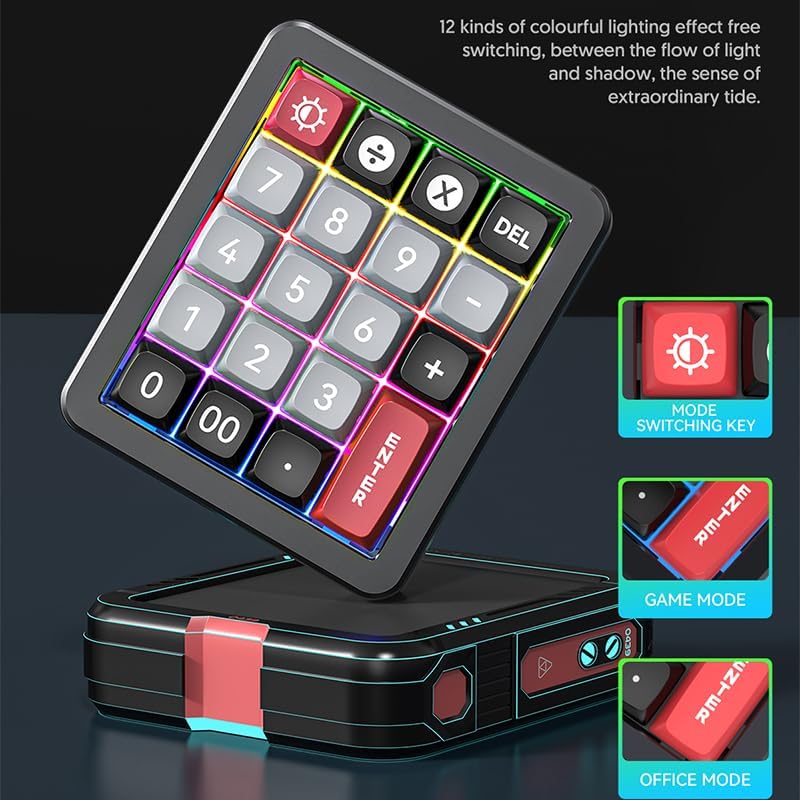
The keyboard features 12 distinct colorful lighting effects. The image also points out the dedicated mode switching key, allowing users to cycle through different lighting presets.
4. ホットスワップ可能なキー
The JOMAA 20-Key Keyboard features hot-swappable switches, allowing users to replace individual key switches without soldering. This enables customization of typing feel and sound.
- Use a switch puller tool (not included) to carefully remove the keycap.
- スイッチ プーラーを使用して、スイッチを軽くつかみ、まっすぐ上に引いて PCB から取り外します。
- 新しいスイッチのピンを PCB の穴に合わせ、カチッと音がするまでしっかりと押します。
- キーキャップを交換します。
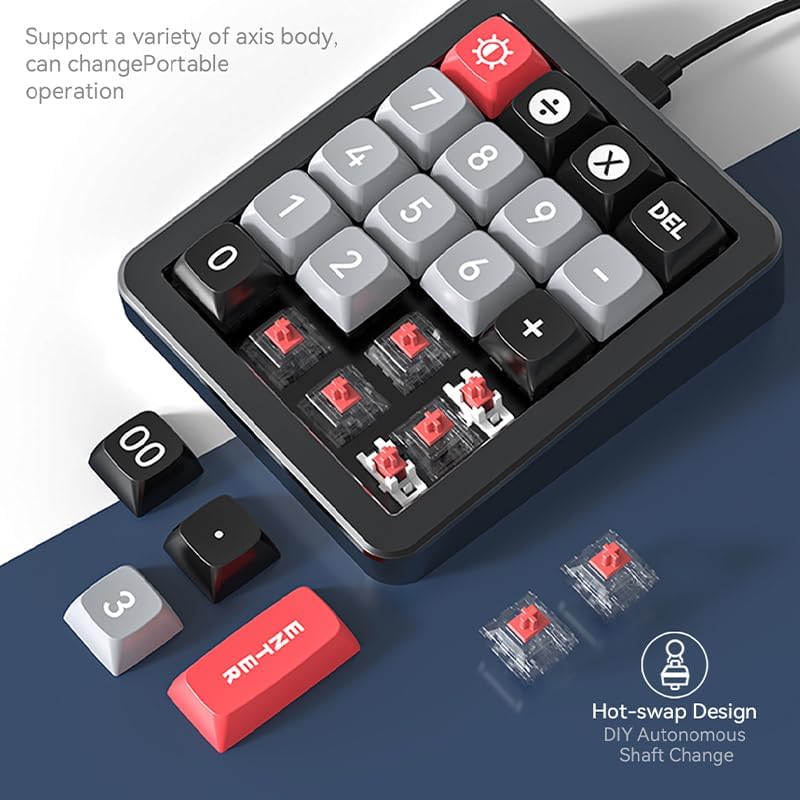
This image illustrates the hot-swappable design of the keyboard, showing how individual key switches can be easily removed and replaced without soldering, enabling customization.
5. Gasket Structure and Aluminum Alloy Body
The keyboard is constructed with an aluminum alloy body and features a gasket structure. The aluminum alloy provides durability and a stable base, while the gasket structure offers a cushioned typing experience, reducing impact noise and improving key feel.

The image emphasizes the keyboard's durable aluminum alloy construction, contributing to its premium feel and stability.

爆発した view diagram detailing the internal gasket structure of the keyboard, which provides a softer, more cushioned typing experience and reduces noise.
メンテナンス
キーボードの掃除
- 清掃する前に、キーボードをコンピューターから取り外してください。
- 柔らかく糸くずの出ない布で軽く拭き取ってください。ampキーボードの表面を水または中性洗浄液で拭いてください。
- キーキャップ間の清掃には、圧縮空気を使用してほこりやごみを除去します。
- 強力な化学薬品や研磨剤入りの洗剤を使用したり、キーボードに液体を直接吹き付けたりしないでください。
一般的なケア
- キーボードを極端な温度、直射日光、高湿度にさらさないでください。
- キーボードを落としたり、強い衝撃を与えたりしないでください。
- 損傷を防ぐため、キーボードに液体を近づけないでください。
トラブルシューティング
キーボードが応答しない
- USB Type-C ケーブルがキーボードとコンピューターの両方にしっかりと接続されていることを確認します。
- キーボードをコンピューターの別の USB ポートに接続してみてください。
- システム固有の問題を排除するために、別のコンピューターでキーボードをテストします。
- USB ハブを使用している場合は、コンピューターに直接接続してみてください。
RGB照明の問題
- キーボードに適切な電源が供給されていることを確認してください。
- Press the 'Mode Switching Key' to cycle through different lighting effects.
- If using the software, verify that lighting settings are correctly applied and saved.
Macro Programming Difficulties
- Confirm that the JOMAA software is correctly installed on a Windows PC.
- Ensure you are following the software's instructions for macro recording and saving.
- Be aware that the software may be slow or clunky, requiring patience during configuration. Allow several seconds for changes to apply.
- If macros are not working on a non-Windows device, ensure they were programmed and saved on a Windows PC first, as the driver does not run on other operating systems.
仕様
| 特徴 | 詳細 |
|---|---|
| ブランド | ジョマー |
| モデル | 20-Key Macro Programmable Numeric Gaming Keyboard |
| 接続技術 | USB-C(取り外し可能なケーブル) |
| キータイプ | ホットスワップ可能なメカニカルスイッチ |
| ボディ素材 | アルミニウム合金 |
| 構造 | ガスケットの構造 |
| 点灯 | RGB(12モード) |
| プログラム可能なキー | 19 keys for macro definition |
| 対応デバイス | ゲーム機、ノートパソコン、PC |
| システム互換性 | Windows XP/Vista/7/8/10, Mac (driver for Windows only) |
| アイテム重量 | 15.5オンス |
| パッケージ寸法 | 6.3 x 4.72 x 1.97インチ |
| 含まれるコンポーネント | USBケーブル |
保証情報
JOMAA products are typically covered by a manufacturer's warranty. For specific details regarding the warranty period and terms for your 20-Key Macro Programmable Numeric Gaming Keyboard, please refer to the warranty card included with your product or visit the official JOMAA webサイトでご確認ください。保証請求に備えて購入証明書を保管してください。
カスタマーサポート
If you encounter any issues or have questions not addressed in this manual, please contact JOMAA customer support. Contact information can typically be found on the official JOMAA webサイトまたは製品パッケージに記載されています。