導入
The Motorola DLR1060 is a 6-channel digital business radio designed for reliable and private communication in various professional environments. Operating in the digital 900 MHz ISM license-free band, this radio offers enhanced clarity and security compared to analog systems. Its compact and lightweight design, combined with robust features, makes it an essential tool for efficient team coordination.
含まれるもの
The Motorola DLR1060 package typically includes the following items:
- Motorola DLR1060 2-Way Digital Business Radio (quantity as per pack size)
- 充電式リチウムイオン電池
- Charging Tray with Power Adapter
- Swivel Belt Holster
- User Guide and Safety Leaflet

Image: A typical 6-pack of Motorola DLR1060 digital business radios, showcasin各ユニットのコンパクトな設計。
主な特徴
- Digital 900 MHz ISM License-Free Band: Ensures private and reliable communication.
- 拡張範囲: Covers up to 300,000 square feet or 20 floors.
- 6 チャンネル: Provides multiple communication lines for different teams or purposes.
- 音声プロンプト: User-friendly voice prompts for channel navigation, battery status, and feature customization.
- ラジオプロfile ID: Unique 4-digit ID for enhanced privacy and direct communication.
- Computer Programming Software (CPS): Allows for personalized setups, including Private Groups, custom channel names, and radio settings.
- 耐久性のある構造: Complies with Military Standards 810 C, D, E, F, and G for resistance against shock, vibration, extreme temperatures, and dust.
- 長いバッテリー寿命: Internal rechargeable battery provides up to 14 hours of continuous operation.
- インスタントミュート: Quickly silence the radio when needed.
- Customizable Top Button: 頻繁に使用する機能を割り当てて、すばやくアクセスできるようにします。
設定
1. バッテリーの充電
- Insert the rechargeable Lithium-Ion battery into the radio, ensuring it clicks securely into place.
- Place the radio into the charging tray.
- Connect the power adapter to the charging tray and plug it into a standard electrical outlet.
- The charging indicator light on the tray will illuminate to show charging status. A full charge typically takes several hours.

Image: The Motorola DLR1060 radio securely seated in its charging cradle, ready for power connection.
2. Attaching the Belt Holster
- Align the radio with the swivel belt holster.
- Slide the radio into the holster until it locks into position.
- Attach the holster to your belt or clothing for convenient carrying.
操作手順
1. 電源のオン/オフ
- 電源を入れるには、 パワー/メニュー button (usually located on the top or side) until you hear a tone or voice prompt.
- 電源を切るには、 を長押しします パワー/メニュー button again until the radio shuts down.

画像: サイド view of the DLR1060 radio, highlighting the power button and volume controls for easy access.
2.音量の調整
- 使用 ボリュームアップ(+) そして ボリュームダウン (-) ラジオの側面にあるボタンで音量を調整します。
3。 チャンネルの選択
- 回転する チャンネルセレクターノブ (typically on the top) to choose one of the 6 available channels.
- ラジオは選択されたチャンネル番号をアナウンスする音声プロンプトを出します。
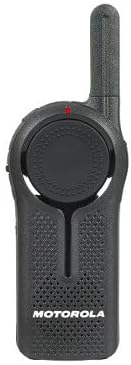
画像: 正面 view of the DLR1060 radio, featuring the prominent channel selector knob and integrated speaker.
4. 送信と受信
- 送信するには、 プッシュツートーク(PTT) ラジオの側面にあるボタンを押してください。マイクに向かってはっきりと話してください。
- PTT ボタンを放して応答を待ちます。
- 通信したい相手と同じチャネルにいることを確認してください。
5. Private Communication (Radio Profile ID)
- The DLR1060 uses a unique 4-digit Radio Profile ID for private communication. This ID must be programmed into all radios intended for a private group.
- Refer to the Computer Programming Software (CPS) manual for detailed instructions on setting up and managing Radio Profile IDs and Private Groups.
メンテナンス
ラジオの掃除
- ラジオの外側を柔らかくて乾いた布で拭いてください。amp 布。
- Do not use harsh chemicals, cleaning solvents, or strong detergents, as these can damage the radio's casing および内部コンポーネント。
- Ensure the radio is powered off and disconnected from any charging accessories before cleaning.
バッテリーケア
- Always use genuine Motorola batteries and charging accessories.
- バッテリーを極端な温度にさらさないでください。
- If the radio will not be used for an extended period, store the battery separately in a cool, dry place.
トラブルシューティング
| 問題 | 考えられる解決策 |
|---|---|
| ラジオの電源が入りません。 | バッテリーが完全に充電され、正しく挿入されていることを確認してください。 |
| 送信も受信もできません。 | Verify that all radios are on the same channel and have the correct Radio Profile ID. Check if the battery is low. |
| 音質が悪い、または雑音がある。 | Move closer to the other radio or to an open area. Check for obstructions. Ensure the antenna is clear. |
| バッテリーの寿命が予想よりも短くなっています。 | Ensure the battery is fully charged before use. Battery performance can degrade over time; consider replacing older batteries. |
仕様
| 特徴 | 詳細 |
|---|---|
| 周波数帯域 | 900 MHz ISM (License-Free) |
| チャンネル | 6 |
| 範囲 | Up to 300,000 sq ft / 20 Floors |
| バッテリー寿命 | 最大14時間(通常使用) |
| 耐久性基準 | Military Standards 810 C, D, E, F, G |
| ハウジング材質 | ポリカーボネート |
| FCC ID | AZ489FT5870 |
| 対応デバイス | Speaker, Headphone, Laptop (for CPS) |
| 色 | 黒 |
保証とサポート
For detailed warranty information and technical support, please refer to the documentation provided with your product or visit the official Motorola Solutions webサイトでご確認ください。保証請求の際は購入証明として領収書を保管してください。