
1. はじめに
Thank you for choosing the CREWORKS 2L Ultrasonic Cleaner. This device is designed to provide efficient and thorough cleaning for a wide range of items, including jewelry, glasses, watches, and various small parts. Utilizing ultrasonic waves, it offers a superior cleaning experience compared to traditional methods, reaching intricate surfaces and tight corners. This manual will guide you through the setup, operation, maintenance, and troubleshooting of your new ultrasonic cleaner.

Image: The CREWORKS 2L Ultrasonic Cleaner, highlighting its ability to eliminate cleaning difficulties for various items.
2. 安全に関する注意事項
Please read all safety instructions carefully before operating the unit.
- 分解しないでください the unit. Unauthorized disassembly may lead to electric shock or damage to the device.
- 無人で使用しないでください。 Always supervise the cleaner during operation.
- あることを確認してください sufficient fluid in the tank before operation. Operating without adequate fluid can damage the ultrasonic transducer.
- Unplug the unit before filling or draining the tank to prevent electrical hazards.
- Keep the unit away from water sources and do not immerse the main body in water.
- 濡れた手で電源プラグに触れないでください。
- お子様の手の届かない場所に保管してください。
- Use only appropriate cleaning solutions. Do not use flammable, corrosive, or abrasive liquids.
- Ensure proper ventilation during use, especially if using specialized cleaning solutions.

Image: The ultrasonic cleaner showing the warning label on the lid, emphasizing critical safety precautions.
3.製品オーバーview
The CREWORKS 2L Ultrasonic Cleaner features a durable stainless steel tank and an intuitive control panel. Familiarize yourself with the components:
- ステンレスタンク: The main reservoir for cleaning solution and items.
- コントロールパネル: Features knobs for temperature and time settings, and toggle switches for cleaning modes.
- 温度調節ノブ: Adjusts heating temperature from 70°F to 210°F.
- 時間制御ノブ: Sets cleaning duration from 1 to 30 minutes.
- モードスイッチ: Select between 'Semi-Wave' (Gentle) and 'Full Wave' (Standard) ultrasonic cleaning, and 'Degas' function.
- デジタルディスプレイ: Shows current temperature or remaining time.
- ハンドル: 持ち運びに便利な一体型ハンドル。
- 蓋: Helps contain splashes and reduce noise during operation.
- クリーニングバスケット: A removable basket for holding items during cleaning, preventing them from resting directly on the tank bottom.

Image: The ultrasonic cleaner positioned on a kitchen counter, highlighting its user-friendly control knobs for time and temperature.
4. セットアップ
- 開梱: 超音波洗浄機とすべての付属品をパッケージから慎重に取り出します。
- 配置: Place the unit on a stable, flat, and dry surface, ensuring adequate ventilation around the machine.
- 充填タンク: Ensure the unit is unplugged. Fill the stainless steel tank with an appropriate cleaning solution. Do not exceed the maximum fill line. The fluid level should be sufficient to cover the items to be cleaned.
- バスケットを挿入: 洗浄バスケットをタンク内に置きます。
- 接続電源: 電源コードをアース付きコンセントに差し込みます。
5. 操作手順
Follow these steps to operate your ultrasonic cleaner:
- 準備するアイテム: Place the items to be cleaned into the cleaning basket. Ensure items are not overcrowded and are fully submerged in the cleaning solution.
- 蓋を閉めます: Securely close the lid of the ultrasonic cleaner.
- 温度設定(オプション): Turn the Temperature Control Knob to your desired temperature (70-210°F). The built-in heater will begin warming the solution. Heating speeds up the cleaning process for certain contaminants.
- モードの選択:
- ドガモード: Toggle the 'Degas' switch to ON. This mode quickly removes dissolved gases from the cleaning solution, enhancing cavitation efficiency and preventing oxidation of cleaned objects. Run for 1-2 minutes before cleaning, especially with fresh solution.
- Gentle Mode (Semi-Wave): For delicate items like circuit boards, certain jewelry, or fragile surfaces, toggle the 'Semi-Wave' switch to ON. This halves the ultrasonic power, providing a gentler cleaning action.
- Standard Mode (Full Wave): For general cleaning and stubborn grime, ensure the 'Full Wave' switch is ON (and 'Semi-Wave' is OFF). This utilizes the full ultrasonic power.
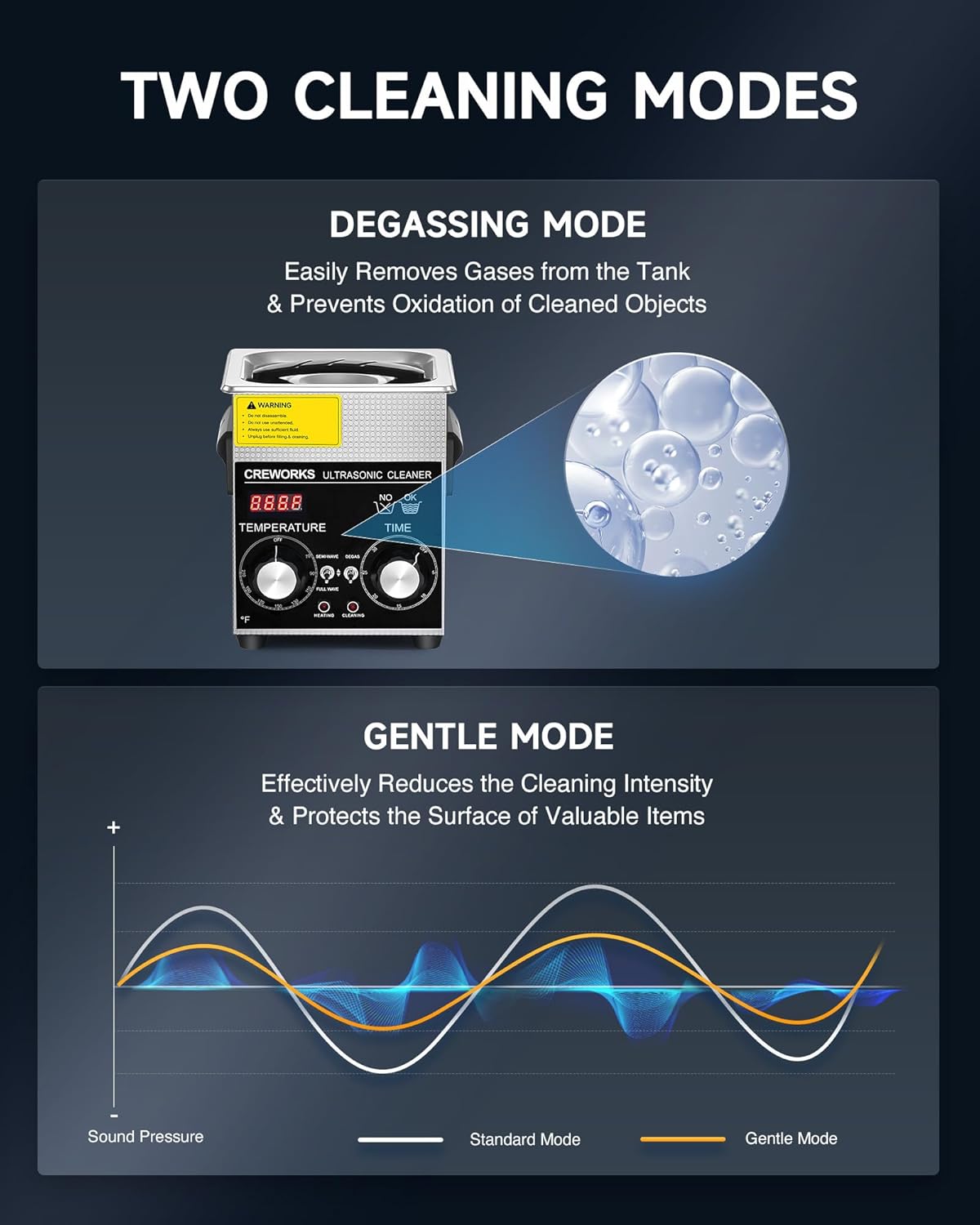
Image: Visual explanation of the Degassing Mode, which removes gases for better cavitation, and the Gentle Mode, which reduces cleaning intensity for delicate items.
- 時間設定: Turn the Time Control Knob to your desired cleaning duration (1-30 minutes). The digital display will show the countdown.
- クリーニングを開始します: The unit will automatically start the cleaning process once the time is set. Ultrasonic waves will generate cavitation bubbles that dislodge dirt and grime.
- 仕上げる: Once the timer reaches zero, the cleaning cycle will stop. Unplug the unit before removing items.
- すすぎ項目: Carefully remove the basket and rinse the cleaned items under clean water to remove any remaining solution or loosened debris. Dry thoroughly.

Image: Demonstrates the visible cleaning effect with before-and-after comparisons of eyeglasses, a razor, and a circuit board.
6. メンテナンス
適切なメンテナンスを行うことで、超音波洗浄機の寿命が長くなり、最適なパフォーマンスが確保されます。
- 排水: After each use, especially if the solution is dirty, unplug the unit and carefully drain the cleaning solution.
- タンクのクリーニング: Wipe the inside of the stainless steel tank with a soft cloth. For stubborn residue, use a mild, non-abrasive cleaner. Rinse thoroughly with clean water and dry completely.
- 外装清掃: ユニットの外装を広告で拭きますamp 布で拭いてください。刺激の強い化学薬品を使用したり、本体を水に浸したりしないでください。
- ストレージ: Store the cleaner in a cool, dry place away from direct sunlight and moisture when not in use. Ensure the tank is empty and dry.
- 定期点検: 電源コードに損傷がないか定期的に確認してください。損傷している場合は使用を中止し、カスタマーサポートにご連絡ください。
7。 トラブルシューティング
If you encounter issues with your CREWORKS Ultrasonic Cleaner, refer to the following common problems and solutions:
| 問題 | 考えられる原因 | 解決 |
|---|---|---|
| ユニットの電源が入らない。 | 電源が供給されていない、電源コードが正しく接続されていない、ユニットが故障している。 | Check power outlet and cord connection. Ensure the power switch is ON. If problem persists, contact customer support. |
| 洗浄効果が悪い。 | Insufficient cleaning solution; Incorrect cleaning solution; Overcrowded items; Degas mode not used; Too short cleaning time. | Ensure items are fully submerged. Use appropriate solution for items. Do not overcrowd. Use Degas mode for new solutions. Increase cleaning time. |
| 動作中に異常な音がする。 | Unit not on a stable surface; Tank empty or insufficient fluid; Foreign object in tank. | Place on a stable surface. Ensure sufficient fluid. Check for and remove any foreign objects. |
| 加熱機能が動作しません。 | Temperature knob not set; Heater malfunction. | Ensure temperature knob is set to a desired temperature. If problem persists, contact customer support. |
If the issue persists after trying these solutions, please contact CREWORKS customer support for further assistance.
8. 仕様
| 特徴 | 仕様 |
|---|---|
| モデル | B0CZNX678Q |
| ブランド | クレワークス |
| タンク容量 | 2リットル(0.5ガロン) |
| 超音波パワー | 60W |
| 火力 | 100W |
| 超音波周波数 | 40kHz |
| タイマー範囲 | 1~30分 |
| 温度範囲 | 70〜210°F(20〜99°C) |
| タンク材質 | 304ステンレススチール |
| 全体寸法 | 6.9×6.5×8.1インチ(約) |
| タンク寸法 | 5.9×5.3×3.9インチ(約) |
| 重さ | 5.4ポンド(約) |

Image: Detailed specifications including the dimensions of the ultrasonic cleaner unit, its internal tank, and the cleaning basket.
9. 保証とサポート
CREWORKS products are manufactured to high-quality standards. For warranty information or technical support, please refer to the warranty card included with your product or visit the official CREWORKS website. You may also contact customer service via the contact information provided on your purchase receipt or the product packaging.
メーカー: クレワークス
発売日: 6年2024月XNUMX日